
Scanned Software
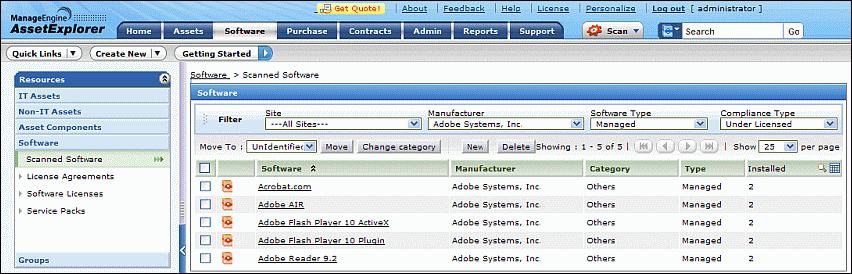
While scanning workstations, the softwares installed in the workstations are also scanned and listed under Scanned Softwares in the Software tab. From the Scanned Software list view page, you can acquire details such as, Manufacturer, Software Type, number of Installations of the software and so on.
The page also includes various useful functionality such as,
Option to view the scanned softwares based on the Sites, Manufacturer and Software Type.
Customize columns to be displayed in the List View
Set the number of softwares to be displayed per page.
Perform bulk operations such as delete, change category and software type of softwares.
Representation of icons in the List View:-
 - Software which are Compliant.
 - Software the Compliant Type as Under
License. The number of license installation is less than the amount purchased.
- Software the Compliant Type as Under
License. The number of license installation is less than the amount purchased.
 - Software with Compliant Type as Over
License. The number of license installation is more than the amount purchased.
- Software with Compliant Type as Over
License. The number of license installation is more than the amount purchased.
 - Softwares
for which the Compliant is not applicable.
- Softwares
for which the Compliant is not applicable.
 -
Select
the columns to be displayed in the list view.
-
Select
the columns to be displayed in the list view.
 -
Search
for softwares on entering the manufacturer, category, type and so on.
-
Search
for softwares on entering the manufacturer, category, type and so on.
From the List View page you can,
View Softwares based on Filter: You can filter softwares based on the Sites, the Software Manufacturer and the Software Type. Say, If you require to view of all the managed softwares from Adobe Systems, select the Manufacturer as Adobe Systems and the Software Type as Managed.
Set the number of softwares per page and navigation buttons: You can set the number of softwares to be displayed per page in the List View page.
Adding New Software: Add New Software apart from the existing scanned softwares.
Bulk Operations:
Move: Option to move the bulk softwares from one software type to another.
Change Category: Option to change the category of bulk softwares.
Delete: Option to bulk delete softwares.