
Patch Management with Endpoint Central
To stay on top of the large number of patches released every day, you need an effective patch management software. Endpoint Central offers a fully automated patch management system for Windows, Mac, Linux and third party applications (view the complete list of supported applications here). The following capabilities give you granular control over the entire patch management process and enable you to keep your endpoints secure and up-to-date:
Patch management dashboard
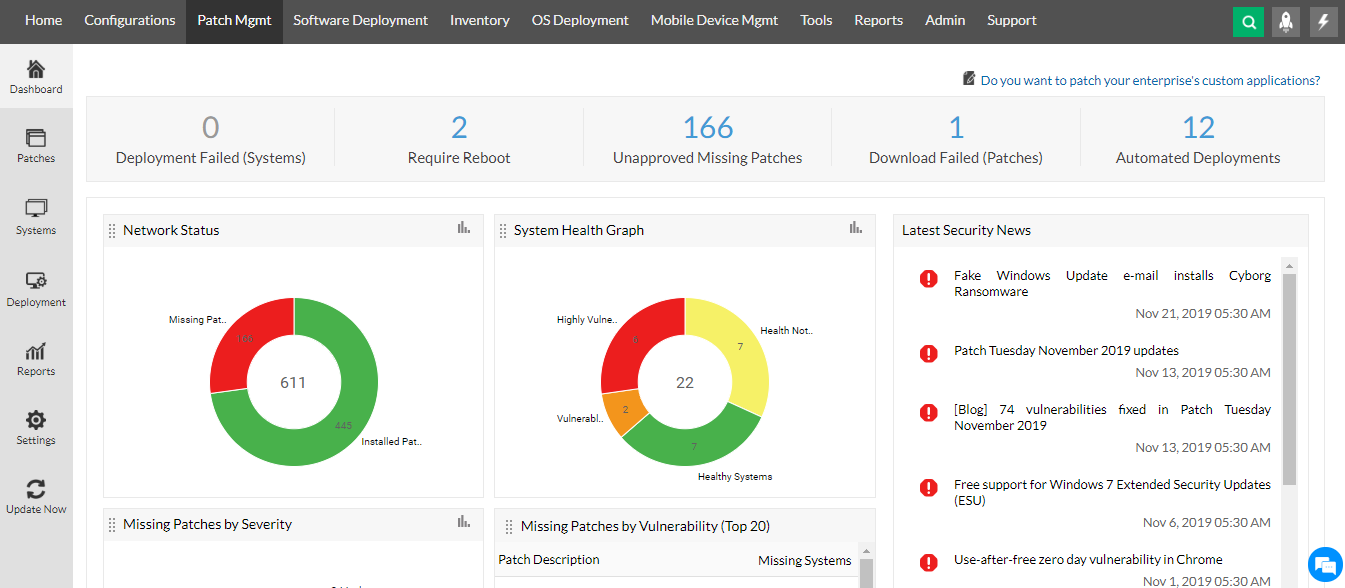
Updated Vulnerability Database
Zoho Corp continuously probes the internet for newly released patches and vulnerabilities. Once a new patch is discovered, it is added to Zoho Corp's Central Patch Repository after ample verification and testing. This repository can be accessed by Endpoint Central server installed within a client's environment and is used to evaluate vulnerabilities within the network.
Updated Vulnerability Database

On the client's site, the server maintains a Vulnerability Database which is synced periodically with the Central Patch Repository. This sync is done in two ways:
- Daily sync: The server syncs its vulnerability database with the central patch repository every day. You can configure the time at which this sync will take place.
- On-demand Sync: The vulnerability database can be updated anytime by initiating an on-demand sync.
Automated Patch Deployment
Admins can automate every step of the patch deployment process with our UEM tool to save time, resources and effort. The patch management process can be automated for specific applications or departments within your network, on the desired day and time, at a convenient frequency. You only need to schedule it once, and the entire process will be automated and you will be notified at each step. Visit this web page to know more about this.
Automatically Test and Approve Patches before Deployment
It is always recommended to test patches before installing them on all the systems in your network to ensure that there is no downtime due to faulty patches. You can form test groups and automate installation of patches on test systems before rolling them out to the entire network. You can also specify the number of days after which the patches should be approved automatically for installation on the rest of the systems.
User-centric patch deployment policies
Ensuring network patch compliance while keeping employee productivity unbothered is simpler than ever with the flexible patch deployment policies. Admins can swiftly configure the deployment policies, allowing the users to schedule or reboot the deployments, in case they are held up with business-critical tasks. Furthermore, admins can also leverage the granular functionalities to deploy patches on specific days and weeks or on specific time intervals, along with a plethora of customizable pre and post-deployment activities.
Wide range of third-party patches supported
Why be limited to patching only the operating systems? With Endpoint Central's broad coverage of third-party patches, you can test and deploy patches to over 1000 third-party applications including the latest enterprise and productivity apps.
Decline Patches for Specific Applications
You can choose to decline patches for certain applications (legacy applications) or in case there's a patch that causes instability while it's installed on test systems. Endpoint Central allows you to decline non-severe patches as well as patches for a specific group of computers.
Periodic Patch Scanning
A patch scan is automatically initiated every time the vulnerability database is updated. All systems in the network will be scanned for missing patches within the next 90 minutes and this data will be posted to the server.
System Health Policy
Endpoint Central allows you to classify the health status of the systems within your network via the system health policy. You can specify the number of missing patches for which the systems should be classified as healthy, vulnerable and highly vulnerable. Based on this classification, you will be able to narrow down the systems that need immediate attention and take effective measures.
Updated Vulnerability Database
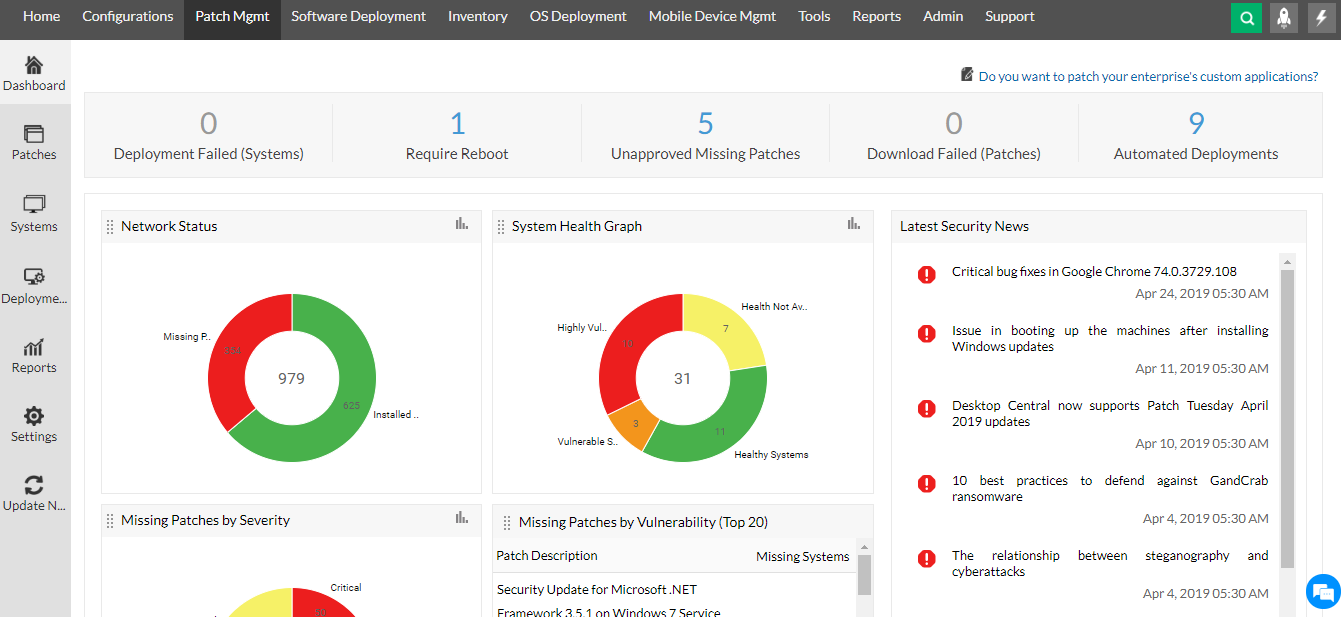
Automate Antivirus Updates
Endpoint Central also helps automate antivirus definition updates. Such updates are quite frequent and may happen several times a day which might result in high bandwidth consumption. To avoid it, you can schedule these updates once every day at a convenient time.
Disable Automatic Updates
You can disable automatic updates in just a few clicks. This allows you to have complete control over any updates that are installed within your network.
Schedule Patch Deployment
To avoid bandwidth issues and ensure system availability, system administrators can schedule the installation of patches on a convenient day and time by configuring a deployment policy. In the deployment policy, you can configure the week(s) and day(s) on which the deployment should take place, the time interval within which the patch should be installed, and the reboot policy. You can also allow the user to skip deployment. The product has the capability to wake computers on LAN before deployment, if the computers are shut down at that moment.
Schedule Patch Deployment
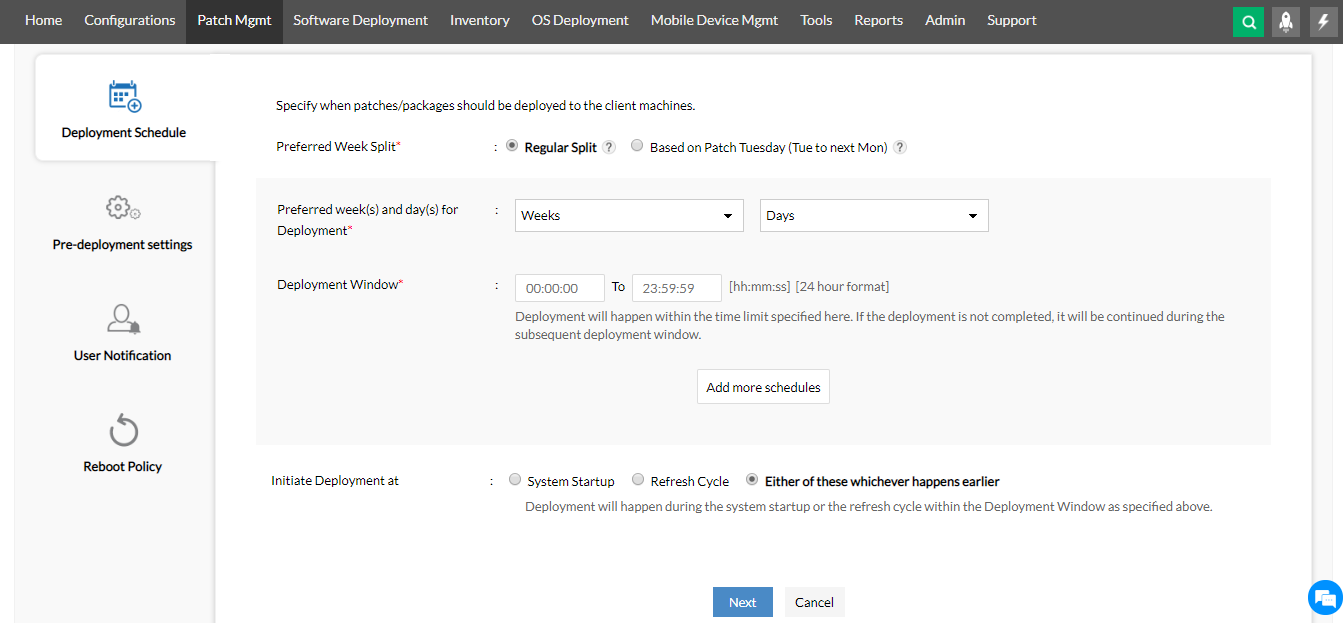
Patch Management using Mobile App
You can manage patches on the go with our mobile app. In just a few taps, you can install software patches, approve/decline patches, view detailed patch reports, initiate patch scanning and much more! What's better is that you don't even have to do these tasks yourself, just ask Zia, Endpoint Central's IT Assistant, and she'll do them for you.
Frequently Asked Questions
What is Patch Management?
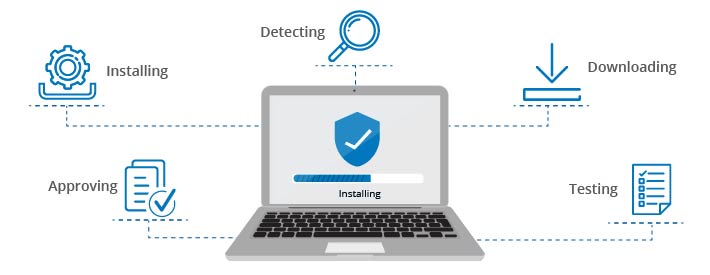
Patch Management is the process of detecting, downloading, testing, approving and installing new/missing patches for all the Operating Systems and applications within a network. It entails having a centralized view on the applicable patches for endpoints across a network, so that Vulnerable, Highly Vulnerable and Healthy Systems can be classified at a glance. This helps spot the systems that need attention so that appropriate measures can be taken to keep the network safe from cyberattacks.
Patch Management
Why is Patch Management so Important?
Cyber crime has increased exponentially in the past decade, with hackers becoming more and more creative and coming up with new ways to exploit vulnerabilities. One of the most common entry points for these attacks are unpatched systems. Every time a security patch is released, the attackers become aware of a new vulnerability that can be exploited (in unpatched systems) and they start probing networks for the weakness.
Since only 38% of the organizations are prepared for a cyberattack, such vulnerable networks are easy to come across and exploit. This is why an effective patch management software is required, to keep networks safe from cyber attacks and prevent data breaches.
If endpoints are left unpatched in a network, it will lead to:
- Missing out on new features and resources
- Reduced performance
- Systems being vulnerable to attacks
Advantages of Patch Management
An IT admin who manages 1000 endpoints will have countless things to keep track of and patches will be on the top of the list. When an IT admin is handling numerous endpoints with multiple operating systems, it translates to diverse applications that will require patching. Patch management facilitates an admin to handle patches based on the threats and their severity for individual operating systems from a centralized location.
- The obvious advantage of patching is security. Cyber threats are not a thing of the past. Security patches are indispensable to a company as they keep networks safe from attacks and data theft.
- Apart from security fixes, patches may also contain new features or enhancements for existing applications thereby keeping the software up-to-date. This also, in turn, improves productivity.
- Patch management helps in boosting the productivity of the company. Patching reduces the downtime caused by unpatched applications hence improving productivity.
- It also helps a company in achieving compliance with security laws.
Looking for an MSP offering? Choose Endpoint Central MSP
Manage and secure client endpoints effortlessly. Discover the benefits of choosing us.
Know more
"We have relied on Endpoint Central for over eight years to provide end-user endpoint support and ensure compliance with our patch management policies. It saves us time by enabling us to access any computer we manage for troubleshooting and patch management without physically visiting each computer. It has greatly reduced our software security patch deployment timeline and provides daily metrics we use to track our progress toward achieving our patch management goals."
Michael R. Haag,
Computer Services Technician at the Department of Information Technology,
County of Madison, New York State