Configuring SonicWALL Internet Security Appliances
Firewall Analyzer supports most of the versions of SonicWALL Firewall devices. Carry out the following configuration depending upon your requirement. To get Live reports using Syslog Enable 'default' (syslog) format in the SonicWALL firewall to get live reports using syslog Configuring SonicWALL To Direct Log Streams- Log in to the SonicWALL appliance
- Click Log on the left side of the browser window
- Select the Log Settings tab
- Type the IP address of the Firewall Analyzer server in the Syslog Server text box
- Click Update at the bottom of the browser window
Configuring SonicWALL Logging Level - Log in to the SonicWALL appliance
- Click Log on the left side of the browser window
- Select the View tab
- Select the Logging Level as Informational from the combo box
- Click Update at the bottom of the browser window
For more information, refer the SonicWALL documentation in the URL given below: http://help.mysonicwall.com/sw/jpn/2907/ui2/42600/Help/42_Log_Reporting.html Whenever you create an access rule in the SonicWALL Firewall, ensure that 'Enable Logging' check box is selected for the particular rule. For more information refer the URL http://www.techrepublic.com/article/how-do-i-configure-firewall-security-on-a-sonicwall-device/6124340 Restart the SonicWALL appliance for the changes to take effect. Configuring SonicWALL to get 'IPFIX with extension' flow information Firewall Analyzer supports the IPFIX flow collection from SonicWALL devices. SonicWALL provides netflow with extended features called 'IPFIX with extension'. This flow support is available in SonicOS version 5.8 and above.  | Note: If syslog is already being forwarded from SonicWALL device and if you configure IPFIX, the SonicWALL device will be added as a new device in Firewall Analyzer with Firewall's LAN IP address as device name. |
IPFIX with Extensions Configuration Procedures
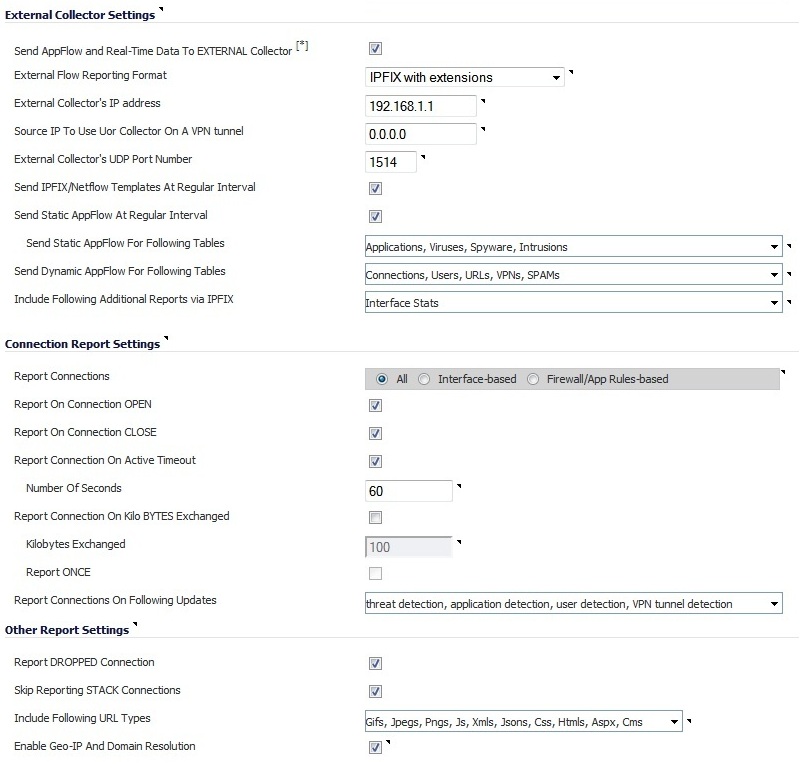
To configure IPFIX with extensions flow reporting, follow the steps listed below. - Select 'Send AppFlow and Real-Time Data To EXTERNAL Collector' check box to enable flows to be reported to an external flow collector.
| Note: After enabling to send the data and completing the configuration, ensure that you restart the SonicWALL firewall device. Only after restart, the device will send the data to the external collector (i.e., the Firewall Analyzer). |
- Select 'IPFIX with extensions' as the External Flow Reporting Type from the drop down list, if the Report to EXTERNAL flow collector option is selected. Next, specify the External Collector’s IP address (the IP address of the Firewall Analyzer) in the provided field
- To reach the external collector (i.e., the Firewall Analyzer) using a VPN tunnel, specify the Source IP of the VPN tunnel in the 'Source IP to Use for Collector on a VPN Tunnel' field.
- Specify the External Collector’s UDP port number (the UDP port number in which the Firewall Analyzer is listening, by default it is 1514) in the provided field
- Enable the option to Send templates at regular intervals by selecting the check box. After enabling this option, you can Generate ALL Templates by clicking the button in the topmost tool bar
- Enable the option to Send static flows at regular intervals by selecting the check box. After enabling this option, you can Generate Static Flows by clicking the button in the topmost tool bar
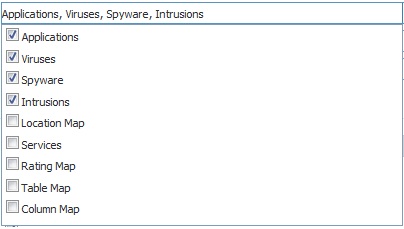
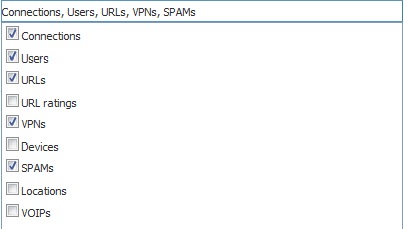
- Select the tables you wish to receive dynamic flows for from the drop down list.
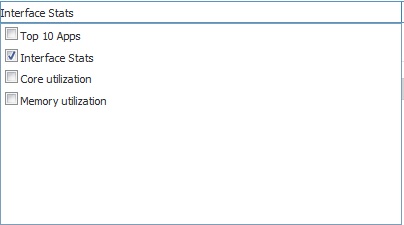
- Select any additional reports to be generated to a flow from the drop down list
Whenever you create or edit an access rule in the SonicWALL Firewall, ensure that 'Enable Flow Reporting' check box is selected for the particular rule. | 

