Password Reset Listener
Password reset is one of the most important functions performed by Password Manager Pro in order to protect the sensitive resources from unauthorized access. Password Manager Pro allows you to carry out similar tasks by invoking scripts or executables, referred to as Password Reset Listeners.
This document walks you through the following topics:
- What are the Follow up Actions you can do using Password Reset Listeners?
- How does a Password Reset Listener Work?
- Who can Add Password Reset Listeners?
- Custom Listener
- Reference Implementation
- Frequently Asked Questions
1. What are the Follow up Actions you can do using Password Reset Listeners?
- Restart the dependent services immediately after password reset.
- In case of a Windows service that makes use of an account whose password is reset locally in Password Manager Pro database, the reset listener helps change the respective 'stored credentials' (i.e. the credentials specified in the 'Logon' property) of the windows service.
- Reset the passwords of Windows scheduled tasks and other associated processes.
- Carry out password resets for network devices. For instance, if you have added the accounts of network devices as resources, you can first reset the passwords of such accounts locally and then invoke a custom script to connect to the devices and execute the changes in the device as well.
2. How does a Password Reset Listener Work?
Notes:
- After updating to build 12300, the existing password reset listeners will be called as the Agentless Post Password Reset Listeners.
- The Execution Order and Execution mode for the Password Reset Listener will only be available after build 12300.
Password Reset Listener is a script or executable that can be invoked by you whenever the password of an account is being changed or reset in the Password Manager Pro repository. This password reset listener can be invoked even for local password changes and also for resources for which remote password reset is not supported out-of-the-box by Password Manager Pro. You can configure listener scripts individually for each resource type including the user defined resource types.
- The password reset listener script will be invoked in a similar fashion as it will be from the command prompt of the operating system from which it is invoked.
- In case, the script needs another program to invoke it from the command prompt, it could be provided as the 'Pre-Command' for that script (for example 'cscript c:\scripts\changepassword.vbs old_password new_password).
- By default, the parameters resource name, dns name, account name, old password, new password are passed as arguments to the script.
- You can also add additional arguments by specifying them against the text field "Additional Parameters" at the time of invoking the script, in the order specified.
The script runs with the same privilege as the user account running the Password Manager Pro server. For Security reasons, dual control mechanism is implemented, which will ensure that two administrators will see and approve the script before it is invoked by Password Manager Pro. Password Manager Pro will not invoke the script unless it has been approved by both the administrators. For example, when an administrator adds or edits the password reset listener, Password Manager Pro will not invoke the scripts unless it has been approved by the other administrator. Thus, the add / edit / delete operations related to password reset listeners can be successfully executed only with the approval of two administrators in Password Manager Pro. The actions are also audited for future references.
The password reset listener is invoked from a separate thread, so it does not impact the password reset process of Password Manager Pro. The listener scripts added will be stored in the same database as the other information. This provides security and also backup, if it is configured for Password Manager Pro database.
To set up password reset listener,
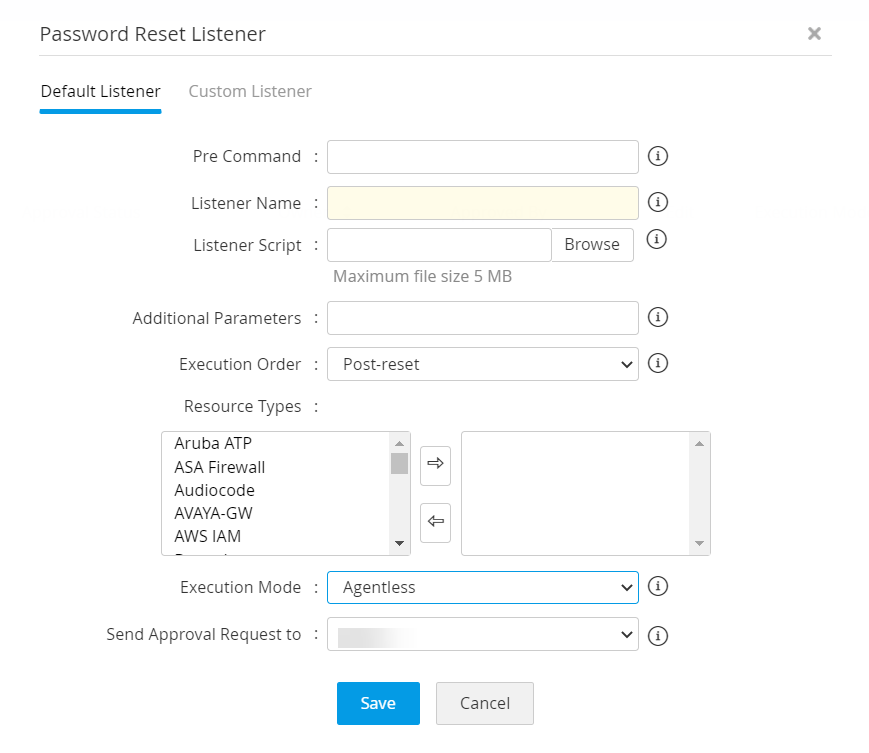
- Navigate to Admin >> Customization >> Password Reset Listener.
- The Password Reset Listener window will open. Click "Add Listener".
- As mentioned above, the password reset listener script will be invoked in a similar fashion as it will be from the command prompt of the operating system from which it is invoked. In case, the script needs another program to invoke it from the command prompt, it could be provided as the 'Pre-Command' for that script (for example 'cscript c:\scripts\changepassword.vbs old_password new_password).
- Enter a name for the listener. Next, browse and add the listener script.
- By default, parameters such as resource name, dns name, account name, old password, and new password are passed as arguments to the script. In case you require to pass additional arguments, add additional arguments by specifying them against the text field "Additional Parameters". The additional parameters supplied will be passed to the script in the order given, at the time of invoking the script.
- Select the Execution Order of the script. This allows users to decide to execute the script before or after the password reset.
- You can also specify the resource types for which the changes to be applied and send approval request to the other administrator.
- Now, select an Execution Mode. You can choose between Agentless, Agent, and Agentless & Agent.
- If you choose Agentless mode, the script will be executed in the Password Manager Pro server.
- If you choose Agent, the script will be executed in the agent machine.
- If you choose Agentless & Agent mode, the script will be executed first in the Password Manager Pro server and if it fails, it will then be executed in the agent machine.
- After adding necessary details, select an administrator from the drop down for sending an approval request. A mail will be sent to the selected administrator intimating the approval request.
- Click Save.
3. Who can Add Password Reset Listeners?
The listeners can be added only by Password Manager Pro administrators. In addition, all listeners added should also be approved by a second administrator to guard against potential risks associated with invoking arbitrary scripts. So, once a listener is created and saved by an admin, the same will be sent to another administrator for their approval. A mail will be sent to the second administrator intimating the approval request.
To approve a recently added password reset listener,If you are an administrator, and another administrator requests you to approve a listener, then you need to ;
- Navigate to Admin >> Customization >> Password Reset Listener.
- Click the link under Approval Status column, beside the listener which has to be approved.
- Once you approve, the listener will take effect.
The listener creation, edition, deletion, and approval events are all audited.
4. Custom Listener
(Feature available only in Enterprise Edition)
In addition to reset listeners, Password Manager Pro allows you to provide your own implementation through "custom listeners". The custom listener basically lets you provide your own listener implementation class, which offers you complete flexibility to execute any post password reset follow-up action, instead of just letting Password Manager Pro execute the listener script provided by you. It offers you complete flexibility to execute any post password reset follow-up action.
4.1 How to create a custom listener?
Summary of steps involved in custom Listener creation:
Step 1: Write your own implementation class
Implement PMPListenerInterface (more details in the reference implementation below).
Step 2: Configuration in Password Manager Pro GUI
Add entries for the implementation class in Password Manager Pro GUI.
Step 3: Archive your implementation class as .jar and put it into Password Manager Pro
Step 4: Restart Password Manager Pro
5. Reference Implementation
To explain how you can have your own implementation for listener in Password Manager Pro, we are providing a reference implementation below. This implementation is for executing PowerShell scripts with reset listener.
Step 1 - To write your own implementation class
You need to write your own class implementing PMPListenerInterface.java as explained below.
public interface PMPListenerInterface {
static final Logger LOG = Logger.getLogger(PMPListenerInterface.class.getName());
public String executeListener(Properties resourceProps, Properties accountProps, String listenerFilePath, String oldPassword) throws Exception;
}
You can implement your class in such a way that properties of resources (resources and accounts in Password Manager Pro) are obtained as arguments. For example, if you need 'Resource Name', you may have to do it as below:
resourceProps.get("RESOURCENAME")
You may obtain the value of any property from the list of keys listed below.
Resource Properties (resourceProps)
- RESOURCENAME - Name of the Resource added in Password Manager Pro
- IPADDRESS - DNS Name or IP Address of the Resource
- RESOURCEURL - Resource URL configured for the resource
- DOMAINNAME - Domain Name if the Resource is of type WindowsDomain
- SSHPORT - SSH Port if the device can be connected over SSH
- RESOURCEDESC - Description of the resource
- LOCATION - Location of the Resource
- DEPARTMENT - Department to which the resource belongs to
- ALL RESOURCE CUSTOM COLUMN NAMES (Label name will be the key)
Account Properties (accountProps)
-
DESCRIPTION - Account's description
- LOGINNAME - Login Name of the user Account added into Password Manager Pro
- PASSWORD - Password for this user account
- DOMAINNAME - Domain Name if the account added is a domain account
- COMPLIANTSTATUS - Provides a status whether the password is in compliant with the Password Policy configured in Password Manager Pro
- COMPLIANTREASON - Reason if the password is not compliant with the Password Policy
- EXPIRYSTATUS - Status of expiry of the account's password
- PASSWRDSYNCSTATUS - Provides information if the password is in sync with the password that is set on the remote resource
- ALL ACCOUNT CUSTOM COLUMN NAMES (Label name will be the key)
Other Arguments
- listenerFilePath - The path of the script/file that you want to invoke as listener. You also have the option to provide the script/file while configuring the listener in Password Manager Pro in Step 5.
- oldPassword - Passing the old password to the implementation class to carry out password reset
Sample implementation to execute PowerShell script
public class PowerShellListener implements PMPListenerInterface {
public String executeListener(Properties resourceProps, Properties accountProps, String listenerFilePath, String oldPassword) throws Exception {
String message = "Executed Successfully";// used for audit reason
// got the properties
// call the powershell script}}
Step 2: Configuration in Password Manager Pro GUI
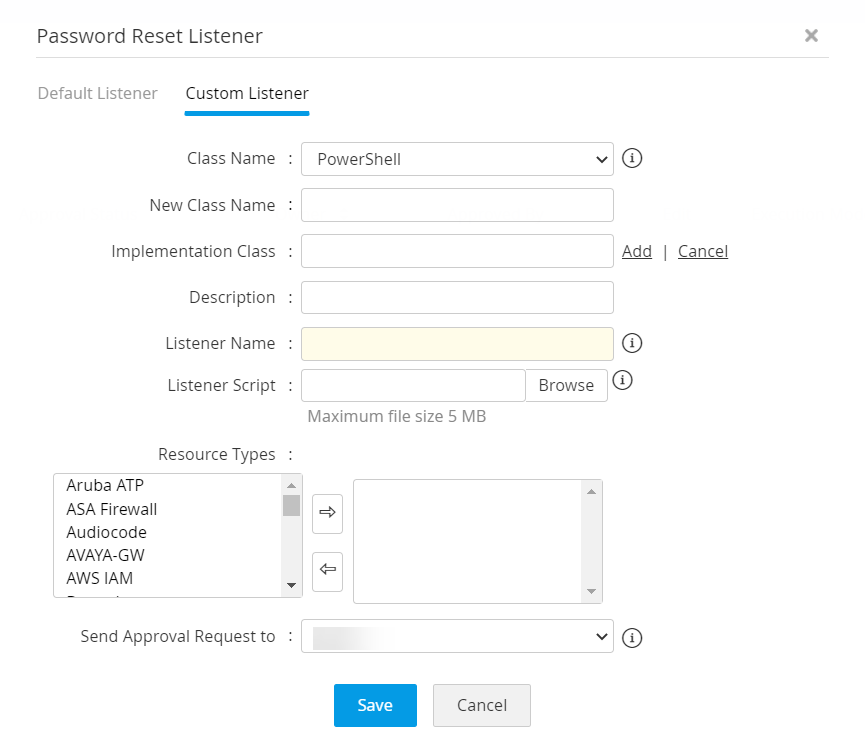
Add entries for your implementation class in Password Manager Pro GUI. To do this, navigate to Admin >> Password Reset Listener >> Add Listener and in the GUI that opens, click the tab "Custom Listener" and then click the link "Add New". Enter the following details:
- Navigate to Admin >> Customization >> Password Reset Listener.
- Click Add Listener.
- In the pop-up form that opens, click on Add New under Custom Listener tab and enter the details.
- Enter the name of the new implementation class and add your own implementation class.
- Add entries for your implementation class and also give information about your implementation class in description.
- Enter a name for the listener script with appropriate extension and then browse and locate the listener script.
- You can also specify the resource types for which the changes to be applied and send approval request to the other administrator.
- Select an administrator from the drop down for sending approval request. A mail will be sent to the administrator intimating approval request.
- Click Save.
Step 3: Archive your implementation class as .jar and put it into Password Manager Pro
You need to convert your implementation class as .jar and put it into <PMP-Installation Folder>/lib directory.
Step 4: Restart Password Manager Pro
After completing the above steps, you need to restart Password Manager Pro to give effect to this implementation.
6. Frequently Asked Questions
- How to create a custom role to manage Password Reset Listener?
To manage Password Reset Listener, the user will need to have Add and Edit permissions to the Resources and permission to Download PMP Agents. Follow the below steps:
- Navigate to Admin >> Customization >> Roles.
- Click Add Roles. In the pop-up that appears,
- Mention the Name and Description.
- Click Password >> Resource and enable Add and Edit.
- Click Custom Settings and enable Download PMP Agents and Manage Password Reset Listener.
- You have successfully created a role to manage Password Reset Listeners.
- What are the Execution Modes available in Password Reset Listener?
There are two execution modes available in Password Reset Listener and they are: Pre and Post. In Pre-password reset mode, the script will be executed before the password reset action and in Post-password reset mode, the script will be executed after the password reset action.
- Are there any reports for resources configured with Password Reset Listener?
Yes, navigate to Reports >> Query Reports >> Resources and search for 'Password Reset Listener'.
This report will contain a list of resources configured with Password Reset Listener. - After upgrading to PMP build 12300, what mode will be applied to the existing listeners?
By default, the listeners will be set to Agentless mode with post as the execution order.