ManageEngine QEngine

Load Testing and Functional Testing Tool

 
Product End of Life Announcement

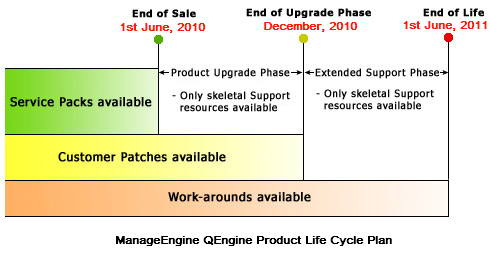
Currently we have changed the product strategy of QEngine and have announced Product End of Life Cycle. Know more »

Some of the capabilities have been ported in to ManageEngine Applications Manager:

Thank you for your patronage.


Playback Options

functional testing playback options

Wide range of Runtime Options provides considerable flexibility, Multiple Play Modes allows you to debug and identify errors in test scripts and automatic/customizable Error Recovery system enables unattended testing.


Functional Testing ComparisonQEngine Functional Testing Comparison with other Functional Testing Tools.

 
Functional Testing Evaluation GuideFunctional Testing Evaluation Guide to kick start your evaluation.
 

Runtime Options

 
  • Option to playback the recorded script in the normal user recorded speed or to execute in fast mode.
  • Option to change the order of script execution using the automatic or manual sequencing mode.
  • Options to handle web and popup exceptions.
  • Option to e-mail test case failures to team members and other related staff.
  • Option to send summary reports to configured e-mail IDs.
  • Option to change the default local GUI map file to a global map file. This maintains a single map file for the entire suite.
  • Option to playback the recorded script with any server, port or protocol(HTTP/HTTPS).

Multiple Play Modes

 
Provides a wide range of play modes to run and debug test scripts. The play modes include:
 
  • Verify mode to continuously playback the entire script without any breakpoints.
  • Execute From and Execute UpTo modes to set breakpoints and execute script from a specified line or upto a specified line to catch errors from a specific point.
  • Execute Step mode to step through each line in the script, repeat steps, stop execution at a particular line or continue playback of script from a specified line. This lets you to easily debug and diagnose errors in test scripts.
  • Update mode to update the web element properties in test cases before test execution.
  • Provision for command-line invocation allows invocation from batch files or scheduling utilities.

Automatic/Customizable Error Recovery System

 
  • Allows you to capture unexpected popup exceptions, web exceptions, script exceptions and object exceptions during a test run.
  • Provides the ability to automatically recover from errors and move to the next test run, facilitating unattended testing.
  • Provides a wide range of error recovery options to report exceptions, capture screen shots for unexpected popup's, stop play, close unexpected popup's or call another script when exceptions occur during a test run.