ManageEngine QEngine

Load Testing and Functional Testing Tool

 
Product End of Life Announcement

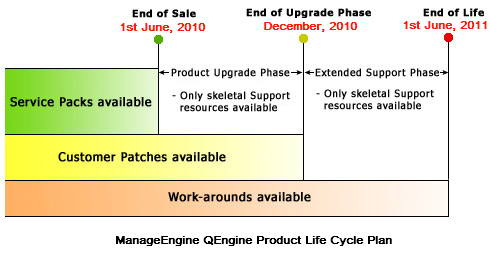
Currently we have changed the product strategy of QEngine and have announced Product End of Life Cycle. Know more »

Some of the capabilities have been ported in to ManageEngine Applications Manager:

Thank you for your patronage.


QEngine Toolbar


Web Functional Testing

QEngine Toolbar is a free download tool that takes only seconds to install. It is one of the most powerful ways to perform remote record and playback of your web applications and web services.

QEngine Toolbar for MSIE, Firefox and Mozilla offers the following

  Remote record/playback of user actions
  Multi-user record and playback
  One-click access to configured suites and test scripts
  Single point of control for functional and performance testing
  Automatic intimation for Toolbar updates

ManageEngine QEngine respects your privacy. The QEngine Toolbar installation does not collect any personal information or does not alter any of your browser settings.

Online Demo - Try now!

  1. In the browser, navigate to the URL http://demo.qengine.com:443. In IE, this displays the Download Toolbar page and in Firefox/Mozilla, displays the Install Toolbar page.
  2. From this page, click the Download/Install Toolbar button to install the toolbar in your browser.
  3. Click the Connect option from QEngine Toolbar and enter the Server Host as demo.qengine.com and Server Port as 443.
  4. Click OK to view the web-based interface where you can perform remote functional and performance testing of your web applications and web services.

Check out the Evaluation Version!

Download QEngine and use the help documentation to get started!