Chaos testing: Is your application ready for the unexpected?
Oct 28 · 7 min read
Did you know that an aircraft goes through multiple rigorous tests right from the initial design stage? In these tests, engineers simulate sudden thunderstorms, heavy turbulence, and unexpected system failures to analyze how the aircraft will fare in dire situations. These tests help engineers detect hidden vulnerabilities, make the necessary design enhancements, and ensure it is resilient enough to safely withstand adverse conditions.
The digital domain can be just as turbulent, and at Zoho Corp., we have first-hand experience of that. Even after following the best coding practices, we've seen applications go offline due to unforeseen disruptive events like server crashes, infrastructure misconfigurations, and memory or network overloads. Our standard response has been to implement code reverts or execute automatic fixes within a specific timeframe—but we realized that this reactive approach was not sufficient. To reduce downtime and deliver a positive user experience, we needed to anticipate events and set up the necessary guardrails proactively. But how does an organization proactively address issues? The answer is chaos testing.
Just like in the case of testing an aircraft, this non-functional testing approach involves intentionally introducing disruptions into our applications to evaluate their resilience. In this article, we'll explore the concept of chaos testing in detail and explain how we have integrated this practice into our development pipelines at Zoho Corp.
What is chaos testing and why is it important?
Chaos testing, also known as chaos engineering, is a proactive testing technique that involves simulating real-world disruptive scenarios in a controlled and monitored environment. It enables you to look beyond the application's functionalities into the infrastructure or platform layers and analyze how sudden disruptions in these layers affect your application.
Netflix is one of the early adopters of this practice. To accommodate its growing user base, Netflix transitioned from a rigid monolithic architecture to a cloud-based microservices architecture.
While this strategic move delivered agility, the increased number of interconnected components in the microservices model also created new vulnerabilities within the platform. Netflix embraced chaos testing to counter this challenge. As a result, the company was able to enhance its resilience and better serve its expanding user base.
Here are some of the key benefits that chaos testing offers:
- Detect hidden vulnerabilities proactively: It's challenging to identify vulnerabilities in the underlying infrastructure or platform layers, as they often surface only after you deploy the application. Chaos testing allows you to run a series of experiments targeting these layers while simulating a production environment. This way, you can uncover hidden vulnerabilities before they affect your operations.
- Ensure resilience while scaling: Many applications struggle to maintain stability while scaling dynamically, especially those built on a microservices architecture. When one component or microservice fails to handle the scaling load, it triggers a cascading effect that brings down the entire application. Chaos testing can help you overcome this. By injecting different scaling loads into your components, you can observe how the application behaves, discover weak points, and implement measures to ensure that the application does not break while scaling.
- Design faster recovery mechanisms: Downtime can be costly. When Meta's platforms went offline for about six hours in 2021, the recorded revenue loss was around $100 million. Beyond the financial hit, such incidents can also damage your reputation and even lead to legal complications. Chaos testing prepares you to tackle downtime efficiently. By simulating various disruptions, you can observe how each incident might unfold and design swift recovery mechanisms that activate the moment your application goes offline.
Different levels of chaos
Now that you have a solid idea of what chaos testing is and its key benefits, you might be eager to try it out. Before you jump in, there is one crucial aspect that you must understand—not all chaos is the same. The intensity and impact of each experiment can vary according to the level of chaos you induce.
Chaos level |
Purpose |
Examples |
|
Low chaos: Disruptions that cause minimal impact. |
|
|
|
Medium chaos: Controlled and temporary disruptions to critical paths. |
|
|
|
High chaos: Disruptions that trigger alerts and require manual or automated intervention. |
|
|
Extreme chaos: Catastrophic failures impacting multiple components or zones. |
|
|
ManageEngine's approach to chaos testing
At ManageEngine, we follow a few key tenets when it comes to chaos testing. Here's a closer look at each of them.
Closed ecosystem: Chaos testing is still an evolving practice at Zoho Corp. We are steadily building and applying an internal chaos testing framework that relies solely on proprietary scripts and programs with no involvement from third-party or open-source tools like Gremlin or Chaos Monkey. This allows us to operate within a fully closed ecosystem, giving us complete control over how we introduce chaos and flexibility to explore failure scenarios beyond conventional boundaries.
Minimal disruption: Being a customer-centric organization, we understand the mission-critical nature of our software applications. Our top priority is to ensure minimal disruptions for our customers. However, it is widely believed that running chaos tests in a live production environment yields the best results. So, how do we attain that balance without impacting our customers?
Our solution to this challenge is relatively straightforward. We study the application's use case and risk profile and design test environments that closely mimic real-world operating conditions. Additionally, rather than disrupting an application running in a live environment, we inject chaos into a packaged version of the application (i.e., a pre-production build that includes all the latest features) or into a standby version that we maintain for backup and disaster recovery purposes.
This way, we get to observe how the application performs under real-world load conditions while ensuring our customers remain safely outside the blast radius of the experiment.
Collaboration: Our chaos testing team collaborates extensively with the site reliability engineering (SRE) team throughout the entire process. The SRE team monitors the application in real time, collects operational feedback, and shares the data with the chaos testing team. This includes details such as live traffic loads, key performance indicators, and more. Our chaos testing team uses these insights to design a test environment that closely resembles production.
Internal data: We maintain high standards when it comes to data privacy. Therefore, we never use our customers' data for chaos testing. Instead, we rely on internal data.
As an organization that actively uses our own products on a daily basis, we have a rich repository of real-time operational data. This provides us with meaningful, production-like insights while allowing us to conduct thorough chaos testing.
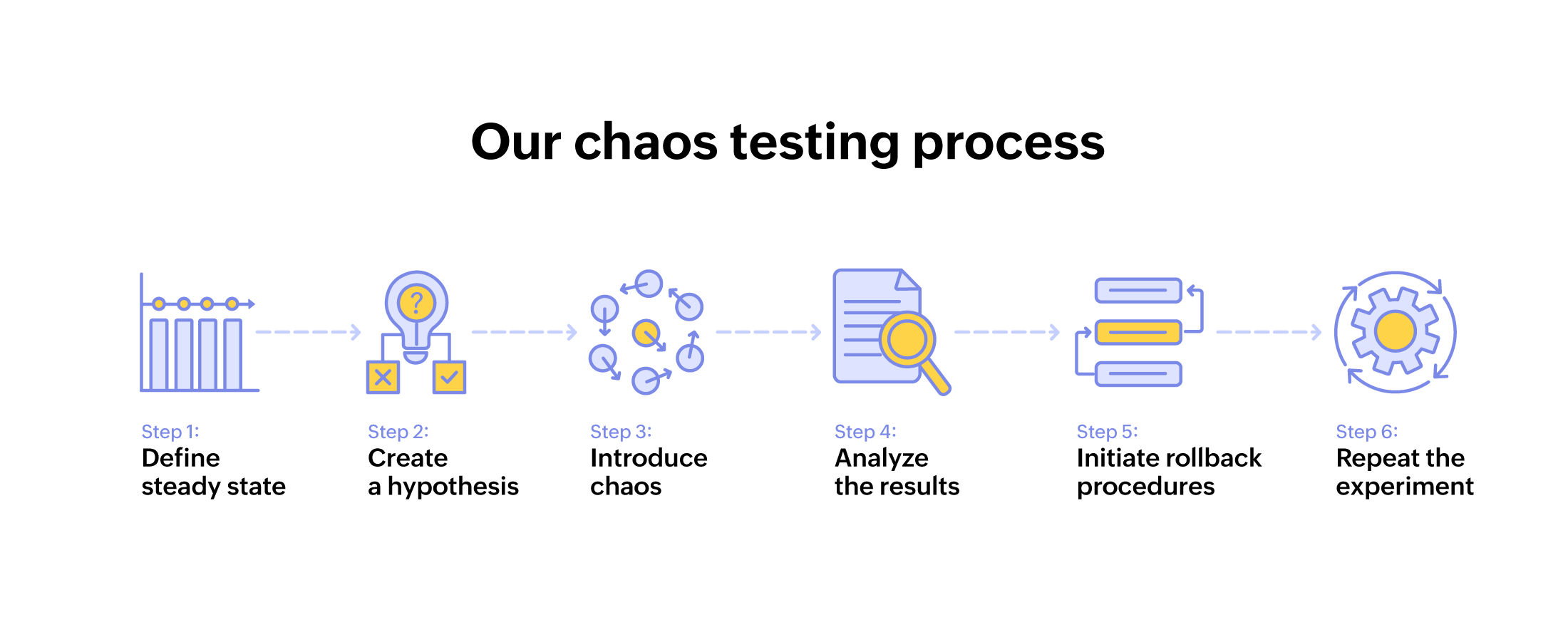
To understand each step better, let's walk through a chaos test we ran on one of our applications.
Known as the Redis Down experiment, this chaos test is just one of the many experiments we have implemented at Zoho Corp. Additionally, we have simulated memory and CPU failures, tested concurrency at the application server level, and deliberately crashed various other components and databases—including Zettabyte File System (ZFS), Apache Kafka, CStore, and MySQL. As the chaos testing program expands, we aim to achieve much broader coverage and scope.
The Redis Down experiment
The Remote Dictionary Server (Redis) is a vital component in most modern software applications. It acts as a caching layer for the primary database and enables quick read and write operations. Applications rely on Redis to process recurring user requests swiftly, maintain low latency, and deliver high throughput.
In this chaos test, we triggered a Redis outage. Our goal was to observe how the application reacted to a disruptive event like this and assess if our fallback mechanisms were working as intended.
1. Define the steady state
Due to the mission-critical nature of the selected application, we decided to conduct the experiment in an isolated test environment. We began by preparing a packaged version of our application with all the latest features. Then, using the data gathered by the SRE team from the production environment, we automated real-time user workflows and traffic patterns. Our test environment now closely mimicked live production, and the application was operating under normal working conditions.
Once this setup was complete, it was time to identify the steady state or performance baseline of the application. The key metrics that we selected for defining the steady state were:
- Number of successful requests.
- Average response time.
- User session throughput.
2. Create a hypothesis
With the steady-state values in hand, we formulated our hypothesis:
"Redis failure will trigger Hystrix intervention, limiting new connections and rerouting traffic to the preconfigured secondary cloud-based cache."
3. Introduce chaos
We had the steady-state values. Our isolated test environment and the application were ready. It was time for us to introduce chaos by shutting down the Redis component. We used two elements to complete this action—an aop.xml file and a chaos agent installed in the host machine.
When the experiment was triggered, the chaos agent started polling the chaos server and received instructions to simulate a Redis failure. It then referred to an aop.xml file, which was configured to intercept Redis-related operations within the application, eventually bringing down the Redis layer.
4. Analyze the result
We started assessing the application's steady-state values. Unfortunately, our hypothesis was incorrect, and there were significant deviations from the steady-state values.
These were some of our observations:
- The number of successful requests dropped.
- The average response time increased.
- User session throughput took a major hit.
5. Initiate rollback procedures
As soon as we spotted the deviations from the steady state, our monitoring systems raised alerts. We quickly terminated the chaos agent, deactivated the aop.xml hook, and restarted the affected application services.
6. Repeat the experiment
After restoring the application to its stable state, we evaluated what went wrong. During our root cause analysis, we found out that Hystrix was disabled for this particular application due to a previous Redis connection leak on the local server.
This meant the application's fallback mechanism for a Redis outage was not properly set up, and the application could have crashed if such an event happened in production. After reconfiguring Hystrix, we ran the experiment again, and this time, the application behaved as expected, successfully handling the Redis failure.
Final words: Fitting chaos testing into different development practices
Before incorporating a chaos testing framework into your organization, there is one final facet to it that you must understand: how it fits into your development practice. You might be using modern agile and CI/CD pipelines or relying on conventional waterfall methodologies, and depending on that, the way you approach chaos testing will differ.
In agile and CI/CD environments, chaos testing is typically introduced during the continuous delivery (CD) phase of the pipeline. After the code passes initial integration and unit tests in the continuous integration (CI) phase, you can deploy it to staging or production-like environments and simulate failures and disruptions. You can also automate these chaos experiments to run continuously with every code change, providing ongoing validation of system resilience.
On the other hand, traditional waterfall models do not offer the same level of granularity or flexibility. Their rigid, linear structure means development occurs in large batches, and you can only run chaos experiments in a dedicated testing phase along with other functional tests. Nonetheless, by carefully scoping out the experiment and conducting a comprehensive root cause analysis, you can still attain positive results. Happy chaos testing!