
- Why do you need workflow automation?
- How to implement workflow automation
- Common mistakes to avoid while implementing workflow automation
- IT workflow automation examples using low-code
- Start automating workflows with ManageEngine AppCreator
- Frequently asked questions
Why do you need workflow automation?
Workflow automation is essential for streamlining operations, minimizing manual intervention, and optimizing repetitive tasks. Workflow automation boosts productivity, ensures consistent error-free processes, enhances team collaboration and visibility. By saving time and reducing operational costs, organizations can scale more efficiently. Ultimately, workflow automation empowers teams to focus on high-value projects that drive innovation and business growth.
How to implement workflow automation
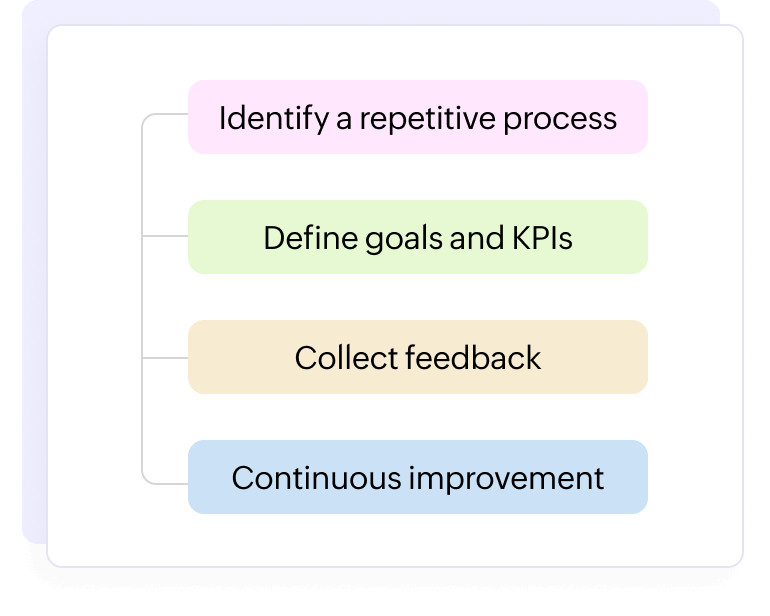
Start implementing workflow automation by identifying repetitive, manual tasks and mapping your current processes. Organizations should choose the right workflow automation platform , set clear goals and KPIs, and begin with small, high-impact workflows. It’s also important to test and refine workflows regularly to maximize performance. Additionally, we recommend collecting feedback from your team and other stakeholders to support continuous improvement.
Looking for a workflow automation software for your organization?
EXPLORE NOWCommon mistakes to avoid while implementing workflow automation
Maximize the benefits of workflow automation by avoiding these common mistakes:
Automating unclear or broken processes
Automating a flawed process only speeds up poor results. Always analyze and improve your workflows before automating.
Skipping stakeholder involvement and feedback
Leaving out key stakeholders can cause resistance and missed requirements. Involve teams early and gather feedback to build better solutions.
Ignoring user training and change management
Without proper training, new systems will struggle to gain adoption. Equip your team with the skills and support they need to succeed.
Overcomplicating workflows from the start
Trying to automate everything at once can overwhelm users. Start small with high-impact workflows and scale gradually.
Failing to set clear goals and metrics
Without clear goals, you can’t measure success. Define objectives upfront and track progress to stay on course.
Not testing thoroughly before going live
Launching without proper testing can lead to errors and disruptions. Test carefully to ensure workflows perform smoothly from day one.
Overlooking integration with existing systems
Automation must work well with your current tools. Poor integration creates silos, inefficiencies, and frustrated users.
Neglecting regular reviews and updates
Workflows can become outdated as your business evolves. Regularly review and update your automated workflows to keep them effective and aligned with your goals.
IT workflow automation examples using low-code
Low-code platforms make it easy to automate complex IT workflows; here are a few examples:
IT Asset management
Automate asset tracking, inventory updates, and life cycle management to maintain real-time visibility and reduce manual data entry.
Ticket management
Streamline ticket creation, routing, and resolution processes, ensuring faster response times and improved user satisfaction.
Incident management
Automate incident logging, escalation, and resolution workflows to minimize downtime and maintain service reliability.
Compliance monitoring
Set up automated checks and alerts for compliance requirements, helping your IT team stay audit-ready with minimal effort.
Employee onboarding
Simplify new hire setup by automating device provisioning, account creation, and access approvals across systems.
Security access requests
Automate access request approvals and provisioning to strengthen security controls while reducing administrative workload.
Start automating workflows with ManageEngine AppCreator
ManageEngine AppCreator is a low-code application development platform that helps you build applications and automate workflows using minimal coding. The platform delivers complete workflow automation, handling tasks like schedulers, approvals, notifications, reminders, and updates. AppCreator also provides powerful workflow automation features like blueprints and custom functions. The platform plays a key role in empowering seasoned and citizen developers to build custom apps, automate repetitive tasks, and integrate seamlessly with existing systems. From process mapping to deployment, AppCreator provides the flexibility and scalability needed at every stage.
TRY APP CREATORFrequently Asked Questions
1. Will I need to overhaul my current systems to adopt workflow automation?
In simple terms, no. Modern automation tools, like low-code platforms, integrate seamlessly with your existing systems, enhancing your workflows without requiring major changes. This means a smoother transition and minimal disruption to your operations.
2. What kind of technical expertise is required to set up workflow automation?
Minimal technical expertise is needed, especially with low-code platforms. Users can typically create and automate workflows using intuitive drag-and-drop tools, while IT teams may provide support for advanced customizations or integrations when needed.
3. Can I customize workflows to match my specific business processes?
Yes, workflows can be fully customized to fit your unique processes, needs, and requirements. The flexibility of low-code platforms enables you to tailor workflows with specific actions, triggers, and logic to align perfectly with your business operations.
4. How can I identify which workflows are best suited for automation?
Identify tasks that are repetitive, time-consuming, prone to errors, or involve multiple steps; these are ideal candidates for automation. By automating these processes, you can free up resources for more strategic work and improve overall efficiency.
5. Can I run manual and automated workflows in parallel during the transition phase?
Absolutely. You can run both manual and automated workflows in parallel, giving your team time to adjust. This hybrid approach ensures that existing processes continue without interruption while you gradually transition to full automation. If you would like to explore AppCreator further with our 30 day free trial or require our personalized assistance for a live demo, sign up here.