EC2 Optimizer report
The EC2 Optimizer report is an auto-generated recommendations report that identifies underutilized Amazon EC2 instances in your AWS environment. It analyzes instance usage patterns to suggest right-sizing opportunities, helping you eliminate wasted cloud spend while maintaining performance. This report identifies savings opportunities and delivers actionable cost-saving insights.
Why do you need this report?
Over time, cloud environments tend to accumulate oversized or idle EC2 instances that silently drain your budget. Without continuous monitoring, identifying and acting on these inefficiencies can be time-consuming and error-prone.
The EC2 Optimizer report solves this problem by:
- Automatically scanning your environment for underutilized EC2 resources.
- Recommending optimal instance types based on usage patterns.
- Quantifying potential monthly savings, giving you actionable financial insight.
- Helping you eliminate cloud waste and maintain performance efficiency.
Benefits of EC2 Optimizer report
- Identify underutilized resources: Detect EC2 instances that are over-provisioned or underused.
- Maximize cost savings: Get optimization recommendations that can reduce your instance costs significantly.
- Right-sizing suggestions: Replace oversized instances with smaller alternatives without sacrificing workload efficiency.
- Visibility and control: Make informed decisions based on instance-level cost comparisons and utilization data.
- Scheduled reports: Share or automate report delivery for continuous cost monitoring.
Use case
A mid-sized organization running multiple workloads on AWS begins to notice a gradual rise in its monthly EC2 expenses. Without full visibility into resource utilization, the IT team finds it challenging to identify which instances are over-provisioned or underutilized. To address this, they leverage CloudSpend's EC2 Optimizer report, which automatically analyzes instance usage and provides right-sizing recommendations.
The report highlights several EC2 instances that can be resized to lower-cost alternatives, along with estimated savings in both percentage and cost. By acting on these insights, the team reduces monthly costs significantly, all without impacting application performance. Beyond immediate savings, the report helps them adopt a data-driven approach to cost management, ensures continuous optimization, and eliminates the need for manual analysis. As a result, the team saves both time and money while maintaining an efficient and scalable cloud environment.
EC2 Optimizer report dashboard
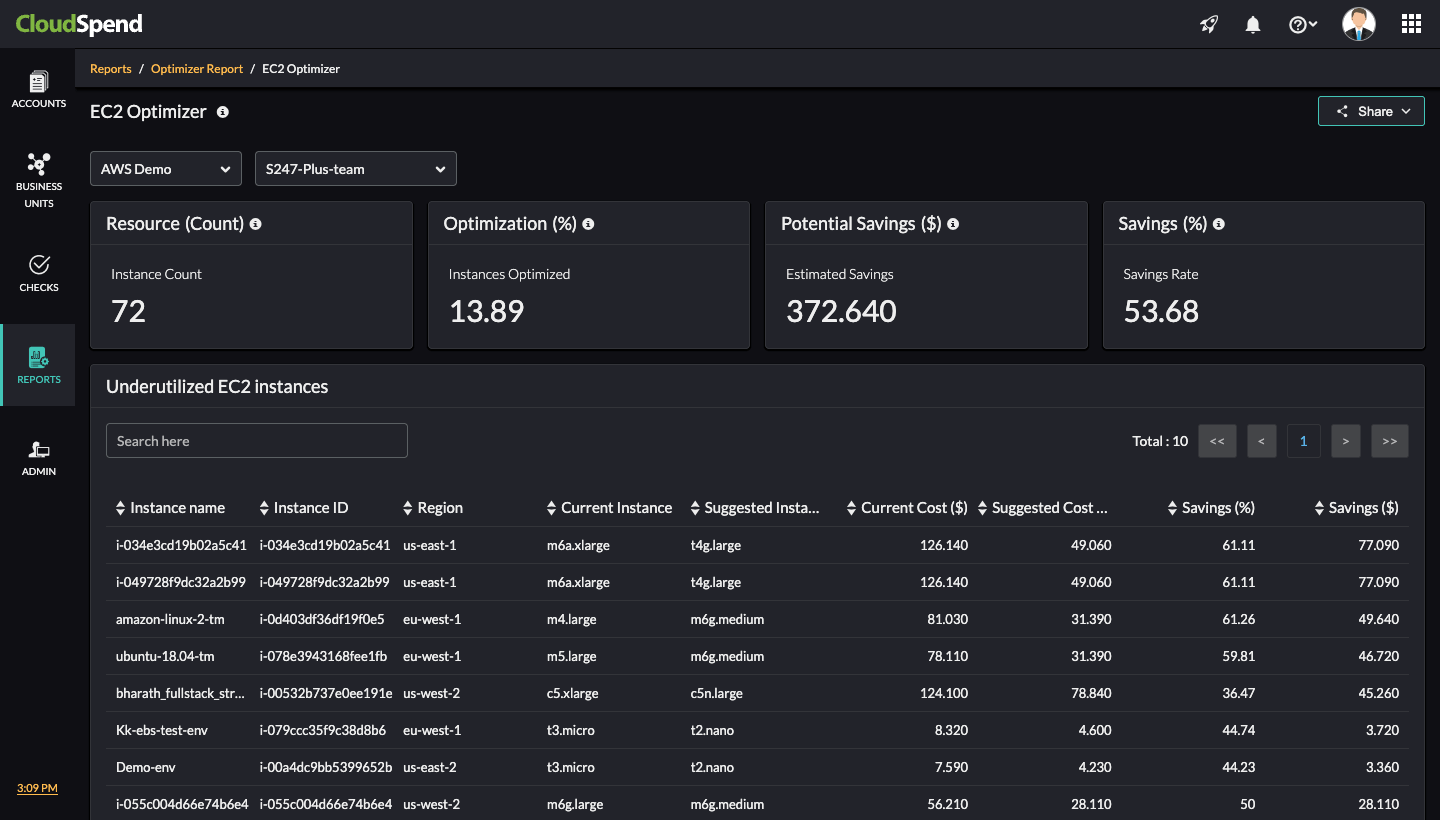
The EC2 Optimizer dashboard comprises high-level summary cards followed by a detailed tabular report. Here's a breakdown of each section:
- Filters : You can select the desired AWS billing account you want to analyze and filter results based on specific organizational units.
- Resource (Count) : Displays the total number of EC2 instances analyzed for optimization.
- Optimization (%) : Number of instances with valid optimization suggestions.
- Potential Savings ($) : Estimated monthly savings if the suggested changes are implemented.
- Savings (%) : Average cost reduction percentage across all optimizable instances.
- Schedule Report : Click Schedule Report to automate the delivery of EC2 Optimizer reports to stakeholders.
- Share : Click the Share to download and share the report as a PDF.
Underutilized EC2 Instances section
The Underutilized EC2 Instances section provides the following details:
Column name | Description |
Instance Name/ID | The EC2 instance and its unique AWS identifier. |
Region | The AWS region where the instance resides. |
Current Instance | The current instance type being used. |
Suggested Instance | The recommended instance type based on observed usage. |
Current Cost ($) | Monthly cost associated with the current instance type. |
Suggested Cost ($) | Estimated monthly cost if the instance is resized as recommended. |
Savings (%) | Cost savings percentage achieved by right-sizing. |
Savings ($) | Monthly cost savings per instance. |
UI breakdown and value derivations
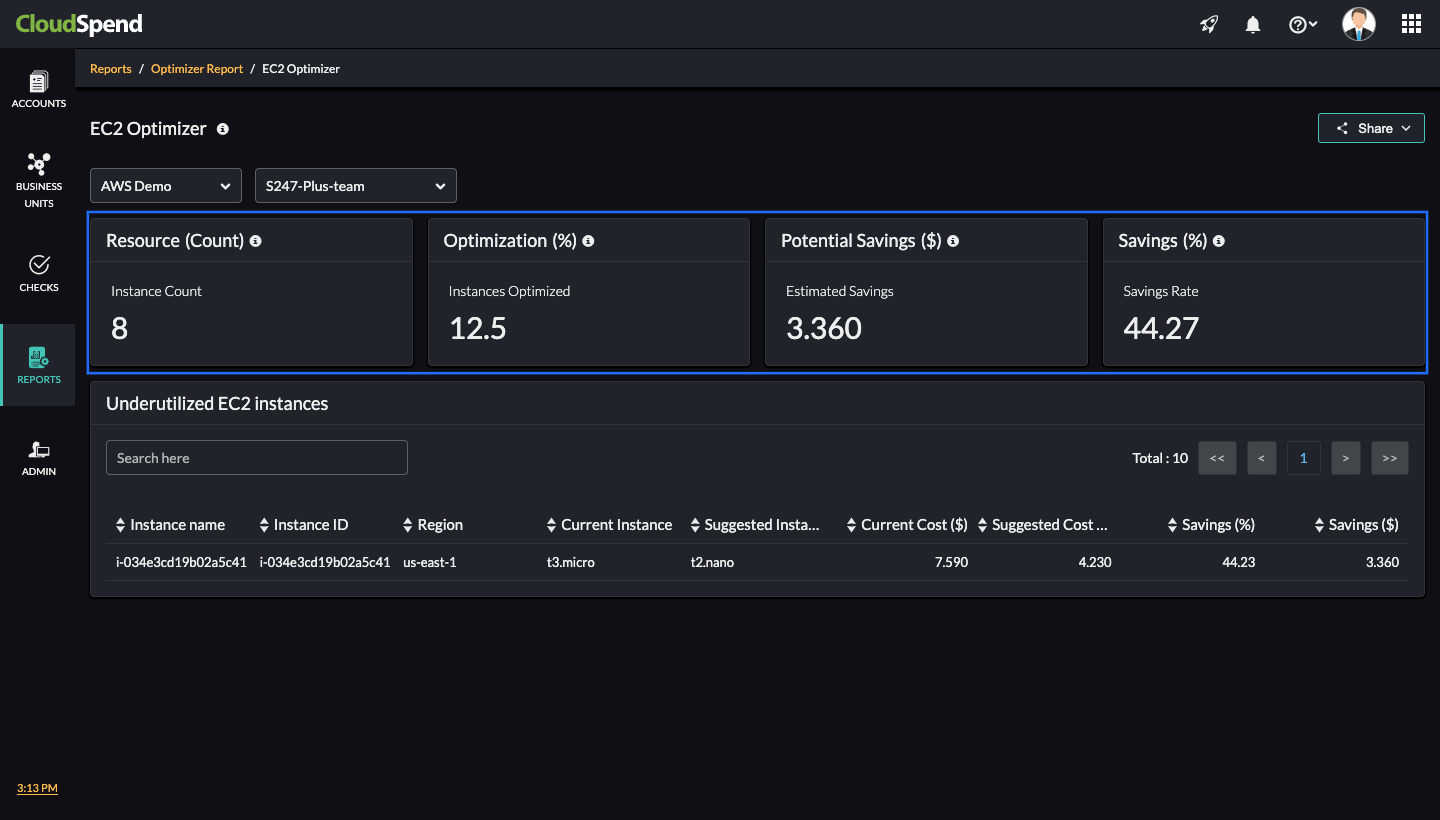
Let’s walk through the UI components in the report and understand how CloudSpend derives values for Resource Count , Optimization (%) , Potential Savings ($) , and Savings (%) based on the image below.
Resource Count
CloudSpend counts all EC2 instances discovered from Site24x7 in the selected account/team.
Example from image:
- Instance Count = 8
CloudSpend has evaluated eight EC2 instances for the selected team, as shown in the image above.
Optimization (%)
The percentage of EC2 instances that CloudSpend found to be underutilized and suitable for right-sizing.
Formula :
- Optimization (%) = (Number of Optimizable Instances ÷ Total Instances) × 100
Example from image:
- Optimization (%) = (1 underutilized instance ÷ 8 total instances) × 100 = 12.5%
Therefore, instances optimized = 12.5%
CloudSpend monitors instance-level usage patterns (CPU, memory, and network) and flags any instance consistently underutilized against its configured capacity. Then, it suggests a smaller instance type that would still meet the usage demand.
Potential Savings ($)
The total estimated monthly savings across all underutilized instances.
Formula (per instance):
- Savings = Current Cost - Suggested Cost
- Potential Savings = Sum of savings across all optimizable instances
Example from image (single instance):
- Current Cost = $7.59
- Suggested Cost = $4.23
- Savings = $7.59 – $4.23 = $3.36
Potential Savings = $3.36 (since only one instance is listed in the image)
Savings (%)
The average percentage of savings possible per optimizable instance.
Formula (per instance):
Savings % = [(Current Cost - Suggested Cost) ÷ Current Cost] × 100
Example from image:
For the instance t3.micro when optimized to t2.nano:
- Current Cost = $7.59
- Suggested Cost = $4.23
Savings % = [(7.59 – 4.23) ÷ 7.59] × 100 = 44.27% (rounded from the instance value)
Understanding Current Cost and Suggested Cost calculations
The Current Cost and Suggested Cost values displayed in the EC2 Optimizer report are CloudSpend-derived estimates, not actual charges fetched from AWS billing. These figures are generated using CloudSpend's internal cost calculation logic.
One key aspect of this logic is that CloudSpend assumes each EC2 instance runs continuously for 730 hours per month. This assumption helps standardize cost comparisons across instance types regardless of the actual runtime or billing data from AWS.
Breakdown of the calculation logic:
- Current Cost = Hourly rate of the current EC2 instance × 730 hours
- Suggested Cost = Hourly rate of the recommended (optimized) EC2 instance × 730 hours
These estimates are helpful in forecasting potential savings if you switch to a more suitable instance type.
Example
Let’s say you're currently using a t3.large EC2 instance in the US East (N. Virginia) region.
- Current hourly price for t3.large (on-demand) = $0.0832
- CloudSpend assumes 730 hours/month of operation.
- Current Cost = 0.0832 × 730 = $60.74
Now, CloudSpend identifies that, based on CPU and memory utilization, a t3.medium instance could serve your workload more efficiently.
- Hourly price for t3.medium = $0.0416
- Suggested Cost = 0.0416 × 730 = $30.37
In this scenario:
- Estimated monthly savings = $60.74 − $30.37 = $30.37
- Savings % = 50%
- This method does not account for actual usage hours (e.g., if the instance was stopped for part of the month).
- These are CloudSpend-provided projections, not AWS invoice values.
Viewing the EC2 Optimizer report
To access the EC2 Optimizer report:
- Log in to CloudSpend and navigate to Reports > Optimizer Report.
- Select EC2 Optimizer.
The EC2 Optimizer report enables cloud teams to make smarter, data-backed decisions around EC2 instance sizing. By identifying inefficiencies and quantifying potential savings, the report delivers measurable ROI and ensures that your cloud spend is aligned with actual usage needs. Regularly review this report to maximize cloud efficiency and keep your AWS costs under control.