- What is digital employee experience (DEX) management?
- Why is DEX crucial?
- Key elements of DEX
- What are DEX tools?
- Establishing a DEX strategy
- Top challenges in establishing a scalable DEX program
- Practical use cases powered by DEX
- What makes an ideal DEX solution?
- ManageEngine's DEX capabilities
Share:




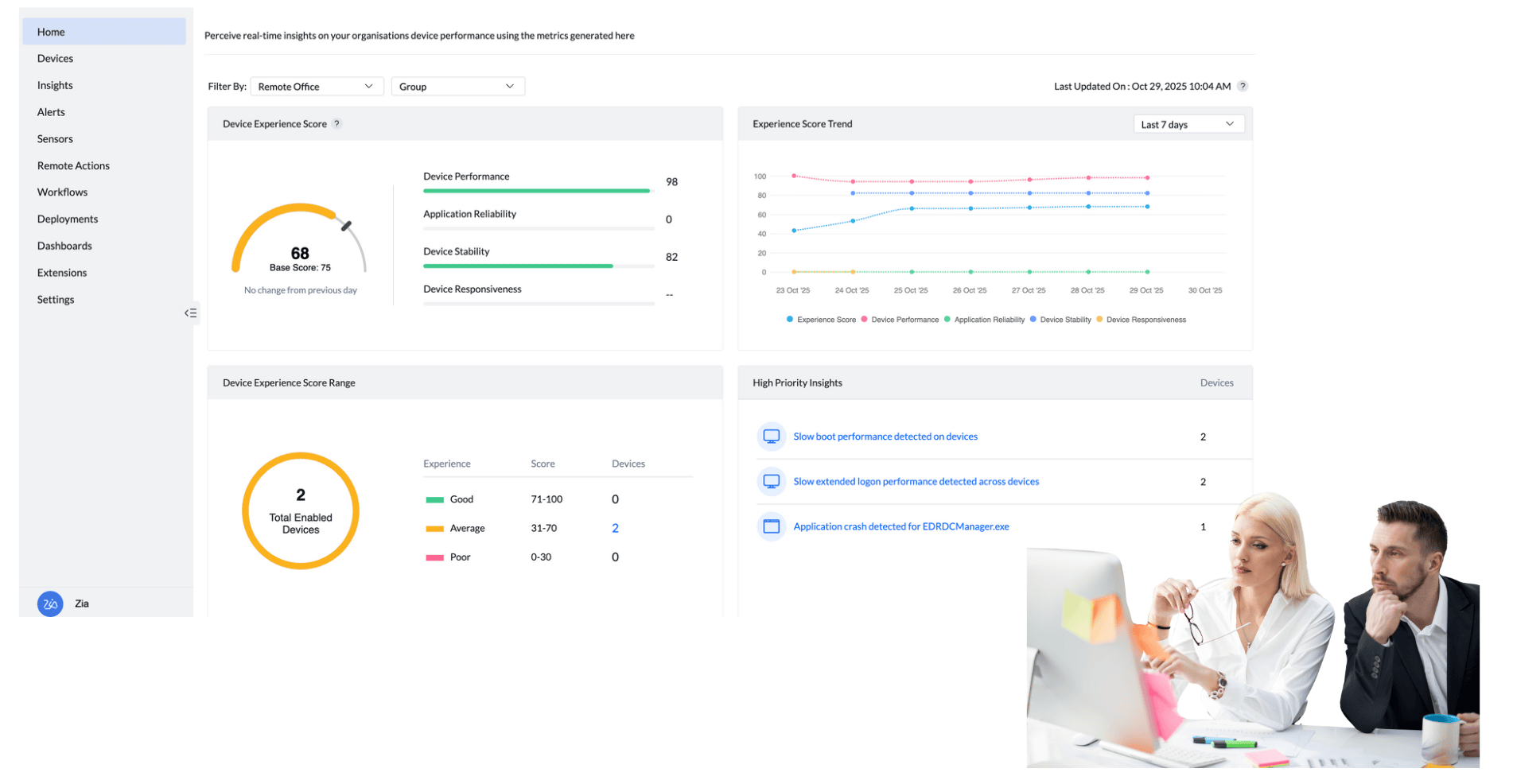
Digital employee experience (DEX) describes an employee’s overall interaction with the technology ecosystem that enables their work.This includes their devices, apps, network connectivity, and system access. DEX is the measure of how seamless technology enables employees to work more efficiently. As workplaces become more digital, DEX has evolved beyond a technical performance metric to become a strategic business indicator, shaping how organizations measure employee satisfaction, engagement, and workplace culture.
Why is DEX crucial?
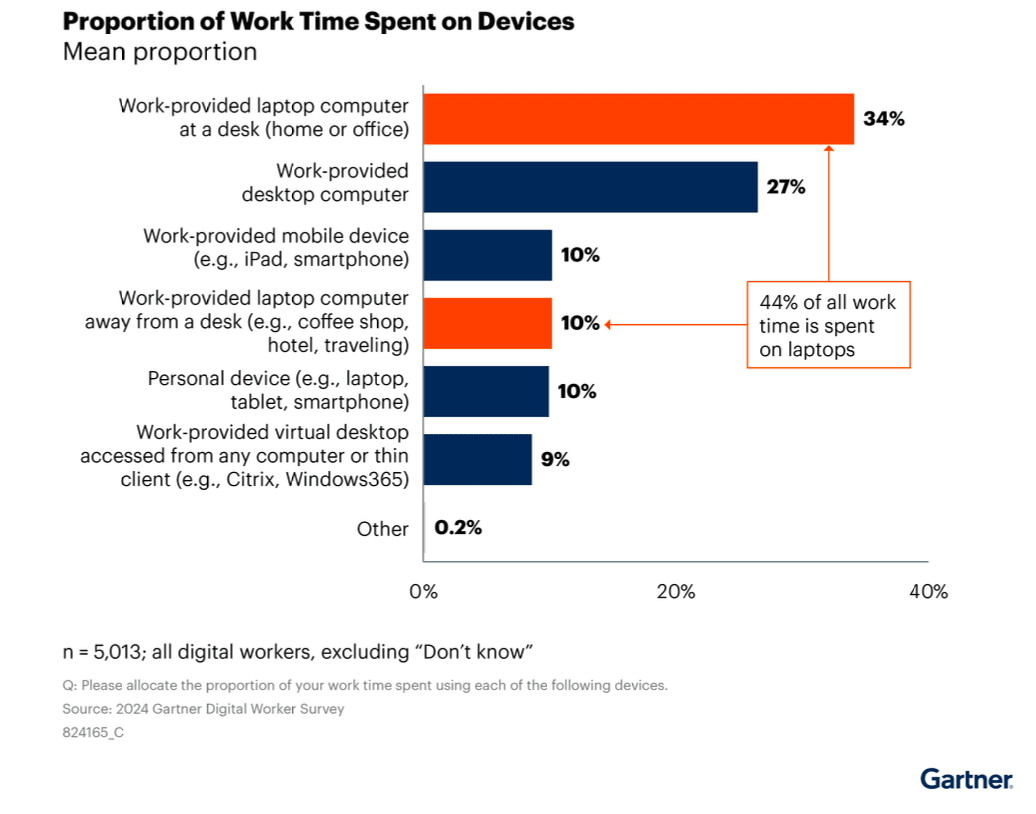
In today’s digital workplace, almost every task depends on a device and a reliable internet connection. According to the 2024 Gartner® 2024 Digital Worker Survey, 44% of all work time is spent on work-provided laptops, while the rest is distributed across work-provided desktops and mobile devices, personal devices, and virtual machines. The rise of hybrid and remote work means employees now connect from anywhere, often outside traditional office (and even home) networks.
As employees work across different devices and unpredictable networks, they still expect their devices to perform seamlessly, apps to run without delays, and access to corporate resources to remain uninterrupted. When technology fails to meet these expectations, it slows productivity, increases frustration, and reduces engagement. DEX management refers to monitoring, detecting, analyzing, and remedying digital friction that employees might face when they work, making it a crucial part of modern IT strategy. It directly links technology performance to employee satisfaction, engagement, and overall business success.
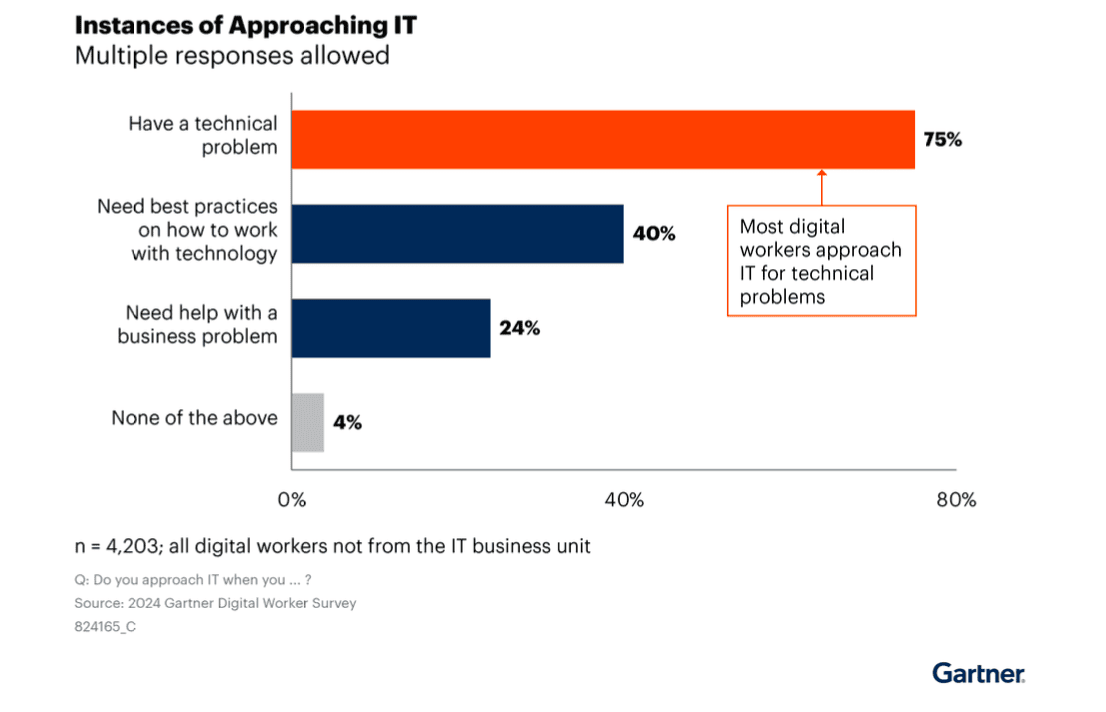
In addition to enhancing employee productivity, a strong DEX strategy enables IT teams to shift from reactive troubleshooting to proactive management. With analytics that continuously monitor device health, app performance, and user behavior, IT can identify patterns and resolve potential issues before they disrupt work.According to Gartner, 75% of digital workers approach IT to solve their technical problems, highlighting the reactive burden most IT teams still face today.
By leveraging DEX analytics, IT gains deep visibility into device, app, and network performance, allowing them to fix an issue reported by one employee for everyone else affected. This proactive approach reduces recurring incidents, lowers ticket volume, and frees IT teams to focus on more strategic, high-impact initiatives.
Key elements of DEX
A comprehensive DEX strategy brings together insights from endpoints, apps, and employees to create a unified view of the digital workplace. At its core, DEX management combines proactive IT monitoring, self-servicing capabilities, and user sentiment analysis to help organizations identify and resolve issues before they affect productivity. These elements are measured and refined through experience scoring and benchmarking, allowing IT teams to track progress, prioritize improvements, and continuously optimize technology performance. Together, they form the foundation of a resilient, data-driven approach to managing digital experiences across the enterprise.
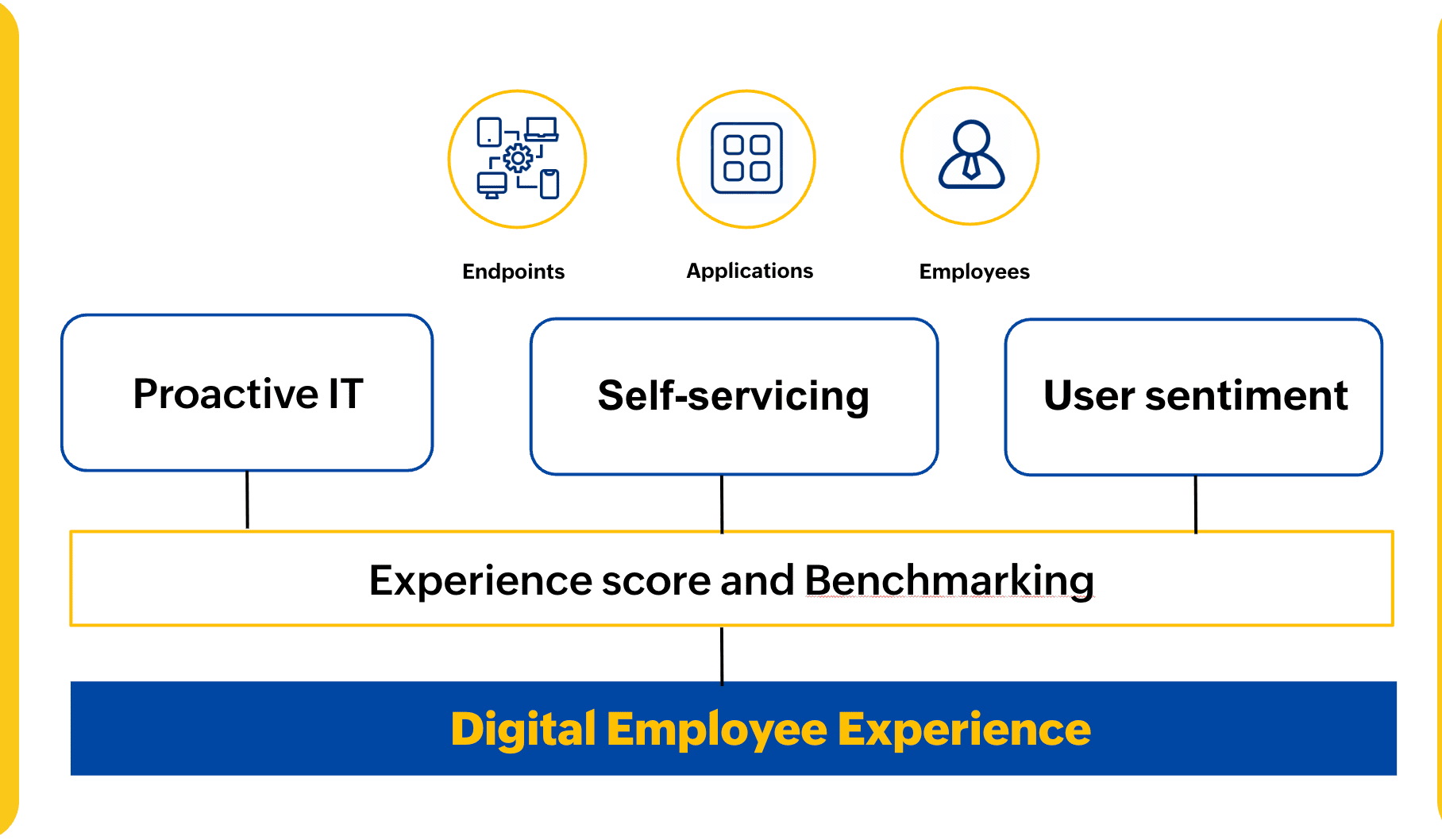
Let's look at the elements that make up each of these sections
Proactive IT
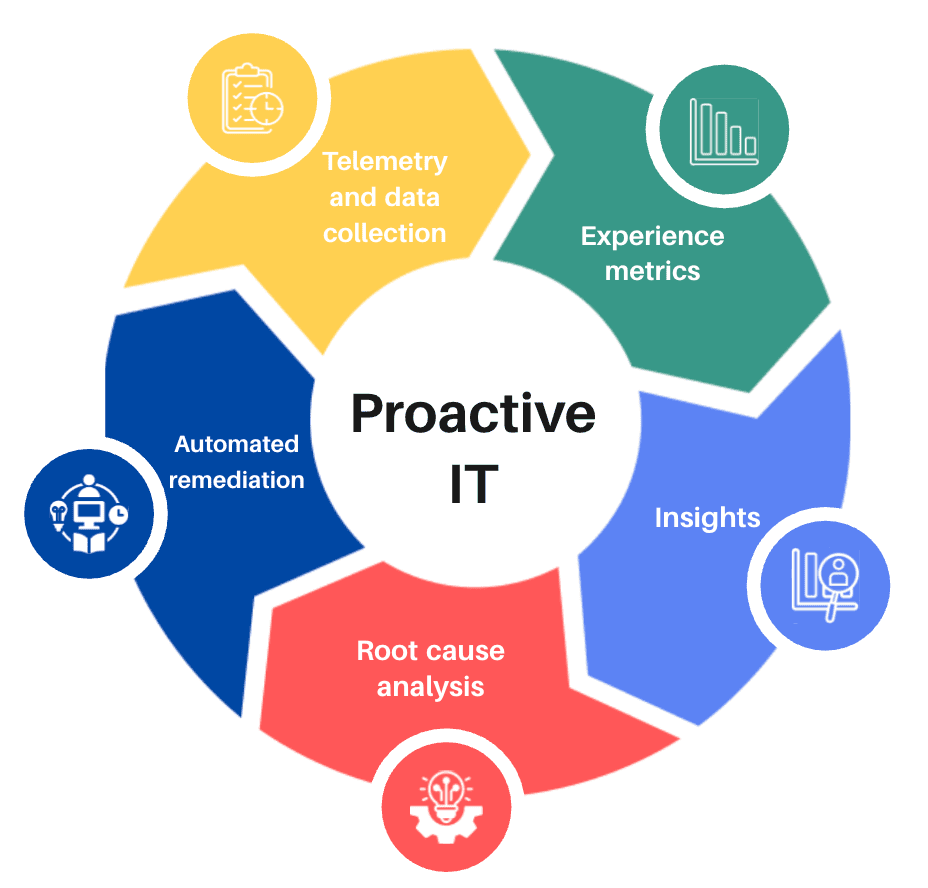
A proactive IT approach enables organizations to move beyond reactive troubleshooting and deliver a continuously optimized digital environment. It begins with telemetry and data collection , where real-time performance metrics from devices, apps, and networks are gathered to create complete visibility into the IT landscape. These data points feed into experience metrics, helping IT teams measure performance trends and identify deviations that may affect productivity. Through detailed insights, teams can understand the underlying causes of issues, supported by root cause analysis that connects performance anomalies to their source. Finally,automated remediation closes the loop by triggering preconfigured workflows or scripts to fix issues before they impact end users. Together, these elements empower IT teams to predict, prevent, and resolve problems proactively, improving uptime, performance, and overall operational efficiency.
Self-servicing
Self-servicing empowers employees to resolve common device and app issues independently, reducing reliance on IT support. A robust DEX framework should include accessible resources and knowledge bases that guide users through troubleshooting steps before they reach out to IT. Employees should have a unified portal where they can raise requests, report problems, install approved apps or patches at their convenience, and access curated solutions to common issues. Achieved through seamless integration with UEM and ITSM tools, this centralized experience enables users to manage, fix, and update their devices with minimal assistance. The result is fewer help desk tickets, faster resolution times, and greater overall user satisfaction.
User sentiment analysis
User sentiment analysis provides IT teams with direct, human-centered insights into how employees perceive their digital environment. Beyond technical performance metrics, it captures qualitative feedback on device responsiveness, app usability, and overall satisfaction. By combining surveys, feedback prompts, and behavioral analytics, DEX platforms help correlate user sentiment with real-time telemetry data to uncover hidden friction points. This context allows teams to prioritize improvements that truly impact users, bridging the gap between system performance and employee perception. Continuous sentiment tracking also enables organizations to measure the effectiveness of IT initiatives and ensure that technology changes lead to meaningful experience gains.
Experience scoring and benchmarking
Experience scoring combines quantitative and qualitative insights to provide an objective measure of the digital experience across the organization. Telemetry data from devices, apps, and networks captures the quantitative side—factors like performance, uptime, and responsiveness—while user sentiment adds the qualitative dimension, reflecting how employees actually perceive their digital environment. Together, these inputs generate a comprehensive experience score that helps IT teams track progress, identify underperforming areas, and benchmark against internal goals or industry standards. By continuously monitoring and comparing these scores, organizations can measure the impact of IT initiatives, validate technology investments, and drive a cycle of ongoing optimization that keeps both systems and employees performing at their best.
What are DEX tools?
According to Gartner's definition in the latest Magic Quadrant™ for Digital Employee Experience Management Tools, "Digital employee experience management tools measure and help IT continuously improve employee sentiment toward and the performance of company-provided technology. They continuously surface actionable insights, drive self-healing automations, and optimize support and employee engagement via the near-real-time processing of aggregated data from endpoints, apps, employee sentiment and organizational context. These insights enable self-healing and can enhance employee interactions with self-service portals and chatbots. They also help IT support, asset management, procurement and other teams whose work depends on reliable information."
How DEX tools deliver value
DEX tools empower IT teams to enhance workforce productivity by identifying and resolving technology issues before they disrupt work. They provide deep visibility into device, app, and network performance while improving reliability, configuration consistency, and patch compliance. Through automation, DEX platforms reduce manual effort, lower operational overhead, and support data-driven decisions on device health and life cycle management.
For employees, this translates to reduced digital friction, faster issue resolution, and optimized endpoints that perform efficiently throughout their lifespan. Common use cases include detecting and remediating configuration drift, improving app performance and adoption, supporting sustainable refresh cycles through performance-based insights, mitigating security risks by uncovering patching gaps, validating OS upgrade readiness, and using usage analytics to define digital personas for more efficient onboarding.
Establishing a DEX strategy
Building an effective DEX strategy starts with understanding your organization’s current digital landscape and aligning it with broader business objectives. The process involves assessing the state of your devices, apps, and networks, identifying key stakeholders, defining clear KPIs and success metrics, and setting an appropriate budget. It’s equally important to evaluate how DEX initiatives integrate with your existing IT ecosystem, including tools like UEM, ITSM, and analytics platforms. A well-defined DEX strategy ensures that both technology and people are aligned toward a common goal—enhancing productivity, reducing digital friction, and driving continuous improvement across the workplace.
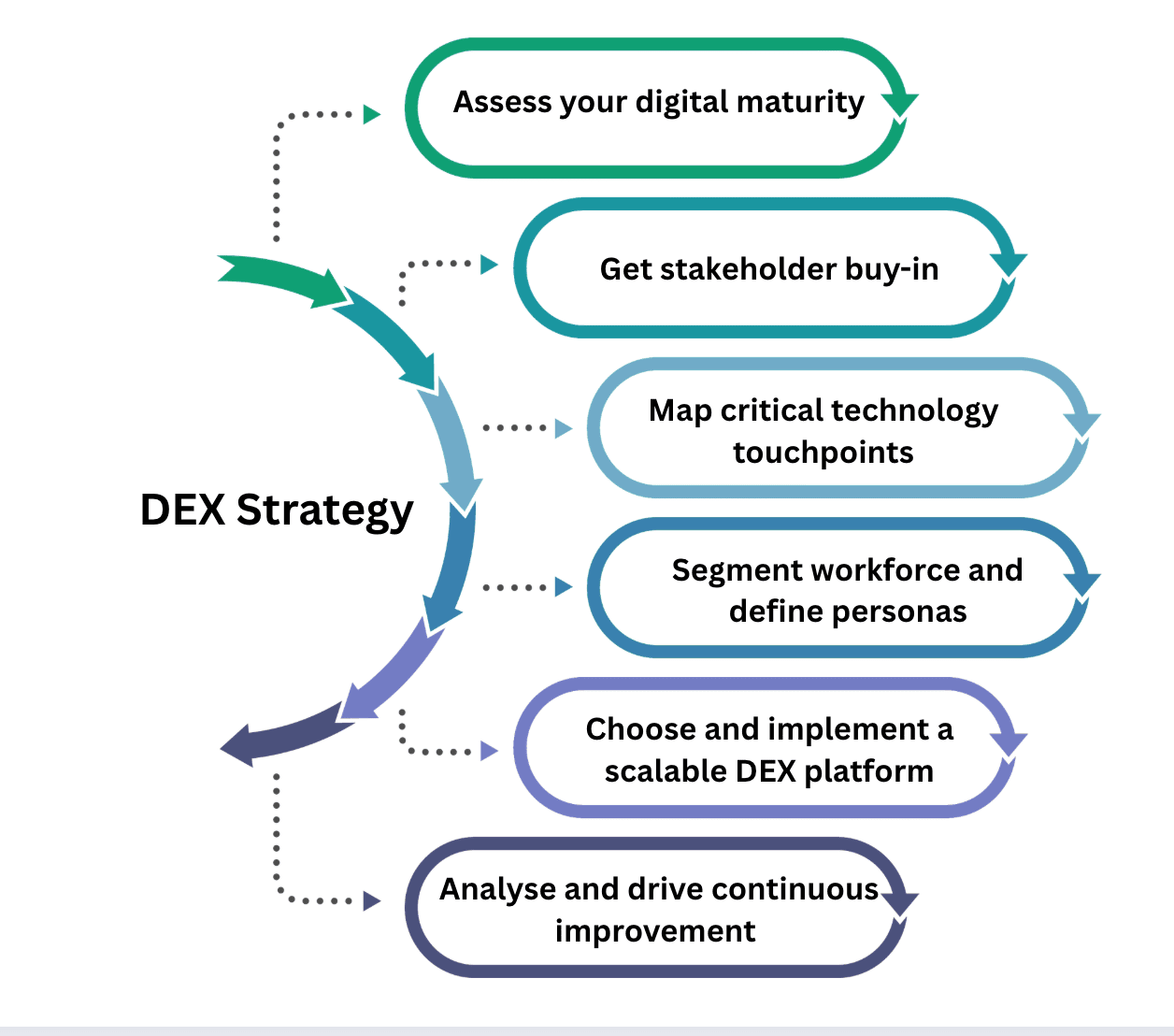
- Assess your digital maturity:Evaluate where your organization stands in its digital journey by analyzing device health, app performance, network reliability, and employee feedback. This helps create a DEX baseline to measure improvement over time.
- Get stakeholder buy-in:Bring together IT, HR, and business leaders to align goals and define measurable outcomes such as productivity improvement, ticket reduction, and employee satisfaction. This is often the hardest part of setting up a process, but it's critical. DEX must be a cross-functional initiative to be scalable and sustainable within the organization.
- Map critical technology touchpoints:Identify key workflows, digital tools, and moments that shape the employee experience, from device onboarding to daily collaboration tools, and uncover friction points that impact productivity.
- Segment the workforce and define personas:Categorize employees based on roles, device types, work environments, and tech needs. This helps IT tailor DEX initiatives and prioritize high-impact user groups. For example, prioritizing remediation for frontline workers in case of battery-related issues or patching critical systems used by the C-suite.
- Choose and implement a scalable DEX platform:Select a DEX solution that seamlessly integrates with your UEM, ITSM, and analytics tools, while supporting scalability, automation, and cross-platform visibility. A DEX solution offers the why of a particular issue, like why a particular app crashed. The UEM or ITSM solution often defines the what next, e.g., what can be done to stop the app from crashing. While DEX primarily deals with the telemetry and analytics needed to detect and troubleshoot a problem, it is usually other solutions like UEM and ITSM that help remediate the issue. That's why it's important to have synergy between these tools.
- Drive continuous improvement with automation and analytics: Implement real-time monitoring, automated remediation workflows, and trend analysis to shift from reactive troubleshooting to proactive IT. Measure ROI and continuously optimize device performance, automation workflows, and user experience scores to achieve sustained digital maturity.
Top challenges in establishing a scalable DEX program
While implementing a DEX strategy is important, it comes with some challenges.
- Fragmented visibility across tools:Most organizations rely on multiple point solutions for device, app, and network monitoring, making it difficult to gain a unified view of the digital experience.
- Lack of cross-functional ownership:DEX impacts multiple functions, like IT, HR, and business teams, but without shared accountability, initiatives often remain siloed and unsustainable.
- Difficulty in defining measurable KPIs:Many IT teams struggle to link technical performance metrics, like boot time or app latency, with experience-driven KPIs, such as satisfaction, engagement, or productivity.
- Limited integration with existing IT systems:A scalable DEX program requires seamless integration with UEM, ITSM, analytics, and security tools. Disconnected systems can lead to data silos and inefficiency.
- Data overload without actionable insights:Collecting telemetry data is easy, but transforming it into actionable intelligence and prioritizing what to fix first remains a major challenge.
- Lack of automation for scale:Without automated remediation and workflow orchestration, IT teams remain reactive, spending excessive time resolving repetitive issues instead of preventing them.
- Change management and adoption:Employees and IT teams may resist new monitoring tools due to privacy concerns or process changes, making adoption and cultural alignment equally critical.
Practical use cases powered by DEX
DEX platforms enable IT teams to move from reactive problem-solving to proactive experience management. By leveraging telemetry, analytics, and automation, DEX management solution address a wide range of operational, security, and productivity challenges across the enterprise.
- Use case 1: Smarter hardware refresh decisions
A new generation of laptops has just been launched across a company. Soon after, employees begin requesting hardware upgrades, citing slowness or outdated systems. Approving all these requests without verification would lead to unnecessary spending and wastage.
With a DEX management solution, the IT team can analyze device performance metrics such as CPU utilization, memory usage, and boot times to objectively assess how well each system is performing. Devices that are still operating within healthy thresholds can continue to be used, while those showing consistent degradation can be prioritized for replacement.
By basing hardware refresh cycles on real performance data rather than perception, the company can optimize costs, extend device life cycles, and ensure fair, data-backed upgrade decisions.
- Use case 2: Software reclamation and license optimization
Multiple departments in an organization use design and analytics software, but over time, licenses remain assigned to users who barely open the apps. As the business grows, software costs skyrocket, and the compliance team struggles to track active usage.
By using a DEX solution to monitor app utilization trends, IT can identify underused software and reassign or reclaim idle licenses. This visibility also helps uncover redundant tools with overlapping functions.
As a result, the organization can cut software costs, improve license compliance, and optimize resource allocation—ensuring every license serves a clear business purpose.
- Use case 3: Ensuring OS upgrade readiness
An enterprise is preparing to roll out a new OS, like Windows 11, across thousands of endpoints. In previous rollouts, many devices failed the upgrade midway due to insufficient storage, incompatible drivers, or poor system health.
A DEX solution enables the IT team to assess device readiness in advance by analyzing performance, storage, configuration baselines, app dependencies, and other metrics. Systems meeting upgrade prerequisites can be queued for deployment, while those requiring optimization can be fixed first. This proactive approach helps reduce upgrade failures, minimize downtime, and deliver a smoother transition for the workforce.
- Use case 4: Enhancing patch and security compliance
A security team discovers that several endpoints are missing critical patches despite automated patching policies being in place. Traditional tools identify the devices that failed but not why they failed.
A DEX solution allows the security team to correlate patching gaps with real device data, revealing causes like low disk space, background process conflicts, or interrupted installations. Once the root cause is clear, IT can apply the necessary fixes to ensure successful patching in future cycles. By addressing the underlying issues rather than symptoms, the organization can strengthen endpoint compliance, reduce vulnerability windows, and build a more secure environment.
- Use case 5: Preventing recurring app crashes
During a high-stakes leadership meeting, the meeting app keeps crashing for multiple participants, cutting off communication mid-call. Each time it happens, dozens of employees raise support tickets, overwhelming the help desk and delaying root cause discovery.
A DEX solution gives IT the visibility to detect trends like simultaneous app crashes across multiple users or after a recent update. By pinpointing the problematic version and rolling back or patching it, IT can resolve the issue at scale before more users are affected. This kind of proactive problem-solving prevents ticket floods, reduces employee frustration, and improves overall app reliability.
What makes an ideal DEX solution?
Here are some pointers if you are looking to invest in a DEX solution.
- Comprehensive telemetry coverage:Choose a solution that collects detailed telemetry from endpoints, apps, and networks across all OSs and device types. Broader data coverage ensures better visibility and more accurate experience insights.
- Real-time analytics and contextual insights:Look for platforms that can process large volumes of telemetry data in real time and correlate performance issues with user impact. The solution should help IT teams identify root causes quickly rather than simply report symptoms.
- Strong remediation and automation capabilities:A scalable DEX solution should go beyond monitoring to include automated remediation workflows and self-healing capabilities that reduce manual intervention and prevent recurring issues.
- Seamless integration with existing IT ecosystem:Ensure the DEX platform integrates effortlessly with your UEM, ITSM, and analytics tools to create a unified IT operations layer. This integration allows IT to act on insights without switching between consoles.
- Scalability and multi-environment support:As hybrid work expands, the solution must support on-premises, cloud, and remote environments while maintaining consistent visibility and performance management across thousands of endpoints.
- Actionable experience scoring and benchmarking:Tools that offer experience scoring models combining telemetry (quantitative) and sentiment (qualitative) inputs are valued. Benchmarking capabilities help IT measure progress and compare performance across departments or industry peers.
- Extensibility and customization:The DEX platform should allow organizations to define custom metrics, dashboards, and workflows that align with their unique IT and business goals.
ManageEngine's DEX capabilities
ManageEngine offers two forms of DEX management—as a standalone cloud solution, DEX Manager Plus, and the DEX Manager add-on to Endpoint Central, our unified endpoint management platform.
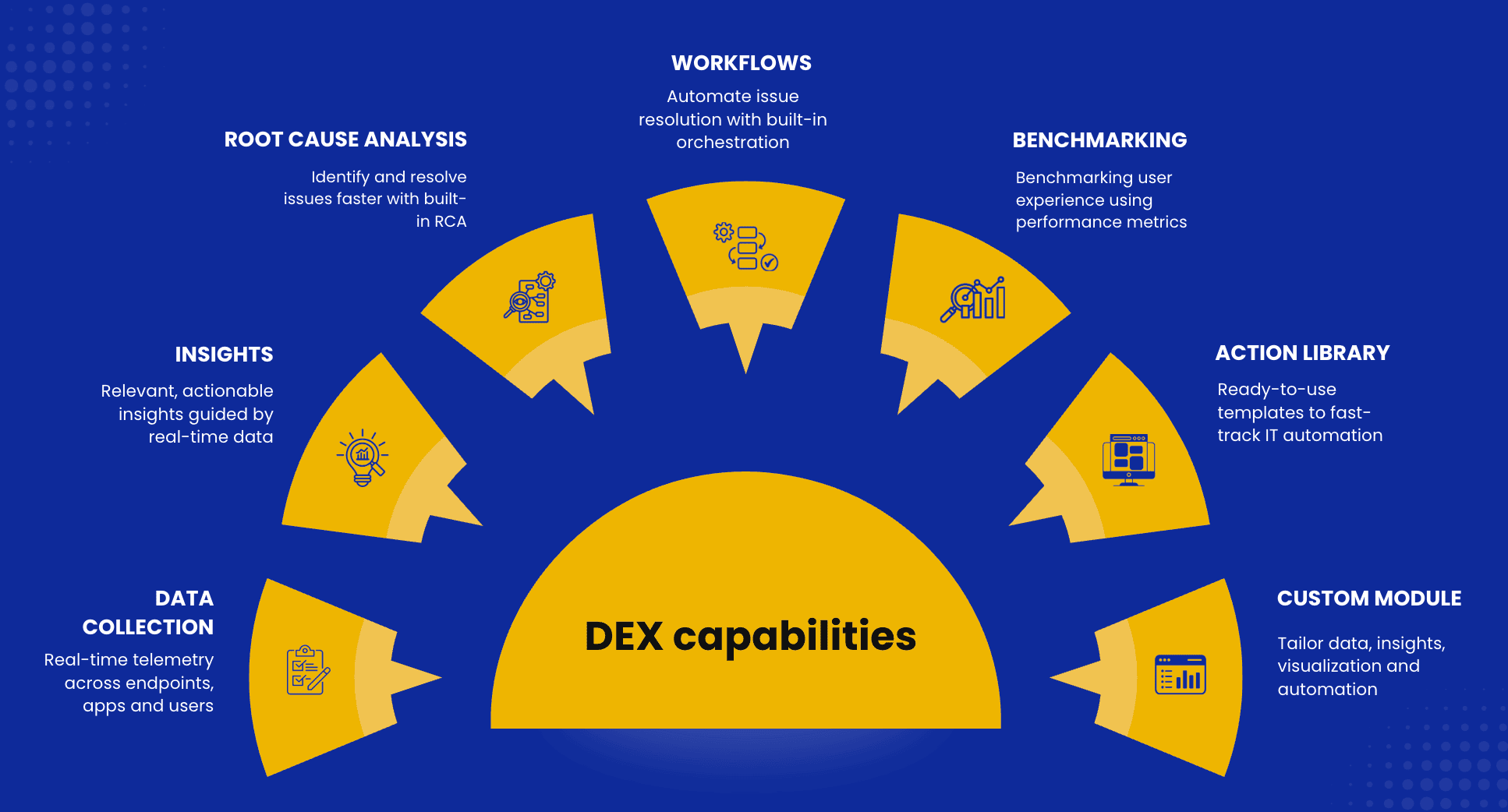
Our focus is on enhancing digital performance through capabilities such as real-time data collection, actionable insights, root cause analysis, automation workflows, experience benchmarking, and a ready-to-use action library that accelerates IT remediation. A custom module allows teams to tailor dashboards, visualizations, and automated responses to their specific environment and business goals.
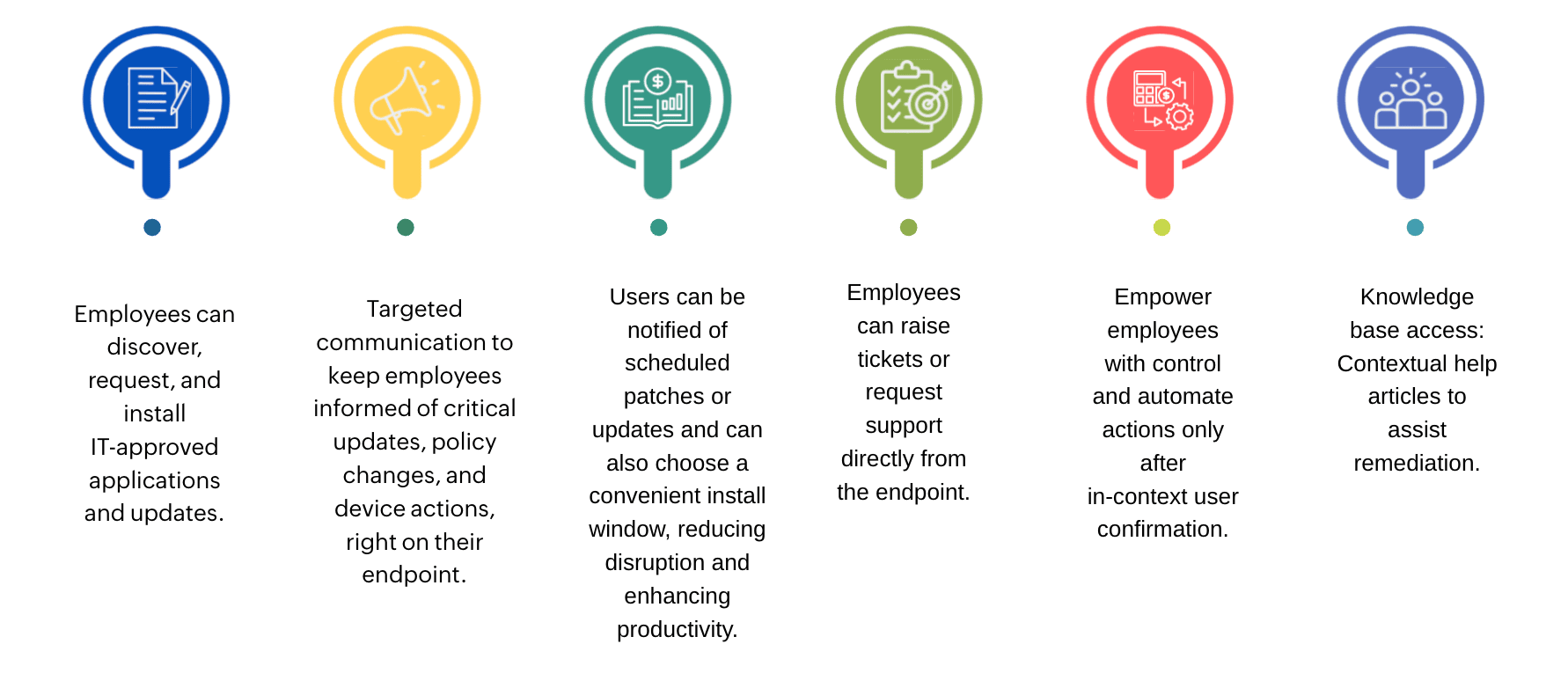
When combined with Endpoint Central, DEX goes beyond visibility to deliver end-to-end experience management. IT teams can empower users with self-service options, enabling them to request or install approved apps and updates, receive targeted communications about critical changes, select convenient patch installation windows, and even raise tickets or access contextual knowledge articles directly from their devices. These integrations reduce support dependency, improve resolution speed, and create a proactive, user-centric IT environment.
By blending analytics, automation, and employee empowerment, ManageEngine’s DEX capabilities help organizations optimize device performance, reduce digital friction, and elevate workplace productivity across both cloud-native and hybrid infrastructures.
 Meet the author