
Anomaly detection
Unified anomaly insights

- Operational truth at a glance
Gauge the overall risk posture of your organization by quantifying the true volume and weight of DNS and DHCP anomalies across all sites—without ever sifting through logs. - Stratified risk visibility
Accelerate decision-making by instantly seeing where risk concentrates. Pinpoint which anomalies fall into high-impact buckets automatically isolated by the engine. - Track how risk builds over time
Predict breakpoints before they happen. The time-series curve reveals whether anomalies are spiking, flattening, or dropping — a powerful early indicator of creeping instability.
- Let evidence drive the hunt
Prioritize investigation with evidence—not instinct—by pinpointing dominant DNS threats—reconnaissance, tunneling, or DGA—and gain instant executive-level insights without requiring any technical interpretation. - Visualize and into DHCP pressure points instantly
Prioritize investigation toward the most disruptive anomaly types by seeing which category occupies the largest footprint—and drill directly into detailed reports with a single click to review affected entities, timestamps, and conflict patterns. - Flagged domains at a glance. Forensics in a click.
Analyze the distribution of flagged domains driving most DNS anomalies. Identify dominant threat actors and drill into each one with a single click to uncover risk patterns, client activity, triggering behaviors, and forensic cues needed for rapid validation.
Network risk snapshot
Instant visibility into emerging threat signals.

- See why a domain was flagged — Not just that it was
Identify which domains require urgent validation with a clean, scored list that reveals whether risk is dominated by a few domains or evenly spread. - See where your DNS traffic truly flows
Get a quick snapshot that ranks the highest-hit destinations to reveal which suspicious domains are being hammered. Unexpected domains with high query counts often indicate malware infections, misconfigurations, or shadow services.
- Identify the clients driving your DNS risk
Triage and prioritize investigation on the top misbehaving clients by validating and correlating why each endpoint triggered the anomaly load—enabling rapid confirmation of malware, misconfiguration, or insider misuse and accelerating remediation workflows. - Track misbehaving clients through DHCP activity
Eliminate guesswork and quickly prioritize investigations into blocked hosts that destabilized lease allocations by correlating each endpoint’s anomaly trail with excessive leases, duplicate identifiers, or churn—helping you determine whether the issue reflects a persistent attack or a short-lived disturbance.
DHCP anomaly reports
When DHCP misbehaves this is where you see it — Every lease, every conflict and every clue.

- From a thousand events to the one you need
Drill down from any angle by risk score, DHCP type, cluster, anomaly type, mentioning one of the affected or conflicting entities to instantly locate specific anomalies or clients, eliminating time normally wasted manually scrubbing logs. - Trace DHCP instability back to its true sources
Identify which clients triggered Duplicate DUIDs, Duplicate IAIDs, or Subnet Starvation attempts, giving admins a definitive list of offenders while CXOs gain visibility into where allocation risks originate. - A day’s DHCP behavior—Decoded on demand
View total anomalies tied to a specific day and hour, giving you temporal clarity into when DHCP misbehavior peaked or stabilized. - Build context without switching screens
See context-rich descriptions like detection windows, unique client counts, and timestamps all in place — reducing dependence on external tools.
- Every entity exposed, Every detail delivered
Validate automated quarantine with evidence-backed detail. Receive granular visibility into all conflicting or affected entities, empowering you to verify patterns, isolate faulty clients, or validate device health without cross-referencing multiple systems. - See Who’s colliding, Who’s conflicting
Identify conflicting DHCP entities by reviewing groups of clients that share identifiers, leases, or abnormal patterns—helping you instantly see where DHCP behavior diverges or overlaps in ways that shouldn’t happen. - Trace every lease that broke the rules
Inspect abnormal lease events by drilling into the exact MACs, DUIDs, or IPs involved, allowing you to trace misbehavior, misconfigurations, or spoofing attempts with zero guesswork. - Turn chaos into clear conflict groups
Understand anomaly clusters by viewing how entities are grouped together, making it easier to spot patterns like repeated conflicts, identity duplication, or burst-based starvation attempts.
DNS anomaly reports
Follow the queries. Decode the misbehavior. Find the truth.

- See why a domain was flagged — Not just that it was
Understand the exact risk indicators — such as high entropy, long labels, suspicious TLDs, or sequential subdomains — giving you clear reasons behind every DGA or enumeration alert. - See the clients behind the chaos
Trace anomalies back to the exact client IPs that queried suspicious domains, helping you follow the trail from DNS behavior to endpoint investigation. - Every query tells a story — Read it instantly
Review query counts, record types, and timestamps to understand how often and when a suspicious domain was hit, improving your timeline reconstruction.
- Patterns, clusters, and clues — All in one feed
Connect anomalies to source clusters so you know which server group or vantage point observed the behavior and whether the pattern was localized or distributed. - Stop searching logs. Start seeing evidence.
Replace log hunting with point-and-click forensics. The pop-up reveals risk reasons instantly, eliminating the need to comb through raw DNS packets. - Decode DNS misbehavior — One domain at a time
Break down anomalies domain by domain, allowing you to validate detections, review the context, and prioritize which destinations need deeper investigation.
Automatic containment
Zero-Touch containment. Threat entities blocked on detection.

- Containment handled. You focus on the truth.
DDI Central uses DNS ACLs on Linux and Client subnet-based isolation on Windows to immediately cut off compromised devices from making further DNS queries, stopping the spread of malware at the earliest stage. - Contain on Your Terms—DNS, DHCP, or Both.
Choose the quarantine method that fits your environment, whether DNS-level blocking, DHCP MAC isolation, or a combined mode—enabling precision containment that aligns with your network architecture and security policy. - See who was stopped before they caused trouble
Review all quarantined domains and clients and instantly understand who attempted risky behavior, helping you assess impact without live threats in play.
- From suspicion to safety—Automatically.
Let DDI Central auto-block suspicious domains and DHCP clients, ensuring risky endpoints can’t rejoin the network until you’ve validated or remediated them. - Your quarantine zone. Your investigation pace.
Work backwards from safely contained entities so your analysis is calm, controlled, and fully informed rather than reactive or rushed. - Filter the noise. Follow the evidence.
Use rich filtering options—by score, cluster, quarantine method, identifiers—to sift through compromised hosts or domains and focus only on what needs your next move.
Focused investigation
Every Indicator Examined. Every Detail Accounted.

- Your threshold. Your rules. Your containment.
Customize the risk score thresholds for both DNS and DHCP so quarantine is enforced only when activity exceeds your defined severity—giving admins full control over when auto-isolation should trigger, based entirely on operational risk appetite. - One view. All blocked threat paths.
See every domain ACL block and every MAC-level DHCP quarantine in one consolidated table, giving you a complete picture of which threats were intercepted. - Reclaim what’s clean. Keep out what isn’t.
Decide which hosts can rejoin after remediation and which should stay blocked, enabling clean recovery without risking reinfection.
- No panic. No packet diving. Just clarity.
Skip manual containment and raw log analysis—the system quarantines automatically and surfaces only what you need to investigate. - Every block tells a story—Read it here.
Drill down by cluster, IP, or quarantine method to review and release entries as needed—all from a unified console. Streamline investigations and restore legitimate devices quickly. - Your network’s safe room—Everything suspicious stays here.
Keep all risky domains and clients isolated until you’ve examined them, ensuring the broader network stays untouched and uninterrupted.
DNS record monitoring
Monitor analytics
From polls to patterns. Your monitors, unified. A real-time window into network vitality.

- All monitors. One command center.
Gain a consolidated, real-time health overview of all your configured monitors — Ping and TCP — across distributed endpoints, helping admins eliminate silos and pinpoint uptime, response, and critical outages across every target host in one pane. - Pings to patterns before problems
Instantly spot latency spikes, downtime clusters, and silent slowdowns in real time. Turn raw poll data into actionable time-series insights that reveal performance trends and enable proactive tuning before disruptions occur. - Every second accounted for
Track each monitor’s poll interval, port, and response history down to the minute. Enable network engineers with forensic precision uncover not just what’s failing, but when and why. - Polling in loops
Automated polling at custom intervals keeps diagnostics fresh and reflects real-time network health without human input. Reinforce uptime confidence with disciplined, looped polling that sustains reliability and eliminates monitoring blind spots.
- Control in one click
Activate, suspend, view associated DNS records, or delete monitors directly from the Actions menu—without leaving the dashboard. Simplify administrative overhead, streamlining the lifecycle of monitor management. - Filter. Focus. Fix.
Use built-in filters to pinpoint monitors by name, type, host, or record in seconds. Cut through noise, streamline diagnostics, and make troubleshooting data-driven in even the most complex, high-volume environments. - Status you can trust
At a glance, distinguish Up, Down, Critical, or Suspended monitors. Turn status colors into operational confidence—so admins act instantly, and CXOs see reliability quantified and linked to customer trust. - Diagnostics without detours
Centralize monitor data, status, and control coexist on the same screen—reducing navigation friction during crises. Enable admins to troubleshoot directly from insight to execution in seconds.
Monitor performance
Easily verify if the service behind your DNS record is truly alive.

- Watch latency before it becomes impact
Track response-time fluctuations across every polling cycle to proactively detect rising latency trends, allowing admins to investigate degradation before it evolves into a service outage. - See your uptime reality in one glance
Assess real uptime posture immediately through a consolidated gauge, helping admins understand service stability without digging through logs or multi-page reports. - Count every Failure. Trust every success.
Analyze success vs failure polling ratios to pinpoint recurring downtime patterns and determine whether issues stem from the monitored service, network paths, or configuration drift. - See when the service slipped
Compare availability hour-by-hour to isolate windows of instability, allowing admins to correlate downtime with changes, deployments, or network events.
- Turn outage history into prevention strategy
Review precise start/end times of every outage to uncover duration patterns, recurrence intervals, and root-cause indicators that guide corrective action across dependent systems. - Know exactly what you’re watching
Validate monitoring configuration at a glance—including host, port, monitor type, associated records, and polling frequency—ensuring that admins always know the scope and reliability of what’s being monitored. - Trust the real-time state, Not assumptions
Confirm real-time service state with an immediate Up/Down indicator, giving admins instant assurance of service continuity without waiting for aggregated reports. - Tune polling for faster detection
Control monitoring sensitivity by adjusting polling intervals, allowing admins to balance resource usage with faster anomaly detection for latency-sensitive systems.
Monitors and alerts
Your DNS, Now outage-proof.

- Turn DNS into a health-aware traffic controller.
Define exactly how the service is probed—Ping for reachability or TCP for port-level validation—ensuring alerts are triggered only by meaningful failures aligned with your monitoring strategy. - Tune how frequently you want the network to speak
Set the polling frequency to control how often the monitor checks service health, giving admins the flexibility to detect failures fast or reduce noise based on service criticality. - Know when a DNS record points to a dead service
Leverage DNS-aware alerts to instantly see when a monitored DNS endpoint becomes unreachable, ensuring DNS responses never route users to a failed backend. - Filter flaps. Set alerts only on real failures.
Configure how many failures it takes to declare a host DOWN, preventing false alarms and ensuring alerts reflect sustained outages—not transient network jitter.
- Know the moment health shifts
Get instant notifications the second a monitor changes state, equipping teams to respond faster to outages and correlate service disruption with network changes, deployments, or backend failures during post-incident analysis. - Spot flapping before it becomes an outage
Detect rapid UP/DOWN oscillations early, helping admins identify unstable endpoints long before they escalate into full outages or impact DNS failover behavior. - Prove stability with recovery alerts
Validate service recovery instantly through UP alerts that confirm when the backend is reachable again—critical for SLA tracking, maintenance verification, and post-incident validation. - Build accurate timelines for post-mortems
Use state-change alerts as forensic markers, enabling admins to reconstruct precise outage timelines, correlate events with infra changes, and strengthen root-cause analysis.
Monitors for DNS records
Your DNS, Now outage-proof.
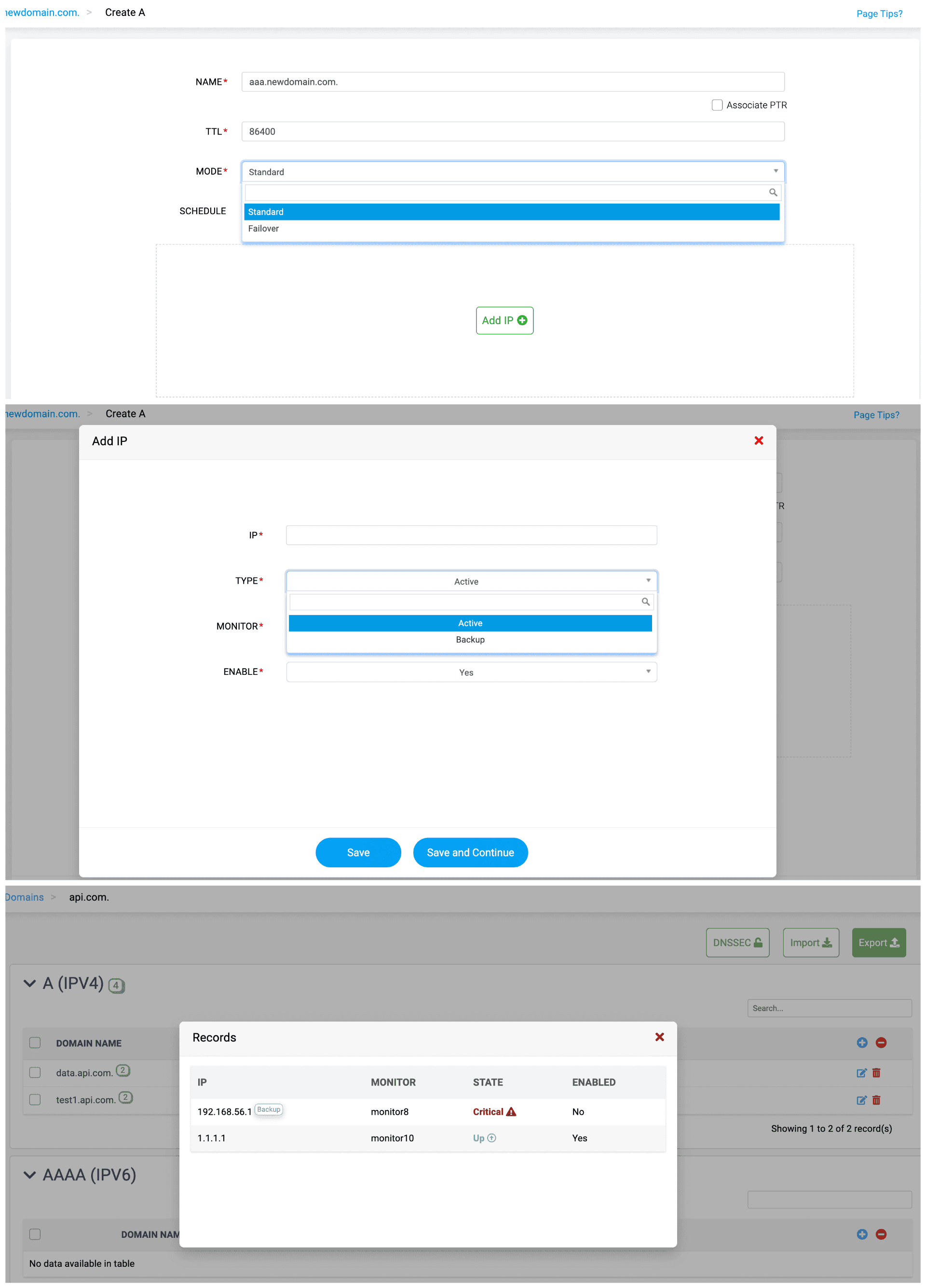
- Turn DNS into a health-aware traffic controller.
Attach monitors to each IP so DNS only returns endpoints that are healthy, preventing clients from being routed to dead services and reducing mean time to recovery without manual intervention. - Failover without firefighting
Enable automated fallback to backup IPs when a primary endpoint enters a critical state, ensuring uninterrupted service continuity without admin intervention during outages.
- Validate record health in a single glance
Review live monitor states for each mapped IP to instantly confirm which endpoints are online, which are degraded, and which are disabled—accelerating troubleshooting and policy decisions. - Control what resolves—and what stays dark
Enable or disable IPs selectively to govern which endpoints receive live traffic, giving admins granular control during maintenance windows, rollouts, or phased service migrations.
Cisco DHCP management
Cisco device configuration
Set up your Cisco routers in One console. See every lease event, instantly.

- Manage credentials once. Gain visibility everywhere.
Store and use device credentials securely to retrieve config snapshots on demand, eliminating repetitive manual logins and enabling effortless multi-device configuration oversight. - Verify every DHCP rule without touching the CLI
View all DHCP exclusions, pools, and bindings in one consolidated pane, helping admins validate configuration accuracy, spot misconfigurations, and ensure consistency across devices. - See the router’s truth—Straight from the source
Use the live configuration snapshot as a reference to investigate outages, IP shortages, or abnormal DHCP behavior with full context.
- Eliminate ghost entries and hidden errors
Surface long-forgotten DHCP pools, stale exclusions, or unused scopes that still exist on the router, enabling admins to clean configurations and reduce operational noise. - Audit across all Cisco routers—From one console.
Aggregate DHCP logs from multiple IOS-XE and IOS-XR routers into a single interface with DDI Central built-in DHCP audit logs, eliminating the need for SSH logins, terminal scraping, or device hopping during incidents. - Prove compliance with built-In DHCP forensics
Store and review historical DHCP logs for compliance, RCA, and reporting—ensuring teams can demonstrate what happened, when it happened, and which Cisco router serviced the request.
Pool management
Orchestrate Cisco DHCP with enterprise-grade precision

- Build pools that align to your network design
Configure DHCP pools with precision by defining subnet ranges, usage limits, and allocation rules—giving admins full control over how IPv4 and IPv6 addresses are handed out across Cisco IOS-XE/XR environments. - Keep critical IPs untouched while automating Cisco scopes under one console
Exclude infrastructure and static-address ranges globally, ensuring the Cisco DHCP service never touches high-value IPs, eliminating collisions and preserving scope integrity. - Shape DHCP behavior with custom-tailored options
Create custom DHCP options to deliver DNS servers, boot file URLs, vendor-specific parameters, and more—allowing admins to adapt DHCP behavior to any deployment or device class.
- Extend DHCP to tomorrow with full DHCPv6 support
Build and manage DHCPv6 pools with the same ease as IPv4, enabling dual-stack networks, IPv6 rollouts, and modern endpoint onboarding without configuration sprawl or manual CLI work. - Push advanced logic through custom IPv6 options
Define DHCPv6 options to support provisioning, routing hints, or vendor extensions—giving admins granular control over how IPv6 clients receive network-layer intelligence. - Delegate IPv6 prefixes without the guesswork
Configure Prefix Delegation (PD) by specifying DUIDs, IAIDs, lifetimes, and source prefixes—ensuring routers and downstream networks receive stable, predictable delegated prefixes with automated lifetime management.
DNS query and DHCP lease forecasting
DNS query forecasting
From query bursts to quiet hours — see the next spike before it strikes.

- Know your future query load today
See projected rise or dip in DNS queries versus the baseline so you can pre-tune capacity and caching.Quantifies expected query volume for the selected window, turning history into concrete capacity numbers. - Read the rush by the clock
Contrasts query activity across business vs. non-business hours (or days) to expose off-hour surges and quiet windows. - Measure the cadence of demand
Track average queries per hour to benchmark service health and set alert thresholds that match real traffic rhythm.
- Watch future query demand unfold in real time
Plan your DNS infrastructure with time-series forecasts that spotlight hourly peaks, troughs, and cycles, helping you schedule maintenance and scale resolvers ahead of demand. - Precision forecasting down to every domain name
Generate predictive query insights for individual hosted domains — from forward zones to response policy and reverse zones — with one click using the Forecast Now option in the Analytics module. - Turn forecasts into deliverables
Capture your DNS and DHCP insights as polished PDFs ready for audits, SLA reviews, or executive reporting.
DHCP lease forecasting
Stay ahead of your leases — before your IP pools run dry.

- Spot the shift before it shows
Track upward or downward lease demand trends to anticipate changes in network usage and optimize capacity planning. - See what tomorrow holds in numbers
Forecast total lease volumes based on historical growth patterns to project utilization accurately over chosen timeframes. - Gauge intensity by the clock
Read the rhythm of your network by comparing lease activity between business hours (9—6) and non-business hours to uncover hidden usage peaks and off-hour load shifts for accurate trend mapping. - Turn recurring demand into reliable insight
Measure average lease issuance per month to evaluate network consistency and plan future capacity expansions. - Know your real network footprint
Identify the average number of distinct clients requesting leases to gauge device diversity and network reach.
- Trace how every endpoint behaves
Analyze the average number of leases per client to detect configuration inefficiencies or redundant address churn. - See the climb before the ceiling
Predict how many days remain before reaching 90% capacity and act early to prevent exhaustion or service slowdown. - Time the life of every lease
Monitor average lease duration to fine-tune renewal policies and strike a balance between flexibility and address stability. - Visualize growth as it happens
Get a timeline view of predicted lease activity trends with Queries Forecast graph to spot cycles, seasonal dips, or spikes across the network. - Export insights, expand with intent
Generate forecast summaries for capacity planning and network scalability.
DNS Zone Versioning

- See history at a glance
Instantly view previous 30 versions of a DNS zone, complete with timestamped records and contextual metadata. - Spot the difference that matters
Compare current and past zone states to identify additions, deletions, or policy-driven modifications. - Audit changes with confidence
Track every DNS alteration for compliance and operational traceability across clusters. - Know what’s live, what’s dormant
Records linked to monitors in down, suspended, or critical states appear as commented entries for quick state recognition. - Preview smarter, export faster
Zones under 5 MB display inline previews; larger ones can be instantly exported for full analysis.
- Rollback without risk
Restore any previous version as the active zone in just one click especially while undoing faulty record updates. - Export for control, import for continuity
Seamlessly export zone versions as backups or import them elsewhere for synchronized DNS recovery. - Clean up clutter, keep what counts
Delete outdated or redundant versions to maintain storage efficiency and zone clarity. - Safeguard monitored zones
Monitored records are view-only for version restoration, ensuring active DNS integrity isn’t overwritten. - Govern with precision
Manage the full lifecycle of DNS zone versions—from creation to archival—with clear, role-based control.