Malware Protection Plus WAN Architecture
ManageEngine Malware Protection Plus is an enterprise Malware Protection software that helps to create cybersecurity policies that proactively prevent the leakage of sensitive endpoint data. Inbuilt with the ability to exercise its functionalities at various levels of flexibility, Malware Protection Plus can fit the unique requirements of any kind of enterprise. Malware Protection Plus supports the Malware Protection process even in a distributed setup like branch or remote offices (WAN) and for mobile users, for example sales persons who are constantly on the move.
Advantages
The advantages of using the WAN architecture of Malware Protection Plus include the following:
- Affordable, simple and quick solution for an enterprises' Malware Protection requirements
- Utilizes low bandwidth
- Utilizes the same infrastructure for VPN connections. No separate VPN infrastructure is required
- Ensures that communication between the server and agents is secured
- Controls sensitive data within applications for users in local offices, remote offices and for those who are always on the go, centrally using a single Web console
The following guide will help you understand the process of Malware Protection Plus the help of an architecture diagram.
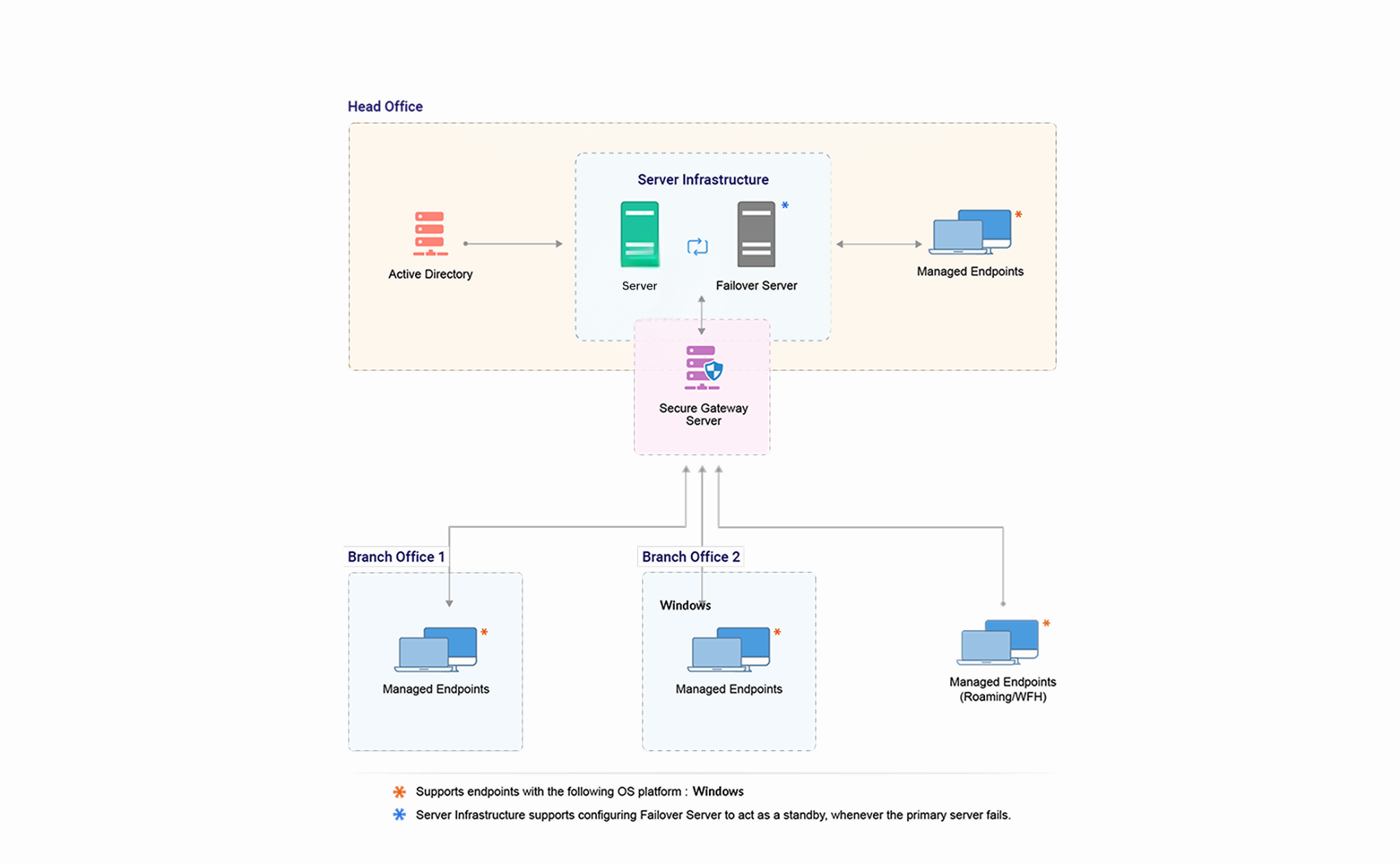
IT administrators or network security teams need the following components to perform Malware Protection in the remote computers:
Malware Protection Plus Server:
The Malware Protection Plus Server helps you to centrally perform all the Malware Protection tasks in your network. Some of the tasks include the following:
- Installing agents in computers.
- Scanning computers to discover the running applications.
- Deploying policies to associate data rules to specific groups of computers.
Any of the Windows computers in your network with the requirements mentioned here can be hosted as your Malware Protection Plus Server.
Components
This section includes detailed information about the components of the Malware Protection Plus architecture. Refer to Figure 1: WAN Architecture of Malware Protection Plus.
Server
- Port
- Purpose
- Type
- Connection
- 8020
- Agent Server communication
- HTTP
- In bound to server
- 8027
- Agent Server communication
- TCP
- In bound to server
- 8383
- For communication between the agent and the Malware Protection Plus Server
- HTTPS
- In bound to server
Note: Ports 135,139 and 445 should also be kept open and inbound on both agent and server (and distribution server, if applicable) for pushing agent installation.
Malware Protection Plus Server has to be installed in your LAN (say, the head office) and has to be configured as an EDGE device. This means that the designated port (default being 8020 and is configurable) should be accessible through Internet. You need to adopt necessary security standards to harden the OS where the Malware Protection Plus Server is installed. Agents from all the remote locations report to this Malware Protection Server.
The Server acts as a container to store information about the discovered applications and the policies deployed. It is advised to keep the Malware Protection Plus Server always running to carry out the day-to-day Malware Protection activities.
Agents:
To perform Malware Protection Plus, a lightweight, multipurpose agent will be installed by the server in your network systems. The agent contacts the server every 90 minutes to get the data needed to carry out the tasks delegated by the server. It returns back the result to the server after completion of the task. The agent also maintains a continuous thin connection with the server in order to perform on-demand tasks.
Agents can be installed either manually or using a logon script in all the branch-office computers that are being managed using Malware Protection Plus. This task is a one-time task. Up-gradation of agents is done automatically. Malware Protection offers two options to help administrators manage computers across a WAN. The option that you choose depends on the number of computers you are going to manage at your remote office. The options available, enable you to use either of the following:
- WAN agents: It is recommended that you use this option if you are managing more than 10 computers in a remote office.
- WAN agents only: It is recommended that you use this option if you are managing less than 10 computers in a remote office.
Web console:
The web console is a graphical user interface to access the server and perform Malware Protection tasks. This console can be accessed from anywhere. For example, it can be accessed through a LAN, WAN and from home using the Internet or a VPN. Separate client installations are not required to access the Web console.