How to send log files to Mobile Device Manager Plus Support?
Description
While working with Mobile Device Manager Plus, you might encounter issues which can be resolved quickly and in better ways by the MDM Support team, if provided with the logs.
The logs can be sent to the MDM Support as explained below:
- MDM Server logsMDM server logs is available in <Install_Dir>\MDMServer\logs.
Steps to send the server logs to the Support
- Navigate to the Support tab in Mobile Device Manager server.
- Select Create Support file.
- Enter the following details:
- E-mail address
- Message
- Select the logs you want to upload:
- Server logs (Applicable only for MDM On-Premises)
- Agent logs
- Click Send to send the Support file.
The log file(s) are sent to MDM Support successfully.
- Managed Android device logs
- Uploading Android device logs from MDM Server
- Uploading logs automatically from managed Android devices to Mobile Device Manager Plus Support
- Uploading logs manually from managed Android devices to Mobile Device Manager Plus Support
- Steps to Collect Remote Control Plugin Logs
Uploading Android device logs from MDM Server
- Navigate to the Support tab in the MDM server.
- Under Contact support, click Create Ticket, then select Without Screen Recording (or With Screen Recording, if applicable).
- On the Create Support File page, specify the following details:
- Your Email ID – the e-mail address to be associated with the support file.
- Ticket ID – (optional) the ticket reference, if you already have one.
- Message – a description of the problem that needs to be sent along with the logs.
- Mobile Device Name – select the device(s) whose logs are to be sent. Only devices that are online can be fetched.
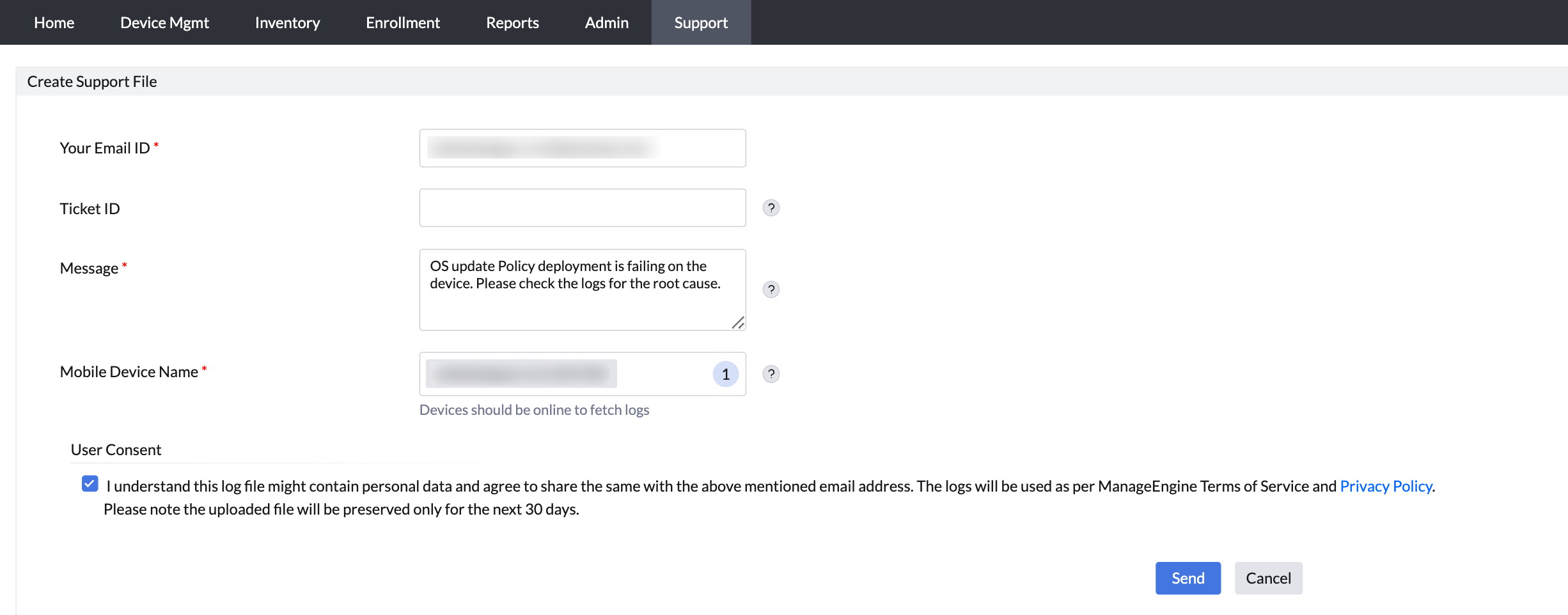
- Under User Consent, select the checkbox to acknowledge that the log file may contain personal data and agree to share it with the above-mentioned email address, in accordance with the ManageEngine Terms of Service and Privacy Policy.
Note: The uploaded file will be preserved only for the next 30 days.
- Click Send to submit the Support file.
The support file is then created and the log files are successfully sent to Mobile Device Manager Plus Support.
Uploading logs automatically from managed Android devices to Mobile Device Manager Plus Support
Logs can be sent directly from the MDM app Open the MDM app.
- Open the MDM app and navigate to Privacy Policy.
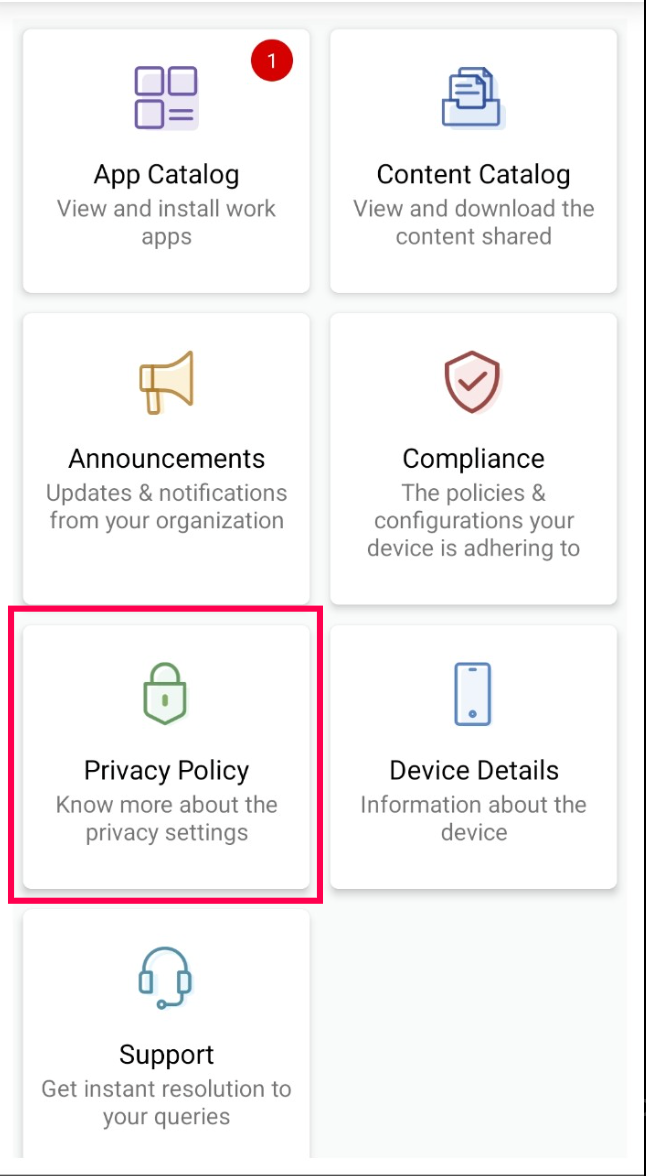
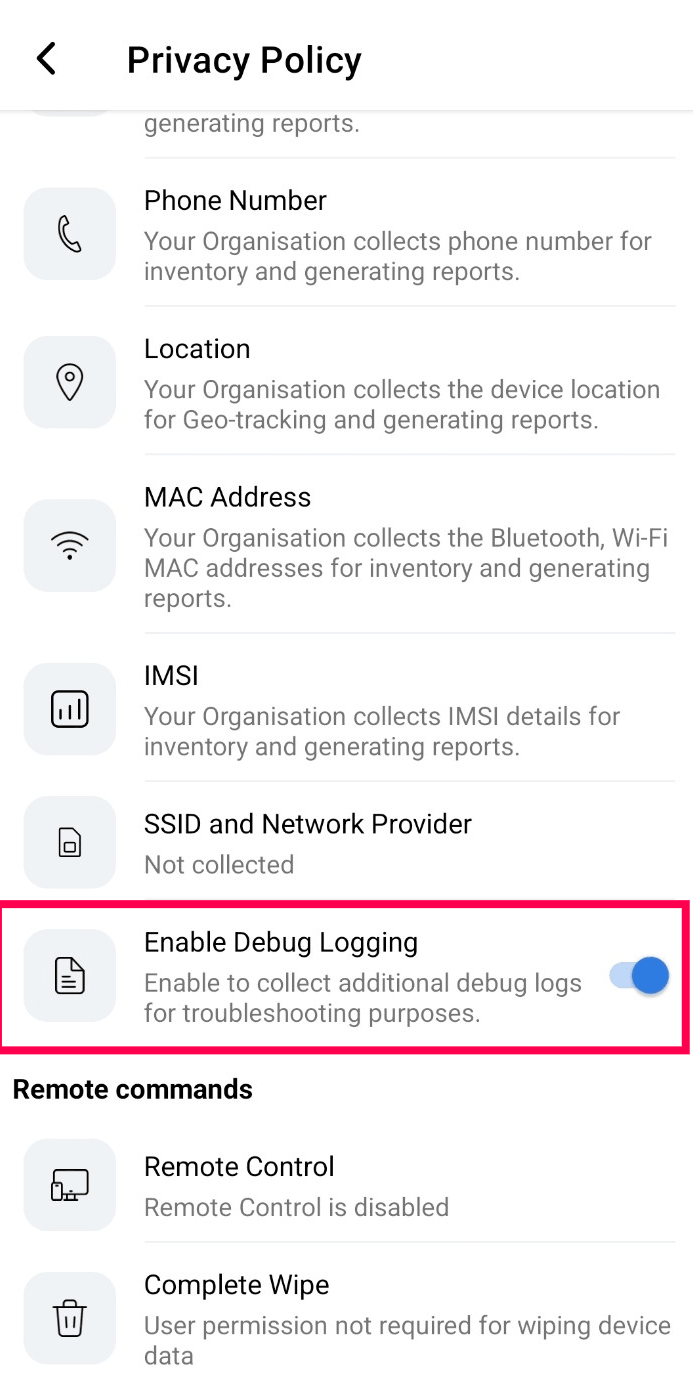
- Enable Debug Logging only if the issue is occurring and needs to be reproduced for troubleshooting. If the issue is not occurring, this step is not required.
- Reproduce the issue on the device.
- Navigate back to the MDM app home screen and open the Support tab.
- Select the appropriate Issue Type.
- Provide the Admin E-mail and a detailed Problem Description.
- Enter the Ticket ID (optional) if a support ticket has already been created for this issue. This helps MDM Support associate the uploaded logs with the existing support case.
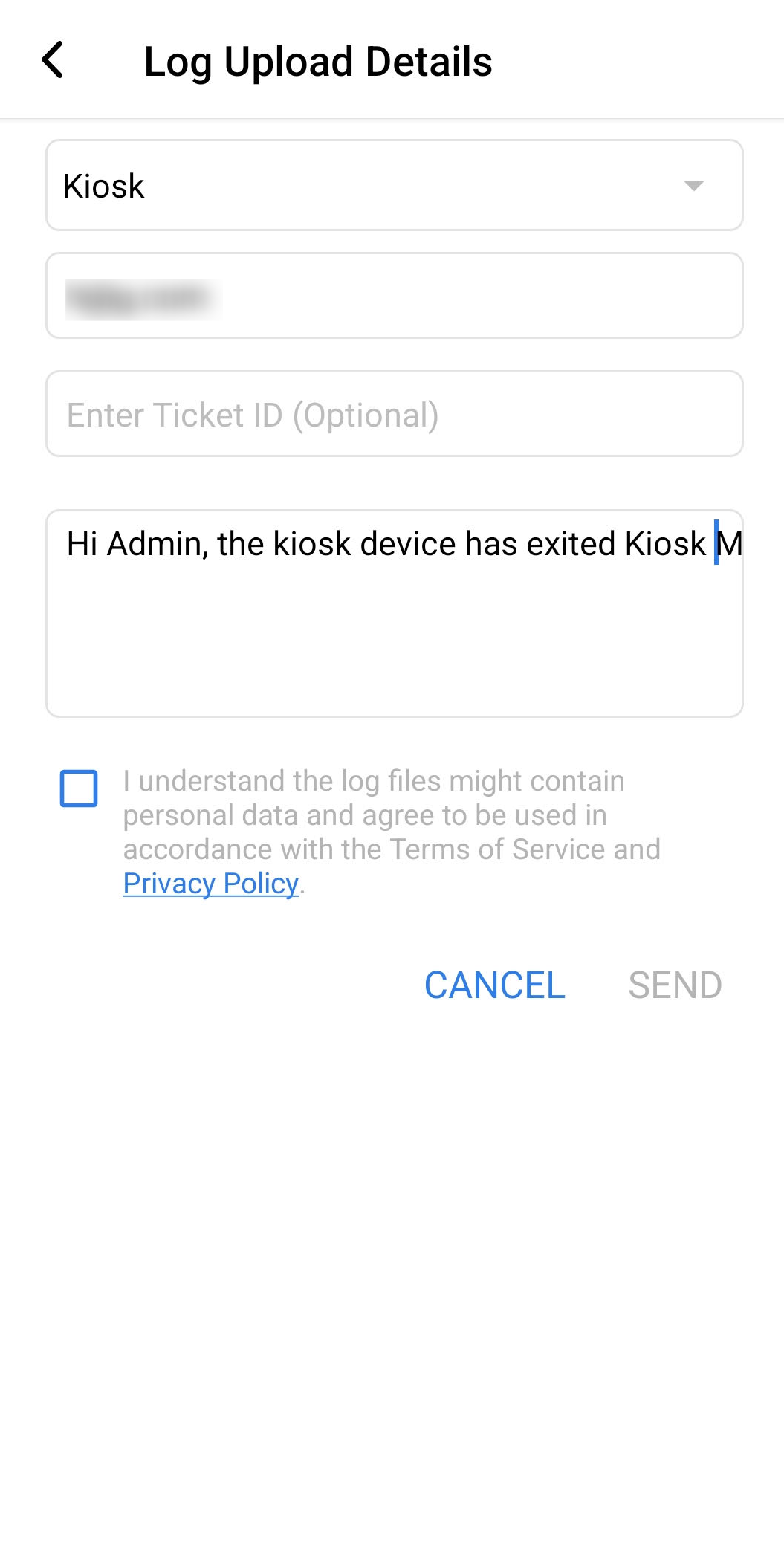
- Select the consent checkbox acknowledging that the logs may contain personal data and agreeing to the Terms of Service and Privacy Policy.
- Click Send to upload the logs to MDM Support.
- Once the logs have been uploaded successfully, navigate to Privacy Policy and disable Debug Logging.
Device logs are then uploaded directly to MDM Support for further analysis.
Uploading logs manually from managed Android devices to Mobile Device Manager Plus Support
You can also upload the logs of Android devices managed by MDM. You can find the steps to archive the logs and the steps involved in sending it to the Mobile Device Manager Plus Support.
- Connect the device to the computer using a USB cable.
- Navigate to Internal Storage -> Android -> data -> com.manageengine.mdm.android -> files -> agent -> logs
- You can then send the logs as a zip file to MDM Support.
Steps to Collect Remote Control Plugin Logs
- Connect your Android device to the computer using a USB cable.
- Navigate to the following directory on the connected device (the path follows the com.zoho.remoteplugin.* pattern; for Zebra devices use com.zoho.remoteplugin.zebra, for other devices the name will vary):
Internal Storage -> data -> android -> data -> com.zoho.remoteplugin.[device-name] - Copy all the log files from the specified directory.
- Compress the log files into a ZIP file and share it with the MDM Support.
- Managed iOS device logs
- Uploading logs automatically from managed iOS devices to Mobile Device Manager Plus Support
- Uploading logs manually from managed iOS devices to Mobile Device Manager Plus Support
- Obtaining iOS device logs using Apple Configurator (Mac only)
- Obtaining iOS device logs using Console application (Mac only)
- Obtaining sysdiagnose logs from iOS devices.
Uploading logs automatically from managed iOS devices to Mobile Device Manager Plus Support
- The users can directly send the logs from the managed iOS devices. Open the MDM app, click on the Support button.
- Select the e-mail logs option. Provide the Issue type, Admin e-mail, Problem description optionally enter the Ticket ID and click Send.
- Device logs will be directly sent to Mobile Device Manager Plus Support.
Uploading logs manually from managed iOS devices to Mobile Device Manager Plus Support
To send the logs to MDM server, you have to
Extracting the logs
Follow the steps to extract the ME MDM App logs.
- Open the ME MDM App in the managed device.
- Navigate to Support tab.
- Select Collect logs. A notification is shown when the logs are successfully compiled.
Sending the logs to Mobile Device Manager Plus Support
Follow the steps to send your logs to MDM Support.
- Navigate to the Support tab in the MDM server.
- Select Create support file.
- Enter the following details:
- Message
- Mobile Device Name
- Select the logs you want to upload:
- Server logs (Applicable only for MDM On-Premises)
- Agent logs
- Click Send and wait till the support file is created successfully.
- Then send the compiled support file from the managed device.
- Managed Mac device logs
- Uploading logs automatically from managed Mac devices to Mobile Device Manager Plus Support
- Uploading logs manually from managed Mac devices to Mobile Device Manager Plus Support
Uploading logs automatically from managed Mac devices to Mobile Device Manager Plus Support
- Click on the MDM Tray Icon above.
- Select Send Logs.
- You can find the logs zip file in Server:
Directory/ManageEngine/DesktopCentral_Server/mdm-logs/1/{contains DeviceUDID as filename}. - Get the zip file and sent it to Support.
Uploading logs manually from managed Mac devices to Mobile Device Manager Plus Support
- Open Finder in the affected Mac device.
- Select Go from the top Menu Bar and then Go to folder and type /Library/MEMDM_agent/logs
- Zip all the folders inside the logs folder and send it Support manually.
- Managed Windows device logs
Uploading logs manually from managed Windows devices to Mobile Device Manager Plus Support
- Open Command Prompt with Admin Privilege.
- Type the following Command :
mdmdiagnosticstool.exe -area "DeviceEnrollment;DeviceProvisioning;Autopilot" -zip "%userprofile%\Desktop\MDMDiagReport.zip" - Once the Command is Executed successfully a .zip file generated in the current user desktop.
- Send the generated .zip file to support.
Note: While running the command, if the error code is 0x80070050 appears then re-run the command with different file.
For example : Instead of MDMDiagReport.zip attempt with MDMDiagReport_1.zip - Secure Gateway server logs
Uploading logs from Secure Gateway server to Mobile Device Manager Plus server
You can also upload the logs of the Secure Gateway configured with Mobile Device Manager Plus. Follow the steps given below to upload the logs from the Secure Gateway to the Mobile Device Manager Plus Support.
- Open https://bonitas.zohocorp.com/.
- Under Products, select Mobile Device Manager Plus.
- Specify the Ticket ID, if you have one.
- Specify your e-mail address to receive notifications and other required fields.
- Click Add Files to browse and select all the files in <Secure Gateway Installation Directory>:/ME_Secure_Gateway_Server\logs.
- Click Upload.
The Secure Gateway server logs are uploaded to MDM server successfully.