One overlooked configuration change can take an entire network offline. A misconfigured route, an untested ACL, or an accidental overwrite doesn’t just cause a hiccup; it can ripple across critical systems and customer-facing services. Recent research by Enterprise Management Associates (EMA) shows the cost of such misconfiguration outages now averages $14,056 per minute, climbing to $23,750 per minute for large enterprises, which amounts to over $1.4 million for every hour of downtime. As device counts surge and multi-vendor environments become the norm, manual configuration management practices can no longer keep up.
The solution? A structured, automated backup strategy that is designed to eliminate risk and ensure rapid recovery when things go wrong. In this page, we’ll walk you through three essential steps to build that strategy and how ManageEngine Network Configuration Manager (NCM) can help you execute it easily:
- Identify the configurations you need to backup
- Choose backup modes that align with your operational needs
- Continuously test your backups to ensure they work properly
1. Identify the configurations you need to backup
A backup strategy is only as strong as the data it captures. Skipping critical elements, whether intentionally or by oversight, can turn a simple failure into a full-blown outage. To build a reliable safety net, start by identifying every configuration component that defines how your network operates.
What to include (and why it matters):
- Startup configurations: These are the default configurations that appear when reboot happens. Failing to backup such configurations translates to a network device not functioning once restart happens.
- Running configurations: The configurations reflect real-time changes and determine the live state of your network. Ignoring them could mean restoring an outdated setup.
- Firmware and OS details: Restored devices risk incompatibility issues due to version mismatch and non-application of patches.
- Access Control Lists (ACLs): They are essential in maintaining security. Losing them opens doors to unauthorized access.
- Routing tables, VLAN assignments, and interface details: These are critical for ensuring traffic flows properly after a restore.
Pro insight: Think beyond simply storing configurations. Document dependencies between components (e.g., VLAN configurations tied to ACL rules) to avoid half-functional restores.
2. Choose backup modes that align with your operational needs
Your backup schedule should adapt to your business and not the other way around. Some organizations require aggressive real-time backups, while others prioritise bandwidth efficiency.
Backup modes to consider:
- Manual (on-demand): Perfect before a risky change like a firmware upgrade. Gives admins immediate control without waiting for the next schedule.
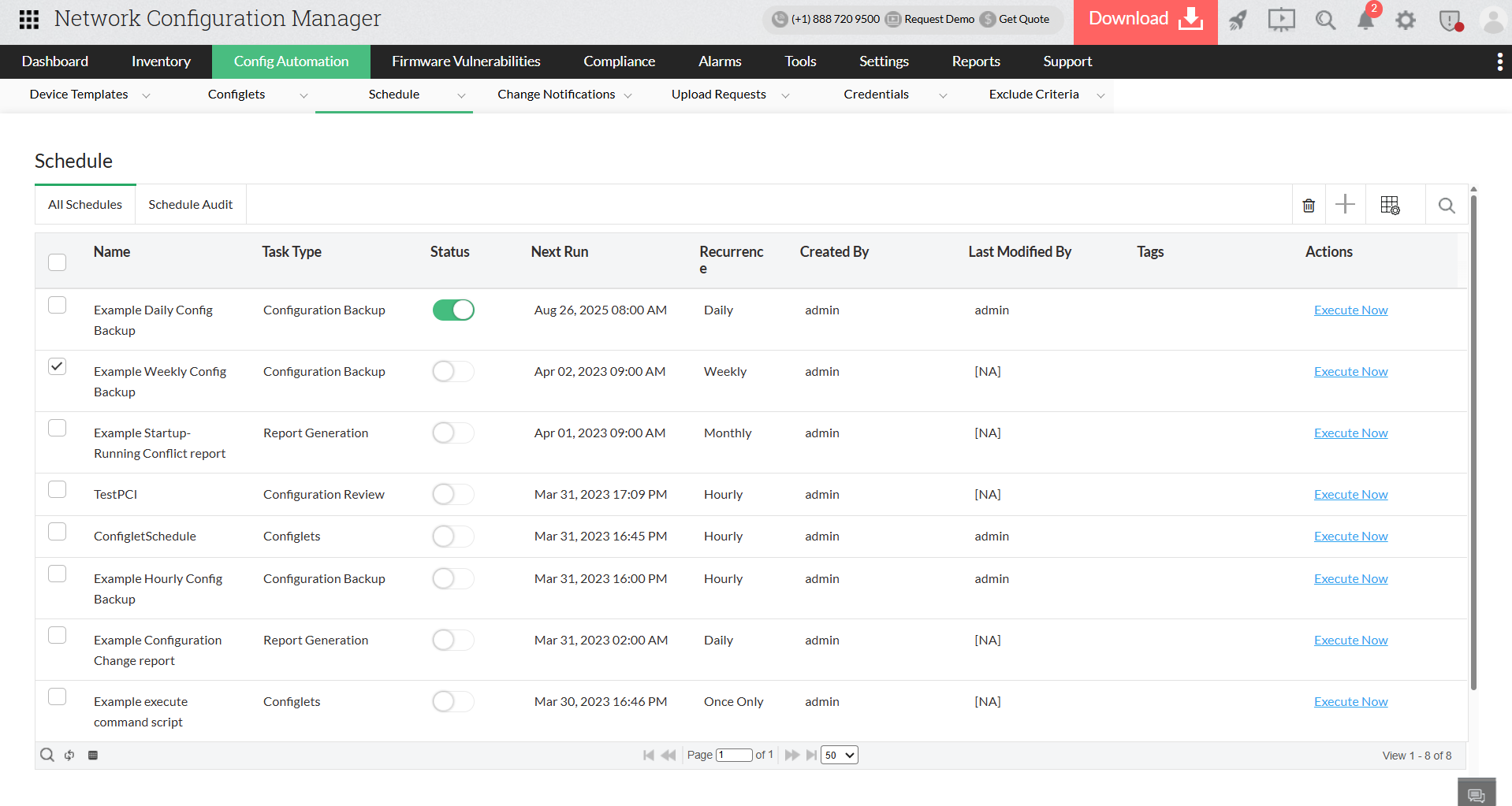
- Scheduled backups: Automate daily, weekly, or monthly jobs. Ideal for predictable environments with fewer configuration changes. This also works for configurations that are supposed to be backed up regularly.
- Change-triggered backups: The gold standard for dynamic networks. Every time Network Configuration Manager detects a config change via syslog, it captures an updated backup in seconds.
Pro insight: Most high-performing IT teams combine scheduled + change-based backups. This dual strategy guarantees routine snapshots while protecting against unplanned or unauthorized changes.
3. Continuously test your backups to ensure they work properly
A backup that hasn’t been tested is a backup you can’t trust. Many IT teams only realize failures when a live outage occurs, but this can be avoided through systematic validation.
Best practices to verify that your backups work:
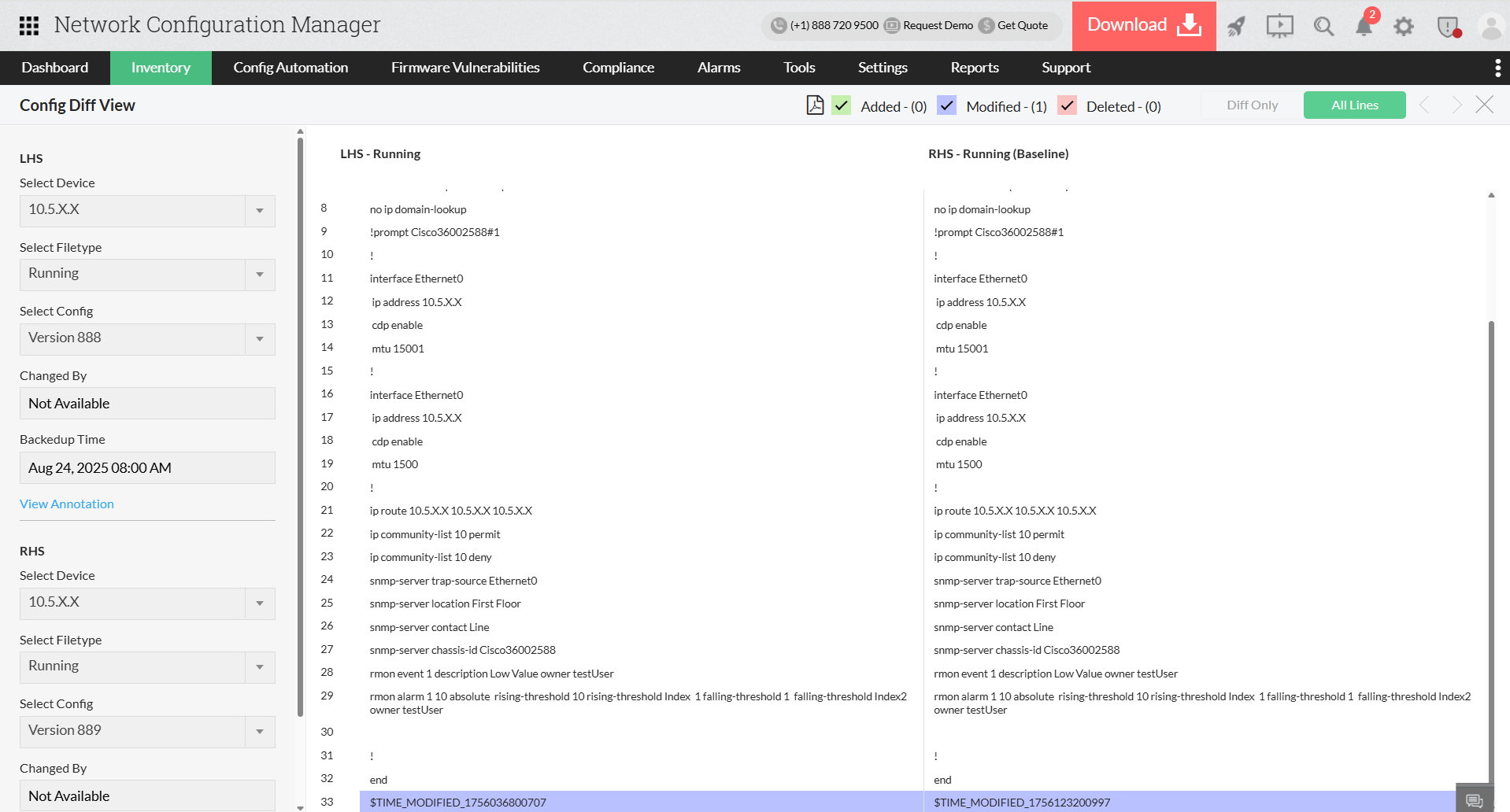
- Compare versions: Identify discrepancies between current configurations and historical versions.
- Set golden configurations: Tag stable configurations as baselines for instant rollback.
- Run mock restores: Simulate device failures and measure how fast you can bring the system back online.
- Audit activity: Maintain full logs of who backed up, restored, or modified configurations for compliance.
Pro insight: Schedule quarterly or bi-annual recovery drills. Even automated backups can fail due to credential changes, device connectivity issues, or policy misconfigurations.
Put these network backup strategies into action with ManageEngine Network Configuration Manager
Designing a backup strategy is only the first step; the real challenge lies in executing it flawlessly. That’s where ManageEngine Network Configuration Manager (NCM) comes in. It transforms your backup plan from a checklist into a fully automated, resilient system. Every step from capturing configurations to restoring backups during an outage is handled with precision and speed. Here is how you can bring these strategies to life using Network Configuration Manager.
Capture all critical configuration artefacts using Network Configuration Manager
- Automatically back up both startup and running configurations for every device in your inventory.
- Maintain a version history, so you can track changes and roll back instantly.
- Encrypt every backup to protect sensitive credentials and configurations.
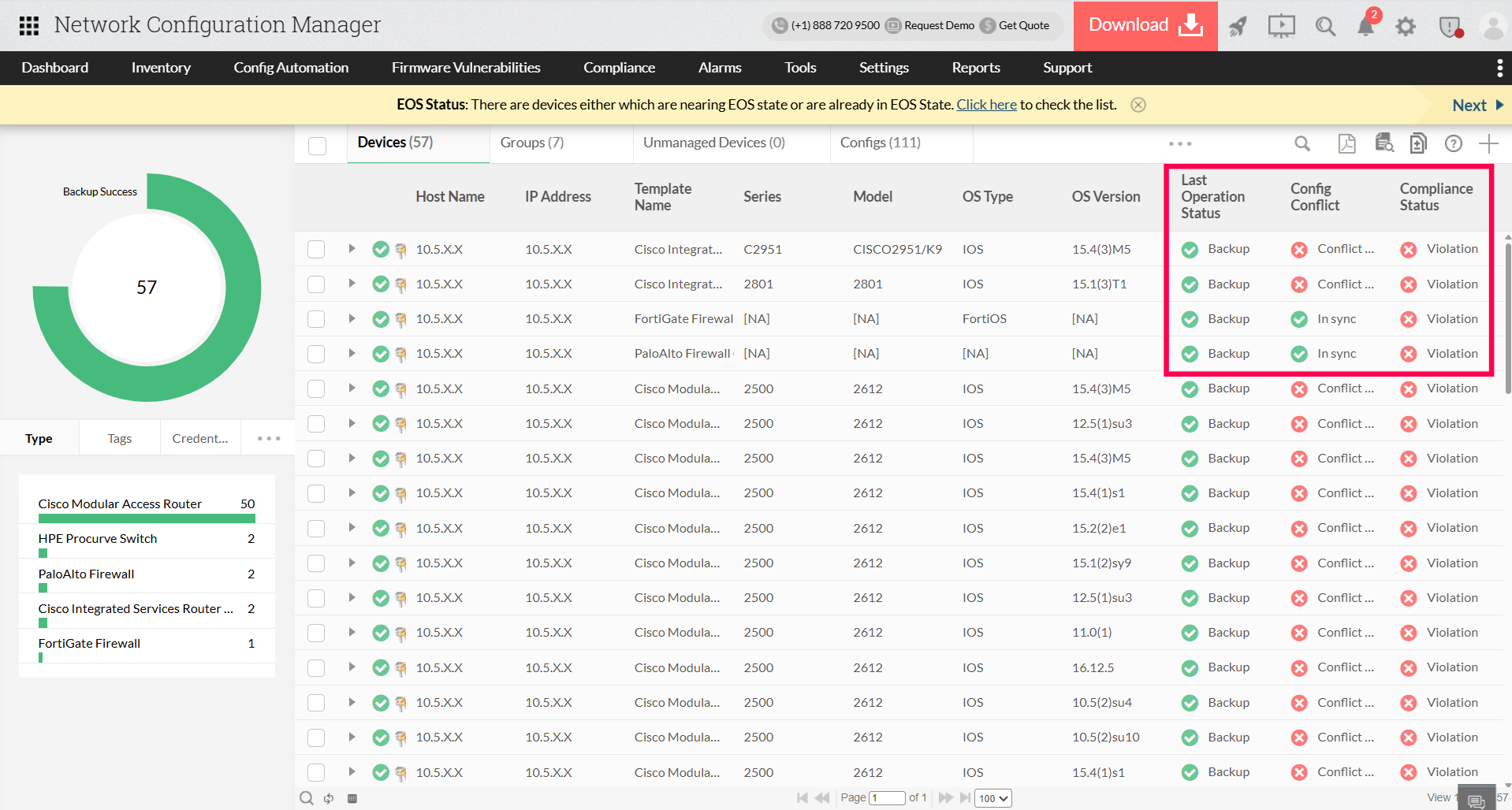
Explore different backup modes that fit your business needs
- Perform bulk backups across thousands of devices with a single click.
- Use intelligent scheduling to avoid peak traffic windows and continuous manual effort.
- Enable syslog-based triggers to capture last-minute changes automatically.
Keep track of all the backup statuses and restore configurations if something goes wrong
- Compare configurations side by side with color-coded comparison charts to detect even single-word differences.
- Use one-click restoration for individual devices or bulk groups during emergencies.
- Access built-in compliance reporting for frameworks like SOX and HIPAA.
Turn backups into a business advantage
With ManageEngine Network Configuration Manager, every step of the backup lifecycle, including capturing, scheduling, monitoring, and restoring, is fully automated within a single platform. Eliminate last-minute outage crises and audit pressures, and instead gain a secure, policy-driven system that keeps your network resilient, compliant, and your team focused on strategic initiatives. Experience the power of automated network backups today. Download a 30-day free trial or schedule a personalized demo.
FAQs about network backup solutions
How do I take a backup of configuration files?
+
What is the best enterprise backup solution for configurations?
+
How do I take a backup of a router configuration?
+