Comprehensive network vulnerability scannner for your network infrastructure
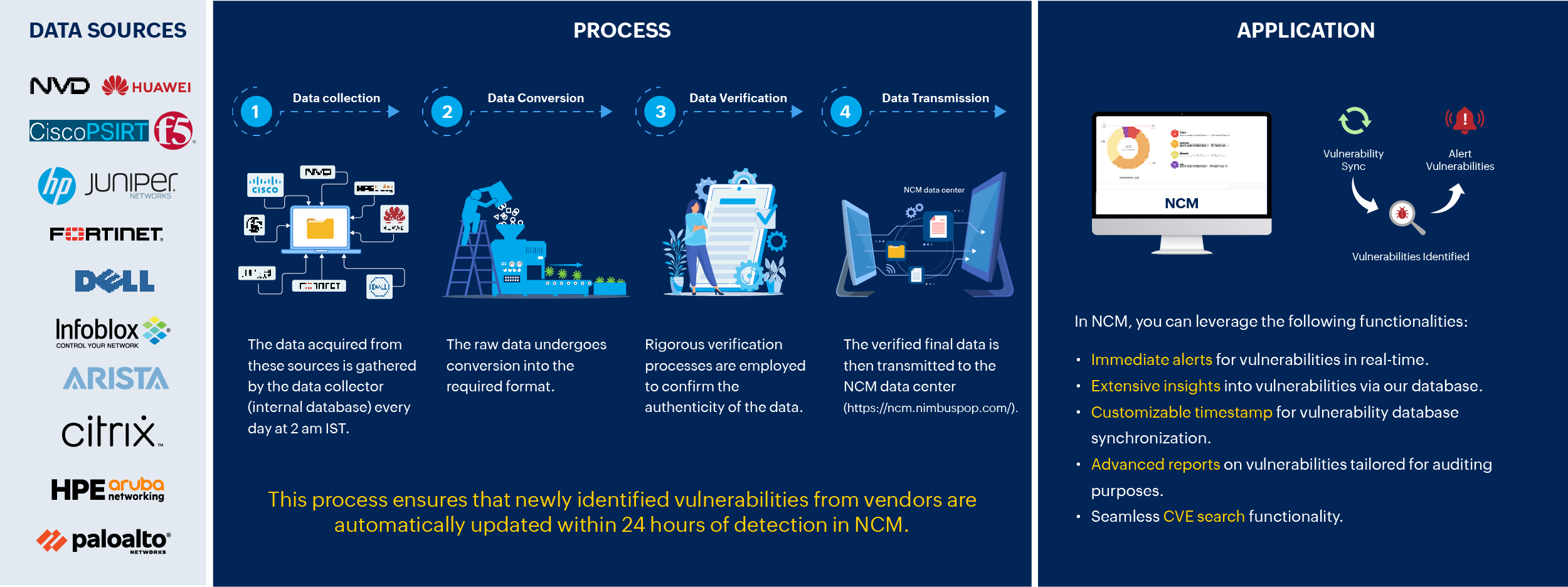
Stay at the forefront of cybersecurity challenges with Network Configuration Manager's cutting-edge vulnerability detection module. With daily updates sourced from the National Vulnerability Database (NVD) and direct feeds from vendors, our system guarantees that your defense mechanisms are always up-to-date with the latest threat intelligence. Also, acquire insights into devices’ vulnerability, exposed devices, and version distribution. This comprehensive overview of vulnerability details strengthens the resilience and integrity of your network.
Safeguard firmware integrity: NCM's workflow for scanning network vulnerabilities
Explore advanced network vulnerability scanning capabilities
Severity levels
Effortlessly access CVE details along with severity ratings ranging from Critical to Low, facilitating effective prioritization of fixes.
Advanced CVE Search
Look up any CVEs in the search option using the CVE ID and promptly obtain comprehensive details about a specific vulnerability.
Time-based vulnerability
Choose a timeframe during which vulnerabilities were identified. You can either select from the provided range or specify a custom range of your preference. The vulnerabilities detected within this chosen period will be displayed.
Base Score System
Leverage our foundational scoring system to quantify the impact of every vulnerability, assisting you in assessing the urgency of each threat.
Vulnerability Counters
Stay updated with counters indicating the total number of vulnerabilities, critical vulnerabilities, and exploitable weaknesses.
Custom vulnerability update
If you discover any vulnerabilities that are not listed, you have the option to request an update on vulnerability data from the engineering team.
Custom CVE Management
Categorize CVEs based on their status, ranging from 'Not Applicable' to 'Resolved,' streamlining the remediation process for enhanced efficiency.
Vulnerability Report
NCM scans network for vulnerabilities and provides comprehensive reports on impacted CVEs, covering device count, severity, attack type, overview, and reference URLs.
Device Counters
This is similar to vulnerability counters, but the distinction lies in its device specificity, including information on affected devices, device versions, and more.
Vulnerability DB sync
Synchronization of firmware vulnerability data from NIST and other vendors to the Network Configuration Manager's database is facilitated by allowing users to schedule regular syncing. Users have the flexibility to set a specific time for the daily synchronization. Once a schedule is established, the vulnerability data is automatically synchronized at the specified time. Network Configuration Manager also provides the option to edit or change the scheduled time to align with user preferences.
If your network is isolated, automatic updates of the vulnerability database through firmware vulnerability scanning with data from NIST vulnerability management may not be possible. In such instances, opting for a manual import of vulnerability data is recommended. For more details, visit this page.
Hawkeye view: Insights through network vulnerability reports
CVE ID Report
In-depth information of each CVE including base score, summary, and reference URL along with published and updated time will be present.
Exposed Devices Report
This report provides details of exposed devices in your network along with their severity levels.
Firmware version with vulnerabilities Report
This report offers insights into device versions and their vulnerabilities, detailing the number of vulnerabilities present for each specific device version and their respective severity levels.
Vulnerability Fix Trend Report
This report provides a trend graph on total vulnerabilities in a day and how many are fixed in that day.
Device Vulnerability History Report
This report lists the history of the devices that had a vulnerability of any kind. The tabular column consists of host name, series, model, OS type, latest OS version, and the count of live vulnerabilities.
Supported vendors
The Network Configuration Manager now features an improved network vulnerability scanner, covering more than 18 major network vendors.
Streamline network vulnerability management with Network Configuration Manager
Resources related to network vulnerability scanning
Top 4 best practices to manage firmware vulnerabilities effectively
Download the e-book to gain insights into best practices for managing device firmware vulnerabilities.
Managing devices' firmware with Network Configuration Manager
Learn more on how firmware vulnerbaility management works in Network Configuration Manager.