- What is privileged access?
- Who are privileged users?
- What are privileged accounts?
- Types of privileged accounts
- What are privileged credentials?
- How does privileged access management work?
- How is PAM different from identity and access management and privileged identity management?
- Privilege threat vectors and why privileged access management is important for enterprises
- How to protect privileged accounts with PAM
- Privileged access management best practices
- How to implement PAM
- Key features to look for in a PAM solution
Before diving deep into privileged access management as a security discipline, its importance, and implementation measures, let us discuss some key components of privileged access management: privileged access, privileged users, privileged accounts, and privileged credentials.
The role of PAM in cyber security
PAM is vital to cybersecurity because it secures privileged accounts — the keys to an organization’s most critical systems. By controlling, limiting, and monitoring privileged access, PAM blocks a major attack path, reduces insider threats, and strengthens compliance. It enforces the principle of least-privilege and underpins a Zero Trust approach thereby bolstering overall IT security. Together, these controls deliver the broader benefits of PAM, from faster audits to lower breachable landscape.
What is privileged access?
Privileged access is a type of IT system access that grants special rights to the access holder. Users with privileged access can execute actions that a standard user cannot. Actions that generally qualify as privileged operations include modifying server settings, changing passwords, accessing business data systems, installing a new program, running critical services, adding user profiles, conducting maintenance activities, and altering network configurations.
Today's enterprise IT teams largely rely on critical user accounts called privileged accounts to provide users with privileged access to various information systems in the network. While privileged accounts remain the top choice for privileged access provisioning in the current IT landscape, other rarely used options include biometric authentication and smart cards.
In some cases, organizations completely secure a physical server, workstation, data center device, or any system that has sensitive information, then prohibit direct access to that machine. In such circumstances, direct physical access to the machine means that the user has privileged access. Such users are often referred to as privileged users.
Who are privileged users?
Privileged users are users who are authorized to have elevated access to part of or the entire IT infrastructure network via possession of one or more privileged accounts or any other mode of access.
Commonly known privileged users include IT workers like system administrators, network architects and administrators, database administrators, business application administrators, DevOps engineers, and other IT heads. At times, a third-party contractor helping out with a firm's IT operations or business requirements and maintenance may also have inside access to the firm's network.
Typically, a privileged user is a specific type of enterprise IT user. Other IT users include standard users and power users.
Examples of privileged enterprise IT users

Standard users
These are regular users who have non-powerful accounts to access business applications on a daily basis to perform routine operations. Standard users normally do not have access to any sensitive information systems.

Power users
Power users have some additional permissions compared to standard users. A common example is in-house IT staff members who help out with end-user workstation management. Such users receive marginal account access elevation that provides them with specific permissions, like remote access to local workstations and databases.

Privileged users
These are your all-important users. Privileged users are usually limited in number. They carry the highest risk to an IT environment and require 24/7 surveillance.
What are privileged accounts?
Privileged accounts are enterprise accounts with elevated user privileges compared to non-privileged accounts. Privileged accounts can be human accounts, application-based accounts (such as machine-to-machine or application-to-application accounts for automated actions), or service accounts.
Using a privileged account, a user can perform functions and access resources that they would not be able to otherwise. This includes accessing and modifying sensitive servers, applications, databases, and other business-critical endpoints.
Types of privileged accounts
Not all privileged accounts carry the same level of risk, and understanding the different types is the first step toward securing them properly. Here are the most common types of privileged accounts found in enterprise environments:
Domain administrator accounts
These are the most powerful accounts in an organization's network. Domain admin accounts have unrestricted control over the Active Directory domain, which means they can modify any user, group, policy, server, or workstation within the domain. Because of the sheer scope of access they provide, domain admin accounts are a top target for attackers and should be tightly restricted, vaulted, and monitored at all times.
Local administrator accounts
Local admin accounts exist on individual servers, workstations, or devices and grant full control over that specific machine. The risk with local admin accounts is that they often share the same password across multiple endpoints—a practice that, if exploited, allows attackers to move laterally across the network with minimal effort.
Emergency or break-glass accounts
These accounts are set aside for crisis situations, including system outages, disaster recovery, or scenarios where standard access paths are unavailable. Because they are rarely used, emergency accounts can easily fall off the radar. If not properly secured and audited, they become a convenient backdoor for anyone who gains access to them.
Service accounts
Service accounts are non-human accounts used to run automated processes, background tasks, application pools, or scheduled jobs. They operate silently in the background and often hold elevated permissions to interact with databases, APIs, or other systems. The challenge is that service accounts tend to be overlooked in routine access reviews, and their credentials are rarely rotated, making them a significant blind spot.
Application or machine accounts
These accounts enable machine-to-machine and application-to-application communication. They are commonly used in DevOps pipelines, cloud workloads, robotic process automation (RPA), and IoT environments. Like service accounts, application accounts often hold elevated privileges and can be difficult to track, particularly in fast-moving development environments where credentials may be hardcoded into scripts or configuration files.
Privileged business user accounts
Not every privileged account belongs to an IT administrator. Some business users, such as finance managers, HR leaders, or executives, need elevated access to sensitive systems, financial data, or personnel records. While their access is more limited in scope than a domain admin's, the data they can reach is often highly sensitive, making these accounts a valuable target.
Each of these account types requires a distinct approach to security, monitoring, and lifecycle management. A comprehensive PAM solution should be capable of discovering, vaulting, rotating, and auditing all of them.
What are privileged credentials?
Privileged credentials are credentials used by privileged users to gain access to sensitive accounts, servers, databases, applications, and other sensitive endpoints. Besides passwords, privileged credentials also include secrets such as SSH keys, API keys, tokens, and certificates.
Now that we have a basic understanding of the PAM fundamentals, let us examine how privileged access management works.
How does privileged access management work?
Privileged access management is the process of entrusting select users with elevated access (aka privileged access) to business-critical resources, accounts, and credentials that are essential to their job functions. In the case of task-specific access, once the task is done, the access provided to the user is revoked.
In other words, with privileged access, privileged users gain access to privileged accounts, credentials, systems, servers, databases, and more to carry out vital tasks, including managing and modifying these accounts and resources. Privileged access management is the process of governing and managing this access.
Although providing privileged access is important to allow employees to carry out job-critical functions, it also involves a high risk of exposure. Since privileged users have access to multiple key credentials and resources, a compromised privileged user or account can prove to be costly.
Therefore, privileged access management also involves continuous monitoring of privileged users to ensure they do not misuse their access rights. This requires regularly reviewing assigned privileges and revoking excess rights whenever a user's role in the organization changes.
How is PAM different from IAM, PIM & MFA?
Although privileged access management is used interchangeably with multi-factor authentication (MFA), identity and access management (IAM) and privileged identity management (PIM), let us look at how they differ.
- 01
PAM vs IAM
IAM is a security framework for identifying, authenticating, and providing access to users. IAM consists of special policies, controls, and solutions to manage identities in an enterprise. IT managers leverage an IAM solution to control access to databases, assets, networks, applications, and resources within their organization. Typically, IAM applies to all users in an organization.
Privileged access management is a subset of IAM that deals only with managing privileged access. PAM mainly pertains to privileged users who have elevated access to sensitive resources, applications, and accounts. PAM focuses on users and accounts that pose a higher security threat and data breach risk by having privileged access. IT admins use a PAM solution to track, audit, and manage privileged users, identities, accounts, and sessions.
- 02
PAM vs PIM
PIM, a subclass of PAM, includes essential security controls and policies limited to managing and securing privileged identities, such as service accounts, usernames, passwords, SSH keys, and digital certificates, that provide access to sensitive information.
- 03
PAM vs MFA
PAM controls and monitors access to sensitive systems by users with elevated privileges, ensuring that only authorized individuals can perform critical actions, often with features like password vaults and session monitoring. MFA, on the other hand, is a method of verifying a user’s identity by requiring two or more authentication factors, adding an extra layer of security to any login process. While PAM manages who can access privileged accounts, MFA ensures that the person accessing any account is truly who they claim to be.
To summarize, IAM covers the broader access patterns across all enterprise verticals, encompassing all users, systems, resources, and assets. PIM and PAM, on the other hand, cover access patterns surrounding privileged resources and systems.
Privilege threat vectors and why privileged access management is important for enterprises
Unchecked privileges are a silent threat to today's businesses. Because privileged access to a critical information system is the crown jewel for a cyberattacker, a privileged user account in the wrong hands is a dangerous weapon that can easily bring down an enterprise.
Furthermore, privileged access is one of the most difficult cyberattack vectors to discover; some breaches resulting from privilege abuse and misuse can actually go undiscovered for months or more.
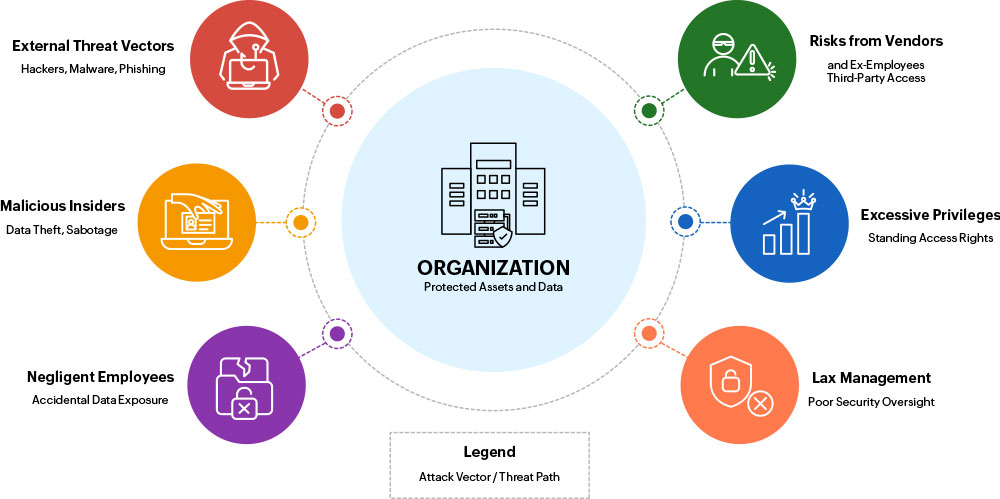
Poor management of privileged access and privileged accounts can expose enterprises to different privilege threats and risks, among the core challenges such as the following:

External privilege threat vectors
Privileged accounts are a favorite among attackers looking to gain full access to sensitive data servers without attracting suspicion. Hackers usually manipulate gullible, privileged users (via phishing, spoofed websites, and other tactics) into giving up information that allows the attackers to circumvent the firm's security and gain network access.
Once inside, hackers immediately prowl around for unmanaged privileged credentials and escalate themselves to domain administrator status, which provides them with unrestricted access to highly sensitive information systems. The best way to tackle this threat is to completely lock down all privileged credentials in a central, encrypted vault; enforce role-based controls; mandate multi-factor authentication for vault access; and log all incoming requests.

Insider threats
At times, the biggest threats are the ones that are closer to home. Likewise, insider privilege misuse is a rapidly growing concern today in organizations of all sizes. Internal privileged users with the wrong intentions, such as those seeking personal gain, can cause more damage than external parties. The inherent trust placed in insiders enables them to take advantage of their existing privileges, siphon off sensitive data, and sell it to an external party without the organization noticing until it is too late.
To protect critical information assets from such malicious internal actors, it is vital to constantly monitor every privileged user's activities in real time and leverage behavior anomaly detection and threat analytics.

Privilege risks due to negligent employees
Careless employees are a difficult threat to manage without proper privileged access management. They are users who do not understand the significance of cybersecurity. They recklessly leave critical user credentials lying around for hackers to find or they sometimes share their access privileges with unauthorized employees.
A typical example is DevOps engineers dumping their codes, which contain authentication tokens for internal servers, on open platforms like GitHub and forgetting about them. Such dangerous practices can only be controlled by robust privileged access governance that ensures, along with comprehensive auditing, that every privileged activity can be linked to a specific user.

Privilege threats due to remote vendors and ex-employees
Remote vendors make up the extended business network of an organization. They usually include contractors, consultants, partners, third-party maintenance teams, and service providers who require privileged access to your internal infrastructure for a variety of business needs. Many organizations depend on multiple contractors to get work done. In today's digital world, this means third-parties have access to your internal network for business requirements and therefore pose the same threat as insiders.
Another type of user who presents the same risk is an unhappy or financially motivated ex-employee. Disgruntled employees who have moved on from the firm but still posses access rights can leverage them to gain illegitimate access, steal data, and sell it to hackers. Handling such threat scenarios requires regularly reviewing employees' and contractors' privileges and removing needless rights.

More privileges than necessary
Often, users are overprivileged, having access rights that are far more than what they need to perform their job duties. As a result, there is a gap between granted permissions and used permissions. In such instances, it is important to apply the principle of least privilege (PoLP) by providing only the minimum amount of permissions required to complete a work task. Without a proper privileged access management system to enforce least privilege security and to monitor user actions, overprivileged user accounts can be leveraged for illegitimate access.

Privileges that are never rescinded
Forgotten privileges are dangerous. IT administrators often provision users with privileged access to data servers and then fail to revoke the access. Without a tool to track who has been given what privileges, retracting permissions is a cumbersome task. This means users continue to hold privileges even after their job is done, and they have the opportunity to execute unauthorized operations. In this case, a privileged access management tool can help IT managers grant users the least required privileged access with timing presets. Once the stipulated time is up, the tool revokes the privileges automatically.

Privilege risks due to unclear records
This is a subtle threat that can emerge as a huge disadvantage if your organization suffers a data breach. Without comprehensive privileged activity logs and clear evidence that can provide context about the incident in question, forensic investigations can fail, destroying your brand's reputation and the trust you have built with your customers.
Privileged access, unless completely managed with powerful controls and constantly monitored, can subject your organization to the risk of data overexposure and consequently result in business disruption, lawsuits, investigation costs, and reputation damage.
Like Gartner says, privileged access management should be one of your top long-term security projects to eliminate weaknesses in your cybersecurity posture and successfully neutralize emerging privileged access risks.
How to protect privileged accounts with PAM?
Forrester estimates that 80% of data breaches are due to compromised privileged credentials, such as passwords, tokens, keys, and certificates. Emerging cyber trends suggest that attackers do not always rely on sophisticated tools or attack methods to breach the security perimeters of an organization. All they need is one compromised privileged account or a weak credential to gain unlimited, unrestricted access to business-sensitive information. Therefore, real-time monitoring, regular auditing, and secure governance and management of privileged accounts are integral parts of privileged access management.
Let us dig deep into some PAM best practices and key features to look out for in a PAM solution.
Privileged access management best practices
Privileged access management best practices can be classified into three phases: before, during, and after the delegation of privileged access to a certain system.
01. Before the delegation of privileged access
Before providing access, the privileged access management process typically begins with taking stock of active, critical endpoints across on-premises, cloud, and virtual platforms in your network.
Upon asset discovery, the next step is consolidating the associated privileged accounts and SSH keys (or any user authentication entities that provide elevated permissions, such as smart cards) in a secure, central vault. This vault must be protected by multiple layers of encryption with military-grade algorithms like AES-256 or RSA-4096.
Other measures include the following:
- 01
Validate vault login requests before approving them by cross-checking with user profiles in the in-house identity governance and provisioning service to ensure the concerned user's role necessitates privileged access.
- 02
Enforce multiple layers of strong authentication for vault login, including one-time passwords, two-factor authentication, and single sign-on.
- 03
Enable a user to checkout a privileged account or other credential only upon approval by IT managers or IT admins.
- 04
Impose time-based access restrictions on the credential that is checked out, which enables the automatic revocation of delegated permissions after a specific period.
- 05
Log all credential requests with timestamps.
02. During the delegation of privileged access
Next, while assigning a party privileged access, the chief principle is to enforce the least privilege model built upon role-based controls. This ensures that the user, who has already proven their identity through multiple authentication levels, is provisioned with only the minimum amount of rights needed. This usually means implementing the following measures:
- 01
Tunnel privileged sessions through gateway servers and encrypted channels to avoid direct connection to the target information systems from the user device. To enhance security further, enable users to log in to the PAM solution and launch privileged connections with a single click, upon which the tool authenticates the user in the background. This practice bypasses the need to disclose the privileged credentials to the user.
- 02
Use ephemeral certificates to authenticate and authorize privileged sessions. Ephemeral certificates are automatically generated and provisioned during privileged access so users do not have to input the credentials while connecting. The certificates automatically expire after the session is complete.
- 03
Supply limited privileges, such as application-specific access permissions during an RDP session, or allow only certain commands in an SSH terminal session.
- 04
Enforce just-in-time (JIT) elevation controls with PAM software. Elevating privileges for employees only when required can help prevent the buildup of unused or unneeded access rights, reducing risk. JIT controls enable users to log in as themselves instead of relying on a shared privileged account, greatly increasing accountability. This method is also referred to as privilege elevation and delegation management (PEDM). For the ideal JIT least privilege model, you can set up a privileged access management system that interfaces with your in-house identity governance tool. This coalescent structure can make implementation easier with role-based controls.
- 05
Record all privileged sessions and archive them as video files. It is also beneficial to oversee ongoing sessions simultaneously (either manually or automatically) to detect any anomalies in real time, such as the passing of malicious commands.
03. After the delegation of privileged access
The foremost thing to remember in this phase is that after the job is done, privileged access should be revoked. Once permissions are rescinded, the privileged credential (password or SSH key) should also be automatically checked back into the vault and immediately reset using strict policies to ward off any unauthorized access in the future.
Additional initiatives for solid security are as follows:
- 01
Implement comprehensive privileged user activity logging as part of your PAM solution. The audit trails should instantly capture all events concerning privileged account operations, user login attempts, workflow configurations, and task completion and should include timestamps and IP addresses. Integrating your privileged access auditing platform with your in-house event logging service can help you correlate endpoint and privileged access data. This gives your IT teams a consolidated dashboard for mapping privileged access with overall system operations, increasing visibility and situational awareness in privileged user monitoring. The combined logs give you more context, which can aid in decision-making when responding to security incidents within the network.
- 02
Tie in AI- and ML-driven anomaly detection to identify threats from unusual behavior. An effective privileged access management tool should spot hidden threats even before they take shape. For a more proactive stance, make your PAM solution work with anomaly detection. Establish a baseline behavior for privileged operations in your network, then leverage AI and ML to incorporate risk scoring for every user action. This enables the tool to recognize outliers based on the location, time, or role and to use this to calculate a weighted risk score. When an action’s risk score is higher than the norm, automated alerts are sent to IT admins to help them stop any potentially harmful activity in its tracks.
- 03
Leverage blended analytics for intelligent insights into risks that are affecting your business. Audit logs are most useful when studied by an advanced analytics platform that presents insights based on all the facts at hand. Similarly, your privileged access audits and reports can offer better insights when you correlate them with business services. For instance, mapping privileged access requests raised in your PAM tool to network issues or incidents in your IT service desk can offer you a deeper understanding of what is going on within your environment, enabling meaningful inferences and quicker remedies.
How to implement PAM
Deploying a PAM solution is not a one-day exercise. It is a phased process that requires planning, stakeholder buy-in, and a clear understanding of where your privileged access risks sit today. Here is a practical, step-by-step approach to getting PAM up and running in your organization:
- 01
Discover and inventory all privileged accounts Before you can protect privileged access, you need to know what exists. Run a comprehensive discovery scan across your on-premises, cloud, and hybrid environments to identify every privileged account, including domain admins, local admins, service accounts, application accounts, SSH keys, and emergency accounts. Many organizations are surprised by the sheer volume of privileged credentials scattered across their infrastructure.
- 02
Classify and prioritize by risk Not every privileged account carries the same level of risk. Once your inventory is complete, classify accounts based on the sensitivity of what they can access and the damage they could cause if compromised. Domain admin accounts and accounts with access to financial systems or customer data should be at the top of your priority list. This risk-based approach helps you focus your initial PAM rollout where it matters most.
- 03
Vault and secure privileged credentials Bring all high-priority credentials into a centralized, encrypted vault. This eliminates password sprawl; credentials stored in spreadsheets, sticky notes, shared drives, or hardcoded in scripts. Enforce strong password policies and set up automatic credential rotation so that even if a password is exposed, it becomes useless within a short window.
- 04
Enforce least privilege and just-in-time access Remove standing privileges wherever possible. Instead of giving users permanent admin access, implement just-in-time (JIT) provisioning so that elevated permissions are granted only when needed and automatically revoked once the task is complete. Pair this with role-based access controls (RBAC) to ensure users can only access what their job function requires.
- 05
Implement multi-factor authentication (MFA) Layer MFA on top of all privileged account access. Even if an attacker manages to obtain a privileged credential, MFA adds a second barrier that is significantly harder to bypass. Wherever possible, use adaptive MFA that adjusts its requirements based on risk signals such as login location, device posture, or time of access.
- 06
Monitor and record privileged sessions Enable real-time monitoring and recording of all privileged sessions. This gives your security team the ability to shadow active sessions, detect suspicious behaviour as it happens, and terminate sessions immediately if needed. Session recordings also serve as a critical audit trail for compliance and forensic investigations.
- 07
Set up policy-based controls and automated responses Define granular access policies that specify who can access what, when, and under which conditions. Configure automated responses for policy violations—for example, triggering an alert when a user attempts an unauthorized command, or automatically revoking access when anomalous behaviour is detected. Automation reduces response time and takes the burden off your security team.
- 08
Integrate PAM with your broader security ecosystem Connect your PAM solution with your SIEM, ITSM, identity governance, and endpoint security tools. These integrations provide a unified view of privileged activity in the context of wider security events, making threat detection faster and incident response more coordinated.
- 09
Conduct regular access reviews and audits PAM is not a set-and-forget deployment. Schedule periodic reviews to verify that privileged access assignments still align with current job roles and business needs. Remove orphaned accounts, revoke excess privileges, and update policies as your infrastructure evolves. Regular audits also help demonstrate compliance with regulatory standards like SOX, PCI DSS, HIPAA, and GDPR.
- 10
Train your teams and build a privileged access culture Technology alone does not solve the problem. Educate IT staff, developers, and business users on why privileged access management matters, how the new workflows operate, and what their responsibilities are. The smoother the adoption process, the less resistance you will face.
Key features to look for in a PAM solution
The ideal PAM solution for your enterprise must go beyond password management and provide a one-stop shop for all your PAM needs.
Let us explore the key features to expect from PAM software:

Privileged account governance and credential management
Privileged account governance is a key part of any PAM tool. An unmanaged privileged account can single-handedly bring down an enterprise. Through privileged account governance, you can implement fine-grained, role-based access controls (RBACs) for users. RBACs ensure that your privileged accounts are not exploited by rogue insiders, external attackers preying on unsuspecting employees, negligent employees, malicious ex-employees, remote vendors, and others.
Using privileged account governance and the PoLP, you reduce the area of exposure by providing only necessary, task-specific access levels to users. Privileged account governance also facilitates secure sharing of privileged credentials and accounts with select users on a timed, need-only basis. A PAM solution with this implemented prevents privilege abuse and unauthorized access and alerts you to abnormalities.
Privileged credential management refers to the vaulting, periodic rotation, and secure storage of privileged credentials and secrets. Using a PAM solution, you can vault passwords, tokens, and SSH keys; retrieve lost credentials; and rotate credentials on a regular basis.
The ideal PAM solution facilitates the vaulting and secure sharing of credentials with human users, generates credentials, brokers privileges, rotates secrets, resets credentials periodically, and manages the authorization of non-human entities (such as machines, applications, services, and DevOps pipelines).

Automated discovery
Most enterprises have thousands of privileged accounts, endpoints, and credentials, and it is impossible to discover and onboard all of them manually. A PAM tool needs to let you discover privileged accounts and resources in bulk and manage them from a single, centralized dashboard. With a PAM solution, you can also automatically discover the services, endpoints, and credentials associated with the discovered accounts and resources.

PEDM
PEDM is a part of privileged access management and is designed to provide users with temporary, granular privileges based on specific requirements. Granting users higher privileges and permanent access to privileged accounts introduces significant security risks. Even through accidental exposure, such standing privileges give attackers access to an organization's most valuable resources.
PEDM in PAM solutions aims to solve this problem by allowing users and applications to access privileged information using a time- and request-based approach. In other words, access to sensitive information is given for a stipulated time based on the validation of the user's requirements, and these privileges are revoked after that time.

Privileged session management
Privileged session management refers to the launching, real-time monitoring, management, and recording of sessions involving privileged access. Privileged sessions pose a significant cybersecurity threat if left unchecked. Therefore, it is important to authorize the initiation of sessions through a PAM tool and monitor sessions in real time so that they can be terminated if there is suspicious activity. By using a PAM solution that supports privileged session management, you can also record privileged sessions for future analysis and get instant alerts when necessary.

Real-time auditing
The audit record of a privileged session includes what the event was, which user or application initiated the event (including the IP address and device type), what operations were performed during the entire session, and the date and time of the event. Audit trails create accountability for each action, ensuring that suspicious activities and system failures can be backtracked to understand their origins.
In addition, maintaining audit trails for privileged access is a component of compliance standards, such as HIPAA, SOX, and the PCI DSS, which expect organizations to monitor and capture all the actions performed by privileged accounts.

Integrations
Your overall enterprise IT management needs extend beyond a PAM solution, so it is important for your PAM software to seamlessly integrate with the other IT management solutions and business applications used in your environment. Contextual integrations provide a holistic view of the privileged activities across your organization. Although it is not essential to integrate all IT functions with each other, doing so contextually eliminates duplicate actions and redundancies, thereby improving the overall security and productivity of your IT team.
Integrating your PAM solution with other IT management tools will help you automate access provisioning and privileged operations, govern human and non-human user accounts, achieve compliance, and do even more across different enterprise verticals. Additionally, a holistic view into privileged activities, user behavior, and analytics across your digital environment allows you to correlate user behavior and privilege abuse patterns as well as identify and understand threat vectors to prevent future security incidents.
FAQs
What is Privileged Access Management (PAM)?
Privileged access management (PAM) is a cybersecurity discipline that secures, controls, and monitors access to an organization's most sensitive accounts, credentials, and systems. It combines people, processes, and technology to enforce least privilege, vault and rotate credentials, record privileged sessions, and detect threats—ensuring that only the right users can access critical resources, only when they need to, and only for as long as necessary.
What to look for in a PAM solution in order to make sure privileged accounts are properly managed?
Look for comprehensive privileged account discovery that automatically identifies administrative accounts across on-premises, cloud, and hybrid environments including service accounts and embedded credentials. Ensure the solution offers secure credential vaulting with encryption, automatic password rotation, and integration with your existing directories and authentication systems. Evaluate session management capabilities including recording, real-time monitoring, command filtering, and the ability to terminate suspicious sessions automatically. Consider scalability for your environment size, platform coverage (Windows, Linux, Unix, databases, network devices, cloud), compliance reporting, automation features, and ease of integration with your SIEM and IT service management tools.
How does PAM protect human and non-human machine identities?
PAM protects human identities through credential vaulting, MFA enforcement, JIT access provisioning, session monitoring, and behavioral analytics that detect anomalous administrator behavior. For non-human identities including service accounts, API keys, SSH keys, and application credentials, PAM provides automated discovery, secure storage in encrypted vaults, and programmatic credential rotation without application downtime. Machine identity protection includes secrets management for DevOps pipelines, certificate lifecycle management, and integration with configuration management tools for credential injection. PAM eliminates hardcoded credentials in scripts and code while providing audit trails for both human and automated privileged access across the organization.
How does PAM monitor, record, and audit privileged sessions?
PAM captures comprehensive session activity including keystrokes, commands executed, files accessed, screens viewed, clipboard activity, and configuration changes during privileged access. Session recordings are stored in tamper-proof repositories with indexing and search capabilities that enable security teams to review specific actions or investigate incidents. Real-time monitoring compares session behavior against baselines and policies, automatically flagging suspicious activities like unusual commands, off-hours access, or sensitive data interactions. Audit logs track who accessed which systems, when, through what authentication method, and what actions they performed, providing compliance reports and forensic evidence for investigations.
How does PAM helps prevent ransomware and credential-based attacks?
PAM prevents ransomware by eliminating credential exposure through vaulting and rotation, removing standing privileges that ransomware exploits to spread, and monitoring privileged sessions to detect malicious encryption activities. Credential-based attacks fail when passwords are stored encrypted and rotated automatically, never residing in accessible locations like scripts or spreadsheets. JIT access ensures most privileged accounts remain disabled, limiting the attack surface even if some credentials are compromised. Session monitoring detects ransomware indicators like mass file modifications or unusual administrative commands, enabling immediate response before encryption completes, while least privilege enforcement prevents lateral movement across the network.
How does PAM implement the principle of least privilege in an enterprise environment?
PAM implements least privilege by discovering all privileged accounts, removing unnecessary administrative rights, and ensuring users receive only the minimum access required for their specific job functions. Role-based access controls define precisely which systems, applications, and resources each privileged user can access based on their responsibilities, preventing blanket administrative access. JIT provisioning grants temporary elevated permissions for specific tasks rather than permanent administrative rights, with automatic revocation after task completion. Session command filtering restricts high-risk operations within privileged sessions, and continuous access reviews identify and remove privilege creep where users accumulate unnecessary elevated permissions over time.
How does PAM solution help secure credentials such as SSH keys, API keys, and service account passwords?
A PAM solution stores all privileged credentials in an encrypted vault protected by HSM or cloud key management services, preventing direct access to actual passwords or keys. SSH keys are managed centrally with automatic rotation, certificate-based authentication where possible, and tracking of which keys access which systems. API keys and tokens are vaulted with expiration policies, programmatic injection into applications, and rotation without requiring application code changes. Service account passwords are discovered automatically, stored encrypted, rotated on schedules, and updated across all systems using those credentials through automated workflows that prevent service disruptions during credential changes.
How to implement PAM and how long does the deployment of a PAM solution typically take?
PAM implementation begins with privileged account discovery across all systems to create a comprehensive inventory, followed by prioritizing critical systems for initial deployment (typically domain controllers, databases, cloud platforms). Deploy credential vaulting and basic session monitoring for high-priority systems first, then gradually expand coverage while implementing access policies, MFA, and workflow automation. Deployment timeline varies by organization size and complexity: small environments (under 100 systems) may implement core PAM in 1-3 months, mid-size organizations require 3-6 months, while large enterprises with complex hybrid environments need 6-12 months for comprehensive deployment. Phased approaches focusing on quick wins deliver value faster while managing change impact across IT teams.