

- Free Edition
- Quick links
- Active Directory management
- Active Directory reporting
- Active Directory delegation
- Active Directory permissions management and reporting
- Active Directory automation
- Governance, risk, and compliance
- Microsoft 365 management and reporting
- Microsoft 365 management and reporting
- Microsoft 365 management
- Microsoft 365 reports
- Microsoft 365 user management
- Microsoft 365 user provisioning
- Microsoft 365 license managementn
- Microsoft 365 license reports
- Microsoft 365 group reports
- Dynamic distribution group creation
- Dynamic distribution group reports
- Exchange management and reporting
- Active Directory integrations
- Popular products
As a Microsoft 365 administrator, managing your users' Microsoft 365 licenses assigning appropriate Microsoft 365 licenses for new employees, freeing up Microsoft 365 licenses when employees leave the organization, and reassigning the freed up licenses to other users constitutes an important part of your day-to-day activities. Microsoft 365 license management is critical to ensure the optimum number of licenses are available in the organization and that you aren't shelling out money to buy more licenses than you actually need.
Manage licenses easily with ADManager Plus
ADManager Plus is a web-based tool that lets you manage your users' Microsoft 365 licenses easily without writing PowerShell scripts. You can manage licenses individually or in bulk with just a few clicks.
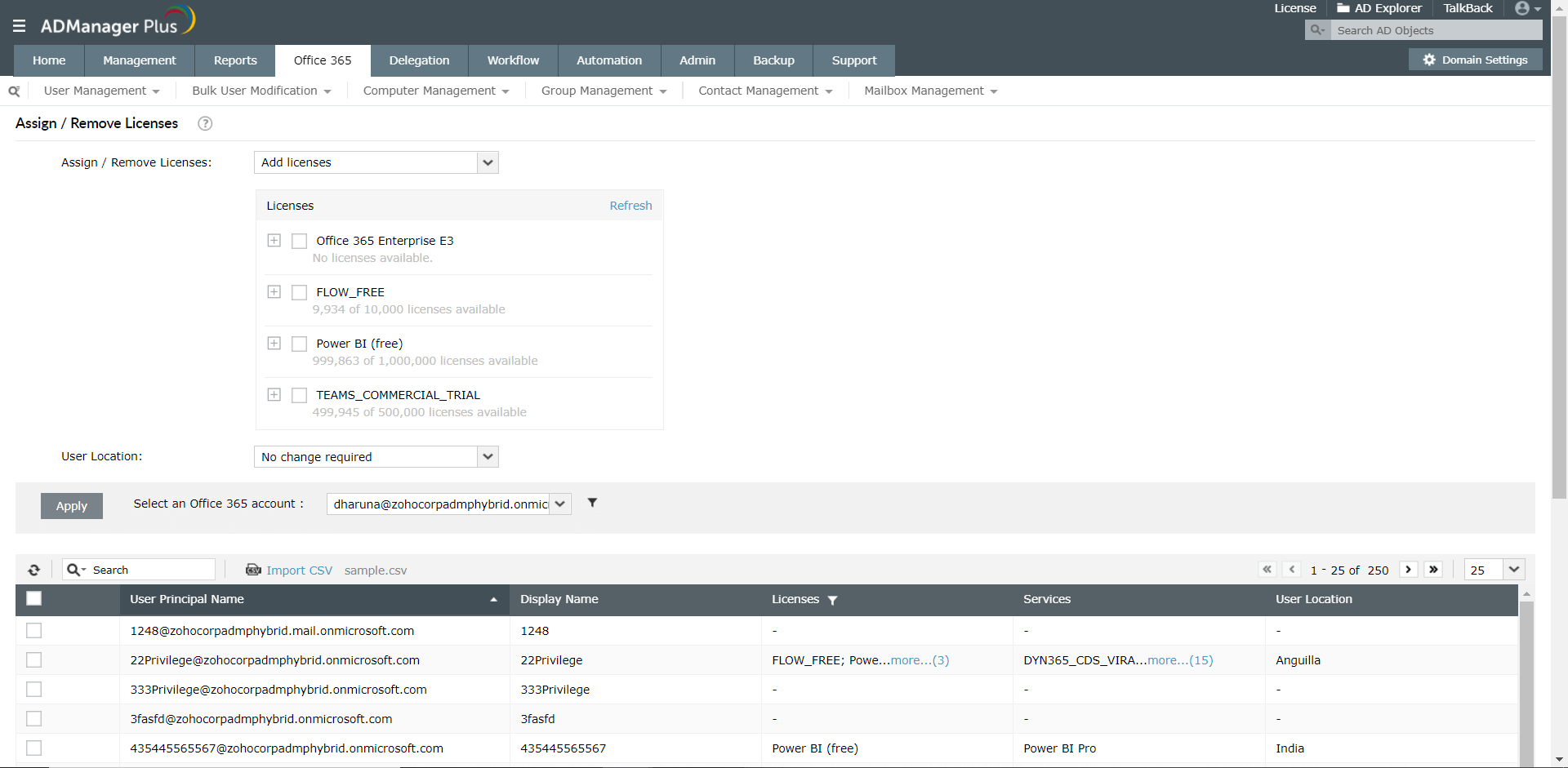
Add Microsoft 365 licenses:
Adding Microsoft 365 licenses to users, especially to multiple users at once, can be challenging. To overcome this challenge, ADManager Plus enables you to assign new Microsoft 365 licenses for individual or multiple users by selecting the desired licenses among all the configured license plans. The available licenses in each license plan are displayed in the same window to facilitate easy tracking, and efficient license usage.
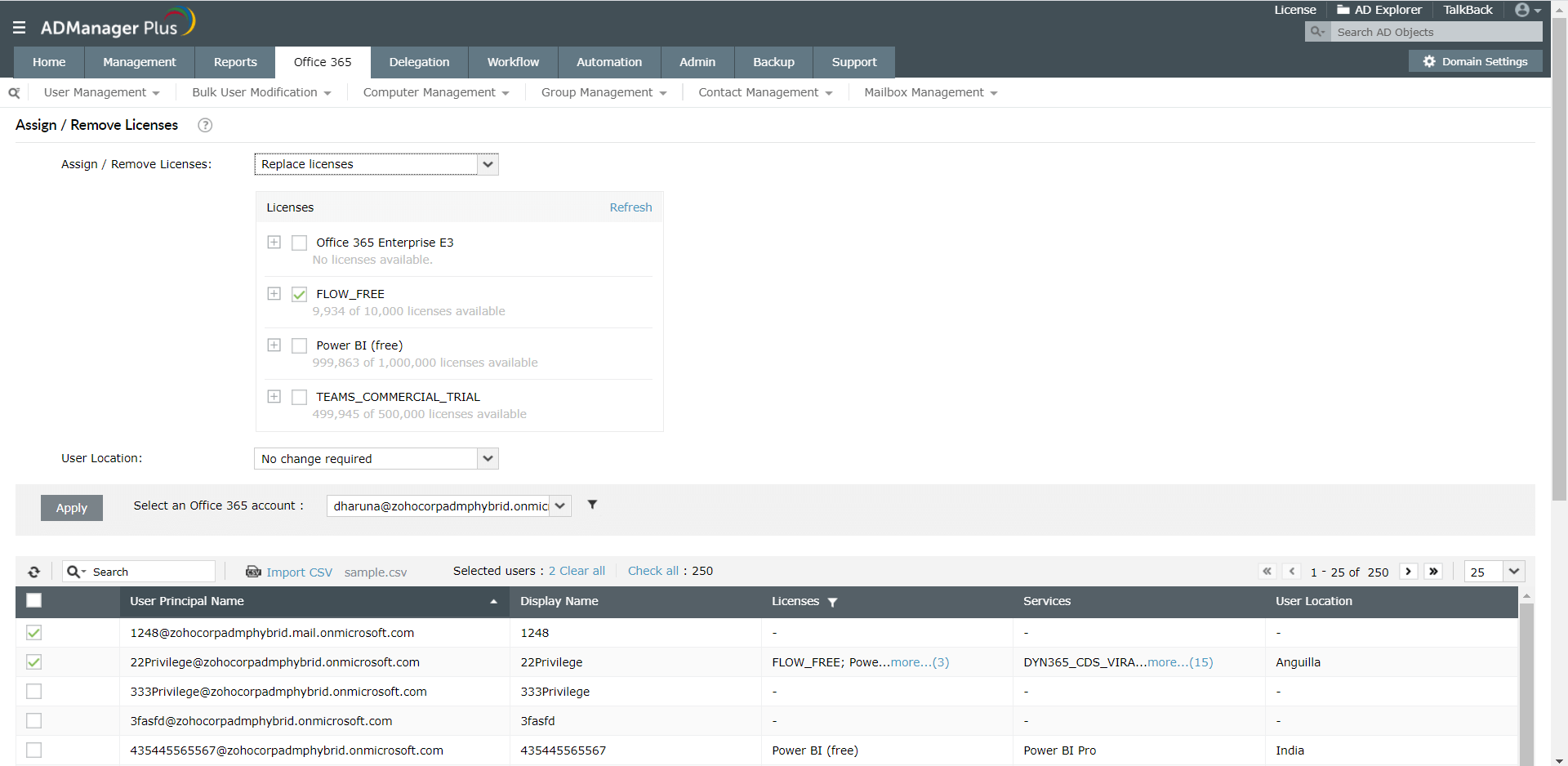
Replace Microsoft 365 licenses:
When users change roles, they may need additional or a different set of Microsoft 365 services for their new role. More often than not, administrators have to replace users' existing licenses with a different license more appropriate for their needs. With ADManager Plus, you can change your users' Microsoft 365 licenses in a single click by simply selecting the license that should replace their previous licenses.
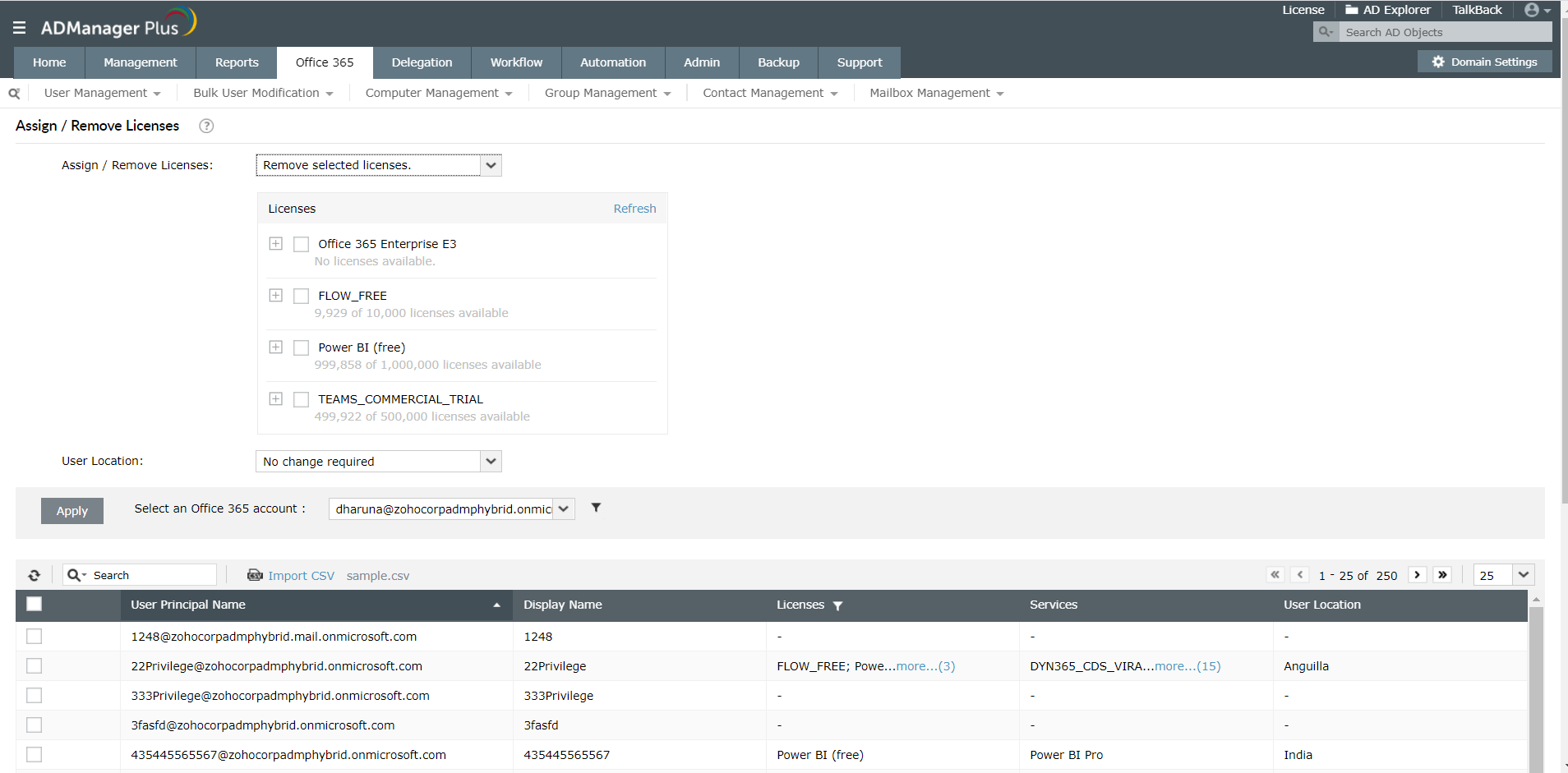
Remove Microsoft 365 licenses:
- Remove selected licenses: Using this feature, you can remove specific Microsoft 365 licenses that have been assigned to users.
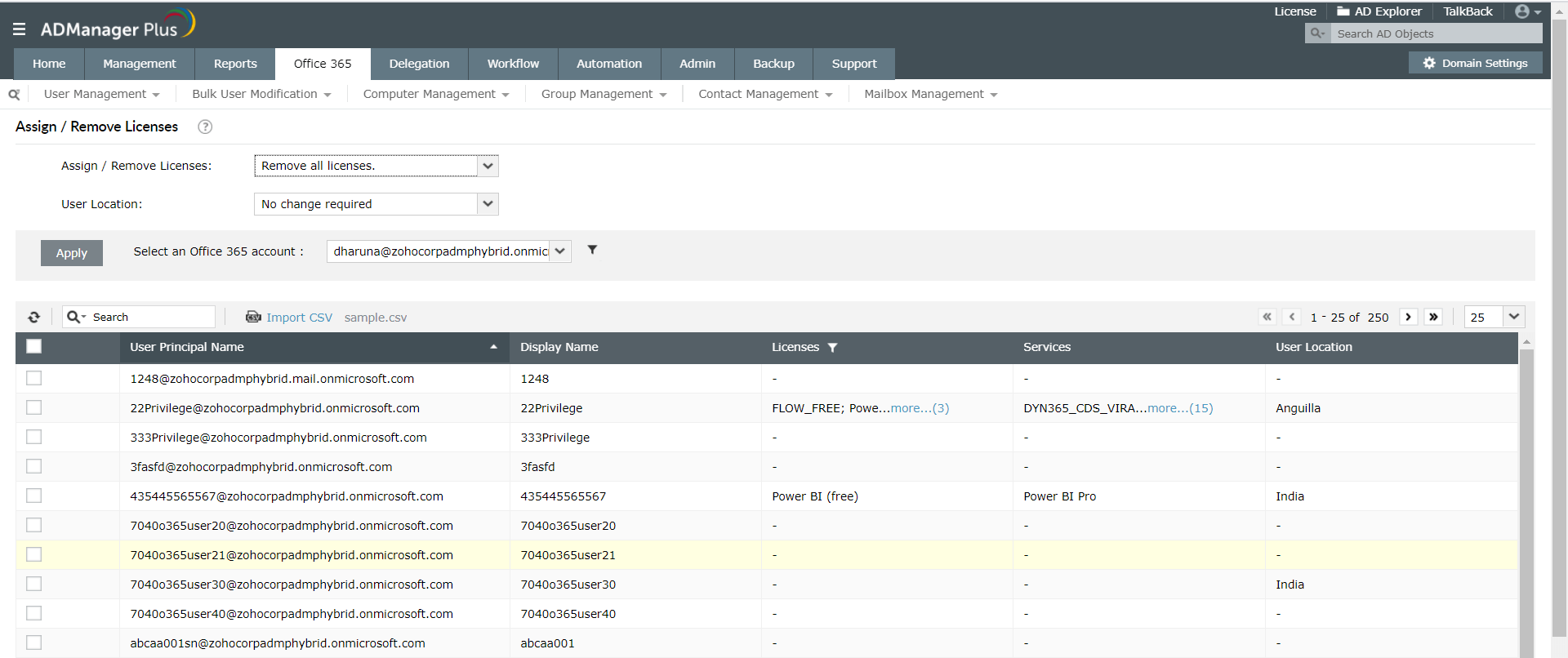
- Remove all licenses: This feature allows you to remove all Microsoft 365 licenses at once, and at your preferred time.
- Remove selected licenses: Using this feature, you can remove specific Microsoft 365 licenses that have been assigned to users.
Group-based license modification:
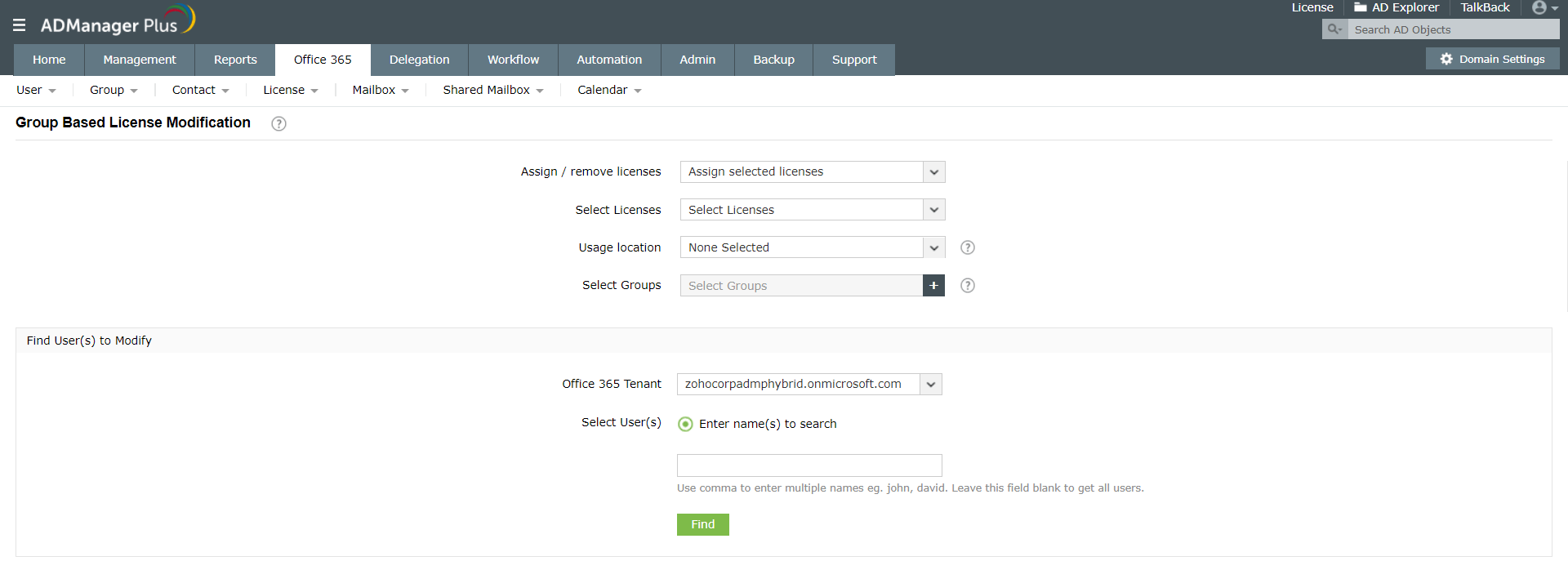
Generally, users belonging to a specific group need the same Microsoft 365 features, and consequently, the same license plans. To help you easily manage licenses in these scenarios, ADManager Plus' group-based license modification feature allows you to easily manage the licenses of users belonging to the same group. You can identify users who belong to a specific group and modify their licenses in bulk.


Steps to assign or revoke Microsoft 365 licenses of users using ADManager Plus.
- Login to ADManager Plus and click the Microsoft 365 tab.
- Click the Management option in the left panel, and click on License Management.
- Click the Assign / Remove Licenses option.
- Select from any of the following options based on your requirements:
- Add licenses
- Replace licenses
- Remove selected licenses
- Remove all licenses
NOTE: Select the type of license for operations such as Add licenses, Replace licenses, and Remove selected licenses.
- Specify the location of the user.
- Select the desired Microsoft 365 tenant account. You can also add OU-based filters.
- Find the users on which you wish to perform the required operation either by typing in their names in the quick search section or by importing their details via a CSV file.
- Select the required users and click Apply.
Steps to perform group-based license modification using ADManager Plus.
- Login to ADManager Plus and click the Microsoft 365 tab.
- Click the Management option in the left panel, and click on License Management.
- Click the Group-based License Modification option.
- Select from any one of the following operations:
- Assign selected licenses
- Remove selected licenses
- Modify selected licenses
- Remove all licenses
- Replace all licenses
- Select the type of license.
- Choose the Usage location.
- Select the groups to filter the users whose licenses must be modified based on their group memberships.
- Select the desired Microsoft 365 tenant account.
- Enter the names of the user and click Find.
- ClickApply.
- Click here for more details.
Specify users with CSV import and search options
- Select the desired users from the list displayed or use the search option to easily locate particular users by typing in their display name(s), user principal name(s), or location.
- Use the CSV import option for a CSV file containing the desired users' object IDs or user principal names.
About ADManager Plus
Besides managing Microsoft 365 licenses, ADManager Plus also lets you create users in Microsoft 365. It offers the capabilities to create Microsoft 365 accounts for existing Active Directory (AD) users or create users across AD and Microsoft 365 simultaneously. It also offers predefined reporting that allows you to readily access important information about your Microsoft 365 environment.
ADManager Plus is an all-encompassing solution that manages AD, Microsoft 365, Exchange Server, Google Workspace, and Lync/Skype for Business. Get a free 30-day download now to explore all of its features first hand!
Other features
Microsoft 365 User Reports
Receive detailed information about your Microsoft 365 users with ADManager Plus' out-of-the-box Microsoft 365 user reports. You can also automatically generate and email these reports to all relevant users.
Microsoft 365 Management
Efficiently manage your Microsoft 365 users, licenses, contacts, groups, and more with simple point-and-click actions.
Microsoft 365 Automation
Choose from prebuilt actions, and automate the most common Microsoft 365 operations, such as user provisioning and license management, without scripting.
Microsoft 365 License Management
Instantly assign, replace, and remove Microsoft 365 licenses to ensure optimal license usage across your organization.
Microsoft 365 Shared Mailbox Management
Bulk create, modify, and delegate the management of Microsoft 365 shared mailboxes without any PowerShell scripts. Managing your shared mailboxes has never been easier.
Microsoft 365 Group Reports
This extensive catalog provides Microsoft 365 group reports for every need. Schedule these reports to be generated automatically at the desired times.
Need Features? Tell Us
If you want to see additional features implemented in ADManager Plus, we would love to hear. Click here to continue


