# Java Agent Configuration Options
This page should help you tune the configuration for APM Insight Java agent configuration profile. The APM Java agent configuration profile enables you to set threshold values for key parameters and web transactions. These settings can be configured in the apminsight.conf file or from the [web client](https://www.manageengine.com/products/applications_manager/help/apm-insight-agent-configuration-profile.html). Make sure that this file is present in the folder where you have deployed the APM Insight agent.
## Editing the configuration settings
These settings can be configured using the edit option available in the web client.
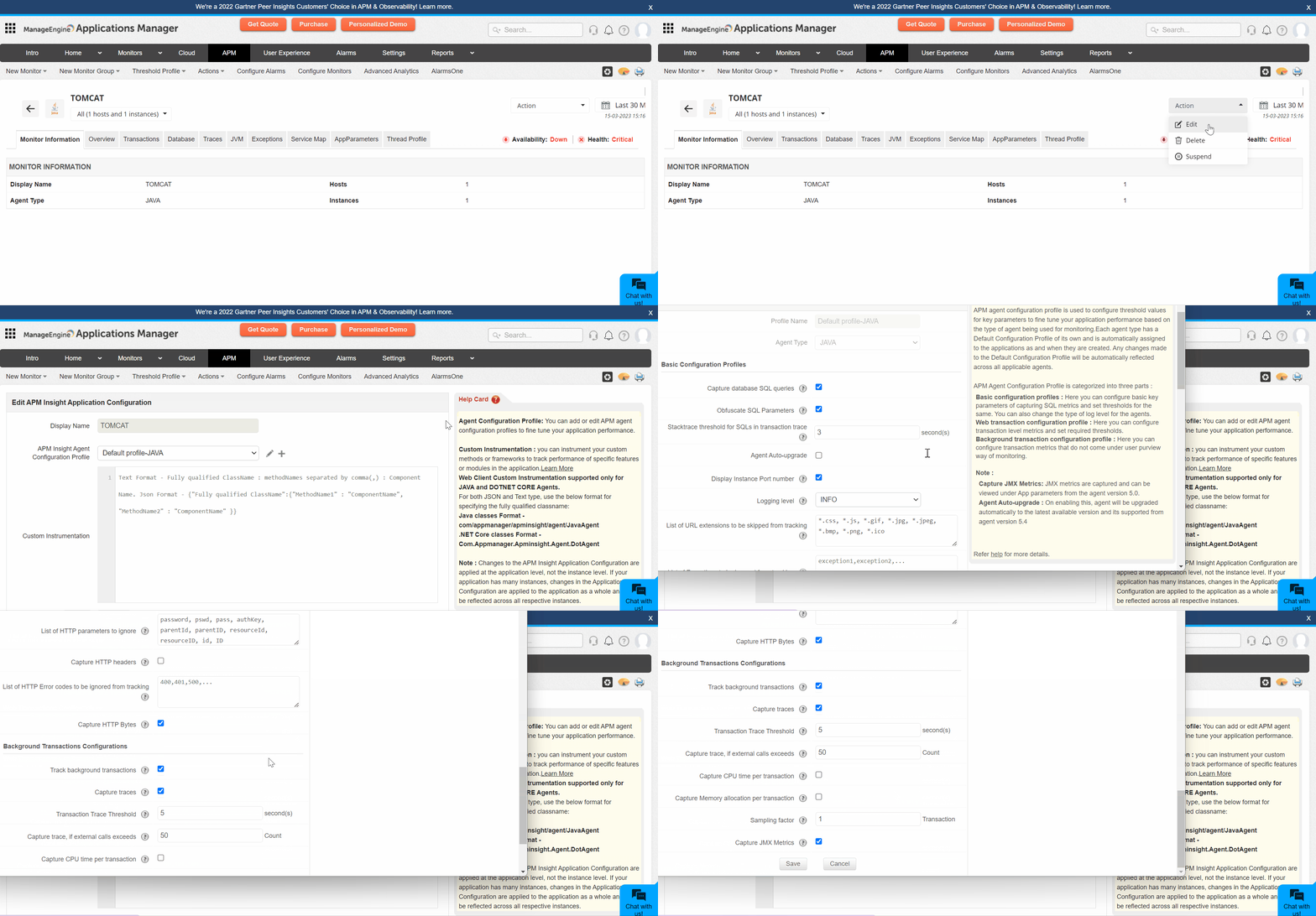
The APM agent configuration profile is categorized into three parts:
- [Basic configuration profiles](https://www.manageengine.com/products/applications_manager/help/apm-insight-java-agent-configuration.html#basic)
- [Web transaction configurations](https://www.manageengine.com/products/applications_manager/help/apm-insight-java-agent-configuration.html#webtransaction)
- [Background transactions configurations](https://www.manageengine.com/products/applications_manager/help/apm-insight-java-agent-configuration.html#bgtransaction)
- [Configurations available only in apminsight.conf file](https://www.manageengine.com/products/applications_manager/help/apm-insight-java-agent-configuration.html#apminsightConfig)
**Note:** '*' indicates that the highlighted default value applies for versions above Applications Manager v16470.
## Basic configuration profiles
| Name | Key | Description | Default value |
|---|---|---|---|
| Capture database SQL Queries | **sql.capture.enabled** | - Enabling this option will listen to all SQL Queries which gets executed. If this option is disabled, no Database Metrics will be collected. | True |
| Obfuscate SQL Parameters | **transaction.trace.sql.parametrize** | - Enabling this option will parameterize all SQL Queries in Slow Transaction Traces (if *sql.capture.enabled* is set to *true* & *transaction.trace.enabled* is set to *true*).
- Disabling this option will give you the real query (with parameters). It is recommended to enable this option if there are queries getting executed using confidential parameters like credit card number, passwords, etc. | True |
| Stacktrace threshold for SQLs in transaction trace | **transaction.trace.sql.stacktrace.threshold** | - Enabling this option will collect the stacktrace whenever any sql query executed above this threshold time value. | 3(seconds) |
| Display Instance Port number | **show.instance.port.number** | - Port number of application instances will be shown, if this option is enabled. | True |
| Logging level | **apminsight.log.level** | - The log level at which the APM Insight agent should record information. Supported levels are *SEVERE, WARNING, INFO* and *FINE*. | INFO |
| List of URL extensions to be skipped from tracking | **transaction.skip.listening** | - Web transactions of the specified URL patterns will be skipped while tracking. Use comma (,) to separate multiple entries.
**Example:** *transaction.skip.listening=*.jpeg*, will skip listening to transactions ending with .jpeg | *.css, *.js, *.gif, *.jpg, *.jpeg, *.bmp, *.png, *.ico |
| List of exceptions to be skipped from tracking | **exceptions.ignore** | - Enter the list of exceptions that need not be tracked. | None |
| Skip Transactions | **transaction.skip.patterns** | - Provide regex patterns or transaction names that can be skipped from tracking. Multiple entries should be comma separated values. | None |
| Show Method Description in Traces | | - When enabled, class name will be captured and shown under trace details -tab | True |
| Enable Loop detection | **transaction.trace.track.loop** | If the value is set to be 'true', the loops running in your application will be captured. | false |
| Enable Smart Sampling | **smart.sampler.enabled** | When enabled, the agent automatically adjusts the sampling factor based on real-time CPU/Memory consumption of the Java process. | true |
| Include Async in Total Response Time | **rt.include.async.time** | When enabled, the response time of asynchronous calls in a trace will be added to the transaction's total response time. | true |
| Capture JVM Metrics | **capture.jvm.metrics** | When enabled, performance metrics of the Java Virtual Machine (JVM) will be captured. | true |
| Exclude Grouping in Transaction Names | **transaction.keyword.skip.grouping** | - Provide a list of keywords that should not be grouped in transaction names.
- For example: v1, v2, index1, index2
- In this case, transactions such as api/v2/web3/index2.html and api/v1/web3/index1.html will be grouped as api/v2/*/index2.html and api/v1/*/index1.html.
- The specified keywords are preserved, while other dynamic segments are replaced with a wildcard (*). | None |
## Web transaction configurations
| Name | Key | Description | Default value |
|---|---|---|---|
| Apdex Threshold | **apdex.threshold** | - Application Performance Index (simply called Apdex) is measurement of an Application's Performance ranging from 0 to 1.
- Detailed information about Apdex can be found at [www.apdex.org](http://www.apdex.org/)
- If any transaction response time scores values below the apdex.threshold value, the transaction is labeled as Satisfied.
- If any transaction response time scores above four times the apdex.threshold, the transaction is labeled as Frustrated.
- If it is exactly equal to apdex.threshold or in between satisfied and frustrated threshold value it is labeled as Tolerating. | 0.5 (seconds) |
| Sampling factor | **transaction.tracking.request.interval** | - Sampling factor helps in tracking sampled transactions. If set to 5, APM Insight tracks only 1 in 5 requests of the same kind. | 1 (request) or 10 (request)* |
| Enable transaction tracing | **transaction.trace.enabled** | - Enabling this option will construct Trace for Slow Transactions. You can view the traces collected in APM Insight Page by selecting **Traces** tab. | True |
| Transaction tracing threshold | **transaction.trace.threshold** | - Trace of any transaction whose response time scoring above the specified threshold value will be collected, provided if *transaction.trace.enabled* is set to *true*. The trace can be used to analyze, troubleshoot the transaction working. | 2(seconds) or 5(seconds)* |
| Capture trace if external calls exceeds | **webtransaction.trace.external.components.count.threshold** | - Trace snapshot will be taken for all HTTP request(s) which has total external components (like MYSQL, MEMCACHED, etc) call count equal or higher than the configured number. | 50 (Count) |
| Capture CPU time per transaction? | **webtransaction.record.cputime.enabled** | - Record CPU time for every HTTP request, if enabled. | True |
| Capture Memory allocation per transaction? | **webtransaction.record.memory.allocation.enabled** | - When enabled, memory allocations for all web transactions will be captured. | 2 (seconds) |
| Capture HTTP parameters? | **webtransaction.trace.input.params.record** | - Enabling this option captures parameters of all GET & POST web requests.
- To skip capturing specific parameters use webtransaction.trace.input.params.ignore key.
- Captured parameters can be viewed by selecting the required transaction in Traces tab. | False |
| List of HTTP parameters to ignore | **webtransaction.trace.input.params.ignore** | - To skip capturing specific web request parameters like password, PIN or any confidential values, specify those parameter names for this key.
- Use comma(,) to separate multiple entries. Values specified for this key are case-sensitive.
- If no value is specified, all request parameters will be recorded. | password, pswd, pass, authKey, parentId, parentID, resourceId, resourceID, id, ID |
| List of HTTP error codes to be ignored from tracking | **http.errors.ignore** | - This is the list of HTTP error codes, like 400, 401, and 500, that will not be tracked. | None |
| List of HTTP error codes to be tracked | **http.errors.track** | - This is the list of HTTP error codes, like 400, 401, and 500, that will be tracked. | None |
| Capture HTTP Bytes | **capture.http.network.bytes** | - Captures Bytes in and out in network requests, if this option is enabled. | True |
| Group similar transactions by position | **transaction.grouping.by.position** | - Combine similar transactions under a single transaction by position for easy monitoring.
- Input format: **Transaction** [*a-zA-Z0-9_/.,-:] : **Position** [0-9] : **Group Name** [a-zA-Z0-9_] | None |
| Capture HTTP Headers | **webtransaction.trace.request.headers.record** | - Enabling this option captures the HTTP headers of the trace. | False |
| Web Transaction Tracker Drop Threshold | **webtransaction.tracker.drop.threshold** | - Trackers with response time less than this threshold will be dropped. | 10 milliseconds |
## Background transaction configurations
| Name | Key | Description | Default value |
|---|---|---|---|
| Track background transactions | **bgtransaction.tracking.enabled** | - Enabling this option, APM Insight agent starts tracking background transactions.
- All transactions other than HTTP are considered as background transactions. | True |
| Capture traces | **bgtransaction.trace.enabled** | - Enabling this option, the agent collects traces for slow background transactions, provided bgtransaction.tracking.enabled is set to true. | True |
| Transaction trace threshold | **bgtransaction.trace.threshold** | - Traces will be collected for background transactions whose response time have crossed the specified threshold value, provided bgtransaction.trace.enabled is set to true. | 5 (seconds) |
| Capture trace if external calls exceeds | **bgtransaction.trace.external.components.count.threshold** | - Trace snapshot will be taken for background transactions which has total external components (like MYSQL, MEMCACHED, etc) call count equal or higher than the configured number. | 50 (Count) |
| Capture CPU time per transaction? | **bgtransaction.record.cputime.enabled** | - Record CPU time for every background transaction, if enabled. | False |
| Capture Memory allocation per transaction? | **bgtransaction.record.memory.allocation.enabled** | - Memory allocated for background transactions will be captured, if this option is enabled. | True |
| Sampling factor | **bgtransaction.tracking.request.interval** | - Sampling factor for background transactions.
- If value is set to 1, agent tracks every transaction. If value is set to n, agent tracks 1 in n transactions of same kind. | 1 (Request) |
### Configurations available only in apminsight.conf file
Certain configuration files cannot be modified from the client. These settings can be configured in **apminsight.conf** file.
| Name | Key | Description | Default value |
|---|---|---|---|
| Application Name | **application.name** | - Specify the desired Application's Name to show in Applications Manager.
- If there are multiple instances of your application and you would like to group them, then specify the same application name in all installed APM Insight Agent Configuration files.
Example: myonlineshopping.com | True |
| Capture traces | **license.key** | - The API Key for the corresponding user.
- This will be available in the APM Insight home page, after login.
- Copy and Paste the Key as value for this parameter.
- This key is user specific. Do not share with anyone else. | none |
| Configure Proxy | **behind.proxy** | - Specify whether the Agent installed Application Server is under a proxy network.
- If set True, Proxy credential information should be given in order to send the metric data from the agent to Applications Manager.
- If behind.proxy is set to true, specify values for the following keys:
- proxy.server.host: Host name of the proxy server
- proxy.server.port: Proxy server's port
- proxy.auth.username: User name of the proxy server
- proxy.auth.password: password for the proxy server | False |
| Host details | **apm.host** | - Specify the Applications Manager host name and port in url format (Eg: *https://apm-server:9090*).
- This url is used to send data to the corresponding Applications Manager.
If a failover setup is configured, provide both the primary and secondary host details in the **apm.host** field (Eg: **apm.host** = https://primary-server:8443, https://secondary-server:8443). | None |
| Agent Server Port | **agent.server.port** | - Specify the port number in which your application is running on the server.
- Each port number is treated as an individual instance and will be grouped under the same application name. | 80 |
| APM Directory path | **apminsight.log.dir** | - Directory path where the APM Insight log should be stored.
- Use forward slash(/) as path separator.
- example: D:/apminsight/
- Defaults to the directory where APM Insight agent jar is installed if commented or mentioned incorrectly or unable to create the configured directory.
- It can be found in the apminsight.conf and it will be commented by default.
- To make changes with this parameter sample usage for both windows and Linux need to defined as follows:
**Windows:** D:/Tomcat/APMInsight/logs
**Linux:** /home/apps/APM/APMInsight/logs | |