×![]()
×
×![]()
×
×
How to deploy Qualys agent on macOS devices using Endpoint Central?
This document will guide you through the steps involved in deploying the Qualys agent to multiple computers running Mac operating system using Endpoint Central's software deployment feature.
ARM based Qualys package deployment
- Download this script - InstallQualysCloud-ARM.sh
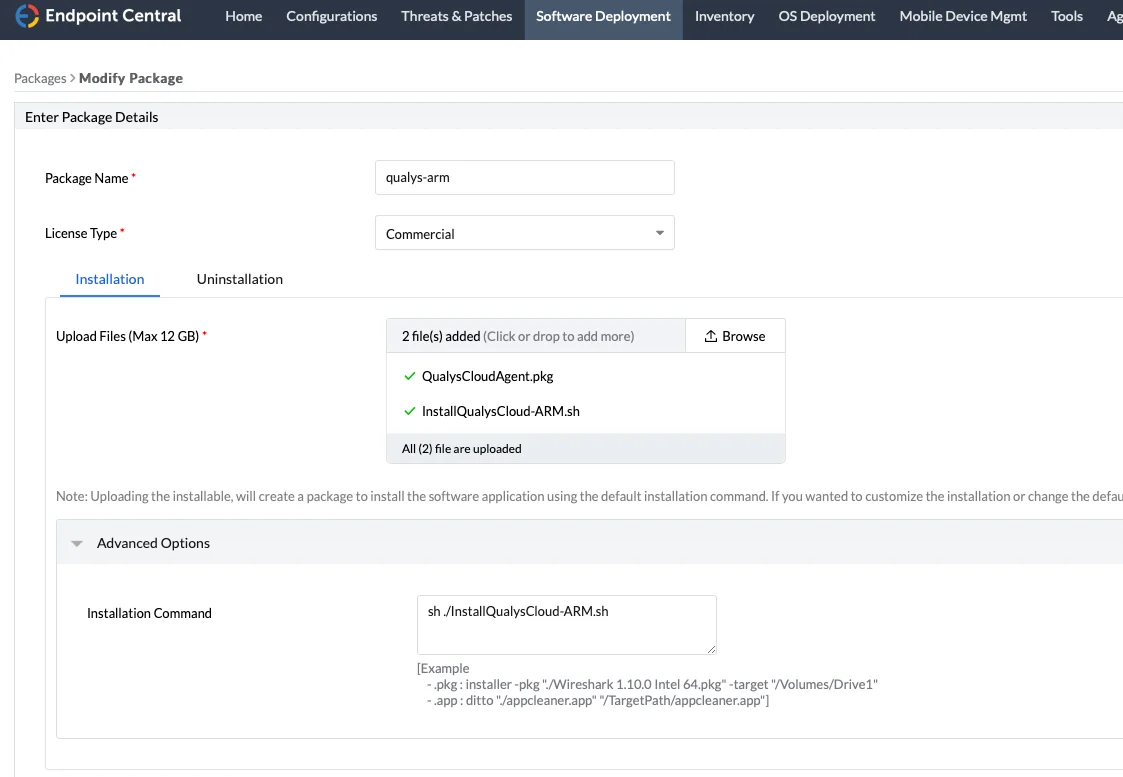
- Navigate to Software Deployment -> Packages -> Add Package -> Mac
- Upload InstallQualysCloud-ARM.sh and QualysCloudAgent.pkg (ARM)
- Under advanced options, enter this installation command - sh ./InstallQualysCloud-ARM.sh
- Save the package
- Navigate to Software Deployment, under Deployment -> Install/Uninstall Software-> Mac -> Computer Configuration
- Create a software configuration with the package, with the ARM machines as target and deploy.
Intel Processor based Qualys package deployment
- Download this script- InstallQualysCloud-Intel.sh
- Change the ActivationID and CustomerID.
- In the product console, navigate to Software Deployment -> Packages -> Add Package -> Mac
- Upload the Intel based QualysCloudAgent.pkg file and the InstallQualysCloud.sh script
- Under Advanced Options, enter this installation command - sh ./InstallQualysCloud.sh and save the package Navigate to Software Deployment, under Deployment -> Install/Uninstall Software-> Mac -> Computer Configuration
- Create and deploy a software configuration with the created package, with the Intel machines as target.