The Patch Management architecture consists of the following components:
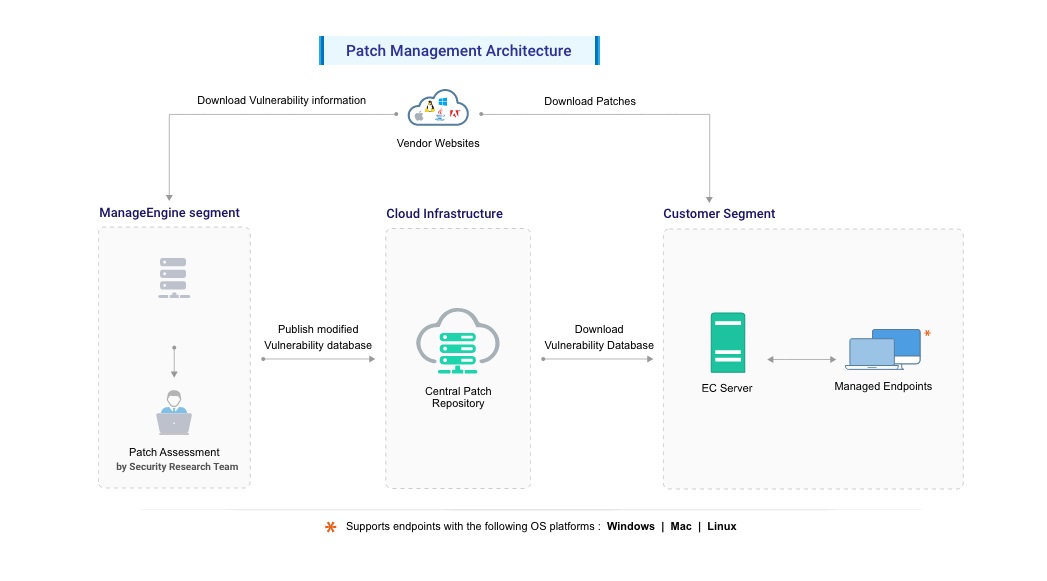
Fig: Patch Management Architecture
The Security Research Team at Zoho Corp. is essential in maintaining cybersecurity. They continuously monitor the internet and vendor websites, including Microsoft, Apple, Linux distributions, and other third-party applications, to gather comprehensive vulnerability information. This includes CVE IDs, CVSS scores, severity, exploit code details, and patches. Additionally, they derive security configurations for systems and hardening guidelines for servers using widely trusted benchmarks like CIS and STIG. Furthermore, they collect data on software deemed unsafe, such as End-of-Life, Remote Desktop sharing, and Peer-to-Peer applications, to ensure robust security measures. The process of managing this data involves several key steps such as:
Only Windows and Mac patches will be tested before release to the central repository. It is recommended that Linux patches be tested in an environment before deployment.
The entire process, from information gathering to patch analysis and publishing, is conducted periodically, ensuring that updates are incorporated into the Central Patch Repository promptly.
Once the updates are supported the corresponding patch details will be available in the Central Patch Repository.
The Central Patch Repository is a portal in the Zoho Corp. site, which hosts the latest vulnerability database that has been published after a thorough analysis. This database is exposed for download by the Endpoint Central server situated in the customer site, and provides information required for patch scanning and installation. The data provided is encrypted and transferred over HTTPS.
The Endpoint Central Server is located at the enterprise (customer site) and subscribes to the Central Patch Repository, to periodically download the vulnerability database. The server:
Patch Management using Endpoint Central is a simple two-stage process:
Patch Assessment or Scanning
Endpoint Central periodically scans the systems in your network to assess the patch needs. Using a comprehensive database consolidated from Microsoft's and other bulletins, the scanning mechanism checks for the existence and state of the patches by performing file version checks, registry checks and checksums. The vulnerability database is periodically updated with the latest information on patches, from the Central Patch Repository. The scanning logic automatically determines which updates are needed on each client system, taking into account the operating system, application, and update dependencies.
On successful completion of an assessment, the results of each assessment are returned and stored in the server database. The scan results can be viewed from the web-console.
Patch download and deployment
On selecting the patches to be deployed, the server downloads the patches from the vendor website and verifies their integrity using checksum. Following this, the agent downloads the patches from the server. The URL of the patches downloaded from the server will be validated with the checksum. Patch binaries will be validated with checksum during the download and each time installation is initiated.
To configure Patch Management follow this link.