BitLocker Audit & Reports
Where to check per-device encryption status, and what the BitLocker and TPM reports actually show.
Overview
Managed Computers
One view summarizes every device's encryption state, policy, and prerequisite status.
What the Managed Computers view shows
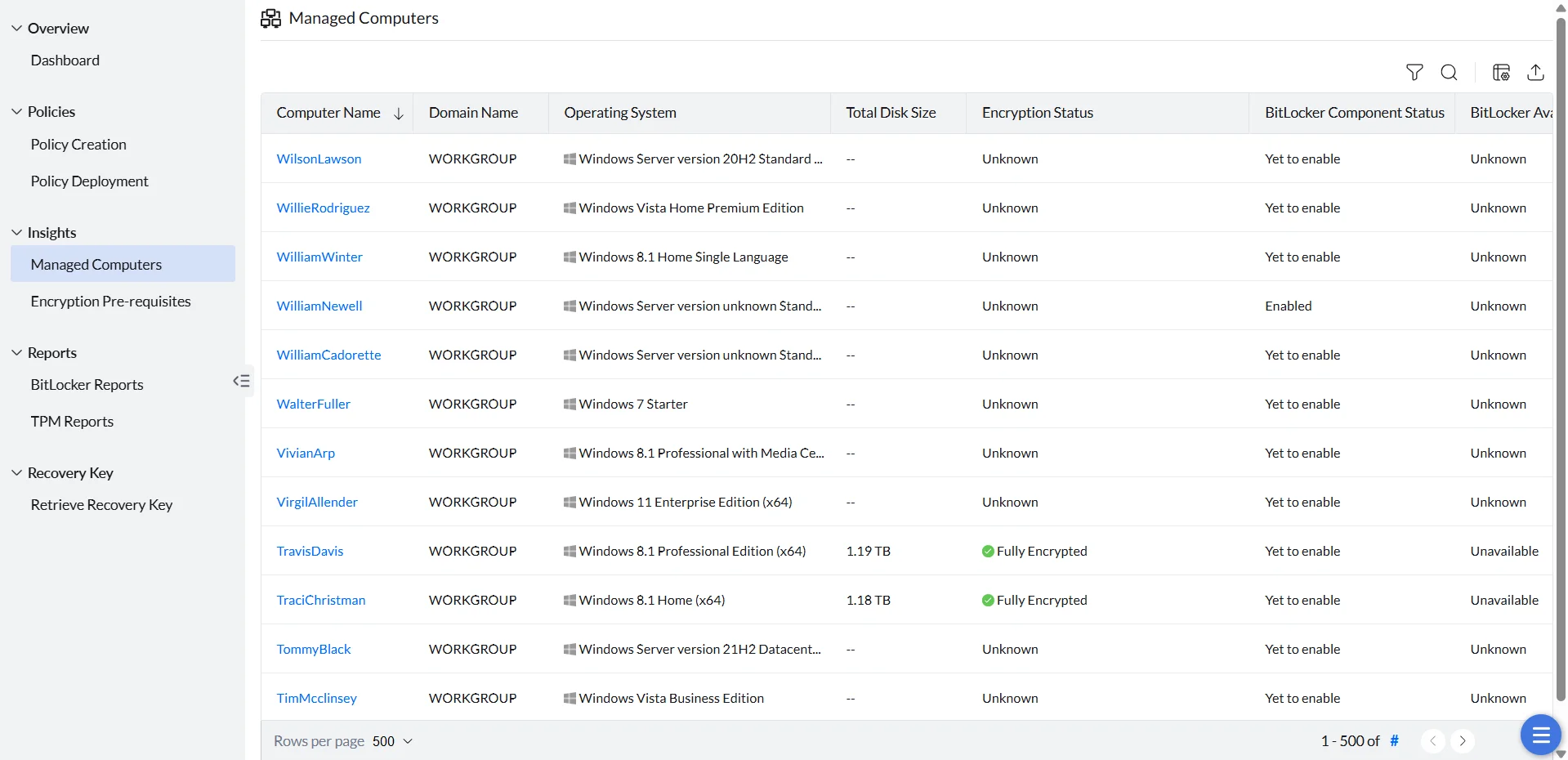
The Managed Computers section under Insights lists, for each device: its name, domain, operating system, storage capacity, encryption status, applied policy, BitLocker and TPM availability, and BitLocker component and prerequisite statuses.
Reading the Encryption Status icon
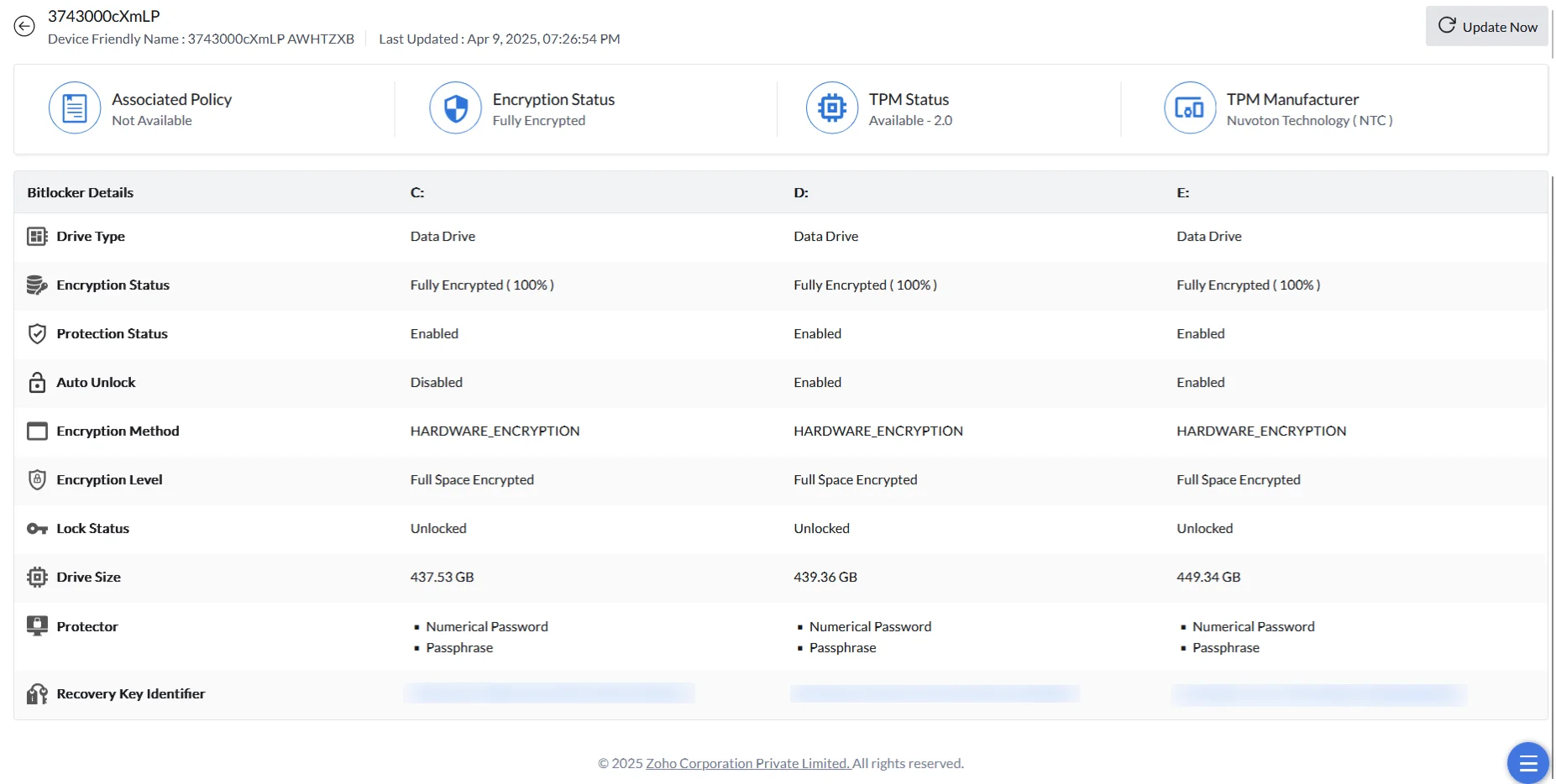
Encryption Status is a machine-level summary across all of a computer's drives. The color of the icon next to the status matters as much as the status text itself:
Reports
BitLocker Reports
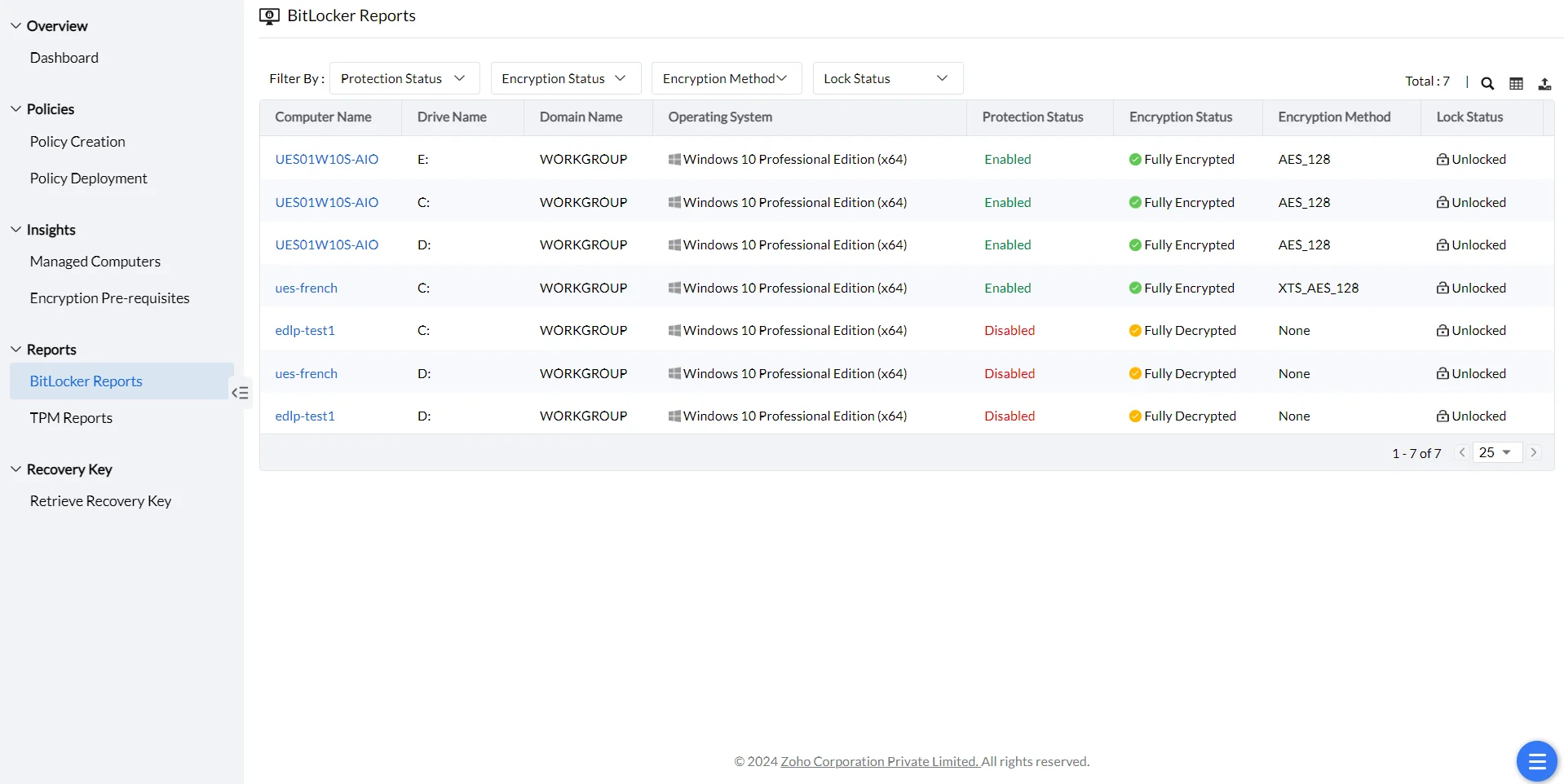
Every computer is scanned for its BitLocker and drive details, starting right after agent installation.
What's in the status report
All computers are scanned to assess their BitLocker encryption status and drive details. The initial scan runs right after agent installation, and later scans detect new computers and track changes in drive status and encryption progress.
Reports
TPM Reports
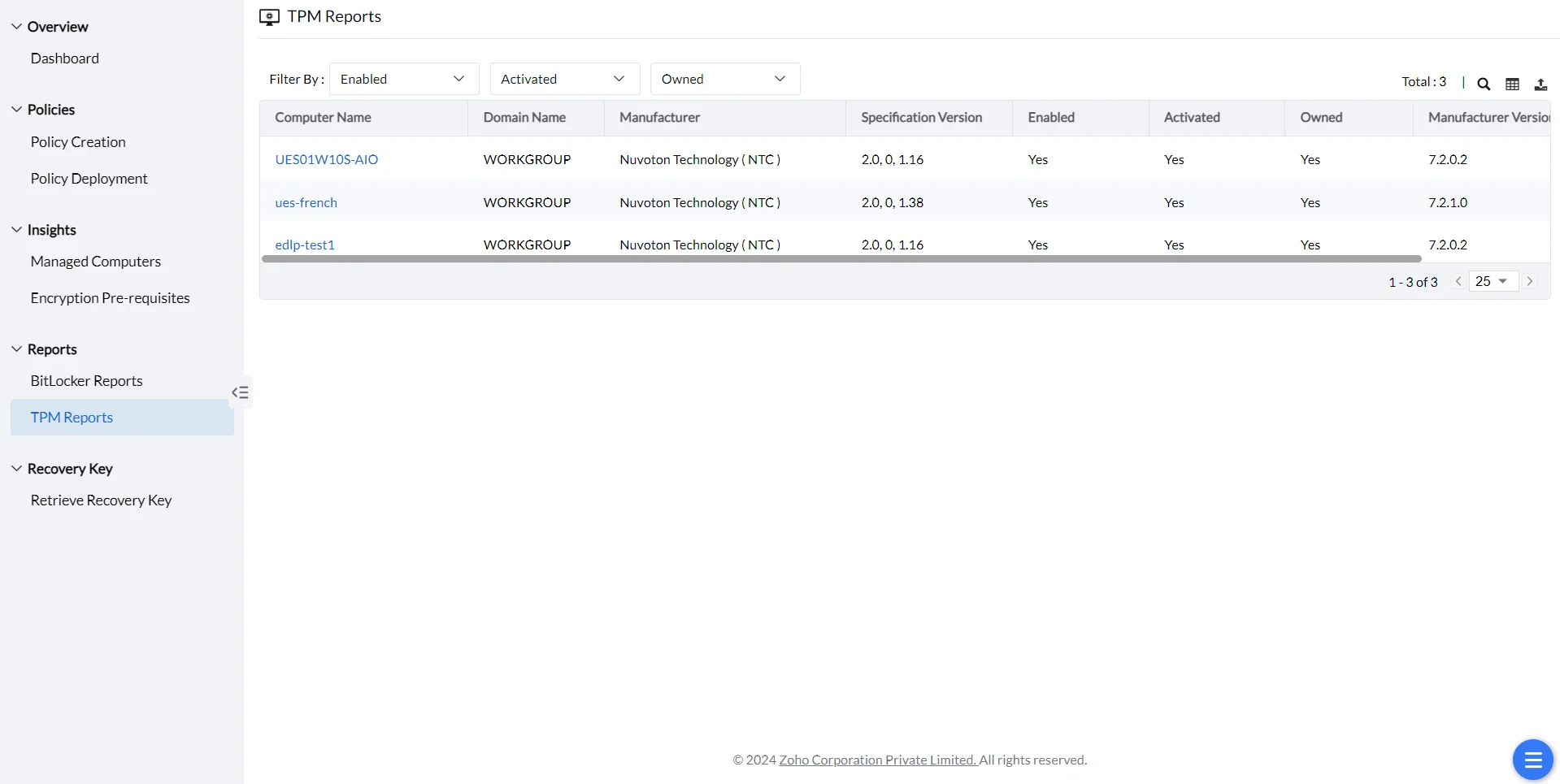
TPM handles the hardware side of encryption, and its own report tracks whether it's available, enabled, and owned.
How TPM protects the drive
The Trusted Platform Module (TPM) is a hardware security chip on the motherboard that provides hardware-level drive encryption. It generates a set of cryptographic keys unique to the host system, storing part of the key in the TPM and the rest on the hard drive — the drive is only accessible when both halves match, so if the drive is moved to another computer, the data stays encrypted.
What's in the TPM report
BitLocker Management Dashboard & Tile Definitions
The BitLocker Management Dashboard provides a quick snapshot of encryption status across your organization through summary tiles, charts, and actionable links to drill down into specific areas.
Computer Encryption Summary Tiles
The dashboard displays four key metrics in the Computer Encryption Summary section:
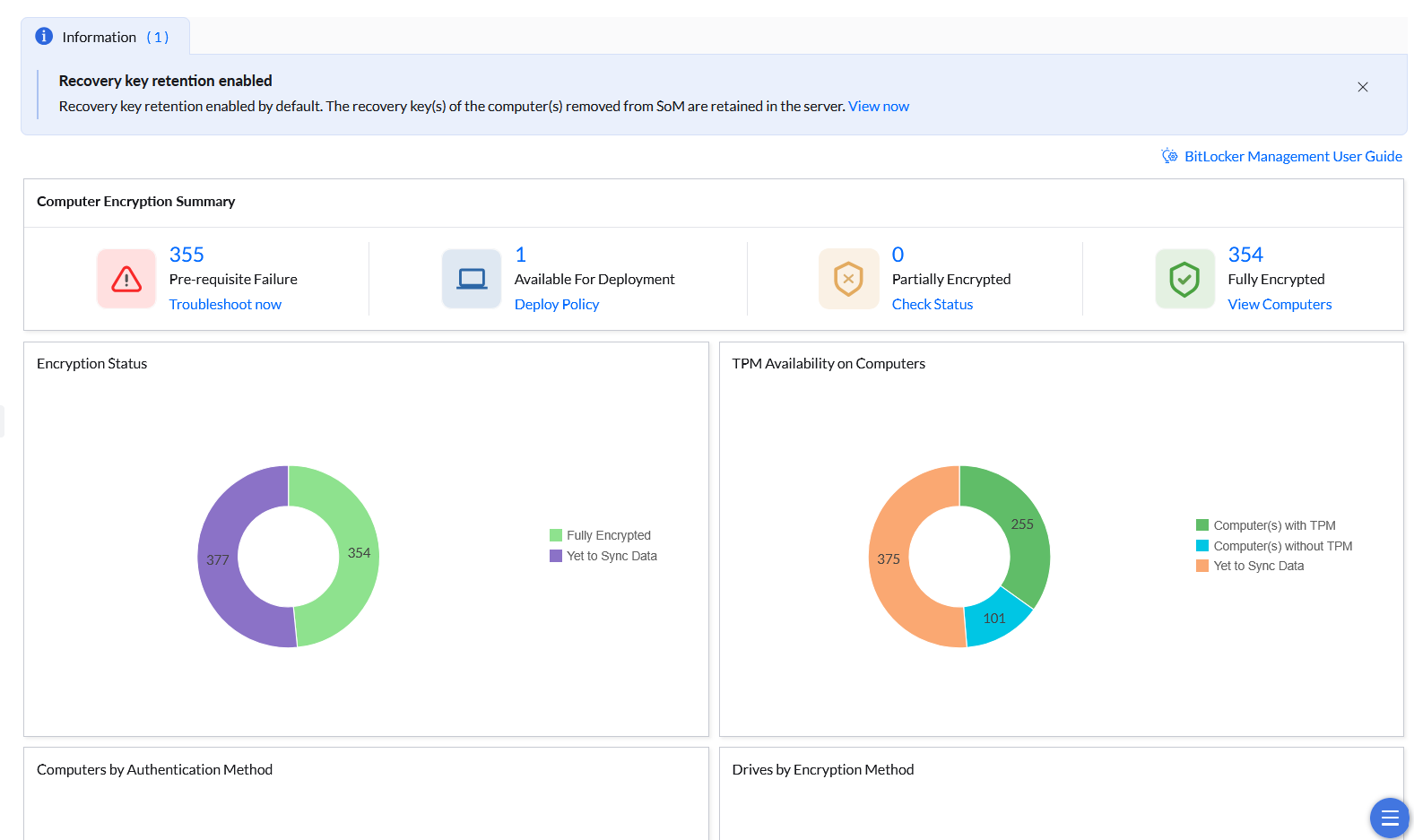
Pre-requisite Failure
Machines where a BitLocker policy is assigned but cannot proceed due to missing prerequisites. Common causes include:
- No TPM (Trusted Platform Module) available
- Secure Boot disabled
- Insufficient drive space for encryption
- Incompatible hardware or firmware
Action: Verify hardware prerequisites on these machines and resolve the blocking issue before encryption can proceed.
Available For Deployment
Machines that have NOT had an Endpoint Central BitLocker policy deployed by the administrator, regardless of their actual encryption state. This category includes:
- Unencrypted machines (awaiting policy deployment)
- Machines manually encrypted outside Endpoint Central (native Windows BitLocker, Device Encryption, or legacy MBAM) — these are still counted here until an EC policy is deployed and takes ownership
- Machines where no BitLocker policy has been selected in Policy Deployment yet
Important: A machine appearing here does NOT necessarily mean it is unencrypted; it may be encrypted but not yet under EC management.
Action: Deploy a BitLocker policy under BitLocker Management > Policy Deployment to move these machines into managed state. After policy deployment and the next agent refresh cycle, the machine will move to "Partially Encrypted" or "Fully Encrypted" (depending on encryption progress).
Partially Encrypted
Machines where an Endpoint Central BitLocker policy has been deployed and encryption is in progress. These machines show encryption completion below 100% on one or more drives.
Action: Monitor these machines — encryption should complete within hours to days depending on drive size and system load. Once all eligible drives reach 100% encryption, the machine automatically moves to "Fully Encrypted".
Fully Encrypted
Machines where an Endpoint Central BitLocker policy has been deployed and all eligible drives show 100% encryption completion. These machines are fully protected under EC management.
Status: No action required; machines are at target encryption state.
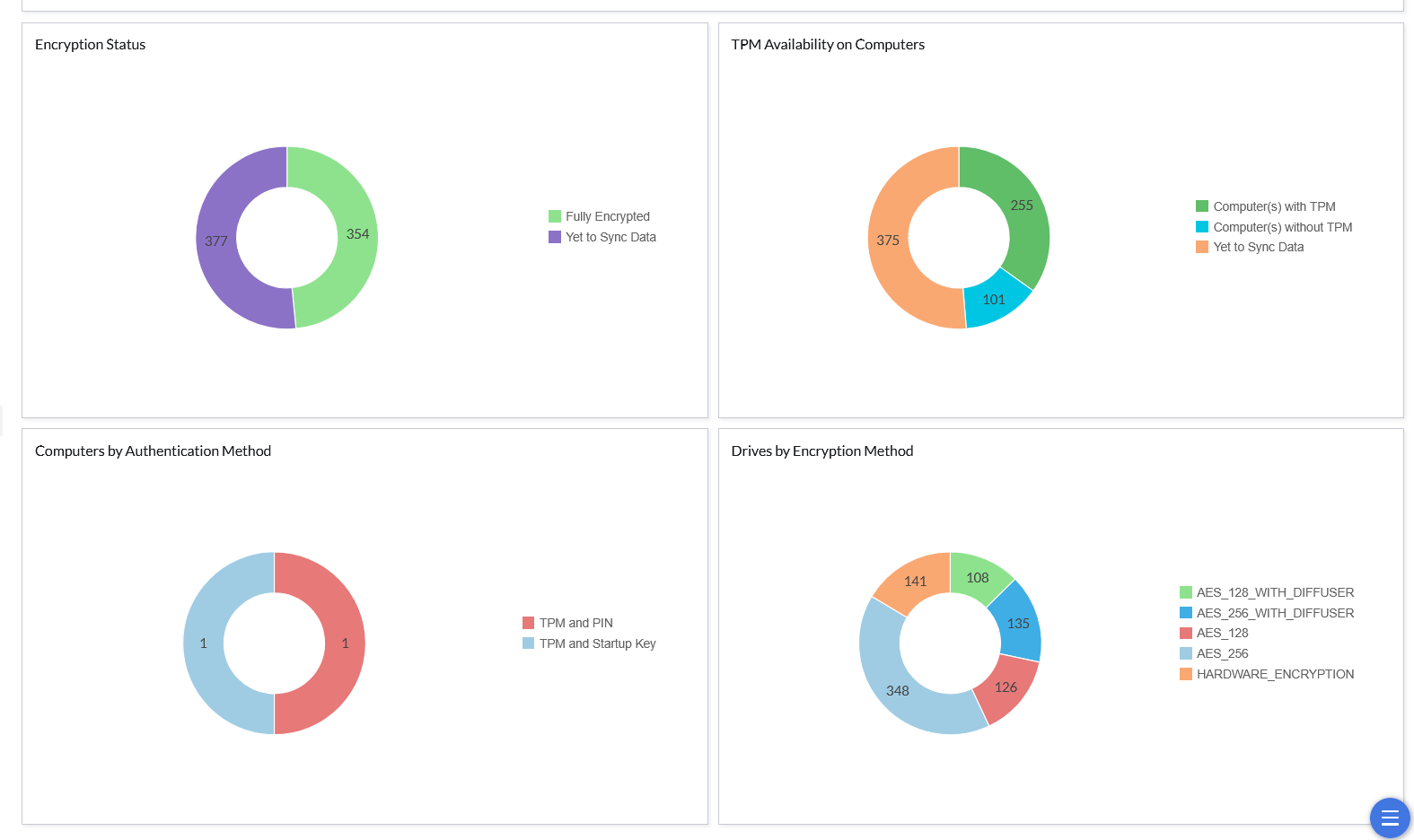
Dashboard Charts
Encryption Status
Pie chart showing the overall encryption progress across all managed machines:
- Fully Encrypted: Machines with 100% encryption completion
- Yet to Sync Data: Machines where encryption status has not yet been reported or synced to the dashboard (typically newly deployed policies or machines awaiting first agent check-in)
TPM Availability on Computers
Pie chart showing TPM readiness across managed machines:
- Computers with TPM: Machines with available Trusted Platform Module (required for TPM-based encryption authentication)
- Computers without TPM: Machines without TPM (will require PIN or passphrase-based authentication)
- Yet to Sync Data: Machines where TPM status has not yet been reported
Computers by Authentication Method
Pie chart showing the distribution of authentication methods deployed across machines:
- TPM and PIN: Machines using TPM with PIN authentication
- TPM and Startup Key: Machines using TPM with startup key file authentication
- Other methods: Passphrase, TPM only, or other configured authentication types
Drives by Encryption Method
Pie chart showing the distribution of encryption algorithms used across all encrypted drives:
- AES_256_WITH_DIFFUSER: Advanced Encryption Standard 256-bit with DIFFUSER (legacy)
- AES_256: Advanced Encryption Standard 256-bit (standard modern encryption)
- AES_128: Advanced Encryption Standard 128-bit
- HARDWARE_ENCRYPTION: Self-encrypting drives or hardware-based encryption
- Other methods as configured in your policies