Software Licenses Management: Tracking & Compliance
Achieve 442% ROI and $3.7 million in net savings with Endpoint Central.

Table of Contents
What is Software License Management?
Software license management (SLM) is the process of documenting, tracking, and controlling the software licenses used throughout an organization from a single console. A software license is a legal document produced by software publishers or distributors that provides rules and guidelines on the usage and distribution of the software. This document typically contains terms and conditions, restrictions, limitations, and disclaimers.
As part of software asset management, IT software license management involves tracking, documenting, and controlling how and where software is used across your organization. A software licensing management solution can assist you in complying with license agreements, including end-user license agreements (EULA). It can also notify you about license expiry dates and flag over-usage or under-usage using a software metering feature, making it an essential component of any IT asset management strategy.
Most commonly, IT teams rely on an application license management tool integrated within a broader IT Asset Management solution. Cloud-based software license management platforms have made it significantly easier to achieve real-time visibility and automate compliance workflows at scale.
Take control of your software licenses with Endpoint Central.
Common Software License Types
Understanding the different types of software licenses is the foundation of effective software licenses management. Broadly, software licenses fall into two categories: proprietary (commercial) and free and open-source software (non-commercial). Proprietary licenses carry the most restrictions with respect to modification and distribution, making a software license key management system essential for compliance.
Types of software licenses
Here is a list of different software license types in increasing order of restrictiveness:
- Public Domain Licenses: Anybody can use and modify the software without any restrictions.
- Lesser General Public Licenses (LGPL): Developers can link open-source libraries in the source code and the resulting code can be licensed under any other type of license. However, the LGPL-applicable component must remain available under the same LGPL license.
- Permissive Licenses: Software modification and distribution is possible with a few restrictions, which differ from one software to another.
- Copyleft Licenses: Developers are allowed to modify and distribute the software provided the same rights remain available for further alterations.
- Proprietary Licenses: Nobody is allowed to copy, modify, or distribute the software. This is the most restrictive form of licensing and requires a dedicated software license management system to stay compliant.
Key Features of Software License Management (SLM) Tools
As part of IT asset management, a software licensing management solution empowers you to carry out all license-related activities in just a few clicks and helps keep software licensing issues at bay.
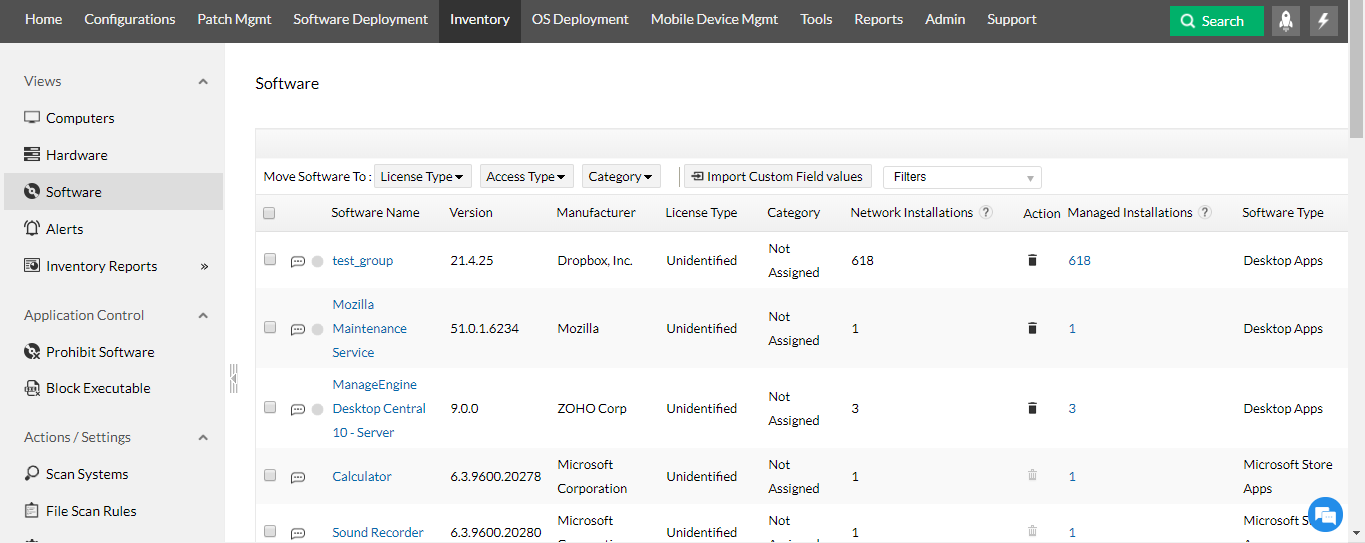
Updated software inventory
IT Asset Management software scans the network periodically to detect new software installed or uninstalled within your network. This is done via differential asset scanning, allowing you to stay up-to-date at all times without utilizing excessive bandwidth.
Software license compliance reports
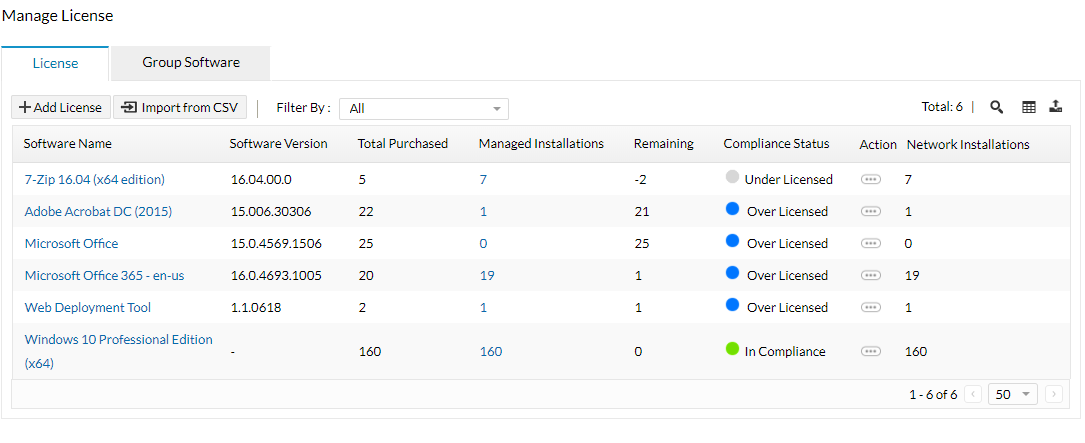
The software audit tool helps simplify software license compliance management using the following built-in reports:
- Software License Compliance Report: This report gives you details on commercial software with their license compliance status, determined based on input provided in the Manage Software Licenses section on our help page.
- Software Licenses to be Renewed Report: This report provides the list of software whose licenses need renewal soon. You can specify the time period and also view licenses that have already expired by selecting appropriate options.
- Based on software metering and usage statistics, you can decide whether or not to renew the licenses.
Software license compliance alerts
With the help of a software license audit tool, you can configure email alerts and stay informed on inventory dynamics across your organization. Alerts can be generated to notify you of:
- Non-compliance of software licensing policy (over-licensed or under-licensed).
- Software being used past its license validity period.
- Software license usage falling below a specified limit.
See how Endpoint Central simplifies software license compliance management.
Steps in Software License Tracking & Management
Effective software licenses management follows a structured four-stage process. Together, these steps form a complete license management services workflow that covers discovery through audit readiness.
Stage 1: Discovery
The first step is building a complete picture of your software environment. Run an asset scan across all endpoints to discover every application installed in your network. This updated inventory forms the foundation for all subsequent license management activities. Using a comprehensive IT software license management tool, you can identify both commercial and non-commercial software and flag any unauthorized or end-of-life applications immediately.
- Step 1: Run an asset scan to discover and update your software inventory.
- Step 2: Identify all commercial software requiring active license tracking.
- Step 3: Flag unauthorized, prohibited, or end-of-life software for removal.
Stage 2: Centralization
Once your inventory is established, use your license management software to consolidate and store all license details in one place. This includes expiry dates, invoices, proof of purchase, warranty details, and license keys. Although this is an investment of time upfront, centralized software license key management will save significant effort during audits.
- Step 4: Upload license details in CSV format (Product Name, Manufacturer, Version, License Owner, Number of licenses, License Name, Licensed To, Purchase Date, Expiry Date, License Key).
- Step 5: Group different versions or editions of the same software under a single entry for easier tracking.
Stage 3: Reclamation
Use the software metering feature in your application license management tool to monitor actual usage. Based on usage data, reclaim licenses from systems where applications are installed but not actively used. This reduces unnecessary expenditure and ensures your license count reflects actual organizational need.
- Step 6: Configure software metering to track usage per application and per user.
- Step 7: Identify underutilized licenses and uninstall applications from systems where they are not in use.
- Step 8: Reallocate reclaimed licenses to other users or departments before purchasing new ones.
Stage 4: Audit Preparation
Configure alerts and schedule compliance reports using your software licensing management solution to ensure you are always audit-ready. Proactive internal audits give you confidence that your license position is accurate before external publishers conduct their own reviews.
- Step 9: Configure alerts for over-licensed or under-licensed software.
- Step 10: Schedule compliance reports to monitor license usage trends.
- Step 11: Conduct periodic internal audits to verify your compliance posture.
- Step 12: Renew licenses based on current usage data rather than previous purchase volumes.
Reclaiming Unused & Redundant Software Licenses
One of the most significant cost-saving opportunities in IT software license management is the systematic reclamation of unused licenses. Organizations frequently pay for software that sits idle on endpoints where it was deployed but never actively used. A robust free license management software trial or a full-scale enterprise platform can help identify this waste quickly.
Reclamation works by combining software metering data with automated uninstall policies. When usage falls below a defined threshold over a set period, the license management system can trigger an uninstall workflow and return the license to the available pool. This is particularly valuable for high-cost enterprise applications such as CAD tools, creative suites, and database clients where a single seat can represent significant annual spend.
- Monitor usage trends over 30, 60, or 90-day periods to identify consistently idle licenses.
- Set automated uninstall policies for applications unused beyond your defined threshold.
- Reallocate reclaimed licenses to new employees or teams before renewing or purchasing additional seats.
- Use the group software feature to track reclamation across multiple versions of the same application.
Start reclaiming unused licenses and reducing IT spend with Endpoint Central.
Challenges in Software License Management
Managing software licenses across a distributed organization is one of the most complex responsibilities IT teams face. Without a dedicated software licensing management solution, organizations frequently run into the following challenges.
What is software non-compliance?
Software non-compliance refers to the failure to adhere to the terms of a software license or the unauthorized use of software. This can occur when an organization installs more copies of a software than the license permits, uses software for commercial purposes without the appropriate license, or modifies and redistributes software in violation of its license terms.
Software non-compliance can have serious consequences, including legal action by the software publisher and significant financial penalties. Software publishers such as Adobe and Microsoft periodically audit client environments to detect piracy, copyright infringement, and unauthorized use. Failing one of these audits can cause irreversible reputational damage and result in costly fines. A proactive license management software approach is the most reliable way to avoid these outcomes.
Other common challenges
- Lack of visibility: Without continuous network scanning, IT teams have no reliable view of what is installed across endpoints, making compliance impossible to verify.
- Decentralized purchasing: Software procured outside of IT (shadow IT) creates license gaps that are difficult to track without a centralized application license management system.
- License sprawl: Organizations accumulate licenses across multiple vendors, editions, and versions over time, making manual tracking error-prone and inefficient.
- Renewal mismanagement: Without automated alerts, license renewals are missed or duplicated, leading to both compliance gaps and unnecessary spend.
- Remote and hybrid workforce complexity: Devices operating outside the corporate network are harder to scan and manage, creating blind spots in your license compliance posture.
- Audit unpreparedness: Organizations without a structured license management services workflow are often caught unprepared when a software publisher initiates an external audit.
Benefits of Using Software License Management Tools
Deploying a comprehensive software licensing management solution delivers value across compliance, cost control, and operational efficiency. Here is why businesses depend on these tools and why staying software license compliant is a strategic priority.
- Maintaining an up-to-date software inventory: Having complete visibility over the software installed within your network is essential for achieving compliance. Regular inventory scans ensure no application goes untracked, whether installed by IT or by end users directly.
- Reduced IT expenditure: By monitoring usage metrics and reclaiming idle licenses, organizations avoid renewing or purchasing licenses they do not need. This is one of the most impactful benefits of cloud-based software license management.
- Real-time alerts for non-compliance: Set up real-time alerts to flag under-licensed software so your team can act before an audit catches the gap.
- Avoiding audit penalties: Software publishers periodically audit client environments. Organizations that maintain continuous compliance through a license management system can approach these audits with confidence rather than concern.
- Prohibit non-business applications: Block non-business applications across your network to reduce security risk and ensure productivity.
- Perform internal software license audits: Frequent internal audits using software licensing tools ensure you are adequately licensed at all times and help you avoid unexpected fines.
- Streamlined renewal planning: With usage data and expiry alerts in hand, license renewals become a planned, data-driven decision rather than a reactive one.
Manage all your software licenses from a single console with Endpoint Central.
How to Achieve Software License Compliance with Endpoint Central
Achieving software license compliance is just one aspect of software licenses management. A complete approach also entails optimizing license usage to reduce IT expenditure and maintaining consistent software license monitoring over time.
Endpoint Central's built-in license management software capabilities make this straightforward. As a unified IT software license management platform, it combines discovery, centralization, metering, and audit readiness into a single lightweight agent deployed across all your endpoints. Whether you are managing a small business or a large enterprise, Endpoint Central scales to meet your needs with cloud, on-premises, and hybrid deployment options.
- Monitor the use of commercial applications to determine whether licenses are being used efficiently.
- Cut down costs by uninstalling applications from systems where they are not being used.
- Renew licenses based on software usage statistics rather than historical purchase volumes.
- Implement license compliance software for holistic visibility across your entire software estate.
- Use the software license key management feature to store and track all license keys and entitlements in one place.
- Leverage application license management capabilities to group, monitor, and report on software across multiple vendors and versions.
Ready to simplify software license compliance? Endpoint Central makes it easy.
Frequently Asked Questions
What are the common types of software licenses?
The most common types of software licenses include Public Domain, Lesser General Public License (LGPL), Permissive, Copyleft, and Proprietary licenses. Each carries a different level of restriction around modification, distribution, and commercial use. Proprietary licenses are the most restrictive and typically require active software license key management to maintain compliance with vendor entitlements.
What is software license compliance, and what are the risks of not tracking it?
Software license compliance is the practice of using software strictly within the terms defined by its license agreement. Organizations that fail to track their licenses risk using more copies than they are entitled to (over-deployment), or continuing to use software after a license has expired. The risks include financial penalties, legal action from software publishers, reputational damage following a failed audit, and potential operational disruption if non-compliant software is forcibly deactivated.
What does the software reconciliation feature analyze, and how can it help my organization?
Software reconciliation compares the number of software licenses you own against the number of installations detected across your network. It highlights discrepancies, such as software deployed beyond its licensed quantity or licenses purchased but never deployed. This analysis helps IT teams make informed decisions about renewals, reclamations, and procurement, reducing both compliance exposure and unnecessary software spend.
Is there any platform that combines license management with automated issue resolution and cost tracking?
Yes. Endpoint Central combines software license management with automated patch management, software metering, application control, and IT asset management in a single console. This means IT teams can detect compliance issues, automate corrective workflows such as uninstalling over-deployed software, and track cost implications of their license portfolio, all from one unified platform.
How do endpoint management platforms handle software license tracking?
Endpoint management platforms handle software license tracking by deploying agents to all managed endpoints that continuously scan for installed software. The data collected is reconciled against license entitlements stored in the platform's license repository. Administrators receive alerts for compliance violations and can generate reports for audits. Endpoint Central, for example, supports differential asset scanning to minimize bandwidth usage while keeping license data current across the entire device fleet.
What is leading enterprise license management software?
Leading enterprise license management software combines automated discovery, centralized license storage, real-time compliance monitoring, software metering, and audit reporting in a single platform. ManageEngine Endpoint Central is one such solution, offering cloud-based software license management alongside unified endpoint management capabilities. It enables IT teams to manage licenses across Windows, Mac, and Linux environments, track software usage, and maintain continuous compliance without manual effort.
Looking for an MSP offering? Choose Endpoint Central MSP
Manage and secure client endpoints effortlessly. Discover the benefits of choosing us.