×![]()
×
×![]()
×
×
Focus Mode

Theme Switcher

Troubleshooting- Extended Error has Occurred
Problem
You see the error message "Extended error has occurred" on the screen during one of the following scenarios:
- During image creation, while accessing the image repository
- During deployment, while accessing the image repository
Cause
- Error while accessing the network share using its UNC path.
- Credentials to access the image repository has expired.
- The source machine has stored credentials about the target share which are obsolete.
Resolution
Try using an IP Address based share path instead of the UNC path
To resolve this error during image creation:
- Create a new image repository using an IP address instead of a DNS name.
- Go to Endpoint Central Server → OS Deployment → Image Repository → Add Image Repository.
- Add the repository as \\IPAddress\sharedFolder. For example: \\192.168.10.20\osdImages
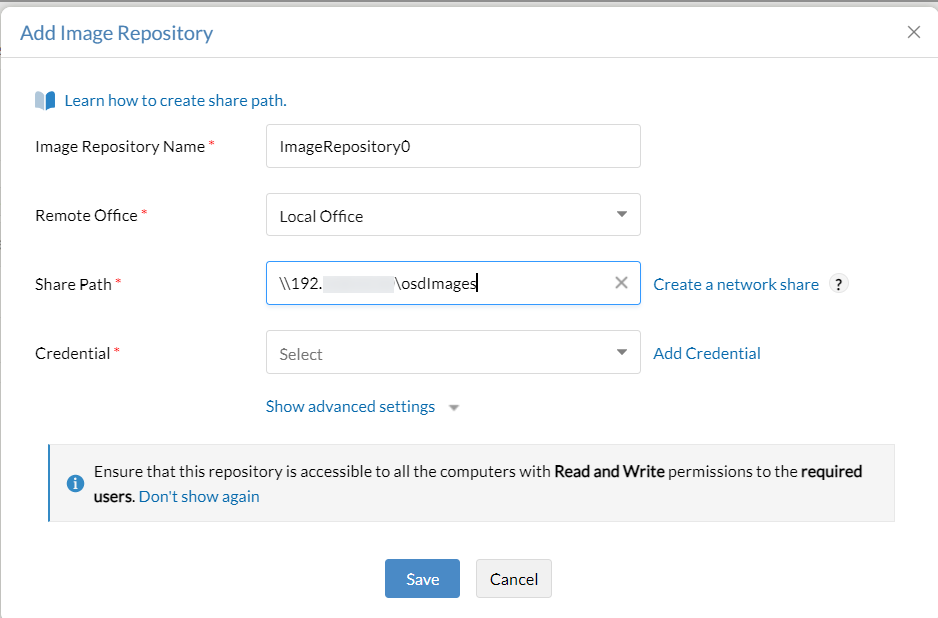
To resolve this error during deployment:
- Create a new image repository using the IP address instead of the DNS name.
- Go to Endpoint Central Server → OS Deployment → Create Image.
- Click on the specific image you are going to deploy.
- Edit the "Image repository" and modify it to use the newly added repository.
Logout from the image repository machine & log in again with the new credentials
- Go to the Image Repository machine.
- Log out, create a new password if expired, and log in with the new credentials.
- Update the password in Endpoint Central → Admin → Global Settings → Credential Manager → Edit Credential.
Remove the obsolete/expired credentials stored in the system cache
- Open Control Panel → Credential Manager on the source machine.
- Remove any outdated credentials from the Windows and Generic Credentials sections.
- Click Details → Remove → Yes on the confirmation box.
- Repeat for any other stored credentials as needed.
Delete the old network share connections
- Open Command Prompt as administrator.
- Type
net useand press Enter. - Identify and remove mapped drives not assigned a drive letter.
- Use
net use /delete \\servername\foldernameto remove a specific connection.
Note
Use net use * /delete to delete all mapped drives if required.
Keywords: Extended error, image repository machine, image creation, image deployment.
 Yes No
Visit Community