Pricing  Get Quote


The better Keycloak alternative


ManageEngine ADSelfservice Plus success story

This is a very effective product and very easy to use from an end user's perspective. It's secure and helps drive self service in the organization.

Highly scalable to multiple domains, Easy integration with on premise and on cloud apps, Quick implementation and configuration.

-- Industry: Manufacturing | Function: IT

Source: Gartner Peer Insights

Try ADSelfServicePlus today

Keycloak vs ManageEngine ADSelfService Plus


Overall


Product capabilities


Integration and deployment


Service and support


Evaluation and contracting


Overall


Product capabilities


Integration and deployment


Service and support


Evaluation and contracting


Source: Gartner Peer Insights

Replace complex identity workflows with a streamlined Keycloak alternative

Keycloak vs ADSelfService Plus feature comparison screenshot

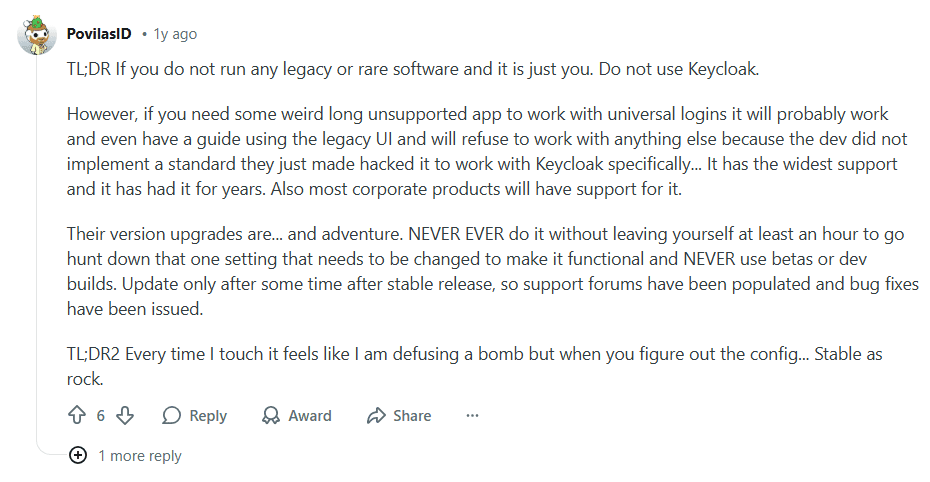
Source: Reddit

Why ADSelfService Plus Is the smarter Keycloak alternative


Ready-to-deploy identity security without developer overhead:

ManageEngine ADSelfService Plus delivers a broad set of authentication capabilities that work out of the box. Administrators can quickly enable SSO, MFA, and self-service password management—including password resets and account unlocks—without writing custom code or building authentication flows from scratch. With native integrations for endpoints and enterprise applications, organizations can streamline authentication across their environment while reducing dependence on developer resources and minimizing password-related help desk requests.


Streamlined self-service password management

ManageEngine ADSelfService Plus enables users to securely reset forgotten enterprise passwords—including MFA verification—through mobile apps or web portals, allowing employees to regain access instantly while reducing password-related support tickets. Administrators can enforce granular password policies during resets and changes, including dictionary filters and pattern restrictions, ensuring credentials meet enterprise standards at creation. ADSelfService Plus also synchronizes password updates across connected systems, allowing users to maintain one set of credentials across multiple enterprise applications.


Harden endpoint security with risk-based and context-aware authentication

By enforcing MFA across machines, VPNs, and enterprise applications, and logins, the system creates a fortified perimeter around every workstation in the enteprise's network. It supports over 20 advanced verification methods, including biometrics and YubiKeys, to prevent phishing and credential-stuffing attacks. The core benefit lies in its context-aware engine, which analyzes IP, location, and time to apply adaptive authentication, ensuring high-risk logins are challenged while legitimate users enjoy a seamless experience.

Highlights of ADSelfService Plus


Self-service password reset

Empower users to reset forgotten passwords and unlock accounts independently via Windows login screen, web portal, or mobile app. Eliminate routine help desk calls with multi-authentication challenges, reducing ticket volume by up to 70% in AD and hybrid environments.


Endpoint MFA

Secure every login with adaptive MFA across desktops, mobile devices, VPNs, and Remote Desktop. Support biometrics, FIDO2 keys, push notifications, and certificates to block unauthorized access without disrupting user workflows.


Password Policy Enforcer

Enforce ironclad password standards with dictionary filters, pattern analysis, history controls, and breach database checks. Ensure compliance across AD, Microsoft 365, and cloud apps while preventing weak credentials at the point of creation.


Password expiry notifications

Proactively alert users via email, SMS, or push alerts before passwords expire, with one-click self-service resets. Minimize lockouts and maintain 24/7 productivity by prompting timely changes without IT intervention.


Conditional access policies

Implement risk-aware access controls based on device trust, location, IP reputation, and behavior analytics. Automatically challenge high-risk logins while allowing seamless access from compliant endpoints.


Passwordless SSO

Replace passwords entirely with FIDO2, biometrics, or magic links for single sign-on across SAML and OIDC apps. Deliver frictionless authentication that scales from on-premises to thousands of cloud services.


Mobile password management

Enable secure password resets and MFA from iOS/Android apps with Face ID, fingerprint, or QR enrollment. Support offline challenges and remote wipes to maintain control over corporate mobiles in distributed workforces.

Here's what our customers say

The deployment is very simple, which makes it nearly fun. We didn’t find any other software that is as fast in deployment as ADSelfService Plus. The instructions are clear and straight forward. The support is working great.
- Matthias Ziolek, Manager
Landratsamt Schwarzwald-Baar-Kreis

ADSelfService Plus is trusted by

bio-key-portalguard-alternative-cus-1-26 bio-key-portalguard-alternative-cus-1-26
bio-key-portalguard-alternative-cus-2-26 bio-key-portalguard-alternative-cus-2-26

Frequently asked questions

The solution acts as a central enforcement point that verifies every access attempt, regardless of whether it originates inside or outside the network. By combining Adaptive MFA (which assesses risk context like IP and location) with Enterprise SSO, it ensures that users are only granted access to specific applications after their identity is continuously validated, moving away from trusted network perimeters.

Yes. During the SAML assertion process, ADSelfService Plus can pass specific Active Directory attributes (e.g., Job Title, Department) to the cloud application. This allows the Service Provider to automatically create or update the user profile upon their first successful login.

Licensing is generally based on the number of domain users who are permitted to use the self-service and MFA features.A license is typically consumed when a user performs a self-service action (like a reset), logs into the portal, or is enrolled in a policy by an administrator.Administrators can easily manage and revoke licenses for inactive or stale accounts to optimize costs

ADSelfService Plus trusted by

Embark on a journey towards identity security and Zero Trust