

Published on: November 06, 2025
The managed services market is currently undergoing rapid transformation, driven by advancements in AI, the IoT, cloud computing, and cybersecurity. These technological influences are reshaping how MSPs deliver services to their customers. In the face of evolving global economic conditions, clients are now seeking more proactive, personalized, expedited services. It is essential for businesses aiming to sustain profitability in today's competitive landscape to meet this growing demand for efficiency.
The MSPs that can crack the code to meet changing customer expectations will reap bigger benefits because the market is expected to grow to $511.03 billion by 2029, up from $365.33 billion in 2024. To capitalize on this opportunity, MSPs must overcome challenges such as inefficient resource allocation and managing multiple tools for handling tickets, billing, and contracts. It's essential for them to address these issues without compromising their service quality or ability to scale profitably.
This is exactly where professional services automation (PSA) and IT ticketing come into play. MSPs require a PSA ticketing system—a single platform that has PSA and traditional IT ticketing capabilities embedded—to empower their leaders, IT admins, and technicians alike to achieve more.
In this guide, we'll dive into what exactly PSA ticketing systems are, the key features you need to look for, the significant benefits you'll gain, and the new trends shaping these powerful tools.
Here are some of the critical questions you need to know the answers to about a PSA ticketing system:
- What is a PSA ticketing system?
- Why is a PSA ticketing system such an important part of modern MSPs?
- What components make up a PSA ticketing system?
- How is a PSA ticketing system different from an ITSM platform?
- What's the role of a PSA ticketing system, and how do you pick the right one?
- What are the emerging trends in the world of PSA ticketing systems?
Let's delve into this guide to find out all the answers.
What is a PSA ticketing system?

A PSA ticketing system is a platform that is tailor-made for MSPs, combining ITSM capabilities such as incident management with business-critical modules like project management, resource management, billing, time tracking, and service contract management. It is a multi-tenant platform that helps MSPs manage IT support and service delivery for every customer uniquely, empower technicians to get more work done without toil, and guide decision-makers with real-time insights on workloads and profitability.
What are the components of a PSA ticketing system?

A PSA ticketing system is the command center for modern MSPs that blends essential tools into a single platform to streamline MSP operations. Let's check out the PSA ticketing system components that make it an indispensable tool for MSPs for managing IT services:
- Ticket creation and management: A platform to log, track, and resolve customers' IT tickets effectively, with capabilities like automated routing, customizable workflows, and built-in SLA management to ensure timely responses
- Multi-tenancy: Capabilities to deliver IT services to each customer with separated client data, customized client portals, and tailored service delivery experiences unique to each customer environment
- Project management: A tool for planning, executing, and monitoring client projects that utilizes Gantt charts, task dependencies, and accurate work log tracking with clear billables
- Time tracking: Accurate logging of technicians' time for billable activities, with automated timers, manual entry options, and categorization for billable versus non-billable hours across tasks and projects
- Resource management: Tools for optimizing technician scheduling and resource allocation, with drag-and-drop scheduling interfaces, skill-based assignments, and availability calendars for efficient technician deployment
- Billing and invoicing: Automated generation of client invoices based on preconfigured contract terms, with flexible service plans and seamless integrations with accounting systems for streamlined financial operations
- Integrations with critical IT and business tools: Seamless connections with tools like Active Directory (AD) management solutions, remote monitoring and management (RMM) solutions, customer relationship management (CRM) systems, and advanced analytical tools, enabling automated ticket creation from alerts, the synchronization of user data from AD or HR information systems (HRISs), and the unification of client information with CRM data for a holistic view, and data exporting from the PSA ticketing system to advanced analytics tools for in-depth reporting on KPIs, profitability, and operational efficiency
How is a PSA ticketing system different from an ITSM platform?

Unlike stand-alone ITSM tools, which cater to a different set of industries, a PSA ticketing system is a purpose-built solution that addresses the unique business model and operational requirements of MSPs. While general IT ticketing systems focus on resolving internal IT issues within an organization, PSA ticketing systems are built for external client service delivery. Here's a breakdown of the key differentiators:
Factor | PSA ticketing system for MSPs | General ITSM system |
Primary focus | Managing IT support for multiple customers | Managing internal IT support requests |
Scope | Customers across different companies (external) | Employees (internal) |
Billing and time tracking | Time tracking for billable hours; integrated with automated invoicing | Not integrated as IT is usually a cost center |
Service contract management | Centralized management of client contracts | Not applicable |
Resource management | Effective resource availability and workload management of both off-site and on-site support staff | Internal workload management |
Multi-tenancy | Architecture to manage multiple clients | Typically, it is not multi-tenant as it is utilized only to support the IT needs of one organization |
Automation focus | Enhancing client service delivery workflows to ensure maximum profitability | Enhancing internal IT management workflows to ensure the maximum ROI |
Integration priority | RMM, CRM, and accounting tools for effective IT operations and customer service management | IAM tools, HRISs, collaboration and communication tools, and more for internal IT management purposes |
What's the role of a PSA ticketing system in MSP organizations?

A PSA ticketing system plays a major role in transforming MSP business operations, enabling MSPs to deliver exceptional service while driving growth. Let’s explore how it supports MSPs in overcoming challenges and achieving operational excellence.
What are MSPs, and what's their business model?
MSPs are IT service providers that manage clients’ technology infrastructure, offering proactive support, monitoring, and maintenance, typically through a subscription-based model. An MSP handles everything from help desk support to network security, allowing businesses to focus on their core operations while the MSP manages their IT infrastructure. This model thrives on consistent MSP service delivery, scalability, and client satisfaction, making the right tools essential for success.
To learn about how to launch your own MSP business and different MSP pricing models, check out our six-step guide to launching a successful MSP business. To learn in depth about what goes into running an MSP business successfully, check out our guide to running a successful managed services business.
Challenges faced by MSPs without a PSA ticketing system
Without a PSA ticketing system, MSPs face a lot of hurdles that impede their efficiency and growth. Here are the key challenges:
- Fragmented operations: Using separate tools for ticketing, billing, and client management leads to silos, causing delays and missed opportunities. This fragmentation makes it hard to streamline MSP services across multiple clients.
- Mounting SLA violations: Manual ticket tracking slows down response times, risking SLA violations and resulting in a string of unhappy customers.
- Revenue leakage due to improper time tracking: Without integrated time tracking and billing capabilities, an MSP misses billable hours, directly affecting its profitability.
- Manual billing: Billing done manually is slow and error-prone, delaying payments and affecting the cash flow.
- Inefficient resource utilization: Without a unified system, MSPs struggle with maximizing resource utilization, often overbooking or underutilizing support agents, which causes burnout or impacts the service quality.
- A lack of AI capabilities: Missing features like predictive AI, NLP-powered chatbots, or GenAI capabilities means MSPs miss out on opportunities to drive up their productivity levels, ultimately losing competitive advantages against other MSPs.
- A lack of integrations: In the absence of connections to observability platforms, endpoint management tools, or advanced analytics solutions, MSPs encounter significant challenges in effectively driving their ITSM workflows, and they have to jump between tools.
What role does a PSA ticketing system play in solving these challenges?
A PSA ticketing system is a boon for MSPs because it helps them address operational hurdles by centralizing ticketing, projects, and client communication to reduce workflow fragmentation. It tracks SLA compliance in real time, ensuring urgent tickets are prioritized, assigned, and dealt with quickly. It also accurately logs technician hours to prevent revenue leakage and ensures consistent profitability with automated invoicing.
By offering visibility into technician availability, a PSA ticketing system optimizes resource use, and its integrated AI proactively detects issues, suggests solutions, and speeds up resolutions. Its integrations with RMM and CRM tools further enhance proactive service management and customer relationships, making it an essential tool for smoother MSP operations.
What are the benefits of using a PSA ticketing system built for MSPs?

Top MSP leaders estimate that 39% of their engineers' time is spent on manual tasks such as ticket management. In fact, 62% of organizations with PSA ticketing software experience "improved project visibility and efficiency, leading to enhanced resource management."
From faster resolutions to better client experiences, here’s how a PSA ticketing system transforms MSP business operations:
Reduced
resolution times
A PSA ticketing system cuts an MSP's ticket resolution time by automating ticket routing and prioritization, ensuring issues are addressed by the right expert and resolved quickly.
Accurate time tracking and automated billing
Integrated time tracking capabilities capture every billable hour without error and automate billing to ensure accurate, error-free billing.
Optimal resource
utilization
Smart technician resource allocation balances workloads, maximizing efficiency across your team.
Improved client communication and service delivery experiences
Real-time updates and client portals enhance MSP client communication, ensuring consistent MSP service experiences.
Contextual reporting
and analysis
Advanced reporting provides insights into service trends, customer satisfaction levels, revenue fluctuations, and more, helping you make informed, data-driven decisions.
Reduced operational
overheads
Cutting-edge automation and AI capabilities free up technicians' time by automating the manual work and allowing them to focus on more important tasks.
How to choose the right PSA ticketing system

With the advancement of AI and modern workflow automation capabilities, PSA ticketing tools have become more powerful. As an MSP, you need to ensure that you're always ahead of the curve, always on the cutting edge. That's why choosing the right PSA ticketing system is very critical; it directly impacts operational efficiency and customer satisfaction.
Leading solutions like ServiceDesk Plus MSP offer unified PSA and ITSM platforms specifically designed for MSPs, enabling them to quickly onboard multiple customers, personalize self-service portals, automate time tracking and billing, implement adaptable SLA management, and customize ticketing templates. These platforms also provide visual workflow creation capabilities and essential integrations with remote monitoring and analytics tools for real-time service desk visibility.
Here’s everything you need to make an informed choice when selecting the right tool for your business.
Key features to look for in a PSA ticketing system
Alignment with industry-recommended ITSM frameworks: When a PSA ticketing solution is aligned with industry-recognized ITSM frameworks, it aids MSPs in ensuring their IT technicians are consistently aligned with best practices when supporting clients or fulfilling service requests.
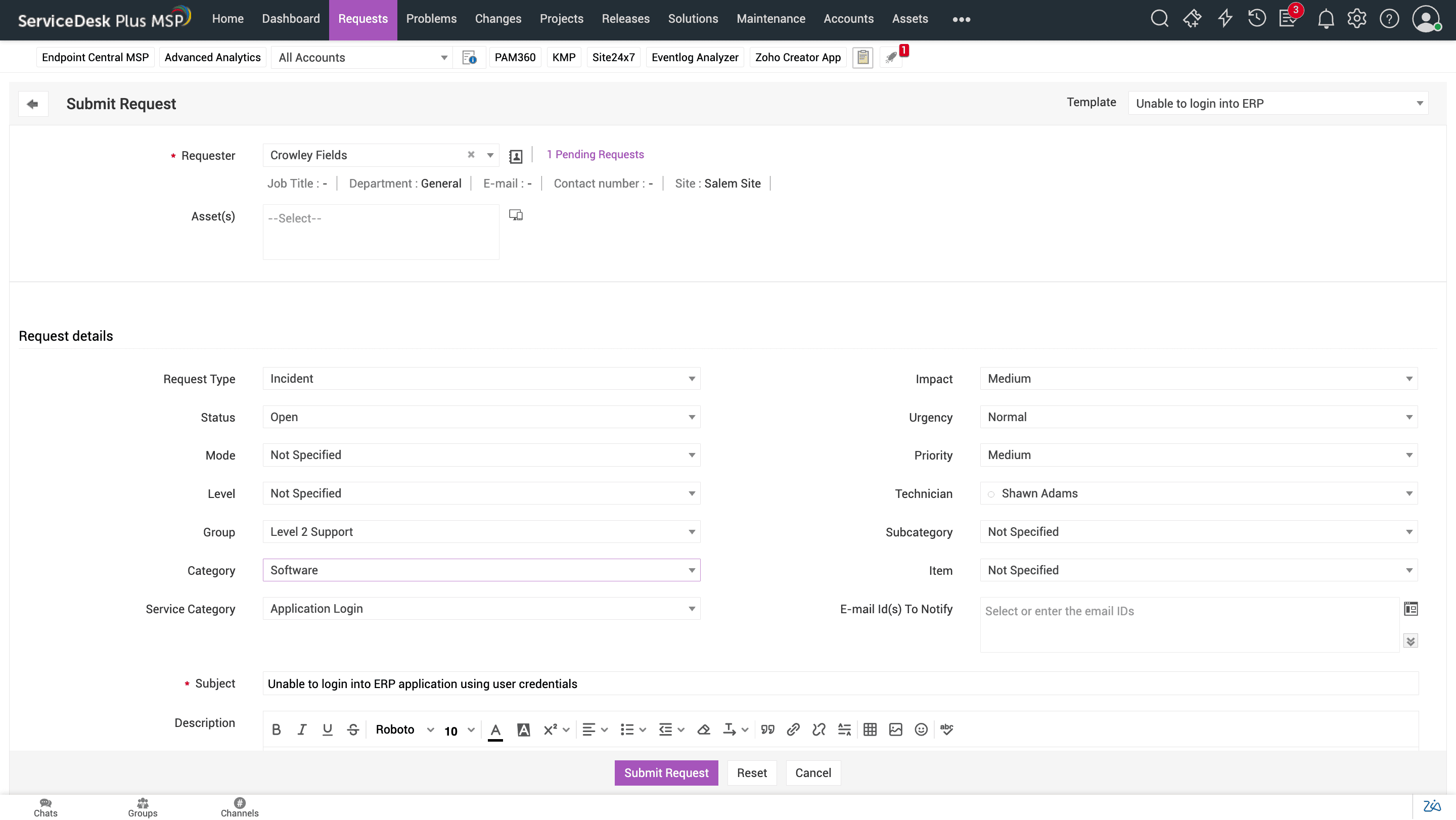
Incident management in ServiceDesk Plus MSP. Accurate time tracking: This capability logs the time spent on tickets and projects for billing and performance analysis. MSPs need it to ensure every billable hour is captured correctly, maximizing revenue.
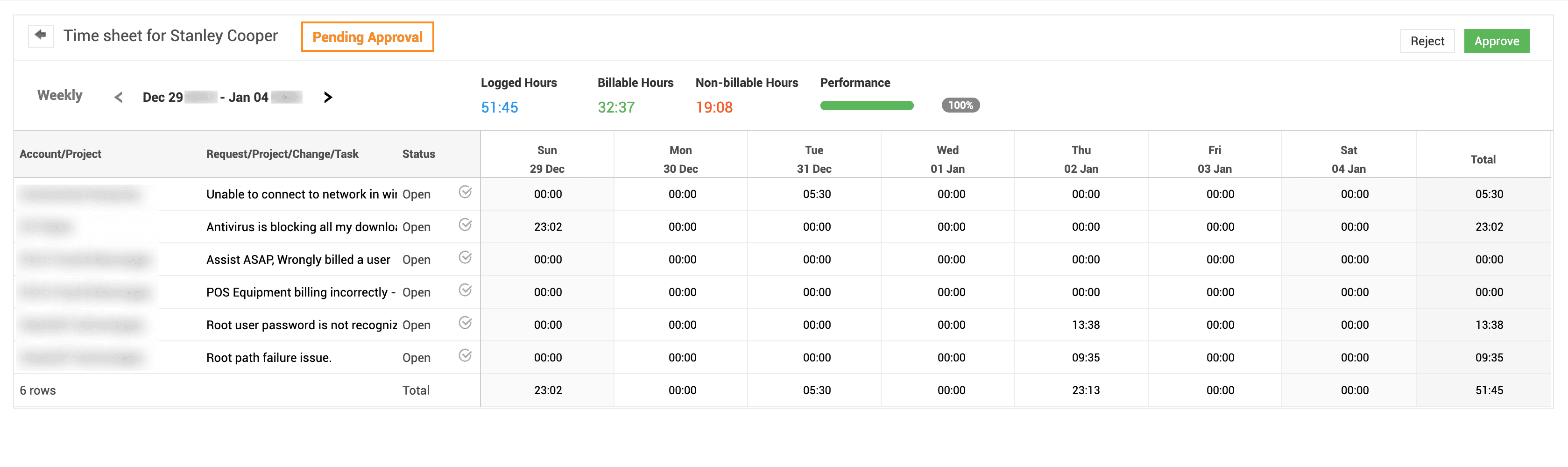
Time sheets for tracking technician efforts accurately in ServiceDesk Plus MSP. Automated billing: This capability generates invoices based on the tracked time and services, reducing manual effort. MSPs need it to save time, speed up payments, and minimize errors, thereby improving the cash flow. In ServiceDesk Plus MSP, automated billing allows MSPs to build customized service plans and billing contracts to ensure customers are accurately charged for the services provided, billed automatically, and notified when the contract nears expiration.
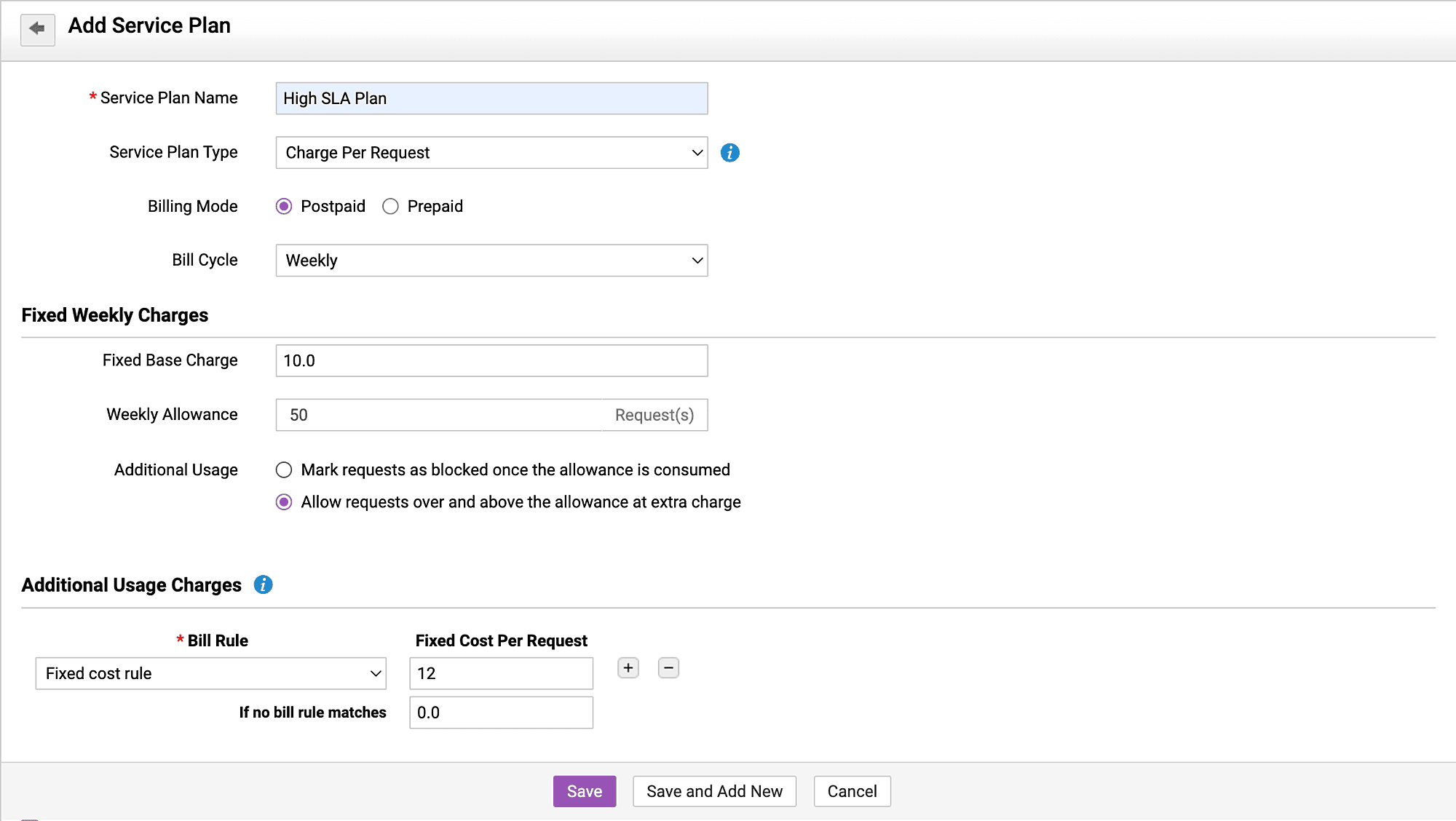
Customizable service plans for billing customers flexibly in ServiceDesk Plus MSP.
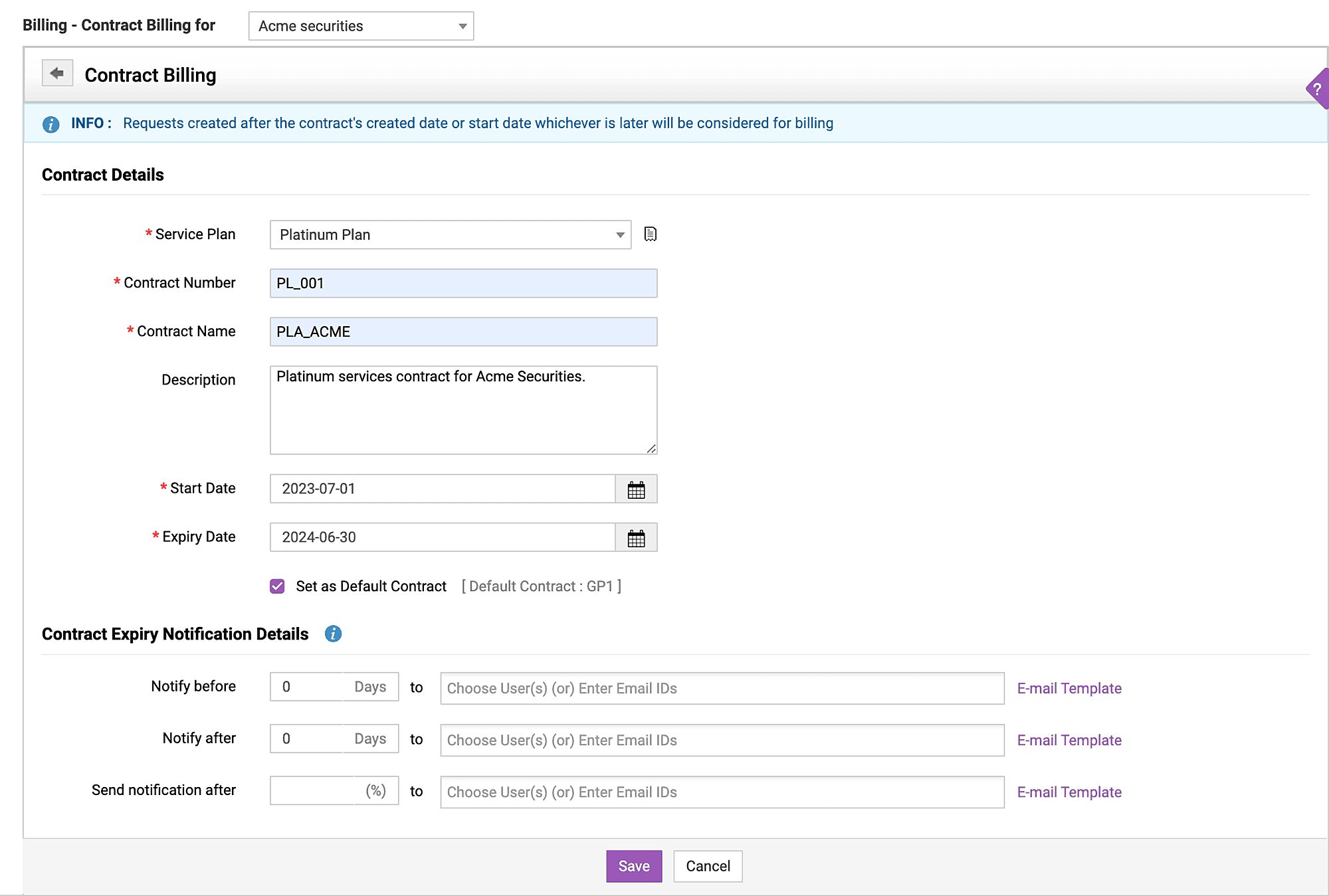
Service contracts for automating billing in ServiceDesk Plus MSP.
Resource management: This involves scheduling and allocating technicians based on their skills and availability. MSPs need it to optimize workloads and avoid overbooking, ensuring efficient service delivery. In ServiceDesk Plus MSP, the resource management feature provides a visual calendar for assigning technicians to tickets or projects, balancing their availability and workload effectively.
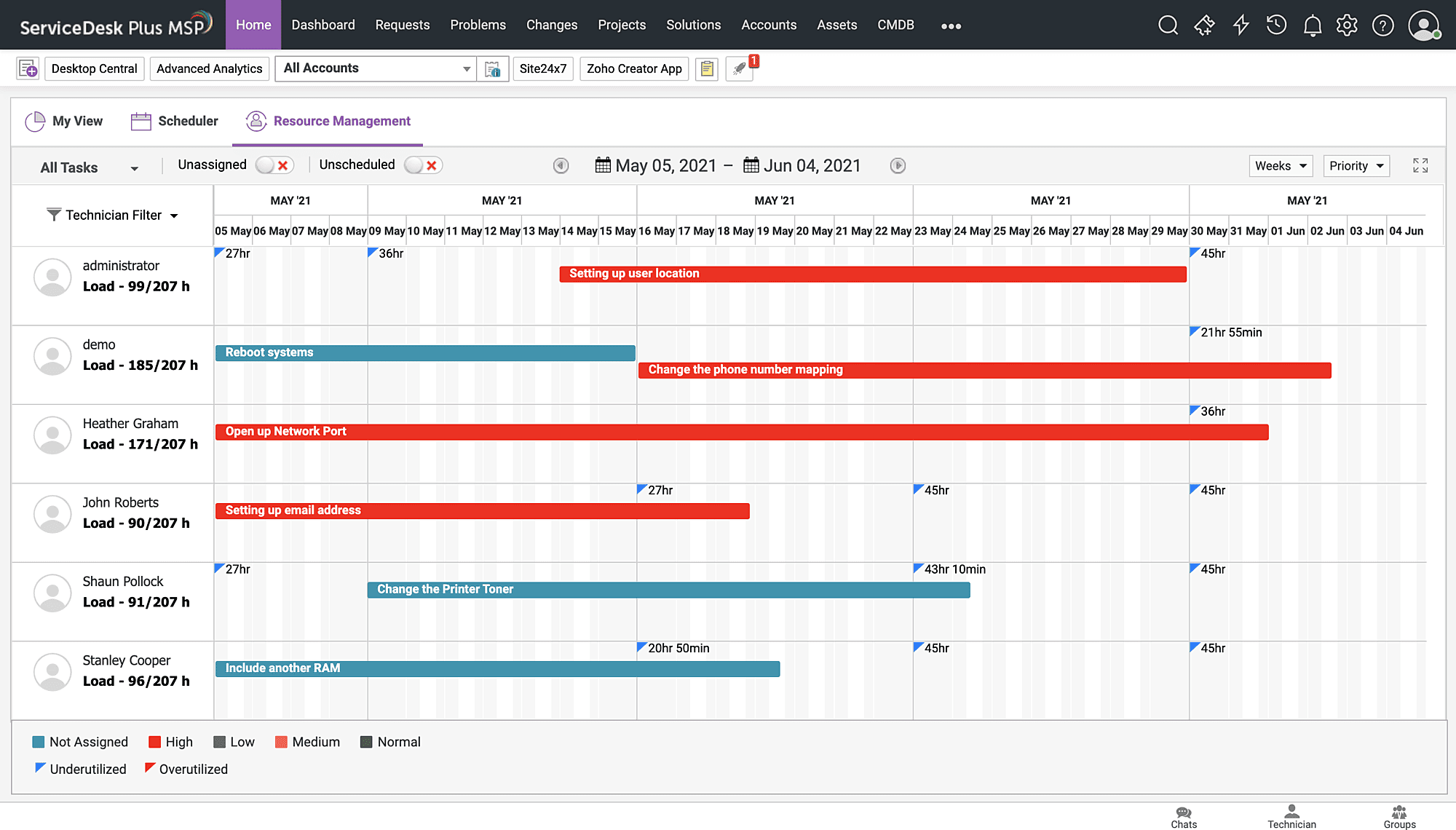
Resource management for visually managing technicians' workloads and availability in ServiceDesk Plus MSP. Project management: This feature allows MSPs to plan, track, and manage client projects, like network upgrades, within the same system. MSPs need it to deliver projects on time and within the budget, enhancing client trust. In ServiceDesk Plus MSP, the project management feature lets you break up projects into tasks, assign deadlines, and monitor progress with Gantt charts.
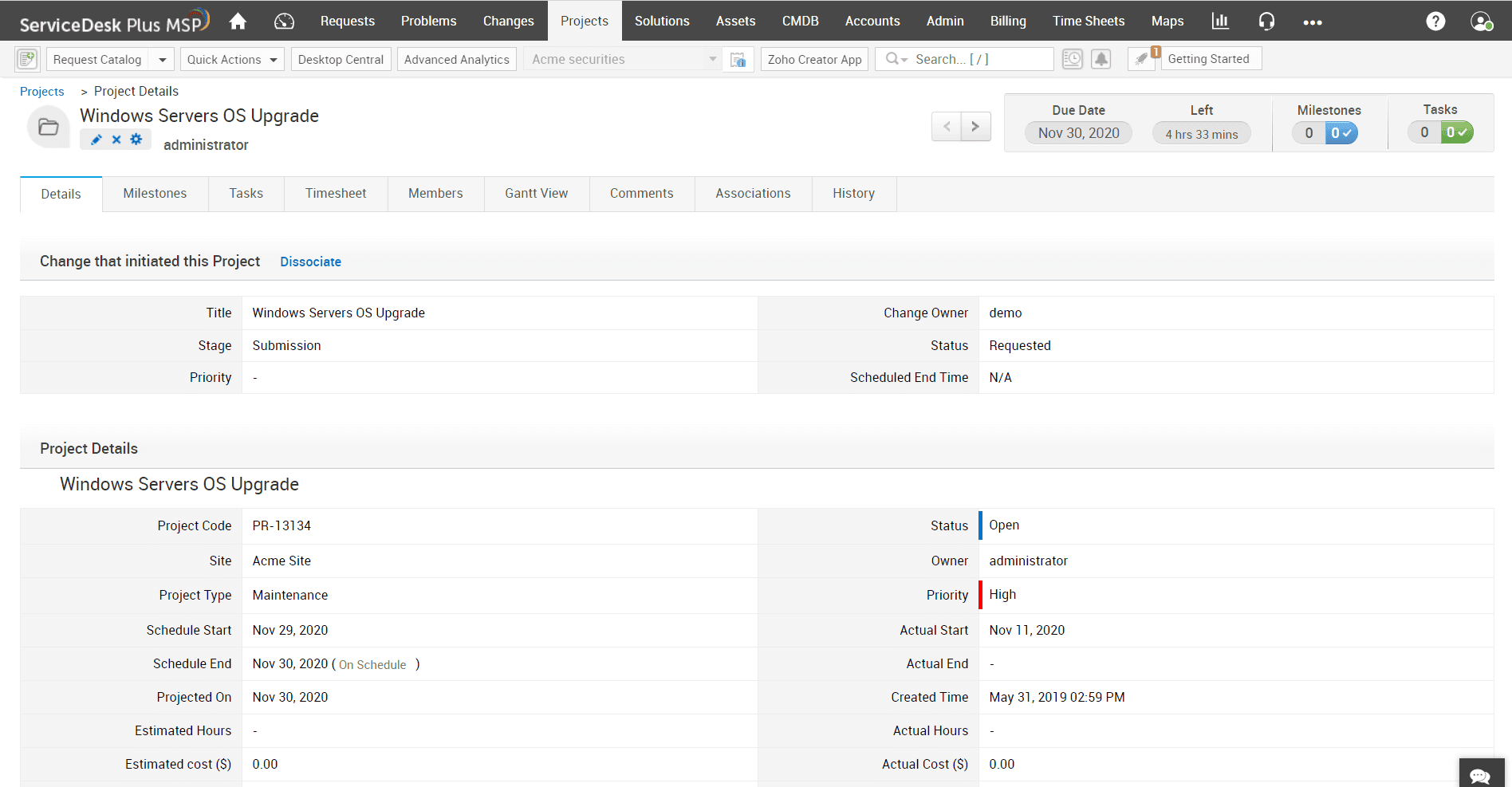
Project management for managing large-scale IT projects in ServiceDesk Plus MSP. AI and ML capabilities: MSPs leverage AI and ML capabilities to predict issues, suggest solutions to end users, and analyze user sentiment. They also leverage GenAI integrations to further enhance the service delivery experience. MSPs need these to proactively address problems and reduce resolution times, improving efficiency. ServiceDesk Plus MSP's AI and ML capabilities include template predictions, category suggestions, execution of users' approval decisions, an AI chatbot with GenAI capabilities powered by LLMs like OpenAI ChatGPT, request summaries, and text enhancements to assist technicians.
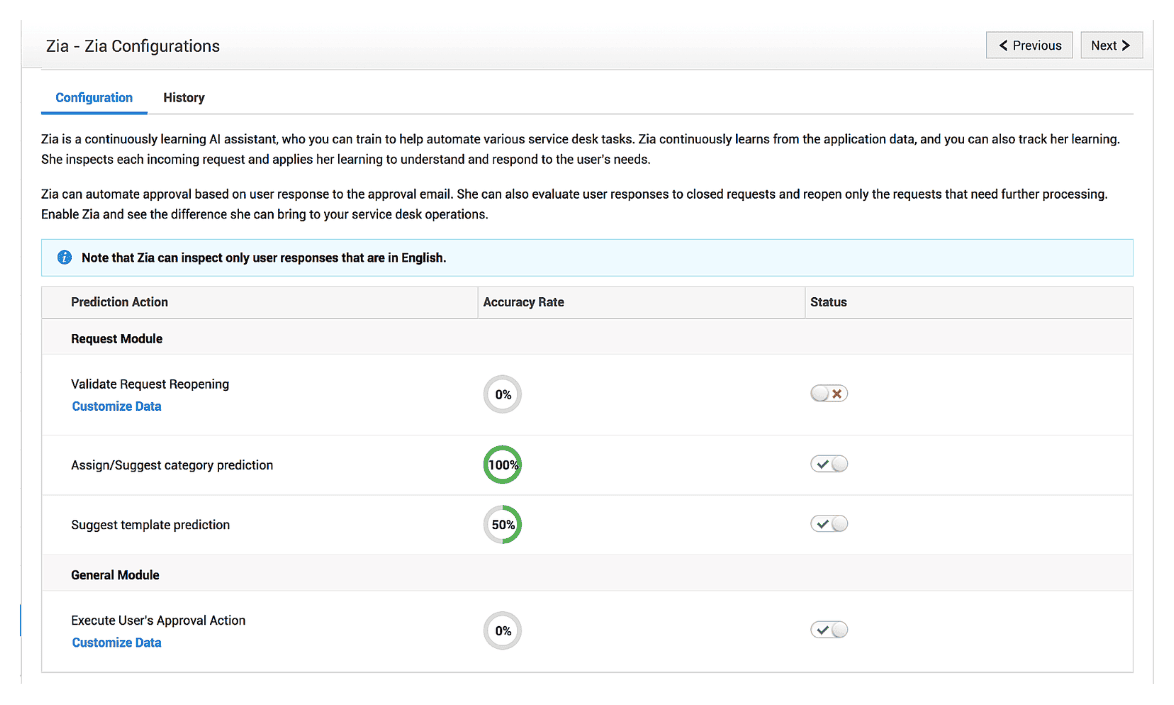
Predictive AI capabilities for assisting with service desk tasks in ServiceDesk Plus MSP.
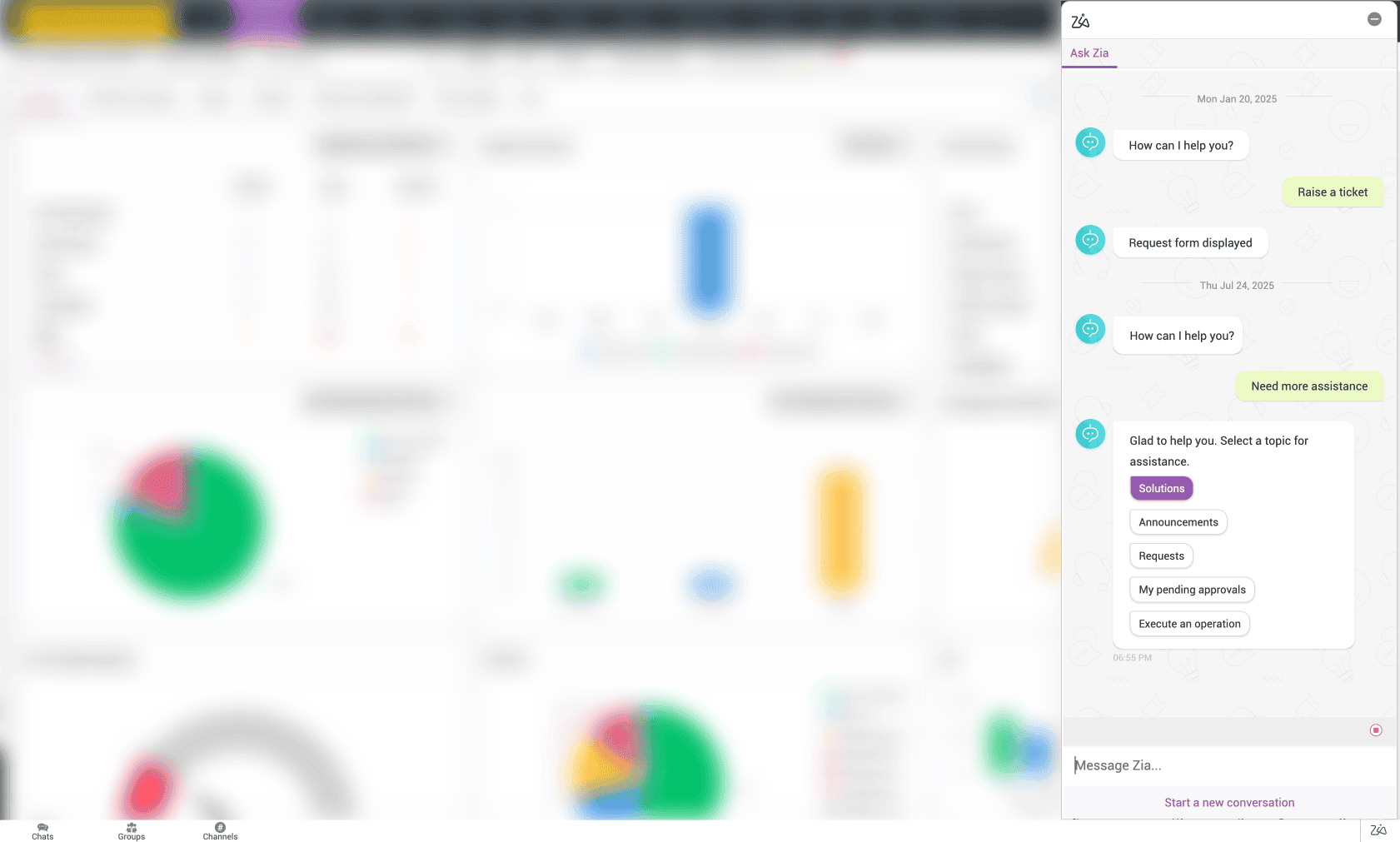
AI-powered chatbot for enhanced end user satisfaction in ServiceDesk Plus MSP.
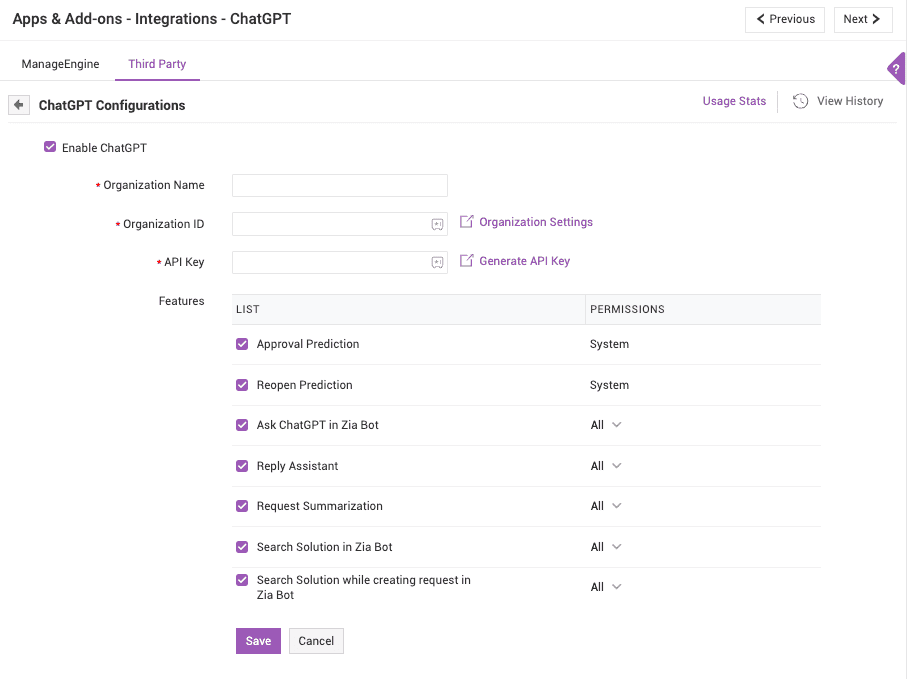
GenAI capabilities powered by OpenAI ChatGPT in ServiceDesk Plus MSP.
A self-service portal: This enables clients to log tickets, check their statuses, and access a knowledge base. MSPs need it to reduce the ticket volume and empower clients, improving satisfaction. In ServiceDesk Plus MSP, the self-service portal lets clients submit requests, view updates, and browse solutions—all branded to your MSP.
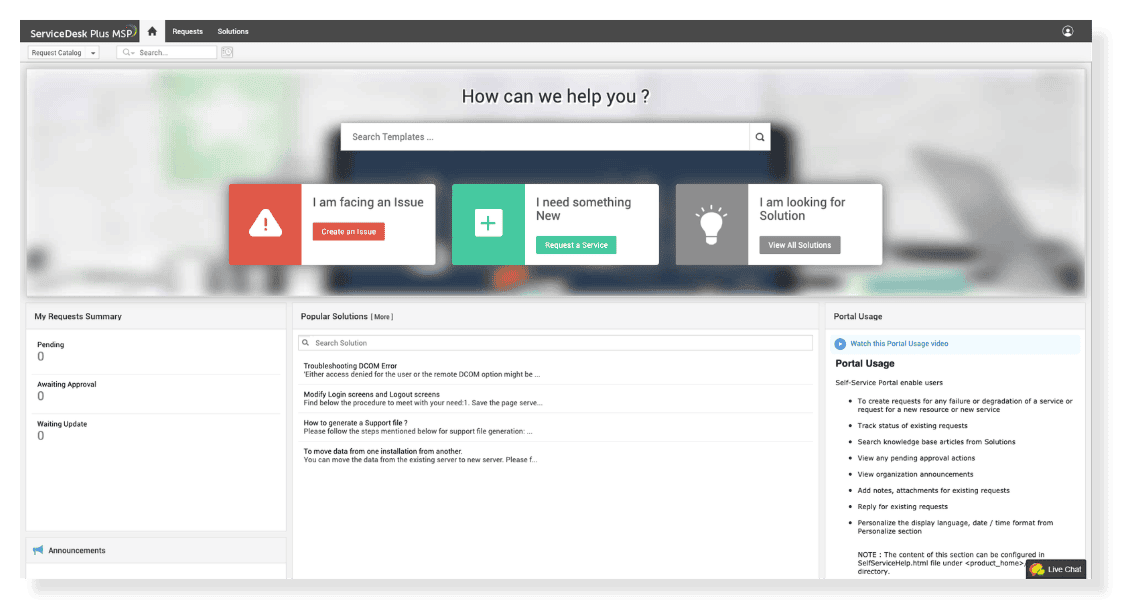
The self-service portal for end users in ServiceDesk Plus MSP. Automations: These are rules that automate repetitive tasks, like ticket assignment or notifications. MSPs need these to save time and reduce errors, allowing them to focus on high-value work. In ServiceDesk Plus MSP, automations handle ticket routing, SLA escalations, and status updates, ensuring seamless workflows without manual intervention.
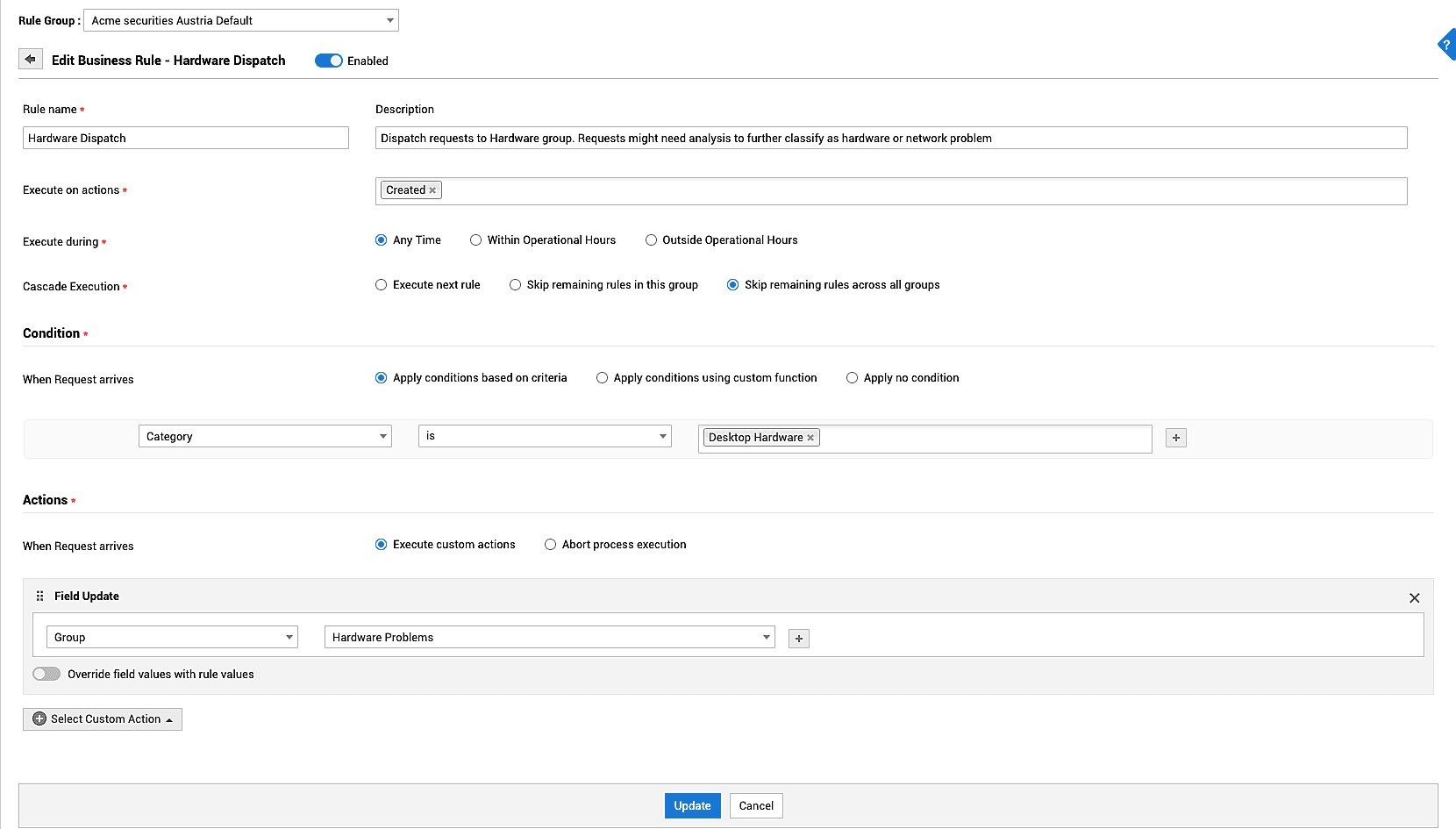
Business Rules for automating manual tasks in ServiceDesk Plus MSP.
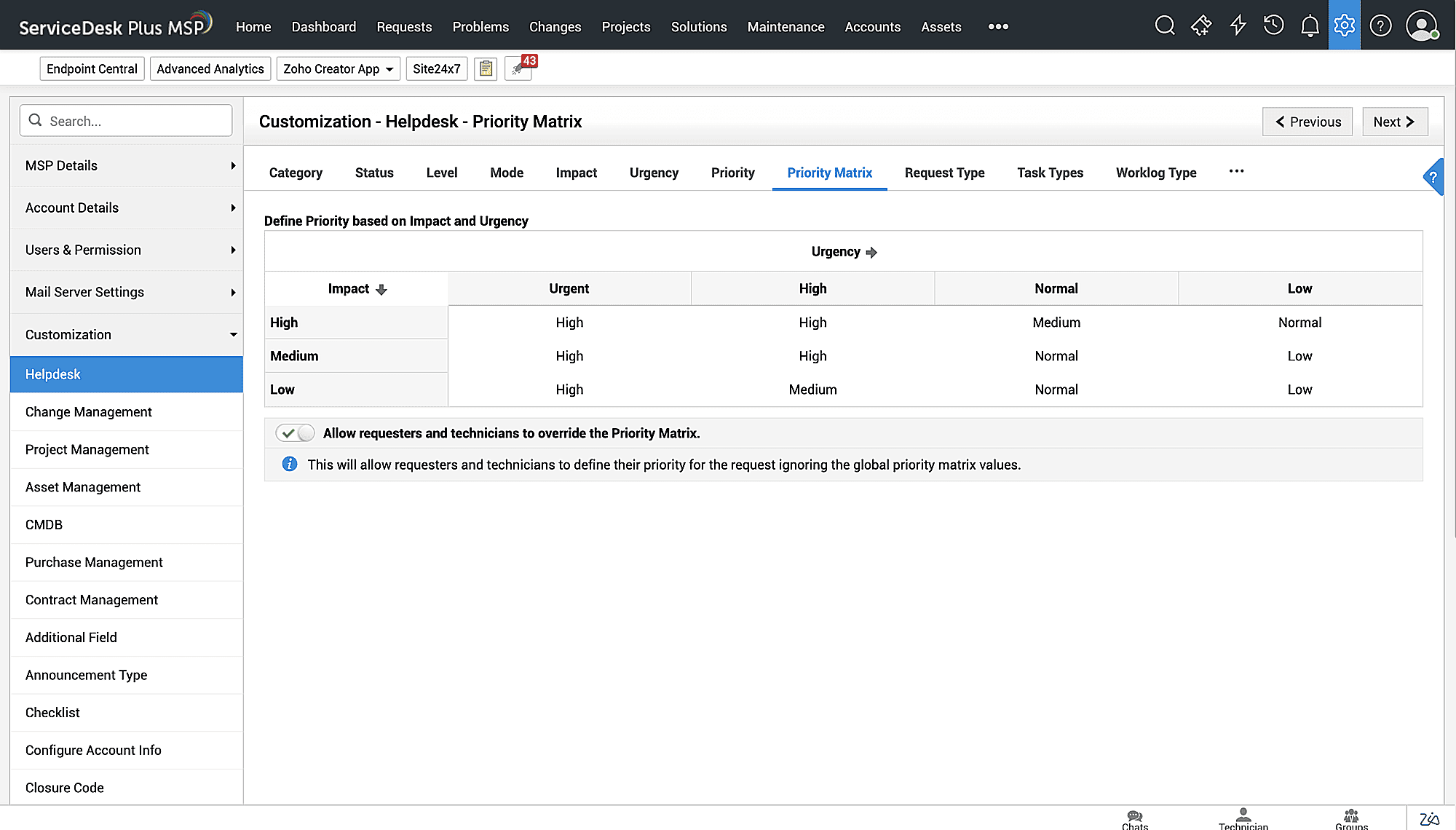
A priority matrix for auto-prioritising incoming tickets in ServiceDesk Plus MSP.
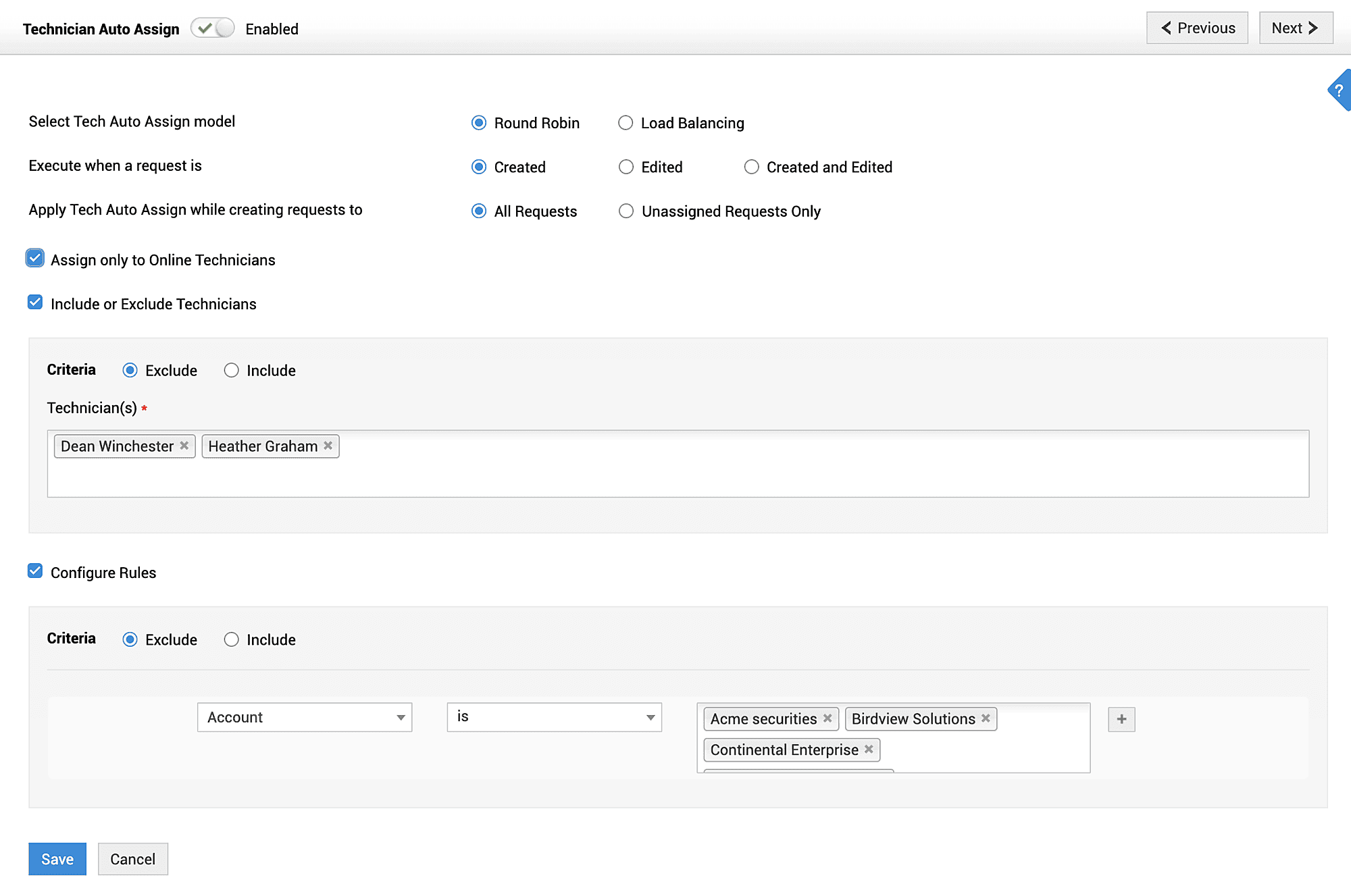
Automatically assigning a ticket to a technician based on algorithms in ServiceDesk Plus MSP.
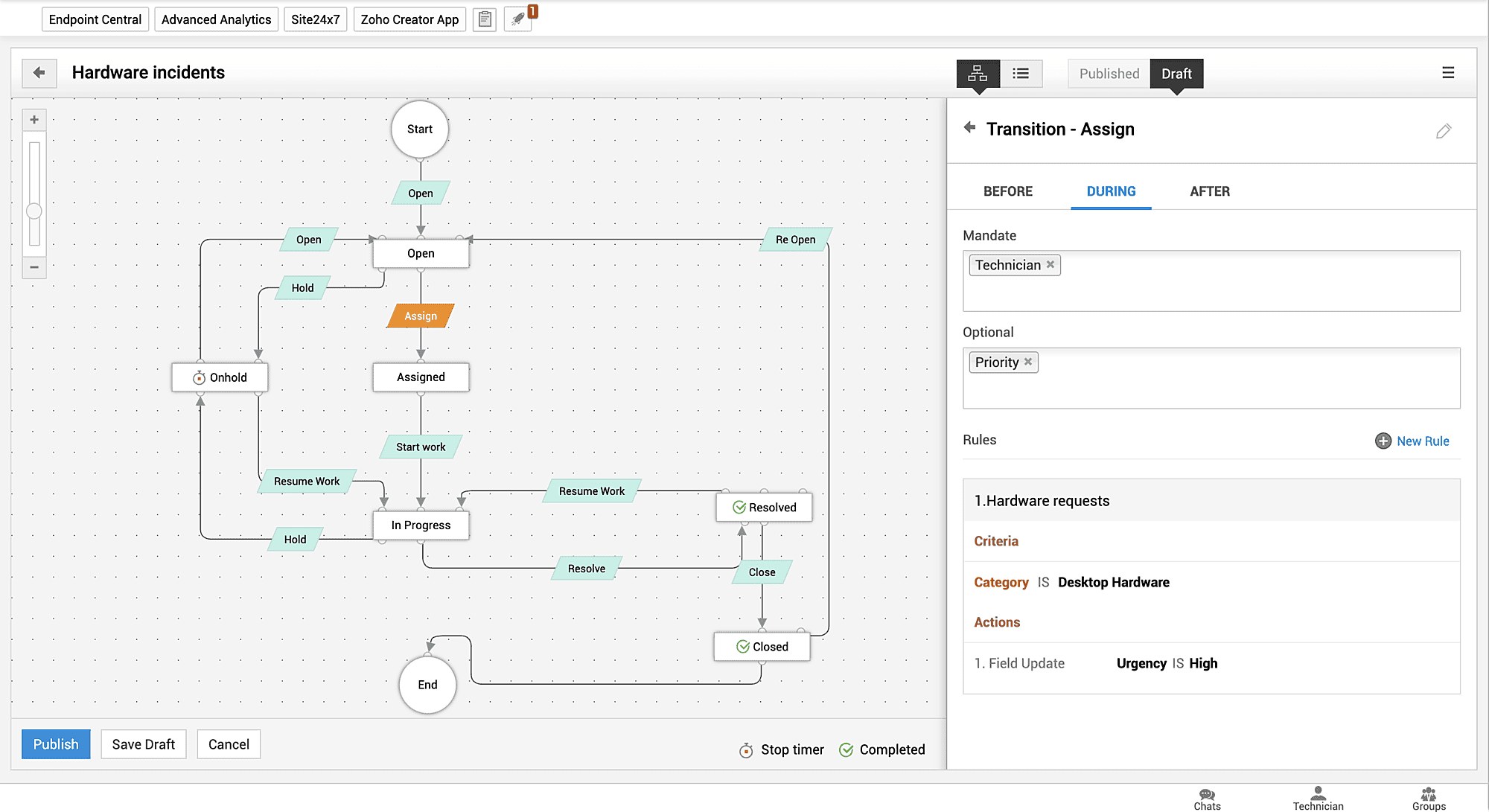
Request Life Cycles for standardizing the ticket resolution process for technicians in ServiceDesk Plus MSP.
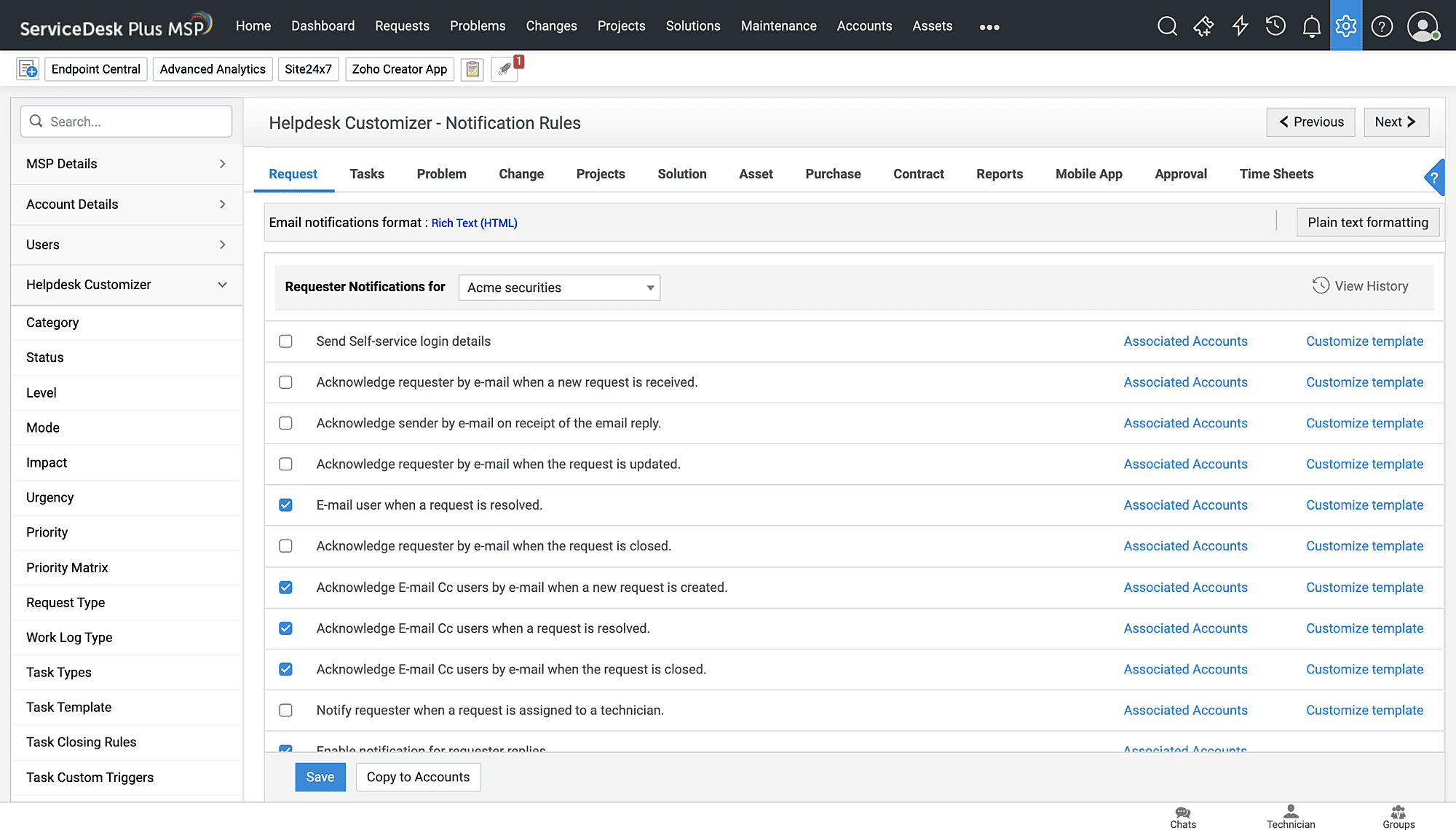
Notification Rules for automatically sending stakeholders contextual, customizable notifications in ServiceDesk Plus MSP.
Emerging trends in PSA ticketing: A look into the future

The landscape of managed IT services is undergoing rapid transformation, driven by innovations that are reshaping how MSPs operate. While AI is undeniably revolutionizing aspects of IT service delivery and powering PSA ticketing tools with unprecedented capabilities, it's merely one facet of a broader technological shift.
Let's check out the emerging trends in PSA ticketing, exploring the disruptions and advancements poised to become fundamental to the service management strategies of MSPs.
Shifting gears from manual tasks to AI-driven automations
AI and ML are already being implemented in PSA ticketing systems to anticipate issues, detect anomalies, predict change risks, and do even more to automate manual tasks and free up technicians' time. The top trend in AI tech in 2026 is GenAI. GenAI essentially takes commands from users to provide learned information. For MSPs, some of the most prominent uses of GenAI are ticket summarization, sentiment analysis, and text generation for technicians.
AI agents, another trending advancement, promise to revolutionize service delivery by acting as an autonomous digital workforce. They can help manage tickets, schedule tasks, and do even more, allowing MSPs to get things done without human intervention. In a PSA ticketing tool, AI agents will further be able to:
- Detect common IT issues (e.g., stopped services or low disk space) via RMM integrations and autonomously execute preapproved scripts to resolve them, automatically closing the ticket and notifying stakeholders upon successful remediation. This takes care of routine fixes entirely without human intervention.
- Manage the entire onboarding process for new end users, scheduling initial setup tasks, drafting configuration emails, updating asset records, streamlining workflows, and ensuring consistency across multiple customers.
- Track SLA metrics in real time, escalating tickets at risk of an SLA violation, notifying customers and technicians about ticket progress and potential SLA violations, and adjusting ticket priorities autonomously. This helps MSPs maintain SLAs without manual oversight.
- Automatically update client configuration items in the CMDB based on detected changes or resolved tickets, ensuring accurate asset records.
A cybersecurity focus
Around the world, a data breach cost $4.88 million on average in 2024. A poor cybersecurity posture impacts business continuity, bottom lines, customer trust, and an organization's overall market reputation, and, not to forget, it leads to legal repercussions, too. As a result, there has been a sharp increase in organizations enhancing cybersecurity. Different cybersecurity issues have given rise to different solutions, like:
- Identity and access management (IAM): Manages user identities and controls access to systems
- Security information and event management (SIEM): Monitors and analyzes security events in real time
- Endpoint detection and response (EDR): Detects and responds to threats on endpoints
- Extended detection and response (XDR): Detects, identifies, analyzes, and responds to cyberthreats across endpoints, networks, and systems
- Privileged access management (PAM): Secures and monitors access for privileged user accounts
With a PSA ticketing system that integrates with IT security solutions, MSPs—specifically managed security service providers—can accelerate security incident response with AI-driven predictions, rapid escalations, and faster turnaround times, which can mitigate cybersecurity threats. This empowers MSPs to safeguard client data effectively while ensuring compliance with stringent regulations like the GDPR and HIPAA.
A shift towards cloud deployment
Cloud solutions provide scalability and accessibility, enabling MSPs to manage service delivery across multiple clients without the need for extensive on-site hardware or significant up-front investments. This approach allows MSPs to easily adjust resources, such as storage or processing power, based on client demand, ensuring they can handle growth without delays or disruptions. This provides MSPs an opportunity to significantly reduce their infrastructure costs and improve flexibility.
Integrations with emerging tech
PSA ticketing systems are increasingly integrating with the latest technologies. For instance, for MSPs managing clients in the manufacturing, supply chain, and automotive sectors, the IoT and advanced analytics can be major tech integration opportunities within their PSA ticketing systems. These allow MSPs to monitor client systems in real time and deliver proactive services. IoT devices, such as smart sensors in client infrastructure, provide continuous data on hardware health, like server temperatures or network traffic, enabling MSPs to address potential issues before they escalate.
The future of PSA ticketing is clearly defined by rapid innovation, driven significantly by AI and advanced automation. As market demands intensify and the cybersecurity landscape evolves, MSPs must leverage these integrated technologies, from autonomous AI agents and cloud deployments to deeper connections with the IoT and analytics. Embracing these emerging trends in PSA ticketing isn't just about operational efficiency; it's about building a more proactive, resilient, profitable service delivery model. For MSPs, staying at the forefront of these advancements will be crucial to securing a competitive edge and ensuring sustained business growth.
Why is ServiceDesk Plus MSP the right PSA ticketing platform for you?

As an MSP, you need a comprehensive platform that serves as a command center for all your IT operations. This platform should enhance usability and eliminate operational inefficiencies, reducing friction for your support agents. ServiceDesk Plus MSP delivers exactly that! It combines powerful automation and intuitive design to simplify your service management and accelerate issue resolution.
It is a unified platform that integrates both PSA and ITSM capabilities, some of which you’ve already observed in the images above. It is a comprehensive, MSP-focused platform that encompasses all the critical capabilities needed to meet the operational scale, security requirements, and service delivery model of various types and sizes of MSPs.
Here are a few key reasons why ServiceDesk Plus MSP is the right fit for your MSP organization:
Deployable in both cloud and on-premises environments
Multi-tenant architecture for personalized service delivery to all your customers
Out-of-the-box PSA and ITSM capabilities
No need to pay extra for predictive AI and GenAI capabilities
Built-in ITAM and a CMDB
Scales as you grow with flexible editions and transparent licensing
Visual workflows for optimizing business processes
Tight integrations with essential IT and business apps
A multilingual platform that supports 35+ languages
Explore ServiceDesk Plus MSP today and see how it can help you optimize your business operations!