
- Overview
- Configuration
Mailwise
Simplify Mailwise Authentication with ADSelfService Plus
Mailwise is an email management application that helps users organize and manage their email accounts more effectively. By integrating ADSelfService Plus with Mailwise, organizations can enable seamless single-click access to Mailwise for users through secure SSO.
One-click access using SSO
Allow users to enjoy one-click access to their email management platform, reducing the time spent logging in and improving productivity.
Enhanced security protocols using MFA
Implement robust authentication methods like biometrics and FIDO2, ensuring that only authorized personnel can access Mailwise.
Passwordless authentication
Provide a passwordless authentication option for users and significantly improve the overall user experience by eliminating the need for remembering complex passwords.
Configuring SAML SSO for Cybozu, Cybozu Office, Garoon, and Mailwise
These steps will guide you through setting up the single sign-on functionality between ADSelfService Plus and Cybozu.
Prerequisite
- Login to ADSelfService Plus as an administrator.
- Navigate to Configuration → Self-Service → Password Sync/Single Sign On → Add Application, and select Cybozu from the applications displayed.Note: You can also find Cybozu application that you need from the search bar located in the left pane or the alphabet wise navigation option in the right pane.
- Click IdP details in the top-right corner of the screen.
- In the pop-up that appears, copy the Login URL and download the SSO certificate by clicking on the Download Certificate.
Cybozu (Service Provider) configuration steps
- Login to Cybozu with an administrator’s credentials. (https://
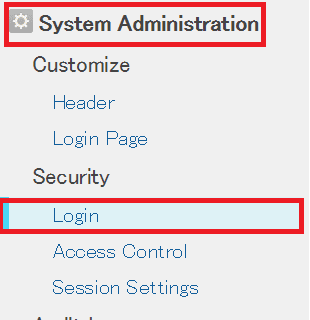
.cybozuoffice.com/admin) - Navigate to System Administration → Security → Login.
- Navigate to SAML Authentication and toggle to enable.
- Under SAML Authentication paste the URL, copied in Step 4 of Prerequisite, in the Login URL and Log out URL
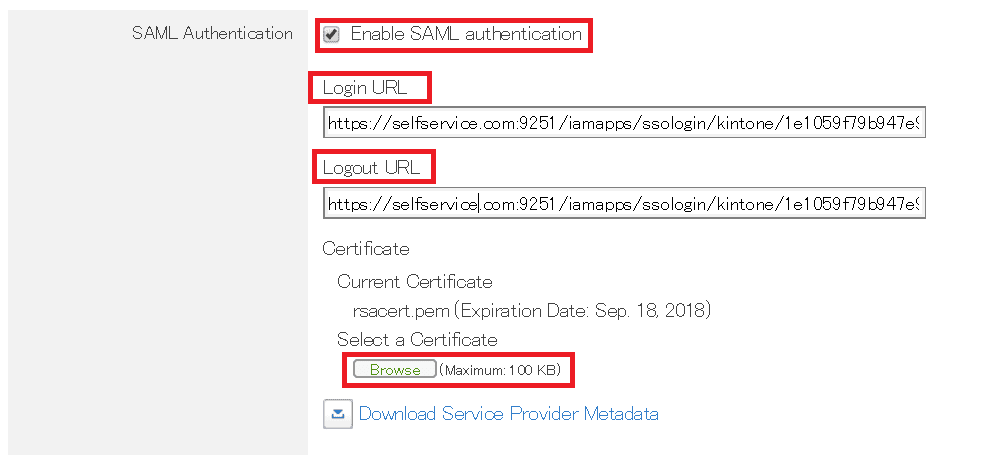
- Upload the downloaded certificate in Select a Certificate field.
- You can save the configuration.
ADSelfService Plus (Identity Provider) configuration steps
- Now, switch to ADSelfService Plus’ Cybozu configuration page.
- Enter the Application Name and Description.
- In the Assign Policies field, select the policies for which SSO need to be enabled.Note: ADSelfService Plus allows you to create OU and group-based policies for your AD domains. To create a policy, go to Configuration → Self-Service → Policy Configuration → Add New Policy.
- Select Enable Single Sign-On.
- Enter the Domain Name of your Cybozu account. For example, if you use johndoe@thinktodaytech.com to log in to Cybozu, then thinktodaytech.com is the domain name.
- Enter Cybozu admin account SP-Identifier in the respective field.(https://<SP_Identifier>.cybozuoffice.com)
- In the Name ID Format field, choose the format for the user login attribute value specific to the application.Note: Use Unspecified as the default option if you are unsure about the format of the login attribute value used by the application
- Click Add Application.