- US Data center (.com)
- EU Data center (.eu)
- AU Data center (com.au)
- IN Data center (.in)
- JP Data center (.jp)
- CN Data center (.cn)
- CA Data center (.ca)
- UK Data center (.uk)
Domains required for Agent communication
This document provides the list of approved domains and IP addresses which are required for seamless agent-server communication.
Domain Whitelist
Communication across remote offices is possible in the following ways:
Direct communication (Roaming users)
Roaming users directly contact the cloud server. Since these users are constantly roaming, they can't be managed by a central server. Therefore, the roaming agents should connect to these websites:
desktopcentral.manageengine.caThis is the server's URL. The roaming agent updates the task status to the cloud server and in order to ensure seamless agent-server communication, the agent has to connect to desktopcentral.manageengine.ca. Check Domain
(endpointcentral-agent)(p)?[0-9]{1,2}\.manageengine\.comNEWEndpoint central agents will use these domains to contact endpoint central servers. If regex based domain whitelisting is not supported whitelist the following domains:
endpointcentral-agent0.manageengine.com
Check Domainendpointcentral-agent1.manageengine.com
Check Domainendpointcentral-agent2.manageengine.com
Check Domainendpointcentral-agent3.manageengine.com
Check Domainendpointcentral-agent4.manageengine.com
Check Domainendpointcentral-agentp1.manageengine.com
Check Domainendpointcentral-agent5.manageengine.com
Check Domainendpointcentral-agent6.manageengine.com
Check Domain
patchdb.manageengine.comThis website will have the latest patch information along with the download URLs. To find the missing patches during the scan process, the agent gets the latest patch details from the patch database, for which it has to connect to patchdb.manageengine.com. Check Domain
patchdatabase.manageengine.comThe roaming agent has to connect to patchdatabase.manageengine.com in order to download dependent patches from the Endpoint Central Server. Check Domain
us3-dms.zoho.comThe roaming agent has to connect to us3-dms.zoho.com to perform on-demand operations. For instance, a user has added a new computer to the network, and he immediately wants to scan that computer. In that case, the user should perform an on-demand operation. Check Domain
us4-dms.zoho.comThe agent should connect to this domain for the user to be able to scan his system immediately. Check Domain
download-accl.zoho.comThe agent should connect to download-accl.zoho.com in order to download the manually uploaded packages in Software Deployment module. Check Domain
downloads.zohocdn.comThe Roaming agent should connect to downloads.zohocdn.com in order to download new agent binaries that are required during upgrade process. Check Domain
files-me-accl.zoho.comThe agent should connect to files-me-accl.zoho.com in order to download files from server. Check Domain
Through Distribution Server
Distribution server is a component which allows you to download patch binaries from the respective vendor websites and distribute it to all the remote office computers managed under the DS. The Distribution server should connect to these websites:
desktopcentral.manageengine.caThe replication of patches is done in the DS. The DS will then update the replication status to the server, for which it has to connect to desktopcentral.manageengine.ca. The remote office/WAN agents will contact the server to update the task status, for which it has to connect to the domain. Check Domain
(endpointcentral-agent)(p)?[0-9]{1,2}\.manageengine\.comNEWEndpoint central agents will use these domains to contact endpoint central servers. If regex based domain whitelisting is not supported whitelist the following domains:
endpointcentral-agent0.manageengine.com
Check Domainendpointcentral-agent1.manageengine.com
Check Domainendpointcentral-agent2.manageengine.com
Check Domainendpointcentral-agent3.manageengine.com
Check Domainendpointcentral-agent4.manageengine.com
Check Domainendpointcentral-agentp1.manageengine.com
Check Domainendpointcentral-agent5.manageengine.com
Check Domainendpointcentral-agent6.manageengine.com
Check Domain
patchdb.manageengine.comThe DS gets the latest patch information from this website. It also downloads the patch binaries from the vendor's site through the download URL in this patchdb website. So it has to connect to patchdb.manageengine.com. Check Domain
patchdatabase.manageengine.comThe DS has to connect to this website in order to download the dependent patches from the Endpoint Central Server. Check Domain
us3-dms.zoho.comThe DS should connect to us3-dms.zoho.com in order to perform the operations involved in installing the agents using local AD without being interrupted. The remote office/WAN agents should connect to this domain to perform on-demand operations. Check Domain
us4-dms.zoho.comThe DS should connect to us4-dms.zoho.com in order to perform the operations involved in installing the agents using local AD without being interrupted. The remote office/WAN agents should connect to this domain to perform on-demand operations. Check Domain
download-accl.zoho.comThe DS should connect to download-accl.zoho.com in order to download the manually uploaded packages in Software Deployment module. Check Domain
downloads.zohocdn.comThe DS should connect to downloads.zohocdn.com in order to download new agent/DS binaries that are required during upgrade process. Check Domain
files-me-accl.zoho.comThe agent should connect to files-me-accl.zoho.com to download files from the server. Check Domain
Distribution Server agents
The agents which belong to remote office/WAN should connect to these domains:
desktopcentral.manageengine.caThe DS agent updates the task status to the cloud server and in order to ensure seamless agent-server communication, the agent has to connect to desktopcentral.manageengine.ca. Check Domain
(endpointcentral-agent)(p)?[0-9]{1,2}\.manageengine\.comNEWEndpoint central agents will use these domains to contact endpoint central servers. If regex based domain whitelisting is not supported whitelist the following domains:
endpointcentral-agent0.manageengine.com
Check Domainendpointcentral-agent1.manageengine.com
Check Domainendpointcentral-agent2.manageengine.com
Check Domainendpointcentral-agent3.manageengine.com
Check Domainendpointcentral-agent4.manageengine.com
Check Domainendpointcentral-agentp1.manageengine.com
Check Domainendpointcentral-agent5.manageengine.com
Check Domainendpointcentral-agent6.manageengine.com
Check Domain
us3-dms.zoho.comThe DS agents should connect to us3-dms.zoho.com in order to perform the operations involved in installing the agents. Check Domain
us4-dms.zoho.comThe DS agents should connect to us4-dms.zoho.com in order to perform the operations involved in installing the agents. Check Domain
download-accl.zoho.comThe agent should connect to download-accl.zoho.com in order to download some dynamic files from the server. Check Domain
downloads.zohocdn.comThe ds agent should connect to downloads.zohocdn.com in order to download localization contents. Check Domain
files-me-accl.zoho.comThe agent should connect to download-accl.zoho.com in order to download some dynamic files from the server. Check Domain
IP Whitelist
Here's the list of IP addresses that are required to be added to the whitelist
US region data centre IP's- 204.141.42.0/23
- 136.143.190.0/23
- 136.143.186.0/23
- 136.143.189.0/24
- 204.141.32.0/23
- 136.143.182.0/23
- 136.143.180.0/23
- 136.143.185.0/24
Geo DNS Domains It is strongly recommended to whitelist the domain instead of whitelisting the IP address as these domains are using GeoDNS , i.e. The IP address of the domain's will change based on geolocation of the user.
However, if you still wish to whitelist IP for the domains:
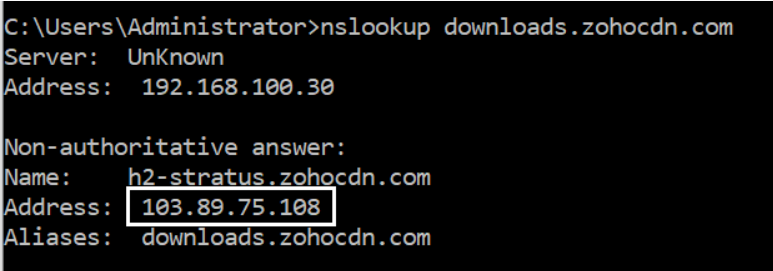
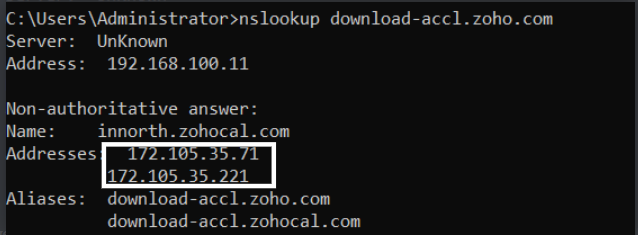
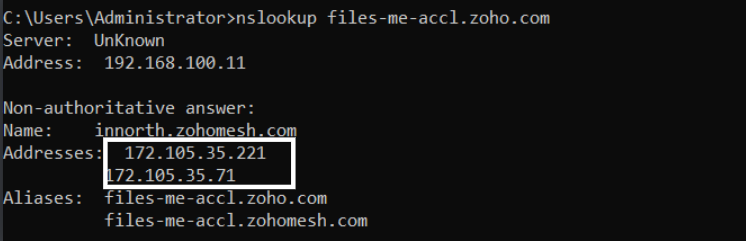
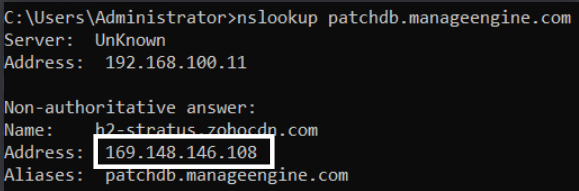
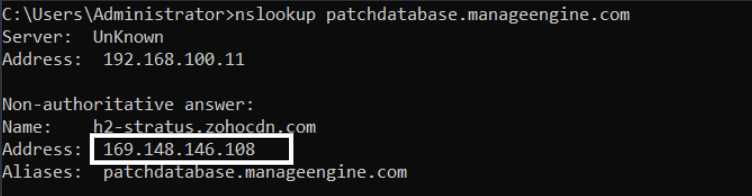
Navigate to the command prompt and execute the command- nslookup <domain> and get the IP as shown in the images below.
- downloads.zohocdn.com
- download-accl.zoho.com
- files-me-accl.zoho.com
- patchdb.manageengine.com
- patchdatabase.manageengine.com
Domains required for Agent communication
This document provides the list of approved domains and IP addresses which are required for seamless agent-server communication.
Domain Whitelist
Communication across remote offices is possible in the following ways:
Direct communication (Roaming users)
Roaming users directly contact the cloud server. Since these users are constantly roaming, they can't be managed by a central server. Therefore, the roaming agents should connect to these websites:
desktopcentral.manageengine.euThis is the server's URL. The roaming agent updates the task status to the cloud server and in order to ensure seamless agent-server communication, the agent has to connect to desktopcentral.manageengine.eu. Check Domain
(endpointcentral-agent)(p)?[0-9]{1,2}\.manageengine\.euNEWEndpoint central agents will use these domains to contact endpoint central servers. If regex based domain whitelisting is not supported whitelist the following domains:
endpointcentral-agent0.manageengine.eu
Check Domain endpointcentral-agent1.manageengine.eu
Check Domain endpointcentral-agentp1.manageengine.eu
Check Domain
patchdb.manageengine.comThis website will have the latest patch information along with the download URLs. To find the missing patches during the scan process, the agent gets the latest patch details from the patch database, for which it has to connect to patchdb.manageengine.com. Check Domain
patchdatabase.manageengine.comThe roaming agent has to connect to patchdatabase.manageengine.com in order to download dependent patches from the Endpoint Central Server. Check Domain
eu1-dms.zoho.euThe roaming agent has to connect to eu1-dms.zoho.eu to perform on-demand operations. For instance, a user has added a new computer to the network, and he immediately wants to scan that computer. In that case, the user should perform an on-demand operation. Check Domain
eu2-dms.zoho.euThe agent should connect to this domain for the user to be able to scan his system immediately. Check Domain
download-accl.zoho.euThe agent should connect to download-accl.zoho.eu in order to download the manually uploaded packages in Software Deployment module. Check Domain
downloads.zohocdn.comThe Roaming agent should connect to downloads.zohocdn.com in order to download new agent binaries that are required during upgrade process. Check Domain
Through Distribution Server
Distribution server is a component which allows you to download patch binaries from the respective vendor websites and distribute it to all the remote office computers managed under the DS. The DS should connect to these websites:
desktopcentral.manageengine.euThe replication of patches is done in the DS. The DS will then update the replication status to the server, for which it has to connect to desktopcentral.manageengine.eu. The remote office/WAN agents will contact the server to update the task status, for which it has to connect to the domain. Check Domain
(endpointcentral-agent)(p)?[0-9]{1,2}\.manageengine\.euNEWEndpoint central agents will use these domains to contact endpoint central servers. If regex based domain whitelisting is not supported whitelist the following domains:
endpointcentral-agent0.manageengine.eu
Check Domainendpointcentral-agent1.manageengine.eu
Check Domainendpointcentral-agentp1.manageengine.eu
Check Domain
patchdb.manageengine.comThe DS gets the latest patch information from this website. It also downloads the patch binaries from the vendor's site through the download URL in this patchdb website. So it has to connect to patchdb.manageengine.com. Check Domain
patchdatabase.manageengine.comThe DS has to connect to this website in order to download the dependent patches from the Endpoint Central Server. Check Domain
eu1-dms.zoho.euThe DS should connect to eu1-dms.zoho.eu in order to perform the operations involved in installing the agents using local AD without being interrupted. The remote office/WAN agents should connect to this domain to perform on-demand operations. Check Domain
eu2-dms.zoho.euThe DS should connect to eu2-dms.zoho.eu in order to perform the operations involved in installing the agents using local AD without being interrupted. The remote office/WAN agents should connect to this domain to perform on-demand operations. Check Domain
download-accl.zoho.euThe DS should connect to download-accl.zoho.eu in order to download the manually uploaded packages in Software Deployment module. Check Domain
downloads.zohocdn.comThe DS should connect to downloads.zohocdn.com in order to download new agent/DS binaries that are required during upgrade process. Check Domain
Distribution Server agents
The agents which belong to remote office/WAN should connect to these domains:
desktopcentral.manageengine.euThe DS agent updates the task status to the cloud server and in order to ensure seamless agent-server communication, the agent has to connect to desktopcentral.manageengine.eu. Check Domain
(endpointcentral-agent)(p)?[0-9]{1,2}\.manageengine\.euNEWEndpoint central agents will use these domains to contact endpoint central servers. If regex based domain whitelisting is not supported whitelist the following domains:
endpointcentral-agent0.manageengine.eu
Check Domainendpointcentral-agent1.manageengine.eu
Check Domainendpointcentral-agentp1.manageengine.eu
Check Domain
eu1-dms.zoho.euThe DS agents should connect to this domain in order to perform the operations involved in installing the agents. Check Domain
eu2-dms.zoho.euThe DS agents should connect to this domain in order to perform the operations involved in installing the agents. Check Domain
download-accl.zoho.euThe agent should connect to download-accl.zoho.com in order to download some dynamic files from the server. Check Domain
downloads.zohocdn.comThe ds agent should connect to downloads.zohocdn.com in order to download localization contents. Check Domain
IP Whitelist
Here's the list of IP addresses that are required to be added to the whitelist
EU region data centre IP's- 31.186.243.0 /24
- 185.20.209.0 /24
- 185.230.212.0 /23
- 87.252.213.0 /24
- 89.36.170.0 /24
- 185.230.214.0 /23
Geo DNS Domains It is strongly recommended to whitelist the domain instead of whitelisting the IP address as these domains are using GeoDNS , i.e. The IP address of the domain's will change based on geolocation of the user.
However, if you still wish to whitelist IP for the domains:
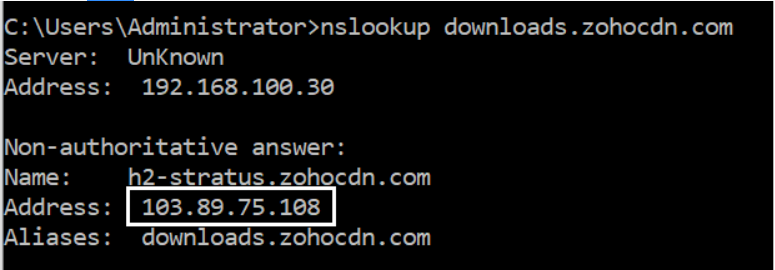
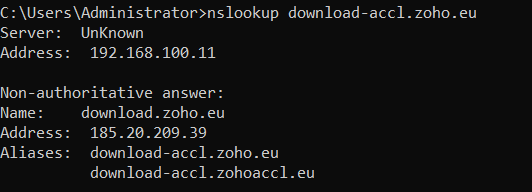
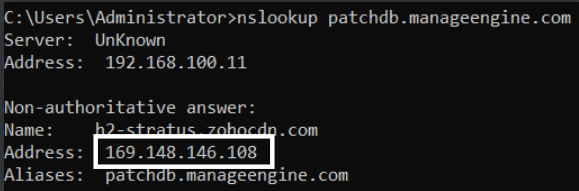
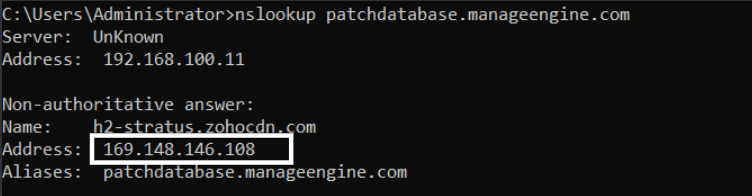
Navigate to the command prompt and execute the command- nslookup <domain> and get the IP as shown in the images below.
- downloads.zohocdn.com
- download-accl.zoho.eu
- patchdb.manageengine.com
- patchdatabase.manageengine.com
Domains required for Agent communication
This document provides the list of approved domains and IP addresses which are required for seamless agent-server communication.
Domain Whitelist
Communication across remote offices is possible in the following ways:
Direct communication (Roaming users)
Roaming users directly contact the cloud server. Since these users are constantly roaming, they can't be managed by a central server. Therefore, the roaming agents should connect to these websites:
desktopcentral.manageengine.ca.auThis is the server's URL. The roaming agent updates the task status to the cloud server and in order to ensure seamless agent-server communication, the agent has to connect to desktopcentral.manageengine.ca.au. Check Domain
(endpointcentral-agent)(p)?[0-9]{1,2}\.manageengine\.com\.auEndpoint central agents will use these domains to contact endpoint central servers. If regex based domain whitelisting is not supported whitelist the following domains
endpointcentral-agent0.manageengine.com.auCheck Domain
endpointcentral-agentp1.manageengine.com.auCheck Domain
patchdb.manageengine.comThis website will have the latest patch information along with the download URLs. To find the missing patches during the scan process, the agent gets the latest patch details from the patch database, for which it has to connect to patchdb.manageengine.com. Check Domain
patchdatabase.manageengine.comThe roaming agent has to connect to patchdatabase.manageengine.com in order to download dependent patches from the Endpoint Central Server. Check Domain
au1-dms.zoho.com.auThe roaming agent has to connect to au1-dms.zoho.com.au to perform on-demand operations. For instance, a user has added a new computer to the network, and he immediately wants to scan that computer. In that case, the user should perform an on-demand operation. Check Domain
au2-dms.zoho.com.auThe agent should connect to this domain for the user to be able to scan his system immediately. Check Domain
downloads.zohocdn.comThe Roaming agent should connect to downloads.zohocdn.com in order to download new agent binaries that are required during upgrade process. Check Domain
download.zoho.com.auThe Roaming agent should connect to download.zoho.com.au in order to download new agent binaries that are required during upgrade process. Check Domain
Through Distribution Server
Distribution server is a component which allows you to download patch binaries from the respective vendor websites and distribute it to all the remote office computers managed under the DS. The DS should connect to these websites:
desktopcentral.manageengine.ca.auThe replication of patches is done in the DS. The DS will then update the replication status to the server, for which it has to connect to desktopcentral.manageengine.ca.au. The remote office/WAN agents will contact the server to update the task status, for which it has to connect to the domain. Check Domain
(endpointcentral-agent)(p)?[0-9]{1,2}\.manageengine\.com\.auEndpoint central distribution server will use these domains to contact endpoint central server. If regex based domain whitelisting is not supported whitelist the following domains
endpointcentral-agent0.manageengine.com.auCheck Domain
endpointcentral-agentp1.manageengine.com.auCheck Domain
patchdb.manageengine.comThe DS gets the latest patch information from this website. It also downloads the patch binaries from the vendor's site through the download URL in this website. So it has to connect to patchdb.manageengine.com. Check Domain
patchdatabase.manageengine.comThe DS has to connect to this website in order to download the dependent patches from the Endpoint Central Server. Check Domain
au1-dms.zoho.com.auThe DS should connect to au1-dms.zoho.com.au in order to perform the operations involved in installing the agents using local AD without being interrupted. The remote office/WAN agents should connect to these websites to perform on-demand operations. Check Domain
au2-dms.zoho.com.auThe DS should connect to au2-dms.zoho.com.au in order to perform the operations involved in installing the agents using local AD without being interrupted. The remote office/WAN agents should connect to these websites to perform on-demand operations. Check Domain
downloads.zohocdn.comThe DS should connect to downloads.zohocdn.com in order to download new agent/DS binaries that are required during upgrade process. Check Domain
download.zoho.com.auThe DS should connect to download.zoho.com.au in order to download new agent/DS binaries that are required during upgrade process. Check Domain
Distribution Server agents
The agents which belong to remote office/WAN should connect to these domains:
desktopcentral.manageengine.ca.auThe DS agent updates the task status to the cloud server and in order to ensure seamless agent-server communication, the agent has to connect to desktopcentral.manageengine.ca. Check Domain
(endpointcentral-agent)(p)?[0-9]{1,2}\.manageengine\.com\.auEndpoint central agents will use these domains to contact endpoint central servers. If regex based domain whitelisting is not supported whitelist the following domains
endpointcentral-agent0.manageengine.com.auCheck Domain
endpointcentral-agentp1.manageengine.com.auCheck Domain
au1-dms.zoho.com.auThe DS agents should connect to this domain in order to perform the operations involved in installing the agents. Check Domain
au2-dms.zoho.com.auThe DS agents should connect to this domain in order to perform the operations involved in installing the agents. Check Domain
downloads.zohocdn.comThe ds agent should connect to downloads.zohocdn.com in order to download localization contents. Check Domain
download.zoho.com.auThe ds agent should connect to download.zoho.com.au in order to download localization contents. Check Domain
IP Whitelist
Here's the list of IP addresses that are required to be added to the whitelist
AU region data centre IP's- 101.97.36.0/24
- 103.138.128.0/23
- 103.91.166.0/24
- 165.173.191.0/24
Geo DNS DomainsIt is strongly recommended to whitelist the domain instead of whitelisting the IP address as these domains are using GeoDNS , i.e. The IP address of the domain's will change based on geolocation of the user.
However, if you still wish to whitelist IP for the domains:
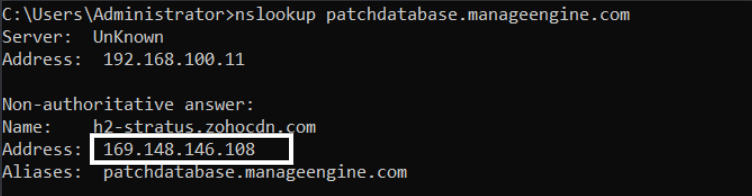
Navigate to the command prompt and execute the command- nslookup <domain> and get the IP as shown in the images below.
- downloads.zohocdn.com
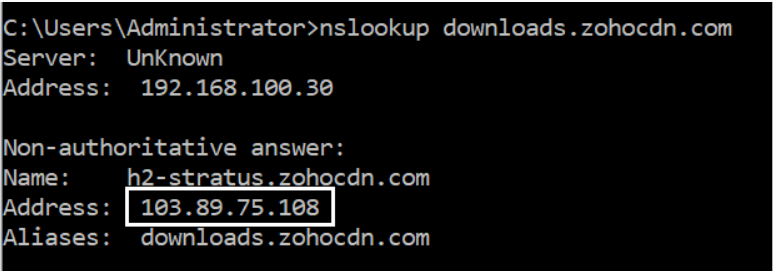
- patchdb.manageengine.com
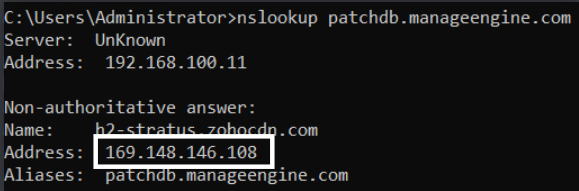
- patchdatabase.manageengine.com
Domains required for Agent communication
This document provides the list of approved domains and IP addresses which are required for seamless agent-server communication.
Domain Whitelist
Communication across remote offices is possible in the following ways:
Direct communication (Roaming users)
Roaming users directly contact the cloud server. Since these users are constantly roaming, they can't be managed by a central server. Therefore, the roaming agents should connect to these websites:
desktopcentral.manageengine.inThis is the server's URL. The roaming agent updates the task status to the cloud server and in order to ensure seamless agent-server communication, the agent has to connect to desktopcentral.manageengine.in. Check Domain
(endpointcentral-agent)(p)?[0-9]{1,2}\.manageengine\.inNEWEndpoint central agents will use these domains to contact endpoint central servers. If regex based domain whitelisting is not supported whitelist the following domains:
endpointcentral-agent0.manageengine.in
Check Domainendpointcentral-agentp1.manageengine.in
Check Domainendpointcentral-agentp2.manageengine.in
Check Domainendpointcentral-agentp3.manageengine.in
Check Domain
patchdb.manageengine.comThis website will have the latest patch information along with the download URLs. To find the missing patches during the scan process, the agent gets the latest patch details from the patch database, for which it has to connect to patchdb.manageengine.com. Check Domain
patchdatabase.manageengine.comThe roaming agent has to connect to patchdatabase.manageengine.com in order to download dependent patches from the Endpoint Central Server. Check Domain
in1-dms.zoho.inThe roaming agent has to connect to in1-dms.zoho.in to perform on-demand operations. For instance, a user has added a new computer to the network, and he immediately wants to scan that computer. In that case, the user should perform an on-demand operation. Check Domain
in2-dms.zoho.inThe agent should connect to this domain for the user to be able to scan his system immediately. Check Domain
download-accl.zoho.inThe agent should connect to download-accl.zoho.in in order to download the manually uploaded packages in Software Deployment module. Check Domain
downloads.zohocdn.comThe Roaming agent should connect to downloads.zohocdn.com in order to download new agent binaries that are required during upgrade process. Check Domain
Through Distribution Server
Distribution server is a component which allows you to download patch binaries from the respective vendor websites and distribute it to all the remote office computers managed under the DS. The DS should connect to these websites:
desktopcentral.manageengine.inThe replication of patches is done in the DS. The DS will then update the replication status to the server, for which it has to connect to desktopcentral.manageengine.in. The remote office/WAN agents will contact the server to update the task status, for which it has to connect to this domain. Check Domain
(endpointcentral-agent)(p)?[0-9]{1,2}\.manageengine\.inNEWEndpoint central agents will use these domains to contact endpoint central servers. If regex based domain whitelisting is not supported whitelist the following domains:
endpointcentral-agent0.manageengine.in
Check Domainendpointcentral-agentp1.manageengine.in
Check Domainendpointcentral-agentp2.manageengine.in
Check Domainendpointcentral-agentp3.manageengine.in
Check Domain
patchdb.manageengine.comThe DS gets the latest patch information from this website. It also downloads the patch binaries from the vendor's site through the download URL in this patchdb website. So it has to connect to patchdb.manageengine.com. Check Domain
patchdatabase.manageengine.comThe DS has to connect to this website in order to download the dependent patches from the Endpoint Central Server. Check Domain
in1-dms.zoho.inThe DS should connect to in1-dms.zoho.in in order to perform the operations involved in installing the agents using local AD without being interrupted. The remote office/WAN agents should connect to these websites to perform on-demand operations. Check Domain
in2-dms.zoho.inThe DS should connect to this domain in order to perform the operations involved in installing the agents using local AD without being interrupted. The remote office/WAN agents should connect to these websites to perform on-demand operations. Check Domain
download-accl.zoho.inThe DS should connect to download-accl.zoho.in in order to download the manually uploaded packages in Software Deployment module. Check Domain
downloads.zohocdn.comThe DS should connect to downloads.zohocdn.com in order to download new agent/DS binaries that are required during upgrade process. Check Domain
Distribution Server agents
The agents which belong to remote office/WAN should connect to these domains:
desktopcentral.manageengine.inThe DS agent updates the task status to the cloud server and in order to ensure seamless agent-server communication, the agent has to connect to desktopcentral.manageengine.ca. Check Domain
(endpointcentral-agent)(p)?[0-9]{1,2}\.manageengine\.inNEWEndpoint central agents will use these domains to contact endpoint central servers. If regex based domain whitelisting is not supported whitelist the following domains:
endpointcentral-agent0.manageengine.in
Check Domainendpointcentral-agentp1.manageengine.in
Check Domainendpointcentral-agentp2.manageengine.in
Check Domainendpointcentral-agentp3.manageengine.in
Check Domain
in1-dms.zoho.inThe DS agents should connect to this domain in order to perform the operations involved in installing the agents. Check Domain
in2-dms.zoho.inThe DS agents should connect to this domain in order to perform the operations involved in installing the agents. Check Domain
download-accl.zoho.inThe agent should connect to download-accl.zoho.com in order to download some dynamic files from the server. Check Domain
downloads.zohocdn.comThe ds agent should connect to downloads.zohocdn.com in order to download localization contents. Check Domain
IP Whitelist
Here's the list of IP addresses that are required to be added to the whitelist
IN region data centre IP's- 169.148.148.0/23 (PI-IP)
- 169.148.146.0/23 (PI-IP)
- 103.103.196.0/24 (PI-IP)
- 103.103.197.0/24 (PI-IP)
- 103.117.158.0/24 (PI-IP)
- 103.89.75.0/24 (Edge IP)
- 169.148.148.0/23 (PI-IP)
- 103.103.198.0/24 (PI-IP)
- 103.117.159.0/24 (PI-IP)
- 103.89.74.0/24 (Edge IP)
Geo DNS Domains It is strongly recommended to whitelist the domain instead of whitelisting the IP address as these domains are using GeoDNS , i.e. The IP address of the domain's will change based on geolocation of the user.
However, if you still wish to whitelist IP for the domains:
Navigate to the command prompt and execute the command- nslookup <domain> and get the IP as shown in the images below.
- downloads.zohocdn.com
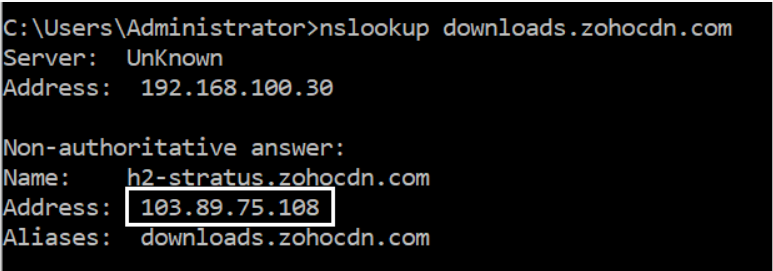
- patchdb.manageengine.com
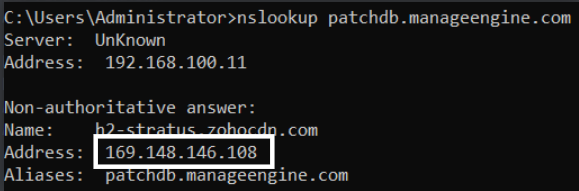
- patchdatabase.manageengine.com
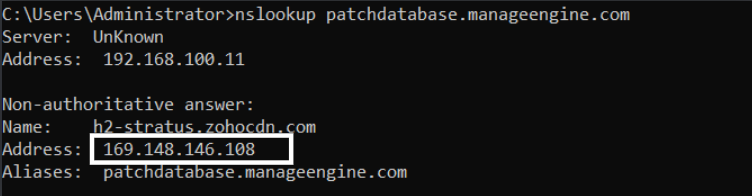
- download-accl.zoho.in
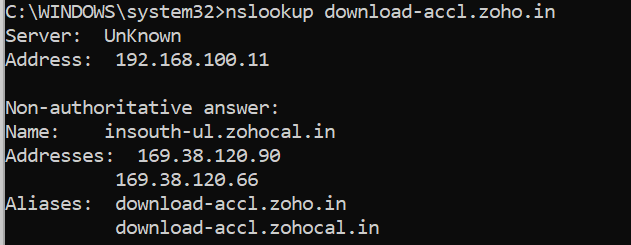
Domains required for Agent communication
This document provides the list of approved domains and IP addresses which are required for seamless agent-server communication.
Domain Whitelist
Communication across remote offices is possible in the following ways:
Direct communication (Roaming users)
Roaming users directly contact the cloud server. Since these users are constantly roaming, they can't be managed by a central server. Therefore, the roaming agents should connect to these websites:
desktopcentral.manageengine.jpThis is the server's URL. The roaming agent updates the task status to the cloud server and in order to ensure seamless agent-server communication, the agent has to connect to desktopcentral.manageengine.jp. Check Domain
endpointcentral-agent0.manageengine.jpEndpoint central agents will use this domain to contact endpoint central serversCheck Domain
patchdb.manageengine.comThis website will have the latest patch information along with the download URLs. To find the missing patches during the scan process, the agent gets the latest patch details from the patch database, for which it has to connect to patchdb.manageengine.com. Check Domain
patchdatabase.manageengine.comThe roaming agent has to connect to patchdatabase.manageengine.com in order to download dependent patches from the Endpoint Central Server. Check Domain
jp1-dms.zoho.jpThe roaming agent has to connect to jp1-dms.zoho.jp to perform on-demand operations. For instance, a user has added a new computer to the network, and he immediately wants to scan that computer. In that case, the user should perform an on-demand operation. Check Domain
jp2-dms.zoho.jpThe agent should connect to this domain for the user to be able to scan his system immediately. Check Domain
downloads.zohocdn.comThe Roaming agent should connect to downloads.zohocdn.com in order to download new agent binaries that are required during upgrade process. Check Domain
download.zoho.jpThe Roaming agent should connect to download.zoho.jp in order to download new agent binaries that are required during upgrade process. Check Domain
Through Distribution Server
Distribution server is a component which allows you to download patch binaries from the respective vendor websites and distribute it to all the remote office computers managed under the DS. The DS should connect to these websites:
desktopcentral.manageengine.jpThe replication of patches is done in the DS. The DS will then update the replication status to the server, for which it has to connect to desktopcentral.manageengine.jp. The remote office/WAN agents will contact the server to update the task status, for which it has to connect to this domain. Check Domain
endpointcentral-agent0.manageengine.jpEndpoint central distribution server will use this domain to contact endpoint central server.Check Domain
patchdb.manageengine.comThe DS gets the latest patch information from this website. It also downloads the patch binaries from the vendor's site through the download URL in this patchdb website. So it has to connect to patchdb.manageengine.com. Check Domain
patchdatabase.manageengine.comThe DS has to connect to this website in order to download the dependent patches from the Endpoint Central Server. Check Domain
jp1-dms.zoho.jpThe DS should connect to jp1-dms.zoho.jp in order to perform the operations involved in installing the agents using local AD without being interrupted. The remote office/WAN agents should connect to these websites to perform on-demand operations. Check Domain
jp2-dms.zoho.jpThe DS should connect to jp2-dms.zoho.jp in order to perform the operations involved in installing the agents using local AD without being interrupted. The remote office/WAN agents should connect to these websites to perform on-demand operations. Check Domain
downloads.zohocdn.comThe DS should connect to downloads.zohocdn.com in order to download new agent/DS binaries that are required during upgrade process. Check Domain
download.zoho.jpThe DS should connect to download.zoho.jp in order to download new agent/DS binaries that are required during upgrade process. Check Domain
Distribution Server agents
The agents which belong to remote office/WAN should connect to these domains:
desktopcentral.manageengine.jpThe DS agent updates the task status to the cloud server and in order to ensure seamless agent-server communication, the agent has to connect to desktopcentral.manageengine.jp. Check Domain
endpointcentral-agent0.manageengine.jpEndpoint central agents will use this domain to contact endpoint central serversCheck Domain
jp1-dms.zoho.jpThe DS agents should connect to this domain in order to perform the operations involved in installing the agents. Check Domain
jp2-dms.zoho.jpThe DS agents should connect to this domain in order to perform the operations involved in installing the agents. Check Domain
downloads.zohocdn.comThe ds agent should connect to downloads.zohocdn.com in order to download localization contents. Check Domain
download.zoho.jpThe ds agent should connect to download.zoho.jp in order to download localization contents. Check Domain
IP Whitelist
Here's the list of IP addresses that are required to be added to the whitelist
JP region data centre IP's- 103.163.152.0/23
- 193.118.160.0/24
- 193.118.161.0/24
Geo DNS Domains However, if you still wish to whitelist IP for the domains:
It is strongly recommended to whitelist the domain instead of whitelisting the IP address as these domains are using GeoDNS , i.e. The IP address of the domain's will change based on geolocation of the user.
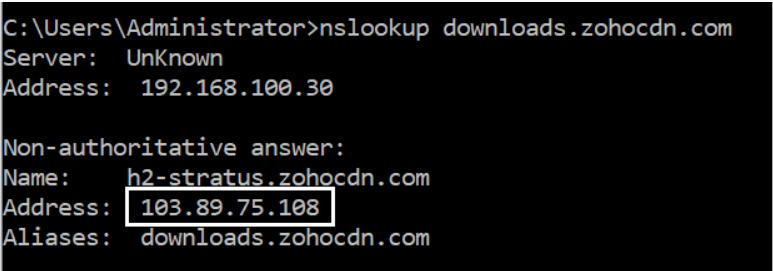
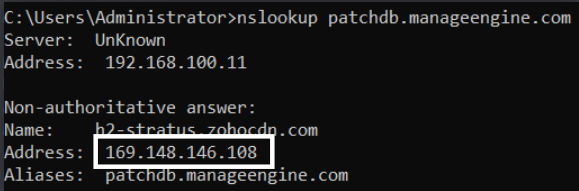
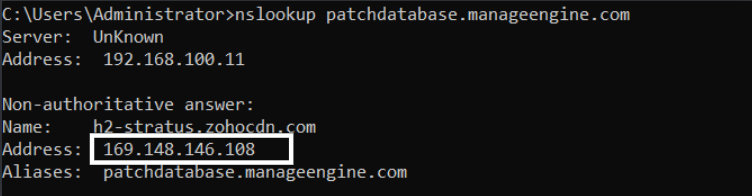
Navigate to the command prompt and execute the command- nslookup <domain> and get the IP as shown in the images below.
- downloads.zohocdn.com
- patchdb.manageengine.com
- patchdatabase.manageengine.com
Domains required for Agent communication
This document provides the list of approved domains and IP addresses which are required for seamless agent-server communication.
Domain Whitelist
Communication across remote offices is possible in the following ways:
Direct communication (Roaming users)
Roaming users directly contact the cloud server. Since these users are constantly roaming, they can't be managed by a central server. Therefore, the roaming agents should connect to these websites:
desktopcentral.manageengine.cnThis is the server's URL. The roaming agent updates the task status to the cloud server and in order to ensure seamless agent-server communication, the agent has to connect to desktopcentral.manageengine.cn. Check Domain
endpointcentral-agent0.manageengine.cnEndpoint central agents will use this domain to contact endpoint central servers Check Domain
patchdb.manageengine.comThis website will have the latest patch information along with the download URLs. To find the missing patches during the scan process, the agent gets the latest patch details from the patch database, for which it has to connect to patchdb.manageengine.com. Check Domain
patchdatabase.manageengine.comThe roaming agent has to connect to patchdatabase.manageengine.com in order to download dependent patches from the Endpoint Central Server. Check Domain
cn2-dms.zoho.com.cnThe roaming agent has to connect to cn2-dms.zoho.com.cn to perform on-demand operations. For instance, a user has added a new computer to the network, and he immediately wants to scan that computer. In that case, the user should perform an on-demand operation. Check Domain
cn3-dms.zoho.com.cnThe agent should connect to cn3-dms.zoho.com.cn for the user to be able to scan his system immediately. Check Domain
downloads.zohocdn.comThe Roaming agent should connect to downloads.zohocdn.com in order to download new agent binaries that are required during upgrade process. Check Domain
download.zoho.com.cnThe Roaming agent should connect to download.zoho.com.cn in order to download new agent binaries that are required during upgrade process. Check Domain
patchdb.manageengine.cnConnection to patchdb.manageengine.cn is required to download patch metadata and synchronize the Patch Database for patch and vulnerability updates. Check Domain
Through Distribution Server
Distribution server is a component which allows you to download patch binaries from the respective vendor websites and distribute it to all the remote office computers managed under the DS. The DS should connect to these websites:
desktopcentral.manageengine.cnThe replication of patches is done in the DS. The DS will then update the replication status to the server, for which it has to connect to desktopcentral.manageengine.cn. The remote office/WAN agents will contact the server to update the task status, for which it has to connect to this domain. Check Domain
endpointcentral-agent0.manageengine.cnEndpoint central distribution server will use this domain to contact endpoint central server. Check Domain
patchdb.manageengine.comThe DS gets the latest patch information from this website. It also downloads the patch binaries from the vendor's site through the download URL in this website. So it has to connect to patchdb.manageengine.com. Check Domain
patchdatabase.manageengine.comThe DS has to connect to this website in order to download the dependent patches from the Endpoint Central Server. Check Domain
cn2-dms.zoho.com.cnThe DS should connect to cn2-dms.zoho.com.cn in order to perform the operations involved in installing the agents using local AD without being interrupted. The remote office/WAN agents should connect to this website to perform on-demand operations. Check Domain
cn3-dms.zoho.com.cnThe DS should connect to cn3-dms.zoho.com.cn in order to perform the operations involved in installing the agents using local AD without being interrupted. The remote office/WAN agents should connect to this website to perform on-demand operations. Check Domain
downloads.zohocdn.comThe DS should connect to downloads.zohocdn.com in order to download new agent/DS binaries that are required during upgrade process. Check Domain
download.zoho.com.cnThe DS should connect to download.zoho.com.cn in order to download new agent/DS binaries that are required during upgrade process. Check Domain
patchdb.manageengine.cnConnection to patchdb.manageengine.cn is required to download patch metadata and synchronize the Patch Database for patch and vulnerability updates. Check Domain
Distribution Server agents
The agents which belong to remote office/WAN should connect to these domains:
desktopcentral.manageengine.cnThe DS agent updates the task status to the cloud server and in order to ensure seamless agent-server communication, the agent has to connect to desktopcentral.manageengine.ca. Check Domain
endpointcentral-agent0.manageengine.cnEndpoint central agents will use this domain to contact endpoint central servers Check Domain
cn2-dms.zoho.com.cnThe DS agents should connect to this domain in order to perform the operations involved in installing the agents. Check Domain
cn3-dms.zoho.com.cnThe DS agents should connect to this domain in order to perform the operations involved in installing the agents. Check Domain
downloads.zohocdn.comThe ds agent should connect to downloads.zohocdn.com in order to download localization contents. Check Domain
download.zoho.com.cnThe ds agent should connect to download.zoho.com.cn in order to download localization contents. Check Domain
patchdb.manageengine.cnConnection to patchdb.manageengine.cn is required to download patch metadata and synchronize the Patch Database for patch and vulnerability updates. Check Domain
IP Whitelist
Here's the list of IP addresses that are required to be added to the whitelist
UK region data centre IP's- 163.53.93.0/24
- 163.53.94.0/27
- 118.126.63.128/25
- 118.126.63.64/26
- 103.212.59.96/29
- 124.251.121.0/24
- 124.251.122.0/25
- 124.251.128.0/24
Geo DNS Domains It is strongly recommended to whitelist the domain instead of whitelisting the IP address as these domains are using GeoDNS , i.e. The IP address of the domain's will change based on geolocation of the user.
However, if you still wish to whitelist IP for the domains:
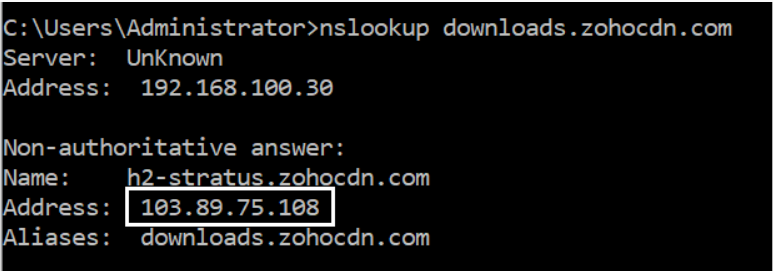
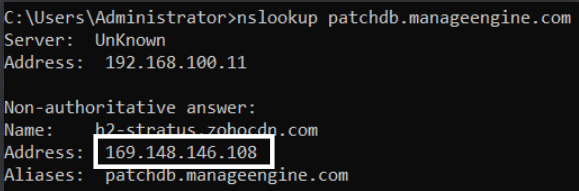
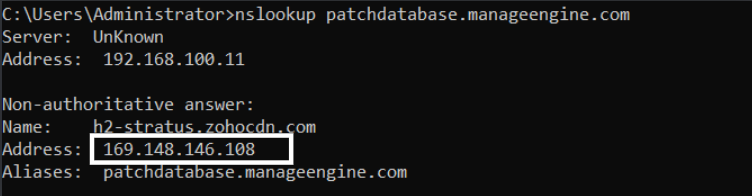
Navigate to the command prompt and execute the command- nslookup <domain> and get the IP as shown in the images below.
- downloads.zohocdn.com
- patchdb.manageengine.com
- patchdatabase.manageengine.com
Domains required for Agent communication
This document provides the list of approved domains and IP addresses which are required for seamless agent-server communication.
Domain Whitelist
Communication across remote offices is possible in the following ways:
Direct communication (Roaming users)
Roaming users directly contact the cloud server. Since these users are constantly roaming, they can't be managed by a central server. Therefore, the roaming agents should connect to these websites:
desktopcentral.manageengine.caThis is the server's URL. The roaming agent updates the task status to the cloud server and in order to ensure seamless agent-server communication, the agent has to connect to desktopcentral.manageengine.ca. Check Domain
(endpointcentral-agent)(p)?[0-9]{1,2}\.manageengine\.caNEWEndpoint central agents will use these domains to contact endpoint central servers. If regex based domain whitelisting is not supported whitelist the following domains:
endpointcentral-agent0.manageengine.ca
Check Domainendpointcentral-agentp1.manageengine.ca
Check Domain
patchdb.manageengine.comThis website will have the latest patch information along with the download URLs. To find the missing patches during the scan process, the agent gets the latest patch details from the patch database, for which it has to connect to patchdb.manageengine.com. Check Domain
patchdatabase.manageengine.comThe roaming agent has to connect to patchdatabase.manageengine.com in order to download dependent patches from the Endpoint Central Server. Check Domain
ca1-dms.zohoone.caThe roaming agent has to connect to jp1-dms.zoho.jp to perform on-demand operations. For instance, a user has added a new computer to the network, and he immediately wants to scan that computer. In that case, the user should perform an on-demand operation. Check Domain
ca2-dms.zohoone.caThe agent should connect to this domain for the user to be able to scan his system immediately. Check Domain
downloads.zohocdn.comThe Roaming agent should connect to downloads.zohocdn.com in order to download new agent binaries that are required during upgrade process. Check Domain
download.zohoone.caThe Roaming agent should connect to download.zohoone.ca in order to download new agent binaries that are required during upgrade process. Check Domain
Through Distribution Server
Distribution server is a component which allows you to download patch binaries from the respective vendor websites and distribute it to all the remote office computers managed under the DS. The DS should connect to these websites:
desktopcentral.manageengine.caThe replication of patches is done in the DS. The DS will then update the replication status to the server, for which it has to connect to desktopcentral.manageengine.ca. The remote office/WAN agents will contact the server to update the task status, for which it has to connect to this domain. Check Domain
(endpointcentral-agent)(p)?[0-9]{1,2}\.manageengine\.caNEWEndpoint central agents will use these domains to contact endpoint central servers. If regex based domain whitelisting is not supported whitelist the following domains:
endpointcentral-agent0.manageengine.ca
Check Domainendpointcentral-agentp1.manageengine.ca
Check Domain
patchdb.manageengine.comThe DS gets the latest patch information from this website. It also downloads the patch binaries from the vendor's site through the download URL in this patchdb website. So it has to connect to patchdb.manageengine.com. Check Domain
patchdatabase.manageengine.comThe DS has to connect to this website in order to download the dependent patches from the Endpoint Central Server. Check Domain
ca1-dms.zohoone.caThe DS should connect to ca1-dms.zohoone.ca in order to perform the operations involved in installing the agents using local AD without being interrupted. The remote office/WAN agents should connect to these websites to perform on-demand operations. Check Domain
ca2-dms.zohoone.caThe DS should connect to ca2-dms.zohoone.ca in order to perform the operations involved in installing the agents using local AD without being interrupted. The remote office/WAN agents should connect to these websites to perform on-demand operations. Check Domain
downloads.zohocdn.comThe DS should connect to downloads.zohocdn.com in order to download new agent/DS binaries that are required during upgrade process. Check Domain
download.zohoone.caThe DS should connect to download.zohoone.ca in order to download new agent/DS binaries that are required during upgrade process. Check Domain
Distribution Server agents
The agents which belong to remote office/WAN should connect to these domains:
desktopcentral.manageengine.caThe DS agent updates the task status to the cloud server and in order to ensure seamless agent-server communication, the agent has to connect to desktopcentral.manageengine.ca. Check Domain
(endpointcentral-agent)(p)?[0-9]{1,2}\.manageengine\.caNEWEndpoint central agents will use these domains to contact endpoint central servers. If regex based domain whitelisting is not supported whitelist the following domains:
endpointcentral-agent0.manageengine.ca
Check Domainendpointcentral-agentp1.manageengine.ca
Check Domain
ca1-dms.zohoone.caThe DS agents should connect to this domain in order to perform the operations involved in installing the agents. Check Domain
ca2-dms.zohoone.caThe DS agents should connect to this domain in order to perform the operations involved in installing the agents. Check Domain
downloads.zohocdn.comThe ds agent should connect to downloads.zohocdn.com in order to download localization contents. Check Domain
download.zohoone.caThe ds agent should connect to download.zohoone.ca in order to download localization contents. Check Domain
IP Whitelist
Here's the list of IP addresses that are required to be added to the whitelist
CA region data centre IP's- 199.67.69.0/24
- 199.67.84.0/24
- 199.67.85.0/24
- 199.67.86.0/24
- 199.67.87.0/24
Geo DNS Domains However, if you still wish to whitelist IP for the domains:
It is strongly recommended to whitelist the domain instead of whitelisting the IP address as these domains are using GeoDNS , i.e. The IP address of the domain's will change based on geolocation of the user.
Navigate to the command prompt and execute the command- nslookup <domain> and get the IP as shown in the images below.
- downloads.zohocdn.com
- patchdb.manageengine.com
- patchdatabase.manageengine.com
Domains required for Agent communication
This document provides the list of approved domains and IP addresses which are required for seamless agent-server communication.
Domain Whitelist
Communication across remote offices is possible in the following ways:
Direct communication (Roaming users)
Roaming users directly contact the cloud server. Since these users are constantly roaming, they can't be managed by a central server. Therefore, the roaming agents should connect to these websites:
desktopcentral.manageengine.ukThis is the server's URL. The roaming agent updates the task status to the cloud server and in order to ensure seamless agent-server communication, the agent has to connect to desktopcentral.manageengine.uk. Check Domain
(endpointcentral-agent)(p)?[0-9]{1,2}\.manageengine\.ukNEWEndpoint central agents will use these domains to contact endpoint central servers. If regex based domain whitelisting is not supported whitelist the following domains:
endpointcentral-agent0.manageengine.uk
Check Domain
patchdb.manageengine.comThis website will have the latest patch information along with the download URLs. To find the missing patches during the scan process, the agent gets the latest patch details from the patch database, for which it has to connect to patchdb.manageengine.com. Check Domain
patchdatabase.manageengine.comThe roaming agent has to connect to patchdatabase.manageengine.com in order to download dependent patches from the Endpoint Central Server. Check Domain
uk1-dms.zoho.ukThe roaming agent has to connect to uk1-dms.zoho.uk to perform on-demand operations. For instance, a user has added a new computer to the network, and he immediately wants to scan that computer. In that case, the user should perform an on-demand operation. Check Domain
uk2-dms.zoho.ukThe agent should connect to this domain for the user to be able to scan his system immediately. Check Domain
downloads.zohocdn.comThe Roaming agent should connect to downloads.zohocdn.com in order to download new agent binaries that are required during upgrade process. Check Domain
download.zoho.ukThe Roaming agent should connect to download.zoho.ca in order to download new agent binaries that are required during upgrade process. Check Domain
Through Distribution Server
Distribution server is a component which allows you to download patch binaries from the respective vendor websites and distribute it to all the remote office computers managed under the DS. The DS should connect to these websites:
desktopcentral.manageengine.ukThe replication of patches is done in the DS. The DS will then update the replication status to the server, for which it has to connect to desktopcentral.manageengine.uk. The remote office/WAN agents will contact the server to update the task status, for which it has to connect to this domain. Check Domain
(endpointcentral-agent)(p)?[0-9]{1,2}\.manageengine\.ukNEWEndpoint central agents will use these domains to contact endpoint central servers. If regex based domain whitelisting is not supported whitelist the following domains:
endpointcentral-agent0.manageengine.uk
Check Domain
patchdb.manageengine.comThe DS gets the latest patch information from this website. It also downloads the patch binaries from the vendor's site through the download URL in this patchdb website. So it has to connect to patchdb.manageengine.com. Check Domain
patchdatabase.manageengine.comThe DS has to connect to this website in order to download the dependent patches from the Endpoint Central Server. Check Domain
uk1-dms.zoho.ukThe DS should connect to uk1-dms.zoho.uk in order to perform the operations involved in installing the agents using local AD without being interrupted. The remote office/WAN agents should connect to these websites to perform on-demand operations. Check Domain
uk2-dms.zoho.ukThe DS should connect to uk2-dms.zoho.uk in order to perform the operations involved in installing the agents using local AD without being interrupted. The remote office/WAN agents should connect to these websites to perform on-demand operations. Check Domain
downloads.zohocdn.comThe DS should connect to downloads.zohocdn.com in order to download new agent/DS binaries that are required during upgrade process. Check Domain
download.zoho.ukThe DS should connect to download.zoho.uk in order to download new agent/DS binaries that are required during upgrade process. Check Domain
Distribution Server agents
The agents which belong to remote office/WAN should connect to these domains:
desktopcentral.manageengine.ukThe DS agent updates the task status to the cloud server and in order to ensure seamless agent-server communication, the agent has to connect to desktopcentral.manageengine.uk. Check Domain
(endpointcentral-agent)(p)?[0-9]{1,2}\.manageengine\.ukNEWEndpoint central agents will use these domains to contact endpoint central servers. If regex based domain whitelisting is not supported whitelist the following domains:
endpointcentral-agent0.manageengine.uk
Check Domain
uk1-dms.zoho.ukThe DS agents should connect to this domain in order to perform the operations involved in installing the agents. Check Domain
uk2-dms.zoho.ukThe DS agents should connect to this domain in order to perform the operations involved in installing the agents. Check Domain
downloads.zohocdn.comThe ds agent should connect to downloads.zohocdn.com in order to download localization contents. Check Domain
download.zoho.ukThe ds agent should connect to download.zoho.uk in order to download localization contents. Check Domain
IP Whitelist
Here's the list of IP addresses that are required to be added to the whitelist
UK region data centre IP's- 199.67.88.0/24
- 199.67.89.0/24
- 169.148.129.0/24
- 169.148.131.0/24
- 169.148.129.23
- 169.148.131.23
Geo DNS Domains However, if you still wish to whitelist IP for the domains:
It is strongly recommended to whitelist the domain instead of whitelisting the IP address as these domains are using GeoDNS , i.e. The IP address of the domain's will change based on geolocation of the user.
Navigate to the command prompt and execute the command- nslookup <domain> and get the IP as shown in the images below.
- downloads.zohocdn.com
- patchdb.manageengine.com
- patchdatabase.manageengine.com