Integrating Endpoint Central MSP Cloud with ServiceDesk Plus MSP Cloud
Table of Contents
Overview
Integrating Endpoint Central MSP Cloud with ServiceDesk Plus msp Cloud bridges the gap between IT operations and help desk teams. This integration enables real-time synchronization of asset data, centralizes IT asset visibility, and streamlines ticket resolution workflows. With all asset-related data pushed directly to the CMDB in ServiceDesk Plus, IT teams can make more informed decisions, reduce manual effort, and maintain a unified view of devices across the organization. The result is simplified IT management, faster issue resolution, and improved operational efficiency.
Pre-requisites
- Ensure your ServiceDesk Plus MSP Cloud account has sufficient licenses to map endpoints.
- The user or technician performing the configuration must have administrator privileges.
- The same user/technician must exist in both Endpoint Central MSP Cloud and ServiceDesk Plus MSP Cloud.
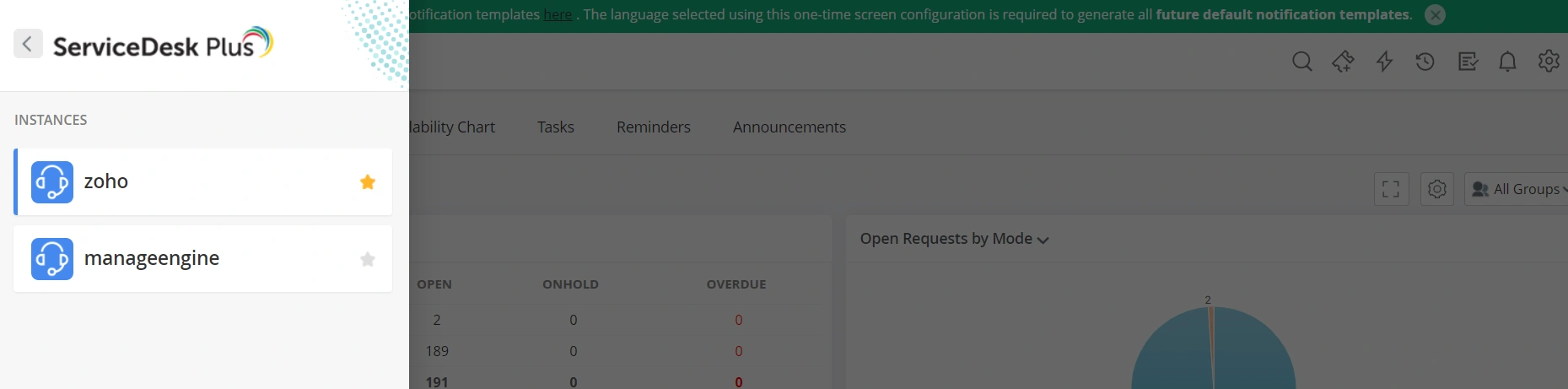
- To integrate Endpoint Central MSP Cloud with ServiceDesk Plus MSP Cloud, ensure a default instance is set. If multiple instances exist in ServiceDesk Plus MSP Cloud, mark one as the default using the star icon. Asset data will be synced only with the selected default instance.
Integration Steps
- Log in to the Endpoint Central MSP Cloud console.
- Navigate to Admin > Integrations > ServiceDesk Plus MSP Cloud.
- Click Enable to activate the integration.
- Contact servicedeskplus-cloud-support@manageengine.com to complete the integration steps on the ServiceDesk Plus Cloud side, to ensure that asset details are successfully received and reflected in the ServiceDesk Plus Cloud console.
Features Supported by This Integration
This integration enables organizations to automatically post computer asset data from Endpoint Central Cloud to the ServiceDesk Plus Cloud CMDB. This ensures all computer-related asset information is up-to-date and accessible within your help desk platform, allowing for streamlined asset tracking, better decision-making, and improved operational visibility.
Data Posted to ServiceDesk Plus MSP Cloud CMDB
To view the complete list of asset data collected during an asset scan and synchronized to the ServiceDesk Plus MSP Cloud CMDB, see the supported asset data mapping details.