- A real-world example
- How to check battery health locally
- Checking battery health enterprise-wide
- Warranty matters
- Fleet impact: why IT should care
- Turning battery health into a DEX signal
- Practical use cases
- Automated remediation workflows
- Takeaway for the IT team
Share:




Most IT teams expect laptop batteries to degrade over time. What often gets missed is how early that degradation becomes severe—and how often it happens while the device is still under warranty.
If you have a way to monitor battery health and warranty status at scale, you can spot failing batteries before the warranty expires and get them replaced at the vendor’s cost. Across a few thousand endpoints, that can easily translate to tens or hundreds of thousands of dollars saved every year—not to mention fewer “my laptop dies in 30 minutes” tickets.
Let’s look at this through a real device example and then walk through how power users (and IT) can measure, interpret, and operationalize battery health.
A real-world example: good laptop, bad battery
Take a Windows workstation like the Dell Precision 5550/5560/5570. These laptops are widely used in enterprises, especially by teams that require high-performance machines—designers, engineers, developers, data scientists, and other power users.
Now imagine looking at its telemetry in a DEX/endpoint analytics console and seeing something like this:
- Device age: 2 years 3 months
- Battery health: 52%
- Warranty: still has 6 months remaining
- No system crashes or hard resets in the last 7 days
- Overall device experience score dragged down mainly by device performance and responsiveness
From the OS and hardware point of view, the laptop is stable. It is not crashing, it is not throwing errors, and nothing “looks” broken. But the battery is already at ~50% of its original capacity and the user is probably:
- Carrying the charger everywhere
- Avoiding working on battery during calls
- Complaining that the laptop is slow and old
In many organizations, this is exactly the point when users start asking for a full device refresh instead of “just a battery replacement.” If IT doesn’t have good telemetry, the path of least resistance is often to approve the refresh. But look carefully:
- The device is still under warranty
- The battery has clearly degraded
- A warranty replacement battery is far cheaper than a full new laptop
If your DEX / endpoint data can bring up battery health + warranty status on the same screen, IT can act in time: open a support case with Dell, get the battery replaced under warranty, and keep the laptop in service for another 1—2 years.
How to check battery health locally (Windows)
Even without centralized tooling, a user can quickly check whether their battery is in trouble using the built-in Windows battery report.
- Press Windows + R and type
cmd. - Paste this command and press Enter:
powercfg /batteryreport - Windows will generate a report. Open
battery-report.htmlin your browser. - In the report, look for:
- DESIGN CAPACITY — what the battery was rated for when new.
- FULL CHARGE CAPACITY — what it can hold now.
A simple rule of thumb: if Full Charge Capacity has dropped below ~66% of Design Capacity, the battery is significantly worn and will benefit from replacement. For example, let’s take a Precision 5550 case: Design capacity: 54,891 mWh and Full charge capacity: 28,380 mWh. That’s ~48% of its original capacity—well into “this device will not work as intended” territory. In that situation, it’s perfectly reasonable to ask IT (or the vendor) for a replacement, especially if the device is still within battery warranty.
How to check battery health enterprise-wide at scale
Now to do this very same thing on scale, we would need a centralized tool or solution. This is exactly where a DEX solution or an endpoint management solution that can detect device performance metrics would come in handy. With our DEX capabilities, we automatically surface Battery Health. Our battery health is calculated using the following formula: (Current Full Charge Capacity ÷ Original Design Capacity) × 100. So according to the above example: There is about ~52% remaining capacity, which means ~48% degradation from the original design capacity.
Recommended Battery Health Ranges (Enterprise Rule-of-Thumb)
| Battery Health | What it means in practice | Recommended IT action |
|---|---|---|
| 90—100% | Healthy, near-new battery | No action |
| 80—89% | Normal wear | Monitor |
| 70—79% | Accelerated wear begins | Flag, track warranty |
| 60—69% | Significant degradation | Plan replacement |
| 50—59% | Severe degradation | Prioritize replacement |
| < 50% | Critical — battery needs replacement | Replace immediately; check warranty status |
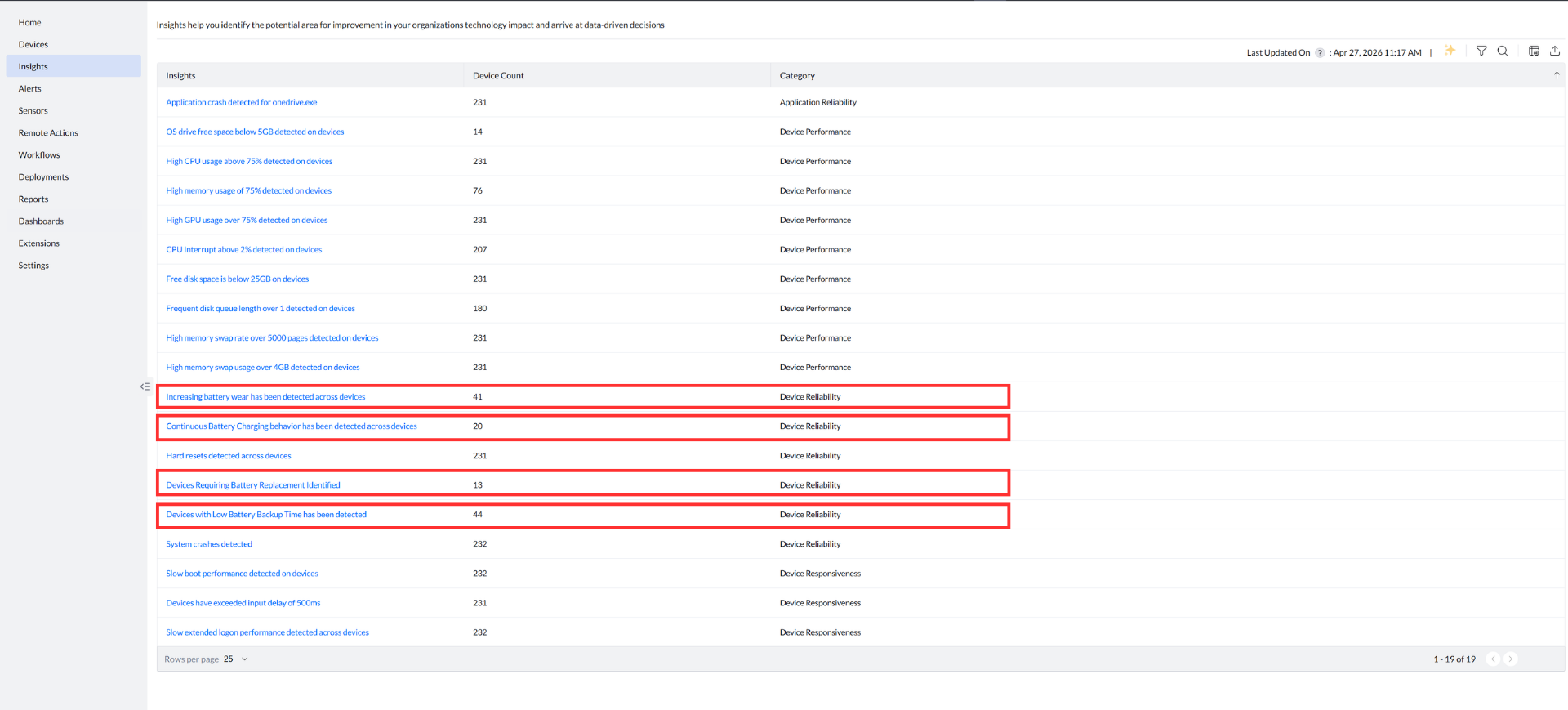
Enterprises can set up multiple battery health-related alerts and track them using our DEX capabilities. If the devices fall under warranty, battery can be replaced at zero additional cost.
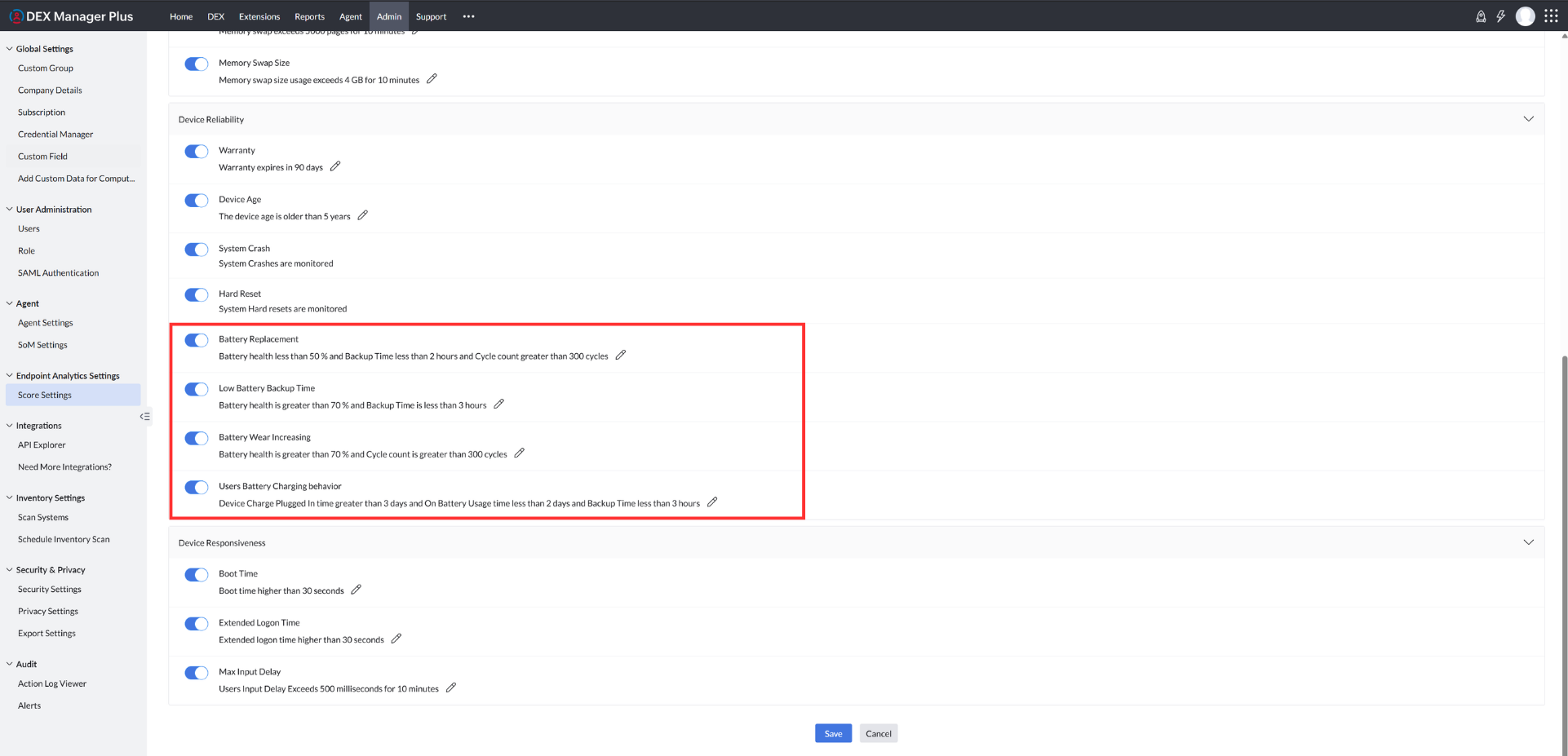
Devices are monitored based on the threshold and insights pointing to battery degradation are surfaced, across the enterprise.
Why warranty timing matters so much
For Dell and Lenovo laptops, battery warranty coverage is determined using the device’s service tag number, allowing the solution to accurately confirm warranty eligibility at the device level—without relying on manual lookups or user-reported information.
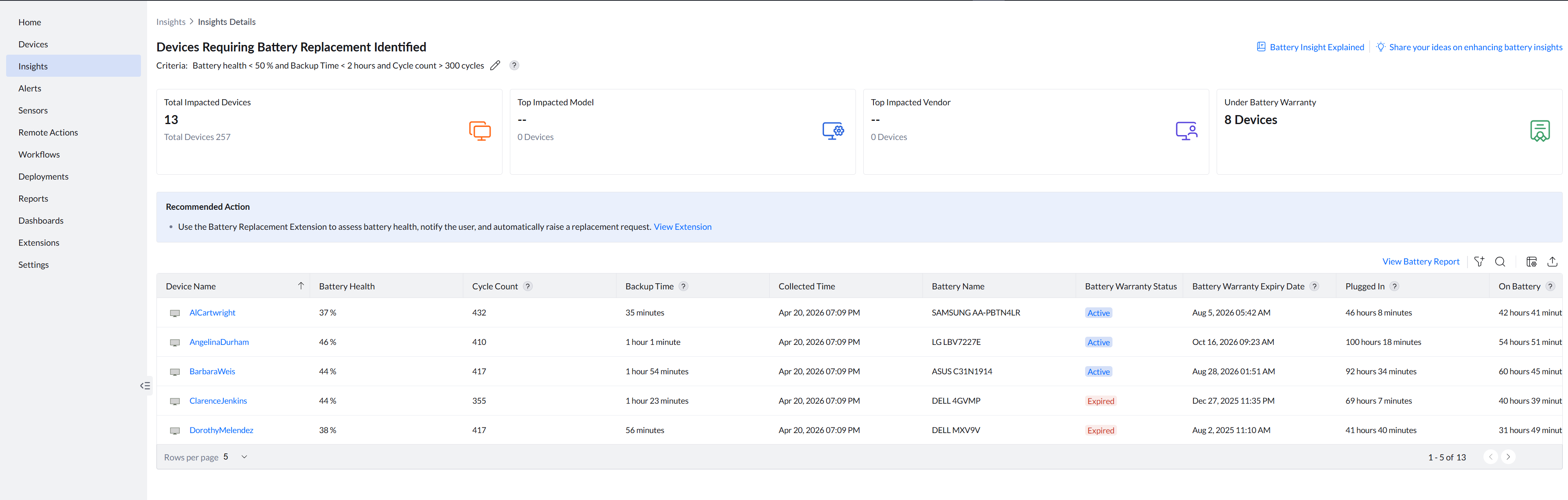
What makes this particularly actionable is that the solution doesn’t just flag whether a battery is degrading—it surfaces the battery warranty status (Active or Expired) and the exact battery warranty expiry date for each affected device. A summary count of how many devices across the fleet are still under battery warranty is also shown upfront, so IT can immediately gauge the scale of the opportunity. This means IT doesn’t have to cross-reference a separate asset register or contact the vendor just to know whether a replacement claim is viable—that context is already there, alongside the health data.
The standard battery warranty for Dell and Lenovo is typically 1 year, even if the system itself carries a 3—5 year warranty. This is why timing is everything:
- If you detect serious battery wear inside the battery warranty window, you can claim a replacement.
- If you detect it after that window, the cost is on you—even if the laptop is still under main system warranty.
This is where DEX-driven monitoring helps. You are not depending on users to complain at the right time. Instead, IT can:
- Track battery health percentage for all laptops.
- See the battery warranty status and expiry date per device, in the same view.
- Automatically flag cases like: Battery health < 50% AND battery warranty status = Active.
Those are your high-priority, high-ROI cases. Every one of those is a potential free replacement instead of an out-of-pocket cost. With our DEX capabilities, admins can also set up thresholds for warranty-based alerts.
Fleet impact: why IT should care
At a single-device scale, a battery replacement vs. a full refresh might save a few hundred dollars. But at fleet scale, the math changes quickly. Imagine:
- ~2,000 laptops in your estate.
- 15—20% of them experiencing premature battery wear inside warranty.
- Replacement battery cost covered by vendor vs. a new $1,500+ laptop.
Even if you save only 150 refreshes a year, that’s easily $220K+ in avoided hardware cost. That’s not all you save if you factor in:
- Lower e-waste
- Less time spent imaging and onboarding new devices
- Less disruption for users
Battery telemetry is low-hanging fruit that many IT teams simply don’t track well today.
Turning battery health into a DEX signal
From a digital employee experience standpoint, battery health is more than just a hardware metric. It directly affects:
- Workstyle (can I actually work unplugged?)
- Reliability (will my laptop die in the middle of a call?)
- Perception (“this laptop is old and slow”)
In a good DEX setup, you’d want to treat battery health as a first-class experience signal, alongside:
- Boot time
- App crash frequency
- System crashes/hard resets
- Device age
- Warranty status
That allows you to do things like:
- Flag “at-risk” devices where battery health is low but warranty is still active.
- Correlate user complaints (“my laptop keeps dying or is slow”) with hard telemetry.
- Separate performance complaints caused by hardware limits from those caused by software configuration.
- Decide whether the right action is: Battery replacement, OS or app cleanup, or Hardware refresh.
How to prioritize battery health using multiple signals
Battery health alone does not tell the full story. To correctly decide whether a device needs a battery replacement, a device upgrade, or user behavior changes, IT teams must look at battery health in combination with usage and performance signals. Here are a few additional insights that show how different battery-related parameters should be interpreted together.
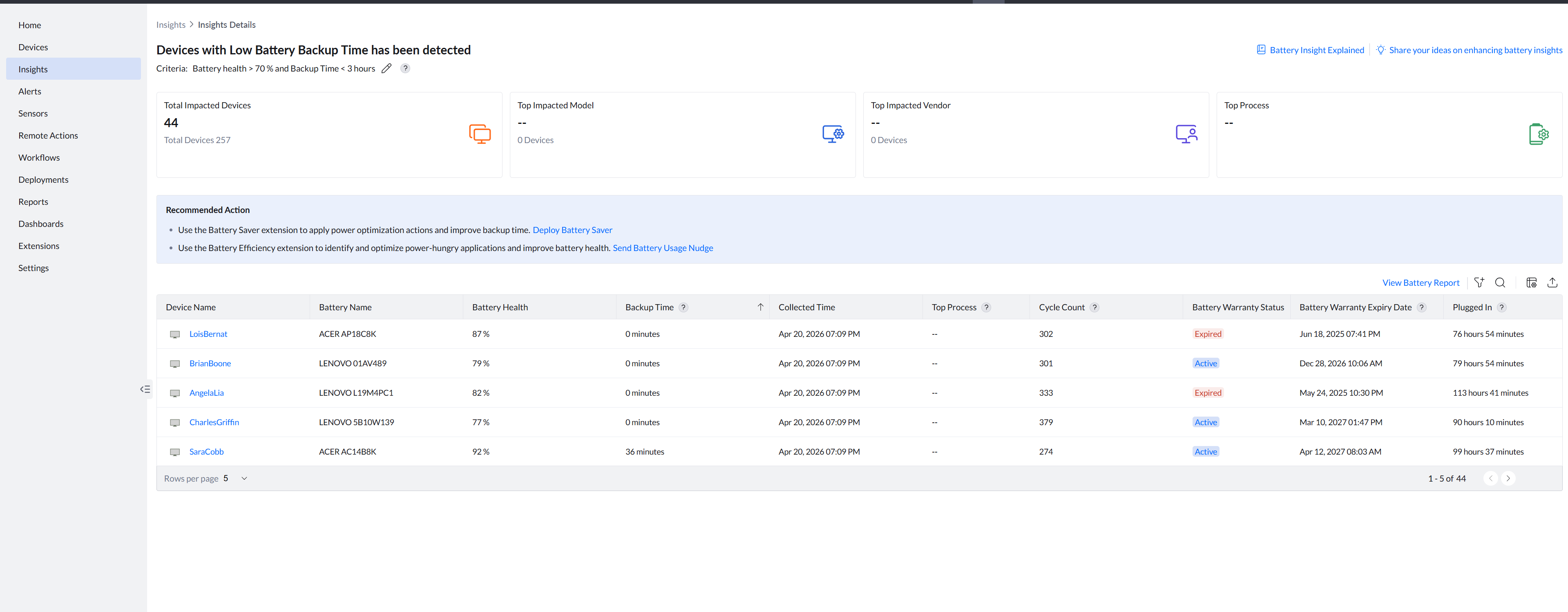
Devices with low battery backup time
When battery health is above 70% but backup time is still under 3 hours, the battery itself isn’t the problem. The insight surfaces the top CPU and GPU-consuming processes on the device, and calculates backup time as an average over the last 7 days for accuracy. This helps IT distinguish between a device that needs a battery swap versus one that’s being overwhelmed by power-hungry applications or is simply underpowered for the user’s role.
Increasing battery wear across devices
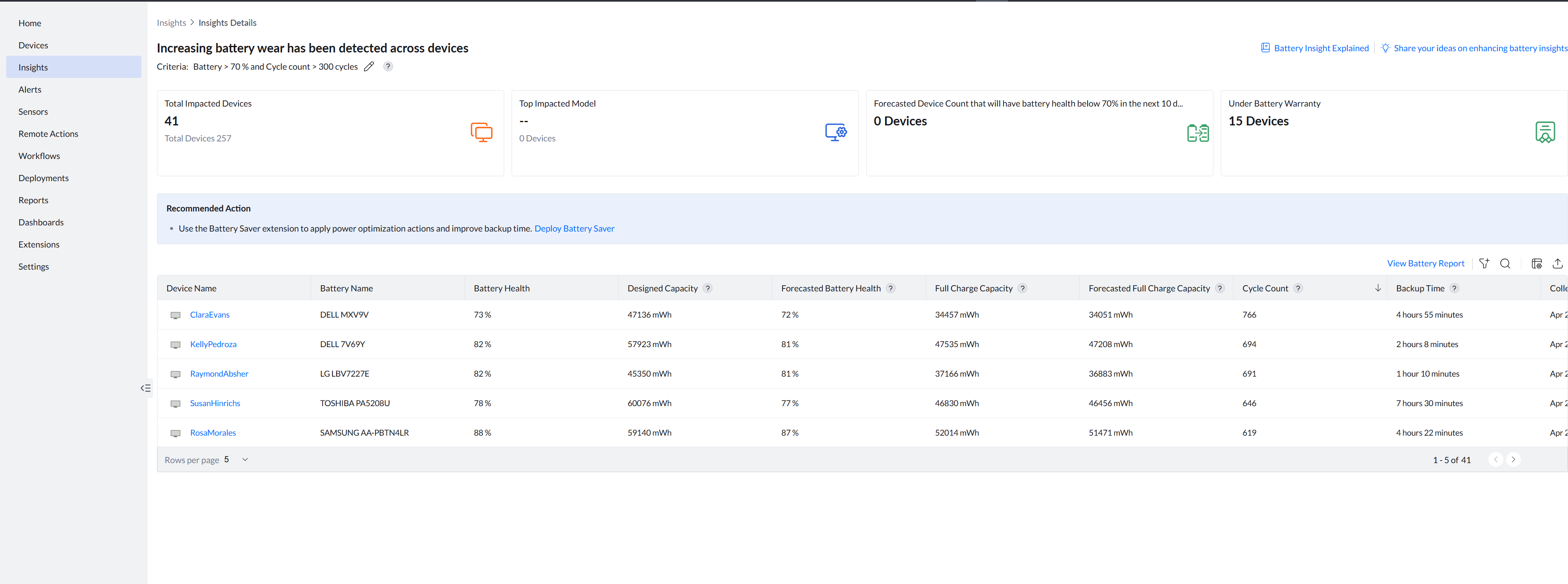
When battery health is above 70% but cycle count exceeds 300 and a downward trend is visible, the battery is healthy today but degrading predictably. The insight goes a step further by forecasting battery health for the next 10 days, helping IT assess whether deploying a power plan now can slow the decline—or whether a replacement should be scheduled before the device crosses a critical threshold. Devices whose forecasted health is expected to drop below 70% within that window are also called out, so IT can proactively align with warranty coverage or refresh cycles.
Continuous battery charging behavior
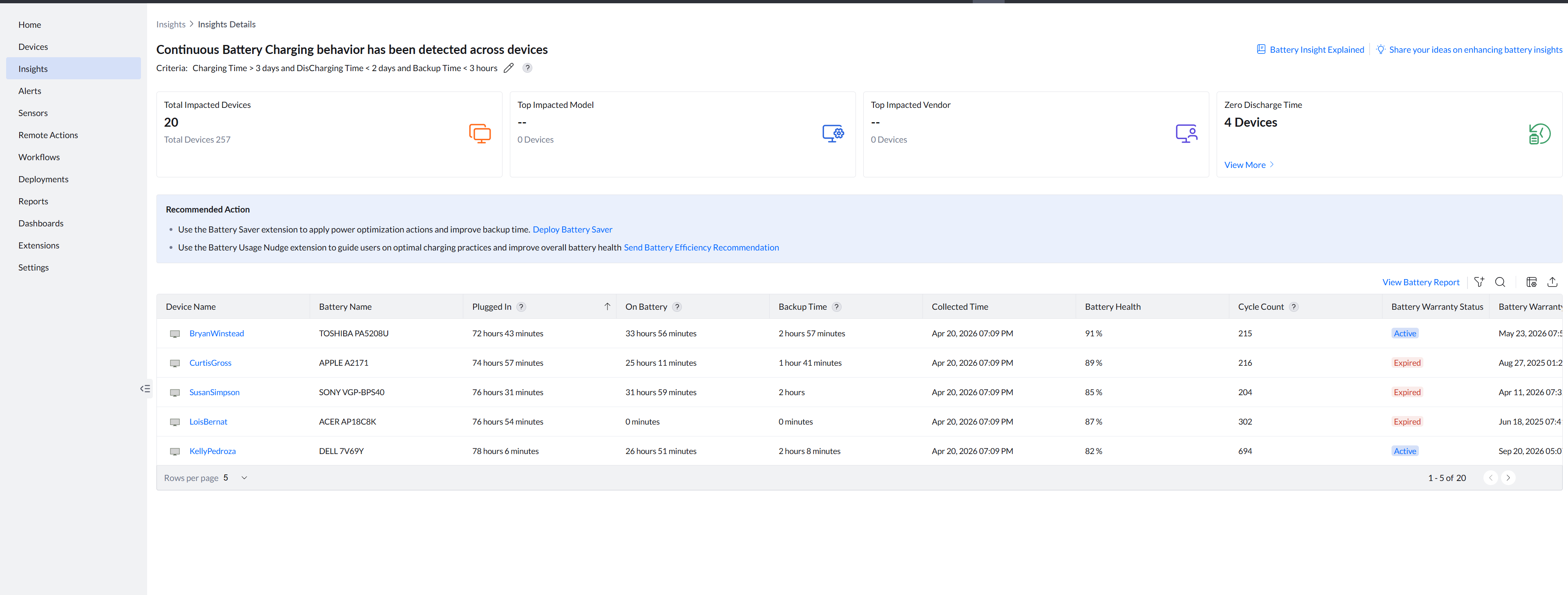
When a device has been charging for more than 3 days, discharging for less than 2 days, and backup time is under 3 hours, the wear is behavioral rather than mechanical. The device is being kept constantly plugged in, which accelerates degradation over time. Devices with zero discharge time are also flagged separately, highlighting the most extreme cases. This insight helps IT identify users who need guidance on charging habits, rather than devices that need hardware intervention.
The table below consolidates all four insights for quick reference:
| Insight | Key parameters | What this combination indicates | Recommended action |
|---|---|---|---|
| Devices requiring battery replacement | Battery health < 50% AND Backup time < 2 hours AND Cycle count > 300 — with Battery Warranty Status (Active/Expired) and Battery Warranty Expiry Date surfaced per device; summary count of devices under battery warranty shown upfront | Severe battery degradation with warranty eligibility confirmed at the device level, without manual cross-referencing. | Prioritize replacement. Use the Battery Replacement Extension to assess health, notify the user, and automatically raise a replacement request. For devices with Active warranty status, initiate vendor claim immediately. |
| Devices with low battery backup time | Battery health > 70% AND Backup time < 3 hours AND top CPU/GPU-consuming processes identified; backup time averaged over last 7 days | Battery is physically healthy but backup duration is short—likely due to power-hungry applications or device under-specification for the user’s role. | Investigate top processes. Reassess device allocation if needed; otherwise use the Battery Efficiency extension to identify and optimize power-hungry applications. |
| Increasing battery wear across devices | Battery health > 70% AND Cycle count > 300, with a 10-day forecasted battery health; devices forecast to drop below 70% are flagged | Battery is healthy today but degrading predictably; 10-day forecast helps determine if a power plan can slow further wear before critical thresholds are crossed. | Deploy Battery Saver for power optimization. If forecast shows health dropping below 70% within the window, align with warranty coverage or planned refresh cycles. |
| Continuous battery charging behavior | Charging time > 3 days AND Discharging time < 2 days AND Backup time < 3 hours; devices with zero discharge time flagged separately | Wear driven by user behavior—device kept constantly plugged in, reducing the battery’s ability to hold charge over time. | Use the Battery Usage Nudge extension to guide users on optimal charging practices and improve overall battery health. |
Creating automated workflows to solve battery-related issues in the organization
Automated workflows play a crucial role in proactively addressing battery-related issues before they impact employee productivity. By continuously monitoring battery health, device age, and warranty status, IT teams can automatically identify batteries that are degrading abnormally or approaching critical thresholds. These workflows can trigger actions such as notifying IT, raising service requests, or initiating vendor warranty claims while coverage is still active. In some cases, remediation workflows can also recommend usage optimizations or power settings to extend battery life. By standardizing how battery issues are detected and handled, organizations can reduce manual effort, prevent avoidable device replacements, and ensure consistent, data-driven decisions across the endpoint fleet.
We provide a workflow builder that enables IT teams to design end-to-end detection-to-remediation workflows tailored to their environment. Using real-time device telemetry as triggers, teams can define conditions and automated actions to handle issues such as battery degradation, performance drops, or recurring system faults. This allows organizations to move from simply detecting problems to resolving them at scale—automatically raising alerts, notifying users, initiating remediation steps, or creating service requests when intervention is required. By codifying these workflows, IT teams can ensure consistent, repeatable responses to common issues while significantly reducing manual effort and support overhead.
Takeaway for the IT team
For IT & ITOps teams:
- Treat battery health + warranty as part of your DEX and endpoint monitoring strategy.
- Automate alerts for in-warranty, high-degradation batteries—using service tag data for Dell and Lenovo to confirm warranty eligibility, expiry dates, and device counts at a glance.
- Use battery backup trends (averaged over 7 days) and 10-day health forecasts to get ahead of failures before they impact users.
- Correlate charging behavior and top process data to distinguish hardware problems from user behavior or application issues.
- Use this data to argue for data-driven refresh policies instead of perception-driven ones.
In-warranty battery degradation is one of those rare IT opportunities where good telemetry, a bit of automation, and a simple policy can translate directly into hard dollar savings—while simultaneously making life better for your users. That’s exactly the kind of win DEX should be delivering.
 Meet the author