
DNS and DHCP anomalies — Detected and neutralized in real time
✖
BLOCKED
DNS Anomalies
- Typosquatting: g00gle.com → fake domain impersonation.
- Invalid TLDs: portal-update.g00gle.iv → non-standard extensions.
- DGA Domains: a9f3h2l0q.biz → algorithmically generated domains.
- DNS Tunneling: aW5mbz1wYXNzd29yZA==.stealth-dns.com → covert data exfiltration.
- Policy Violations: Internal devices resolving unauthorized hostnames.
- Excessive Query Volume: Rapid repetitive lookups → beaconing or C2 traffic.
✖
BLOCKED
DHCP Anomalies
- DuplicateIP: Same IP assigned to multiple MACs → spoofing/config error.
- RapidLease: Same MAC requesting many leases rapidly → DoS attempt.
- Starvation: Numerous unique MACs exhausting pool → DHCP flooding.
- ReservedMismatch: Reserved IP issued to unexpected MAC → tampering.
- UnauthorizedRelay: Rogue relay agent forwarding malicious requests.
- RogueDHCPServer: Unauthorized DHCP server leasing fake IPs.
The Insights dashboard
Built-in anomaly reports
Anomaly detection and response
The Insights dashboard
Built-in anomaly reports
Anomaly detection and response
The Insights dashboard
Your complete anomaly landscape—visualized clearly for faster investigation and early threat awareness.
Unified anomaly insights

- Operational truth at a glance
Gauge the overall risk posture of your organization by quantifying the true volume and weight of DNS and DHCP anomalies across all sites—without ever sifting through logs. - Stratified risk visibility
Accelerate decision-making by instantly seeing where risk concentrates. Pinpoint which anomalies fall into high-impact buckets automatically isolated by the engine. - Track how risk builds over time
Predict breakpoints before they happen. The time-series curve reveals whether anomalies are spiking, flattening, or dropping — a powerful early indicator of creeping instability.
- Let evidence drive the hunt
Prioritize investigation with evidence—not instinct—by pinpointing dominant DNS threats—reconnaissance, tunneling, or DGA—and gain instant executive-level insights without requiring any technical interpretation. - Visualize and into DHCP pressure points instantly
Prioritize investigation toward the most disruptive anomaly types by seeing which category occupies the largest footprint—and drill directly into detailed reports with a single click to review affected entities, timestamps, and conflict patterns. - Flagged domains at a glance. Forensics in a click.
Analyze the distribution of flagged domains driving most DNS anomalies. Identify dominant threat actors and drill into each one with a single click to uncover risk patterns, client activity, triggering behaviors, and forensic cues needed for rapid validation.
Network risk snapshot
Instant visibility into emerging threat signals.

- See why a domain was flagged — Not just that it was
Identify which domains require urgent validation with a clean, scored list that reveals whether risk is dominated by a few domains or evenly spread. - See where your DNS traffic truly flows
Get a quick snapshot that ranks the highest-hit destinations to reveal which suspicious domains are being hammered. Unexpected domains with high query counts often indicate malware infections, misconfigurations, or shadow services.
- Identify the clients driving your DNS risk
Triage and prioritize investigation on the top misbehaving clients by validating and correlating why each endpoint triggered the anomaly load—enabling rapid confirmation of malware, misconfiguration, or insider misuse and accelerating remediation workflows. - Track misbehaving clients through DHCP activity
Eliminate guesswork and quickly prioritize investigations into blocked hosts that destabilized lease allocations by correlating each endpoint’s anomaly trail with excessive leases, duplicate identifiers, or churn—helping you determine whether the issue reflects a persistent attack or a short-lived disturbance.
Built-in anomaly reports
DHCP anomaly reports
When DHCP misbehaves this is where you see it — Every lease, every conflict and every clue.

- From a thousand events to the one you need
Drill down from any angle by risk score, DHCP type, cluster, anomaly type, mentioning one of the affected or conflicting entities to instantly locate specific anomalies or clients, eliminating time normally wasted manually scrubbing logs. - Trace DHCP instability back to its true sources
Identify which clients triggered Duplicate DUIDs, Duplicate IAIDs, or Subnet Starvation attempts, giving admins a definitive list of offenders while CXOs gain visibility into where allocation risks originate. - A day’s DHCP behavior—Decoded on demand
View total anomalies tied to a specific day and hour, giving you temporal clarity into when DHCP misbehavior peaked or stabilized. - Build context without switching screens
See context-rich descriptions like detection windows, unique client counts, and timestamps all in place — reducing dependence on external tools.
- Every entity exposed, Every detail delivered
Validate automated quarantine with evidence-backed detail. Receive granular visibility into all conflicting or affected entities, empowering you to verify patterns, isolate faulty clients, or validate device health without cross-referencing multiple systems. - See Who’s colliding, Who’s conflicting
Identify conflicting DHCP entities by reviewing groups of clients that share identifiers, leases, or abnormal patterns—helping you instantly see where DHCP behavior diverges or overlaps in ways that shouldn’t happen. - Trace every lease that broke the rules
Inspect abnormal lease events by drilling into the exact MACs, DUIDs, or IPs involved, allowing you to trace misbehavior, misconfigurations, or spoofing attempts with zero guesswork. - Turn chaos into clear conflict groups
Understand anomaly clusters by viewing how entities are grouped together, making it easier to spot patterns like repeated conflicts, identity duplication, or burst-based starvation attempts.
DNS anomaly reports
Follow the queries. Decode the misbehavior. Find the truth.
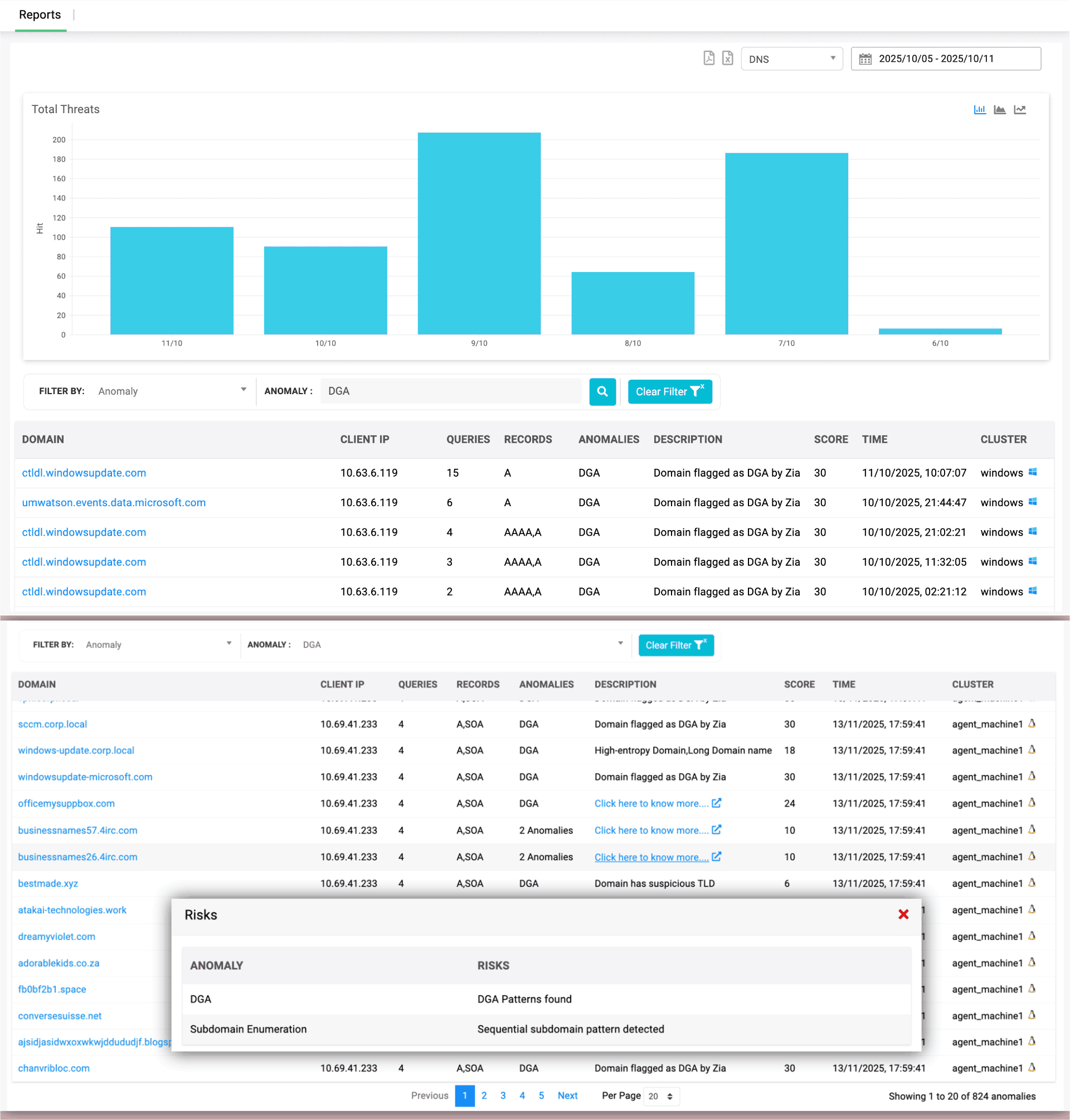
- See why a domain was flagged — Not just that it was
Understand the exact risk indicators — such as high entropy, long labels, suspicious TLDs, or sequential subdomains — giving you clear reasons behind every DGA or enumeration alert. - See the clients behind the chaos
Trace anomalies back to the exact client IPs that queried suspicious domains, helping you follow the trail from DNS behavior to endpoint investigation. - Every query tells a story — Read it instantly
Review query counts, record types, and timestamps to understand how often and when a suspicious domain was hit, improving your timeline reconstruction.
- Patterns, clusters, and clues — All in one feed
Connect anomalies to source clusters so you know which server group or vantage point observed the behavior and whether the pattern was localized or distributed. - Stop searching logs. Start seeing evidence.
Replace log hunting with point-and-click forensics. The pop-up reveals risk reasons instantly, eliminating the need to comb through raw DNS packets. - Decode DNS misbehavior — One domain at a time
Break down anomalies domain by domain, allowing you to validate detections, review the context, and prioritize which destinations need deeper investigation.
Anomaly detection and response
Automatic containment
Zero-Touch containment. Threat entities blocked on detection.

- Containment handled. You focus on the truth.
DDI Central uses DNS ACLs on Linux and Client subnet-based isolation on Windows to immediately cut off compromised devices from making further DNS queries, stopping the spread of malware at the earliest stage. - Contain on Your Terms—DNS, DHCP, or Both.
Choose the quarantine method that fits your environment, whether DNS-level blocking, DHCP MAC isolation, or a combined mode—enabling precision containment that aligns with your network architecture and security policy. - See who was stopped before they caused trouble
Review all quarantined domains and clients and instantly understand who attempted risky behavior, helping you assess impact without live threats in play.
- From suspicion to safety—Automatically.
Let DDI Central auto-block suspicious domains and DHCP clients, ensuring risky endpoints can’t rejoin the network until you’ve validated or remediated them. - Your quarantine zone. Your investigation pace.
Work backwards from safely contained entities so your analysis is calm, controlled, and fully informed rather than reactive or rushed. - Filter the noise. Follow the evidence.
Use rich filtering options—by score, cluster, quarantine method, identifiers—to sift through compromised hosts or domains and focus only on what needs your next move.
Focused investigation
Every Indicator Examined. Every Detail Accounted.
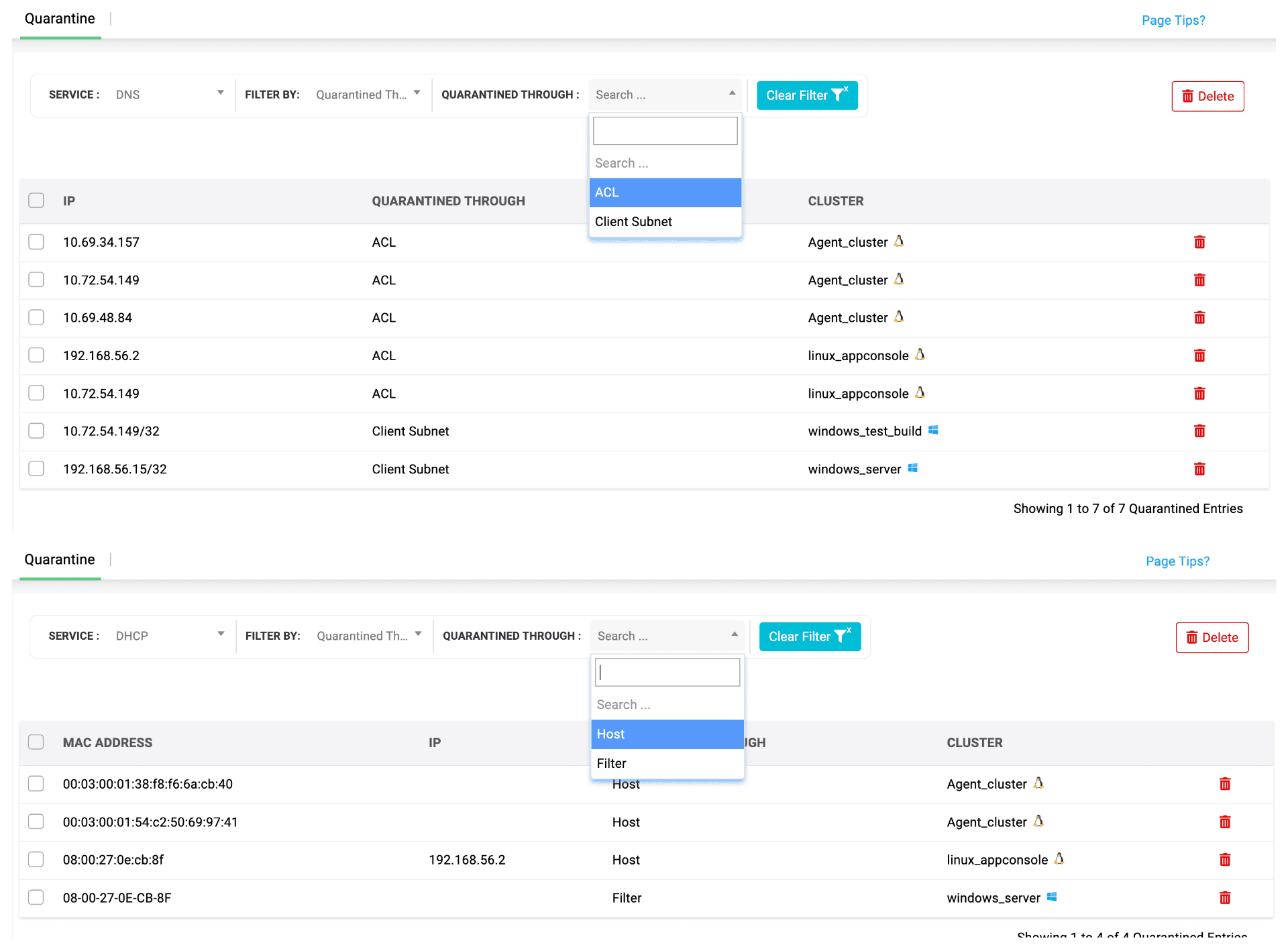
- Your threshold. Your rules. Your containment.
Customize the risk score thresholds for both DNS and DHCP so quarantine is enforced only when activity exceeds your defined severity—giving admins full control over when auto-isolation should trigger, based entirely on operational risk appetite. - One view. All blocked threat paths.
See every domain ACL block and every MAC-level DHCP quarantine in one consolidated table, giving you a complete picture of which threats were intercepted. - Reclaim what’s clean. Keep out what isn’t.
Decide which hosts can rejoin after remediation and which should stay blocked, enabling clean recovery without risking reinfection.
- No panic. No packet diving. Just clarity.
Skip manual containment and raw log analysis—the system quarantines automatically and surfaces only what you need to investigate. - Every block tells a story—Read it here.
Drill down by cluster, IP, or quarantine method to review and release entries as needed—all from a unified console. Streamline investigations and restore legitimate devices quickly. - Your network’s safe room—Everything suspicious stays here.
Keep all risky domains and clients isolated until you’ve examined them, ensuring the broader network stays untouched and uninterrupted.