

What is a Windows event log?
Event logs, which are generated by the Windows Event Logging Service, offer a detailed record of activities that occur within a Windows operating system. They provide a wealth of information about the system’s activities, applications, and security events. This includes timestamps and user identity, making them an invaluable resource for system administrators and security analysts.
System administrators monitor event logs for troubleshooting system errors, crashes, and application failures. They also use event logs to track system changes and updates. Security analysts, on the other hand, use the information contained within event logs to correlate and detect threats, build threat timelines, investigate security incidents, and respond to cyberattacks. Security analysts also have to know about instances where event logs have been deleted or cleared, as this can indicate that a threat actor is trying to hide their tracks. SOC teams can improve their security and operational efficiency by monitoring Windows event logs.
To view the event logs, open your Run dialog box (Windows key + R), type eventvwr, and hit enter. You'll see the event logs as shown below:
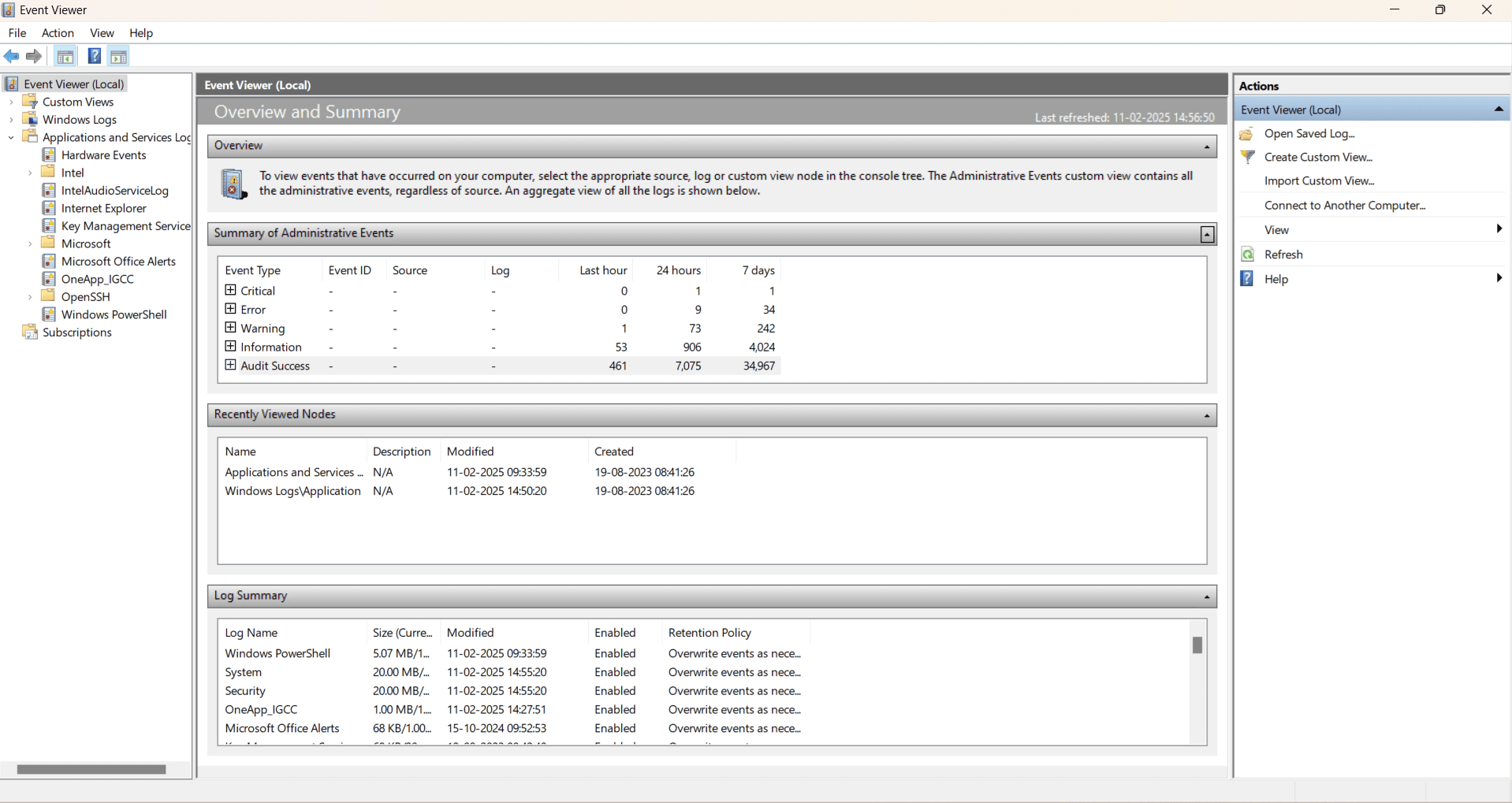
Figure 1: Event Viewer displaying a summary of administrative events
What are the five categories of Windows logs?
Windows event logs can comprise of system logs, application logs, security logs, setup logs, and forwarded events logs.
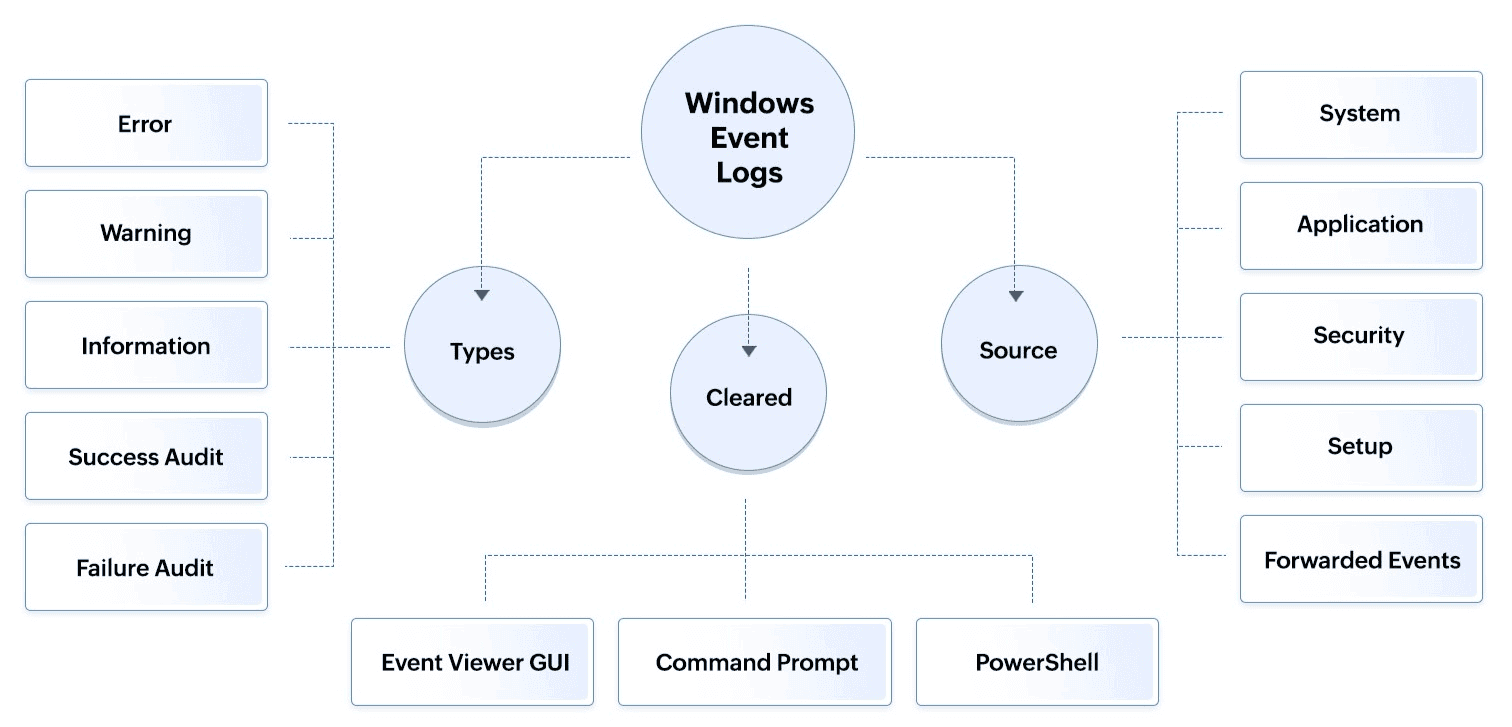
Figure 2: Windows event log categories based on types and sources
- System logs contain events logged by Windows system components, such as memory issues or the failure of a driver during startup, or disk errors like corrupt file system or failed disk writes.
- Application logs contain events logged by applications or programs, such as problems in starting the Calculator or Zoom applications.
- Security logs contain events related to system security, such as failed logins and file deletions.
- Setup log contains events related to system updates.
- Forwarded events log contain events forwarded from other computers.
Windows event logs are also classified into five event types : Error, Warning, Information, Success Audit, and Failure Audit.
- Error indicates a significant problem, such as a system or application failure.
- Warning signifies a potential issue that could lead to future problems, such as disk space running low.
- Information provides details about the normal operation of applications or services, such as a service starting successfully.
- Success Audit records successful security-related events, such as successful user authentication.
- Failure Audit records unsuccessful security-related events, such as failed login attempts.
Threat actors may disable event logs before clearing them and executing their attack. However, disabling logs will also generate an entry in the security logs. Attackers may clear event logs in multiple ways , but usually, it involves a manual deletion from the Event Viewer interface, the use of Command Prompt, or PowerShell commands. Understanding the importance of event logs will provide a clear picture as to why it's crucial to monitor them and their deletions.
Why should SOC teams monitor Windows event logs?
Monitoring event logs is critical for the following reasons:
- Diagnosing system health: Event logs help in diagnosing and troubleshooting system health. For instance, if a service fails to start, the system log can indicate details about the cause.
- Ensuring compliance: Tracking security events also helps in complying with requirements such as HIPAA, GDPR, and SOX, which mandate the monitoring and logging of access to sensitive data.
- Detecting security threats: Event logs play a crucial role in security monitoring and can help analysts detect intrusions by providing details of failed login events, unauthorized access attempts, and suspicious activities indicative of potential attacks.
- Accelerating incident response and forensics: Regularly tracking logs enables quicker detection and response to incidents, thus minimizing damage. Also, in case of a security incident, event logs serve as a critical source of evidence, helping analysts reconstruct the sequence of events which led to the breach and understand the extent of its impact.
That's why attackers clear event logs, so they can remove traces of their activities and hide their tracks to avoid detection. But, how do attackers clear the logs?
Prefer watching instead of reading? Check out this video explanation instead!
How do attackers execute their attack?
Attackers usually follow these steps to carry out their goal of executing a successful attack, as shown in Figure 3.
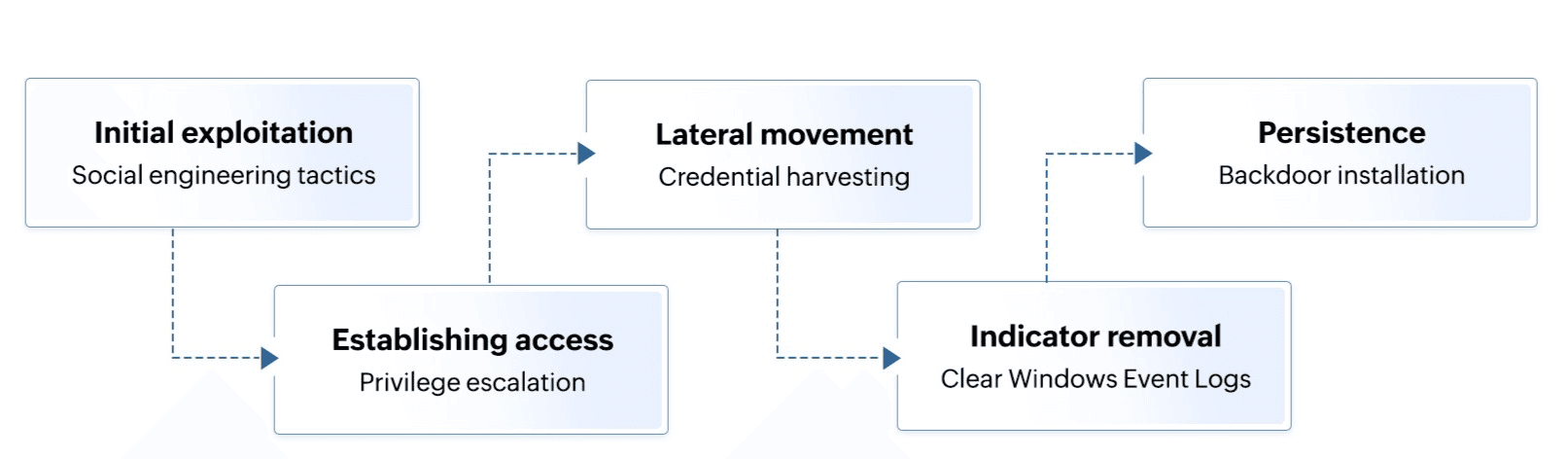
Figure 3: Steps involved in attackers clearing Windows event logs
- To gain the initial entry into the victim's network, attackers either exploit vulnerabilities in the system or use social engineering tactics to manipulate users into providing credentials or downloading malicious software.
- To establish and maintain access, they install a remote access tool and carry out privilege escalation to gain admin privileges.
- Then, attackers move laterally and scan the network to identify other valuable systems, or harvest credentials using techniques such as keylogging or pass-the-hash attacks.
- Attackers then cover their tracks by clearing event logs and disabling future logging.
- Finally, attackers ensure persistent access by installing additional back doors, creating hidden user accounts, or modifying legitimate software to include malicious code.
Clearly, irrespective of the size of an organization, tracking event logs is critical. However, the bigger the organization, the more events there will be to monitor, and the more daunting the task can be. So, it's crucial for organizations to invest in a SIEM solution that can help with log management, log analysis, threat detection, incident response, log forensics, and help them ace their compliance requirements with ease. ManageEngine Log360 is a unified SIEM solution with UEBA, SOAR, DLP, and CASB capabilities that can help your organization thwart threats of both internal and external origin.
How can ManageEngine Log360 help?
Log360 helps collect logs from more than 700 types of network devices for real-time monitoring and analysis. It helps organizations monitor users and entities for time, count, and pattern-based anomalies, and helps them prioritize security events based on accurate risk scores. Log360 is also equipped with a correlation engine complete with both predefined and custom correlation rules, including an out-of-the-box rule for identifying cleared event logs as shown in the figure below.
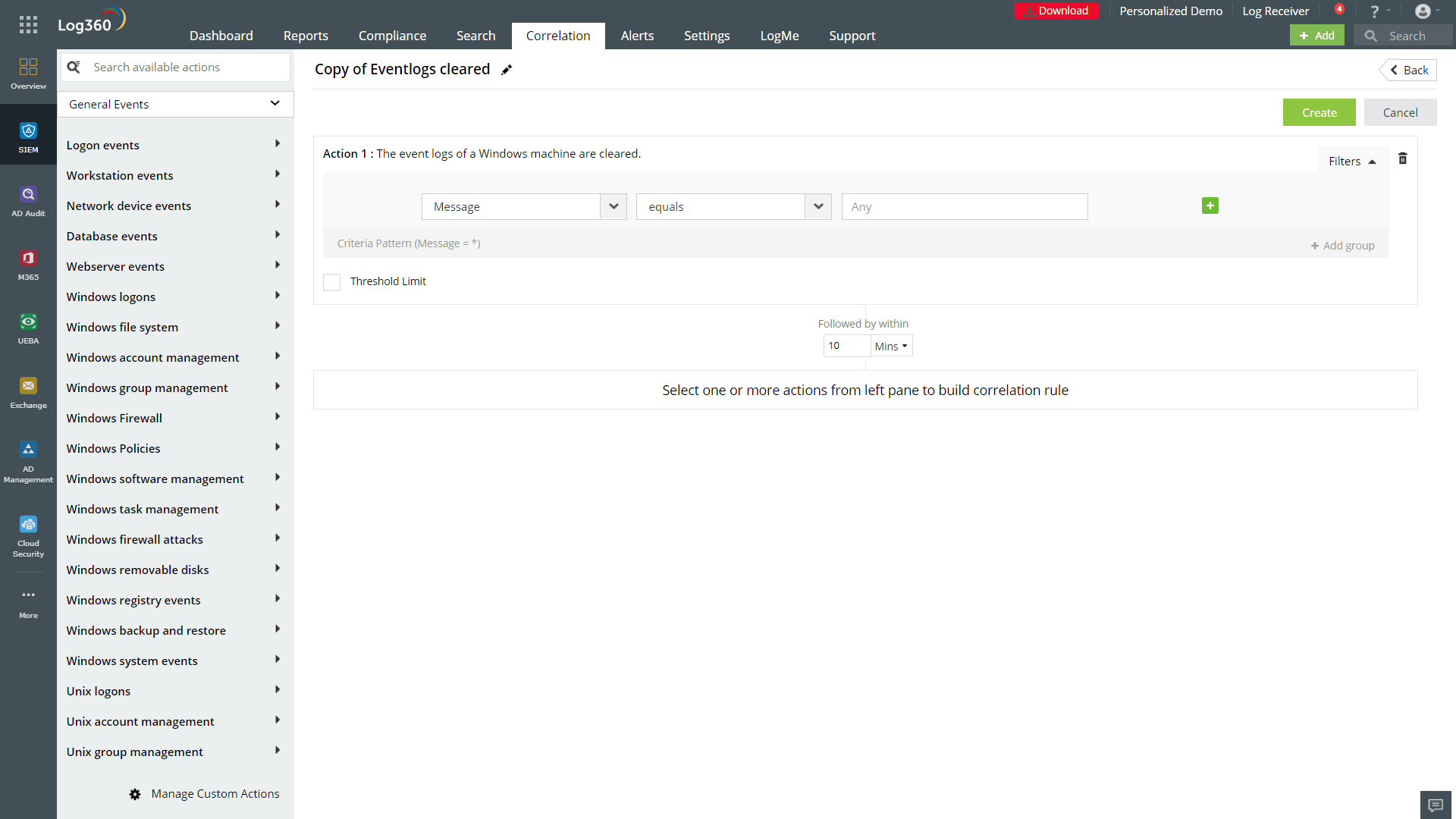
Figure 4: Log360's correlation rule for identifying cleared event logs
Irrespective of the type of log cleared (system, security, application, setup, or forward events), Log360 will detect and alert you to incidents of log deletions as long as the alert profile option is enabled. Log360 also comes with SOAR capabilities. This means that if you associate a response workflow with an alert profile, Log360 will be able to carry out certain automated actions such as disabling a computer or logging off and disabling the user. This can help SOC teams reduce their MTTD and MTTR and improve their security posture significantly. To learn if Log360 is the right fit for your organization, sign up for a personalized demo.
What are the next steps a SOC analyst should take?
Apart from deploying a SIEM solution like Log360, here are some steps SOC teams can take to prevent future attacks:
- Enforce strict access controls on event log management.
- Review user privileges to identify who has access to clear event logs and revoke access accordingly.
- Implement audit and security policies to strengthen log retention and monitoring capabilities.
- Ensure that you encrypt event files locally and in transit to avoid log manipulations.
- Ensure that you automatically forward events to a log server or back them up in a secondary location for secure storage.
Windows event logs are not just system records; they are a cybersecurity lifeline. Proactively monitoring and securing them can be the difference between preventing an attack and responding too late.

