Last updated: August 13, 2026
Scope
This page explains how scope works in Mobile Device Manager Plus, allowing administrators to delegate device management responsibilities across departments or regions. Scope defines whether a user has access to all devices on the MDM server or only specific groups. Using a practical example with technicians and departments, the page covers how different scope assignments affect user access, subgroup creation, policy deployment, and what happens when users with limited scope leave the organization.
If you have different departments or regions and want to delegate the responsibility of managing the devices of those different departments or regions, then you can assign scope to users.
What we mean by scope in the context of Mobile Device Manager is the number of groups a user can be given access. In other words, you can choose to grant your technicians access to specific Departments or regions and comply with existing privacy practices in your organization.
This is done by defining the scope under devices to be managed in Mobile device Manager console to All Devices or Selected groups.

If the scope is assigned as ALL DEVICES,then the user will have access to all the groups and devices in the MDM server. However, if the user is delegated only selected groups under devices to be managed, they'll only have limited scope.
For a better understanding consider the below flowchart representing a hypothetical organisation Zylker, with 3 Departments A, B and C.
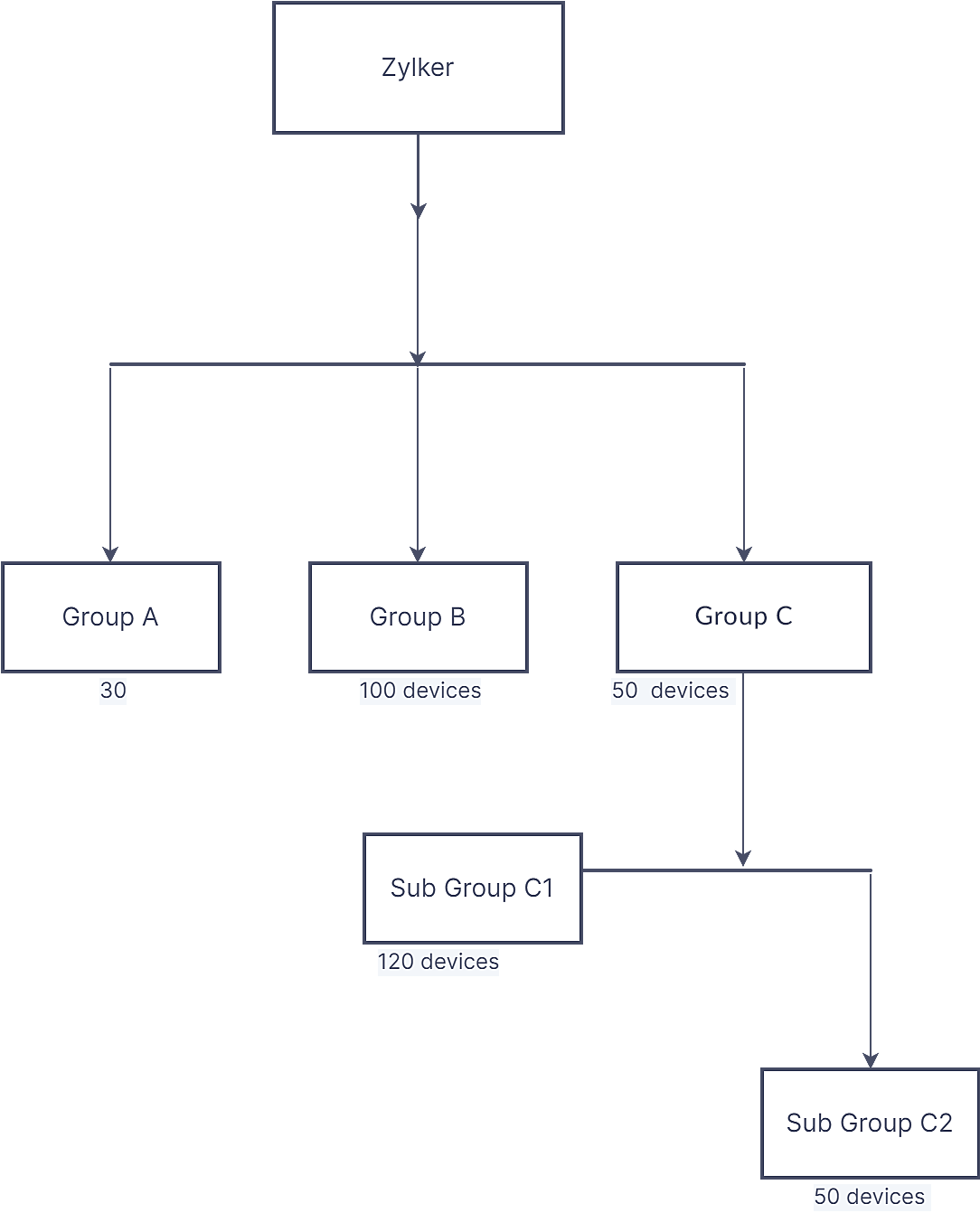
In our MDM server, these departments will be represented as 3 groups.The first admin [A] who sets up the MDM server will have scope as ALL DEVICES by default.
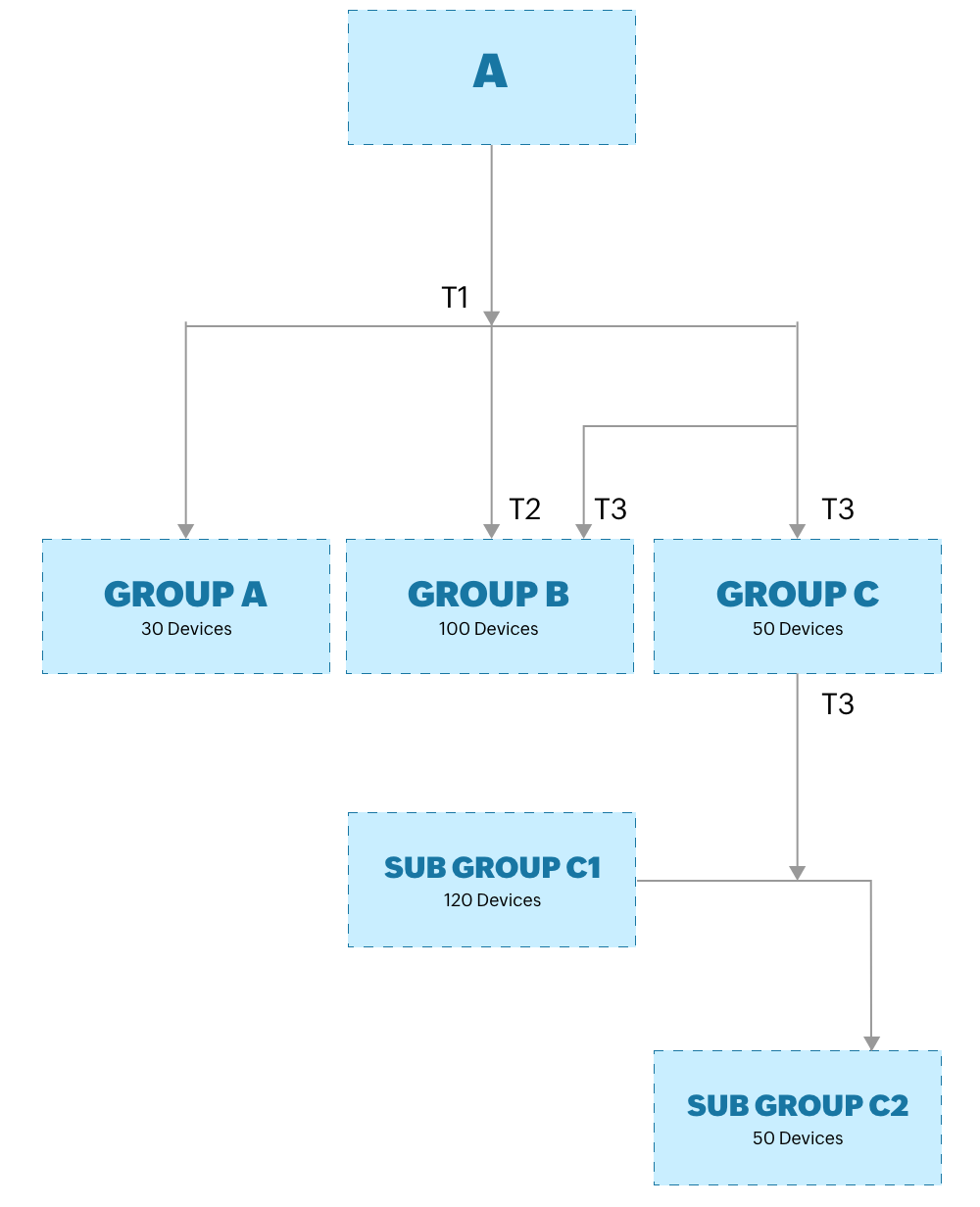
Consider A adds 3 technicians. The first technician,say T1 is delegated scope as ALL DEVICES. T1 will have access to all groups and devices in the server.
POINTS TO NOTE:
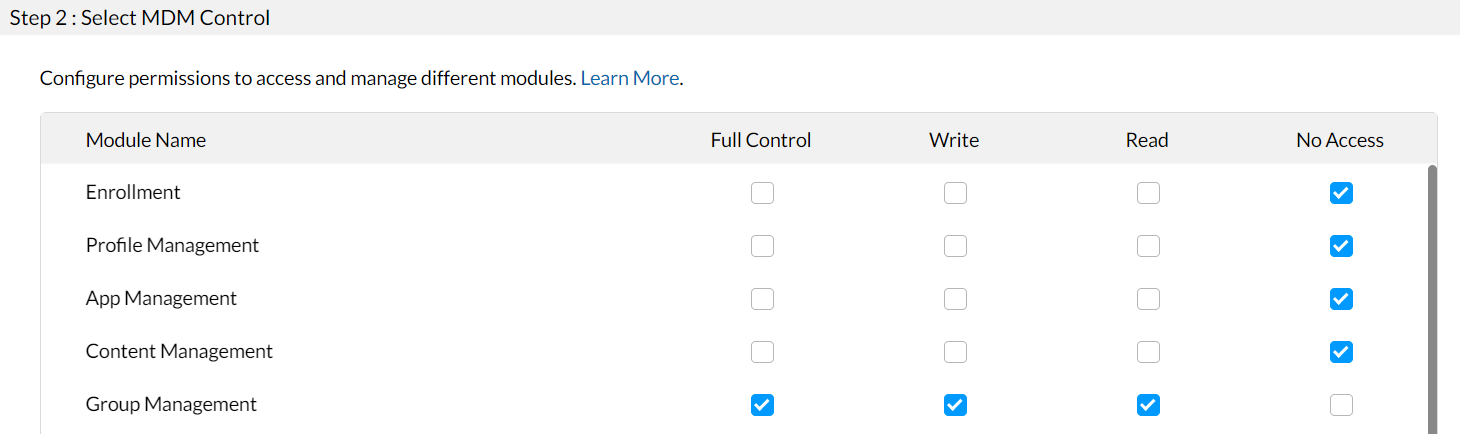
If T1 is given the role of a group admin, wherein he has FULL CONTROL of group management, T1 or any other user with a similar role and scope ALL DEVICES can edit the groups created by the main administrator.
The second technician, say T2 is delegated limited scope by giving access to just Group B with 100 devices. T2 will only be able to view the 100 devices in Group B when T2 signs into the MDM server.
Further T2 can execute the following scope management actions:
- Create subgroups within these 100 devices.
- Push policies to these 100 devices depending on his role & permissions.
POINTS TO NOTE:
- T2 will not be able to add any devices to his scope, Group B.Only the main admin A1 or T1 will be able to add new devices to Group B.
- The main admin A1 will be able to view the subgroups created by T2, but won't be able to add or edit devices in any subgroups created by T2. This is because if an admin adds devices to the subgroups directly, it will change the defined scope of the technician and break the default flow.
- If T2 leaves the organisation and is deleted from the user list in MDM server, then the admin A1 or any other user with scope ALL DEVICES like T1 with full group management permission can edit and take control of Group B.
The third technician, say T3 is also delegated limited scope, but given access to both Group B with 100 devices, and Group C with 50 devices. Hence T3 will be be able to view and manage a total 150 devices when T3 signs into the MDM server. In other words, Group B is common to both T2 and T3
Further T3 can execute the following scope management actions:
- Create subgroups like C1 and C2 taking control of devices in both groups.
- Push policies to these 150 devices depending on his role & permissions.
POINTS TO NOTE
- T3 will not be able to view the subgroups created by any other user like T2 in the server or perform device actions out of his scope.
- T3 will not be able to add any devices from his scope to other users. The system will only allow admin (or an equivalent role like T1) to modify or perform member operation to the groups.
Frequently Asked Questions
- What does "scope" mean in Mobile Device Manager Plus?
- Scope defines the number of groups and devices a user can access. A user can be assigned scope as All Devices, giving them access to every group and device on the server, or Selected Groups, limiting them to specific departments or regions.
- Can a technician with limited scope add new devices to their assigned group?
- No. A technician with limited scope, like access to only Group B, cannot add devices to that group. Only the main admin or a user with ALL DEVICES scope and full group management permission can add new devices to it.
- What happens to a technician's group if they leave the organization?
- If a technician with limited scope is deleted from the user list, the admin or any other user with ALL DEVICES scope and full group management permission can edit and take control of that technician's group.
- Can a technician view subgroups created by another technician?
- No. A technician cannot view or manage subgroups created by another technician outside their own scope.