Discover firmwarerisks with Network Configuration Manager
- Instant updates on firmware vulnerabilities through vulnerability database synchronisation
- CVE IDs, base scores, severity levels, affected devices, and firmware versions in one place
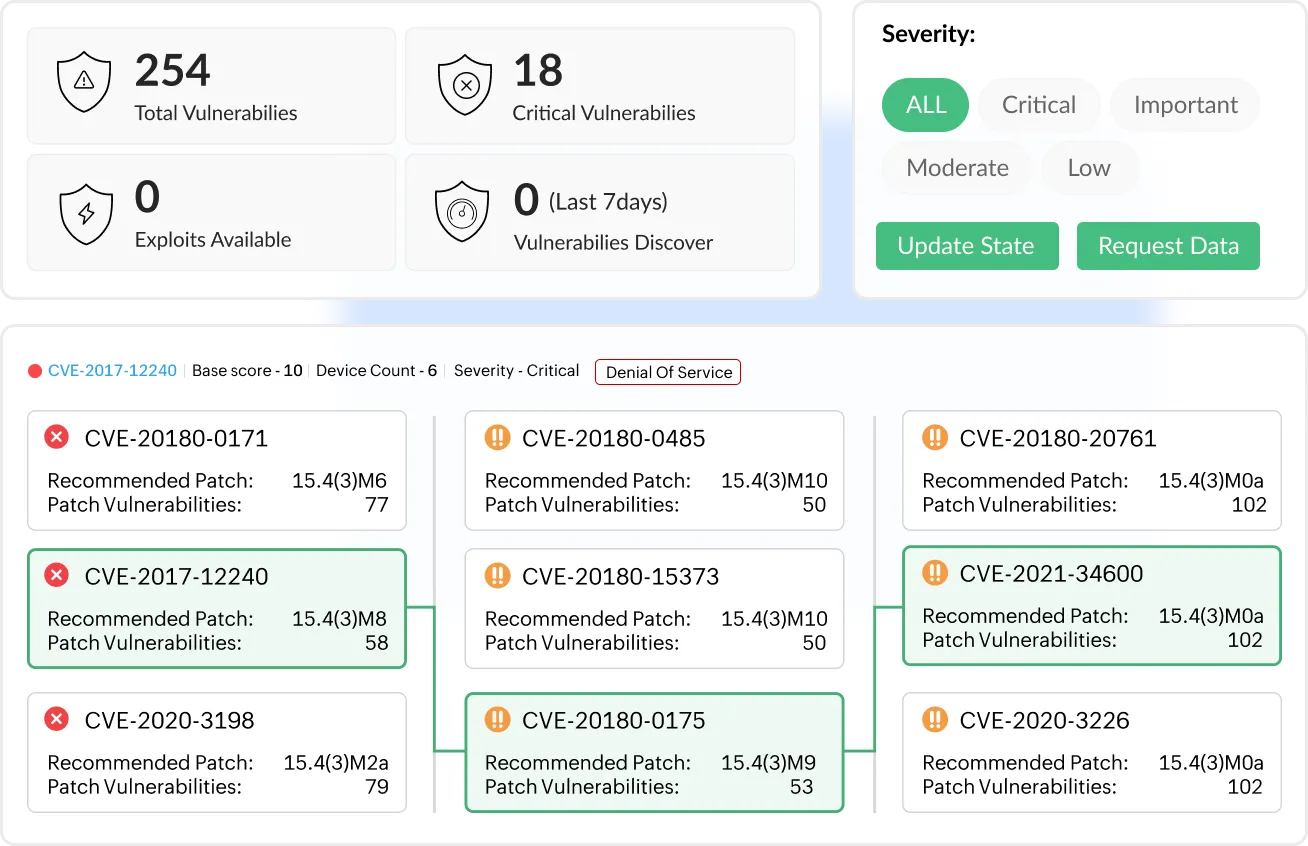
- Visual patch trees that help teams track firmware fixes without missing critical updates
Trusted by over 15,000 happy customers globally






The questions that matter in firmware vulnerability management
Firmware vulnerabilities rarely surface in everyday monitoring. They exist between operating systems and configurations, which means many networks run vulnerable firmware without clear visibility.
Before choosing a remediation approach, teams first need answers to a few fundamental questions:
- Which firmware versions are currently running on routers, switches, and firewalls?
- Are any of these versions associated with known vulnerabilities?
- Which devices require immediate attention?
- Can this information be clearly presented during audits or security reviews?
Answering these questions reveals a deeper problem; firmware risk isn’t just about visibility, it’s about maintaining continuous control across devices, versions, and changes. Without a structured approach, gaps in firmware tracking, remediation, and validation quickly emerge. This is where ManageEngine Network Configuration Manager comes in.
How Network Configuration Manager addresses firmware vulnerabilities
Centralized firmware inventory across all network devices
Maintain accurate, real-time firmware inventory
Automatically discover devices and track running firmware during backups and changes, ensuring inventory stays updated across upgrades, rollbacks, and replacements.
Identify risks and deviations instantly
Locate devices by firmware version, detect missed upgrades or unauthorized changes, and identify devices outside approved standards.
Enable targeted remediation with full context
Map vulnerabilities directly to affected devices and confirm upgrade completion across sites without manual verification or broad maintenance efforts.
Discover more about firmware inventory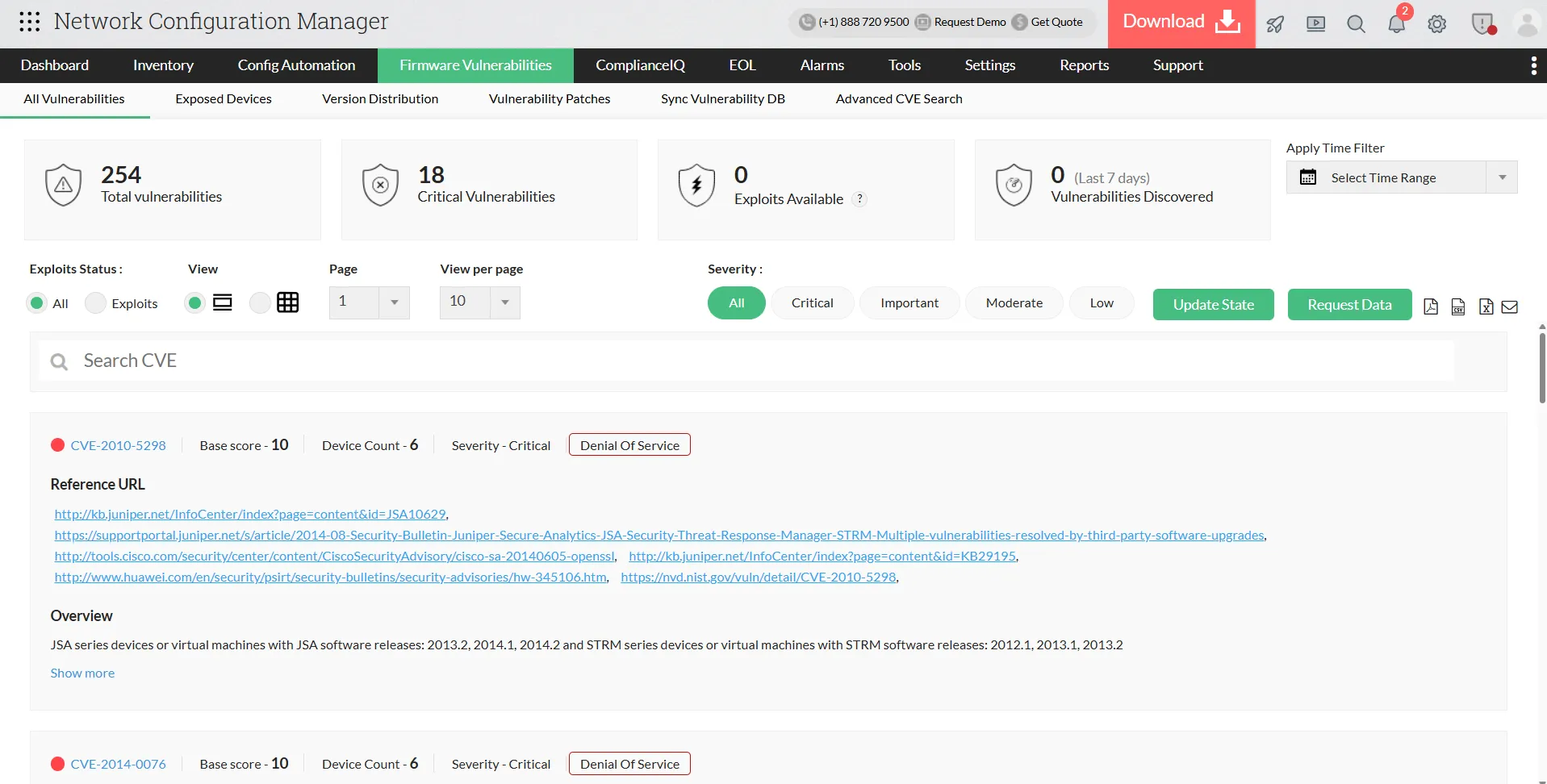
Identify vulnerable firmware the moment it appears
Continuously map firmware to vulnerabilities
Correlate each device’s firmware with vulnerability intelligence and automatically flag affected devices when new CVEs are published.
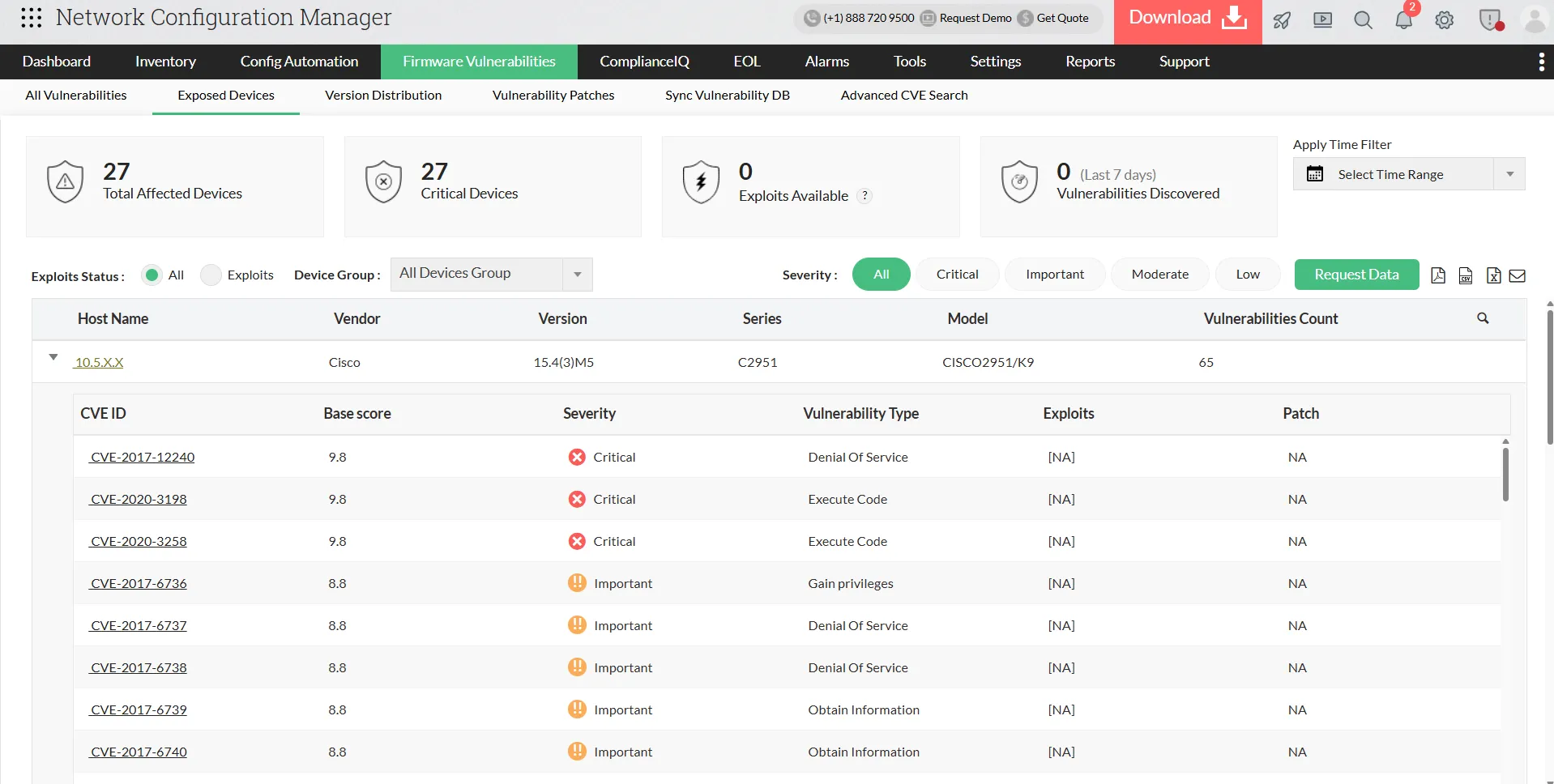
Gain complete device-level risk visibility
View vulnerabilities affecting firmware, severity, exploit availability, total exposure, and detect devices introduced or reintroduced with risk.
Enable continuous, real-time exposure tracking
Detect vulnerabilities based on live device state instead of periodic scans, ensuring continuous monitoring across the network.
Download a free e-book to manage firmwarePrioritize remediation using real network impact
Prioritize vulnerabilities based on real impact
Network Configuration Manager aggregates vulnerabilities across devices, helping teams identify which issues require immediate attention instead of reviewing devices individually.
Assess exposure with full context
Evaluate severity, exploitability, affected device count, firmware versions introducing risk, and where exposure is concentrated across the network.
Focus remediation where it matters most
Start remediation with vulnerabilities impacting the largest portion of the network, preventing low-impact issues from consuming maintenance windows.
Learn how to fix vulnerabilities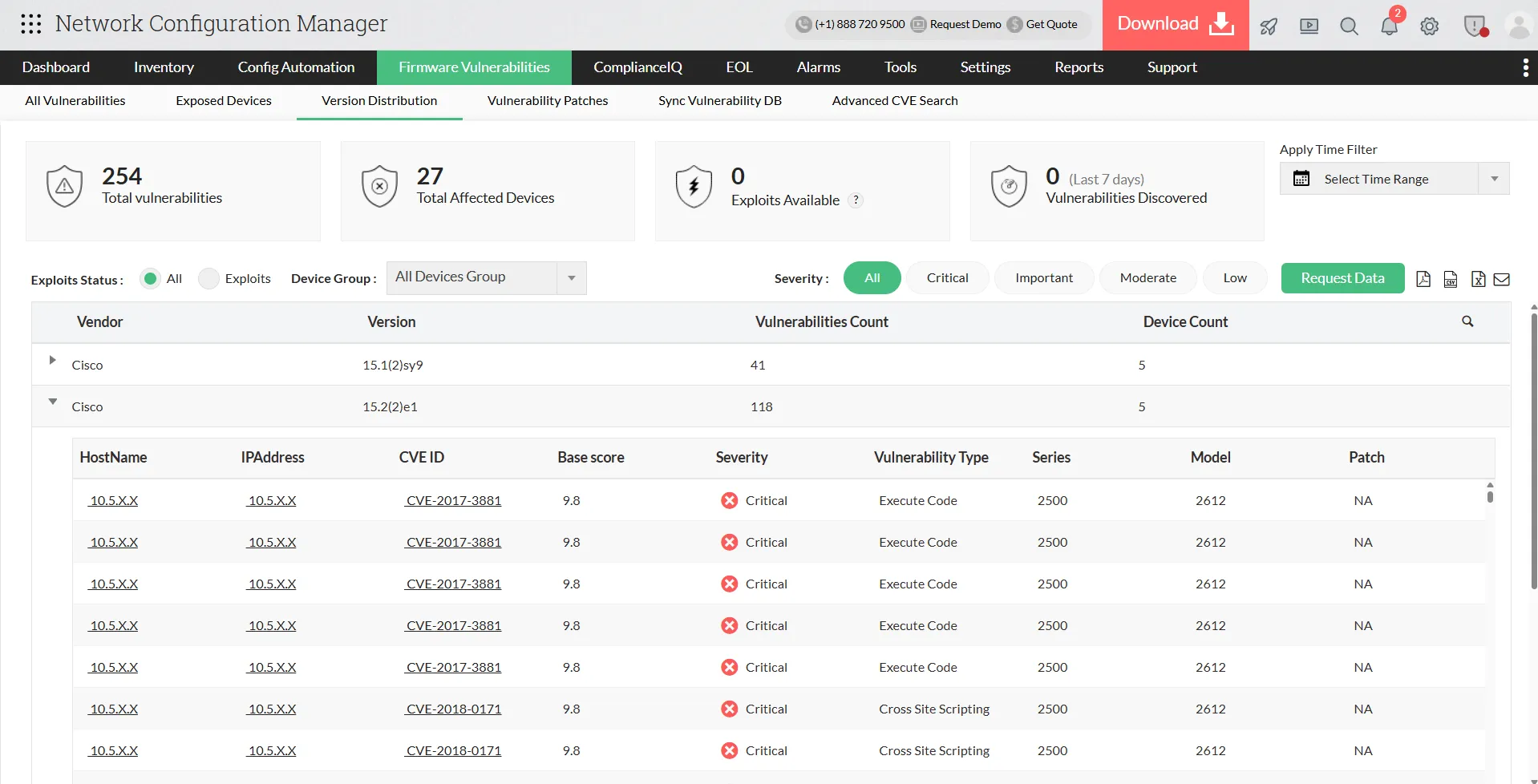
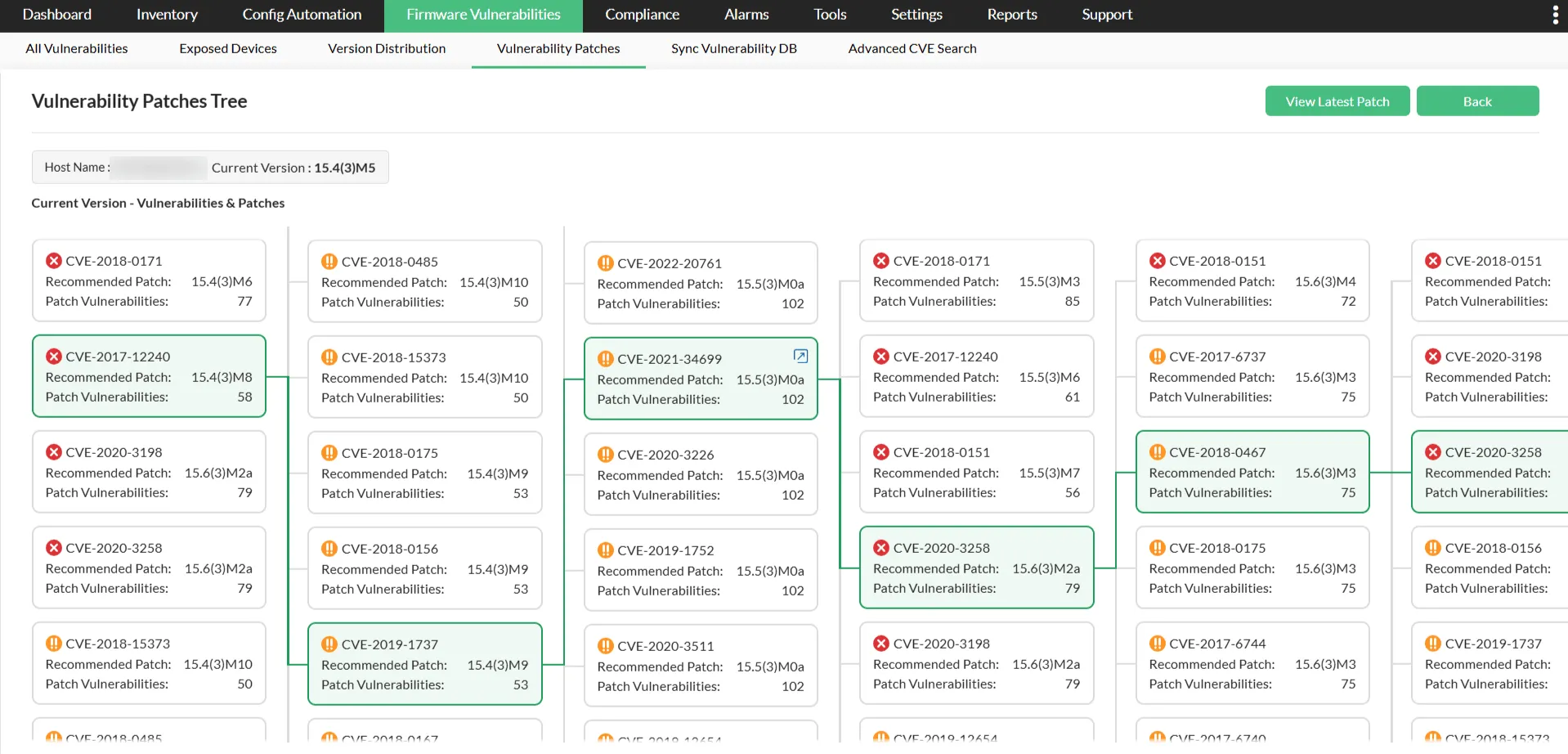
Remediate firmware vulnerabilities with controlled patch rollout
Plan firmware upgrades with clear impact visibility
The platform identifies target firmware versions and shows how many vulnerabilities each upgrade resolves, enabling controlled, phased updates instead of network-wide changes.
Execute upgrades in a controlled, flexible manner
Select upgrade paths, schedule maintenance windows, and deploy updates by device group or location to minimize disruption.
Validate, track, and safely roll back changes
Verify devices post-upgrade, audit every firmware change, and roll back when needed to ensure stable, disruption-free remediation.
Learn how to remediate firmwareProve firmware remediation and compliance with verifiable history
Maintain a complete record of vulnerability lifecycle
Network Configuration Manager continuously tracks firmware exposure and remediation actions, capturing the full lifecycle from detection to resolution.
Demonstrate remediation with detailed reporting
Show which devices were vulnerable, when fixes were applied, current firmware upgrade status, and which devices are still pending for updates.
Provide audit-ready, defensible evidence
Access historical exposure per device and prove vulnerabilities were actively managed, not just identified.
Learn more about firmware reports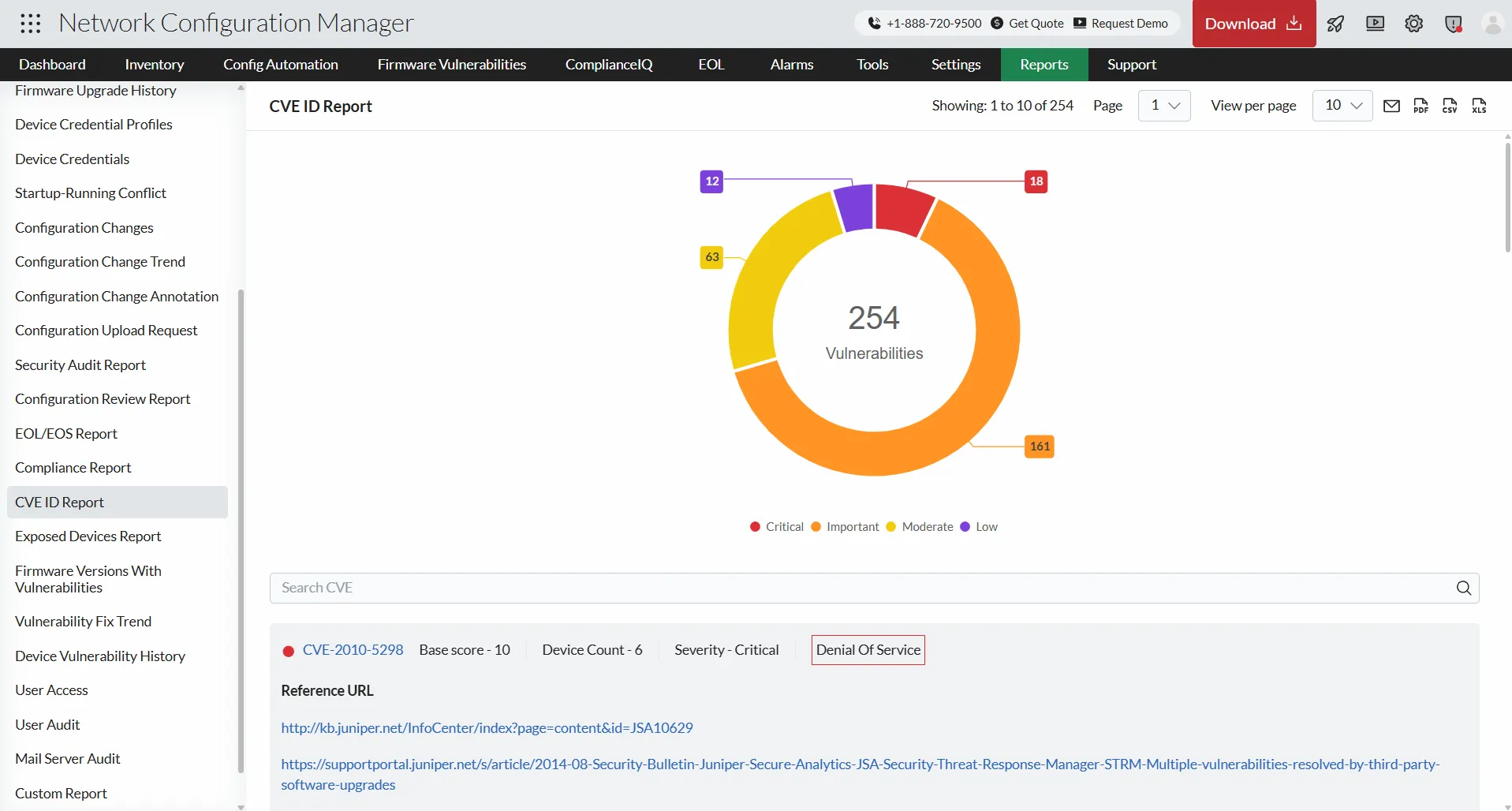
How Firmware Vulnerability Management works in Network Configuration Manager
New vulnerabilities are disclosed
Device vendors and CVE authorities publish firmware security advisories. Risk information changes without any change to network conditions.
NCM synchronises the vulnerability database
The latest firmware vulnerability definitions are imported without interacting with devices. The knowledge base updates silently in the background.
Firmware versions are re-evaluated
All discovered device firmware is compared against updated intelligence. Devices previously considered safe may now be identified as exposed.
Exposure status updates automatically
Affected devices, counts, and severity refresh across dashboards and reports. Security visibility reflects the latest intelligence immediately.
Remediation actions are guided
NCM identifies firmware versions that resolve the exposure and helps plan upgrades. Administrators select the target version and maintenance window.
Device risk state updates after upgrade
After firmware upgrade, devices are automatically rechecked against the same intelligence and marked cleared when no longer vulnerable.
Newly disclosed vulnerabilities are detected and cleared without manual verification or repeated scanning.
Firmware vulnerability reports in ManageEngine Network Configuration Manager
ManageEngine Network Configuration Manager presents network vulnerability data through focused reports that help teams quickly understand risk, exposure, and remediation status across devices.
CVE ID report
The CVE ID report provides detailed information on detected vulnerabilities, including severity scores, summaries, reference details, and update timelines, enabling faster risk assessment and prioritisation.
Exposed devices report
The Exposed devices report shows which network devices are currently affected by vulnerabilities along with their severity levels, helping teams identify and address high risk devices first.
Firmware version with vulnerabilities report
The Firmware version with vulnerabilities report highlights firmware versions associated with known vulnerabilities and the number of issues linked to each version, supporting informed upgrade decisions.
Vulnerability fix trend report
The Vulnerability fix trend report tracks how vulnerabilities are identified and resolved over time, giving teams a clear view of remediation progress.
Device vulnerability history report
The Device vulnerability history report offers a historical view of vulnerabilities detected on devices, along with key device details, helping maintain visibility, accountability, and audit readiness.
Where firmware risk emerges and how ManageEngine Network Configuration Manager mitigates it
Firmware upgraded during an outage
Use case
Maintaining visibility over emergency firmware changes
Scenario
During a service outage, an engineer upgrades the firewall firmware version to restore connectivity. The network recovers, but the version change is never recorded. Days later, stability issues appear and the team cannot confirm which firmware introduced the behaviour.
How Network Configuration Manager helps
Network Configuration Manager automatically records the previous and new firmware versions with device details and timestamp.
Result
Teams quickly identify the exact firmware responsible and resolve issues without trial-and-error rollback.
Vendor releases a new firmware vulnerability advisory
Use case
Rapid firmware exposure identification
Scenario
A vendor announces a critical vulnerability affecting specificfirmware versions. Administrators must determine whether any network devices run those versions across multiple locations.
How Network Configuration Manager helps
The updated advisory is automatically matched against discovered firmware versions and affected devices are identified instantly.
Result
Teams act only on exposed devices and avoid unnecessary network-wide upgrades.
Audit requires firmware governance proof
Use case
Demonstrating firmware control during audits
Scenario
An audit requires evidence of firmware versions in use, when updates occurred, and whether vulnerabilities were addressed. Collecting this information manually across devices delays the audit response.
How Network Configuration Manager helps
Centralized reports show device firmware versions, version changes, and remediation status over time.
Result
Auditors receive clear proof of firmware management without manual data gathering.
Unauthorized firmware downgrade introduces risk
Use case
Detecting firmware security regression
Scenario
During troubleshooting, a device is rolled back to an older firmware version that contains known vulnerabilities. The downgrade goes unnoticed in normal operations.
How Network Configuration Manager helps
Firmware version deviations are detected automatically and flagged as exposure.
Result
Risky firmware changes are identified and fixed early before they impact security.
Multi-vendor supported firmware vulnerability management tool
Switch
- IBM
- Aruba
- Cisco
- DLink
- Dell
- Gigamon
- Motorla
- and more
Router
- Hitachi
- Brocade
- Huawei
- Microtik
- Dax
- Digi
- and more
Firewall
- CheckPoint
- Citrix
- F5
- Fortinet
- PaloAlto
- Yamaha
- and more
FAQs on firmware vulnerability management
How does Network Configuration Manager detect firmware vulnerabilities?
ManageEngine Network Configuration Manager correlates firmware versions running on network devices with known vulnerabilities from its synced vulnerability database, giving teams visibility into exposed firmware without manual tracking.
What types of devices are covered by firmware vulnerability management?
The solution supports multi-vendor network devices including routers, switches, and firewalls, helping teams assess firmware risk consistently across their infrastructure.
Can firmware vulnerability data be used for audits and reviews?
Yes. Network Configuration Manager provides structured reports with firmware versions, associated CVE IDs, severity levels, and affected devices, making it easy to present clear evidence during audits and security reviews.