DNS Insights
DNS Insights provides real-time visibility into all DNS queries and responses across your network by analyzing packet-level data. It enables administrators to quickly detect, diagnose, and resolve DNS-related performance issues and failures without relying on DNS server logs.
Prerequisites
- DNS Insights leverage deep packet inspection (DPI) to provide real-time visibility into DNS traffic flowing through the network.
- To enable the DPI engine in OpManager, a Remote Collector should be installed. The Remote Collector is a lightweight, unified agent that functions as both a poller and a packet analysis engine. To learn more about how to install the Remote Collector, click here .
- DNS packets are mirrored from the network switch, processed by the Remote Collector, and sent to OpManager for correlation and visualization.
How to access DNS Insights
Once the Remote Collector is installed and DNS data collection has started, users can view DNS Insights in a visual format from the device’s Snapshot page.
To access DNS Insights:
- Navigate to Inventory and select the required DNS server.
- Open the DNS Insights tab on the device's Snapshot page.
- Or, Go to the Network tab and select Packet analysis. The monitored DHCP and DNS servers will be listed here.
- Click on a DNS server to open its DNS isnights tab.
DNS Insights overview
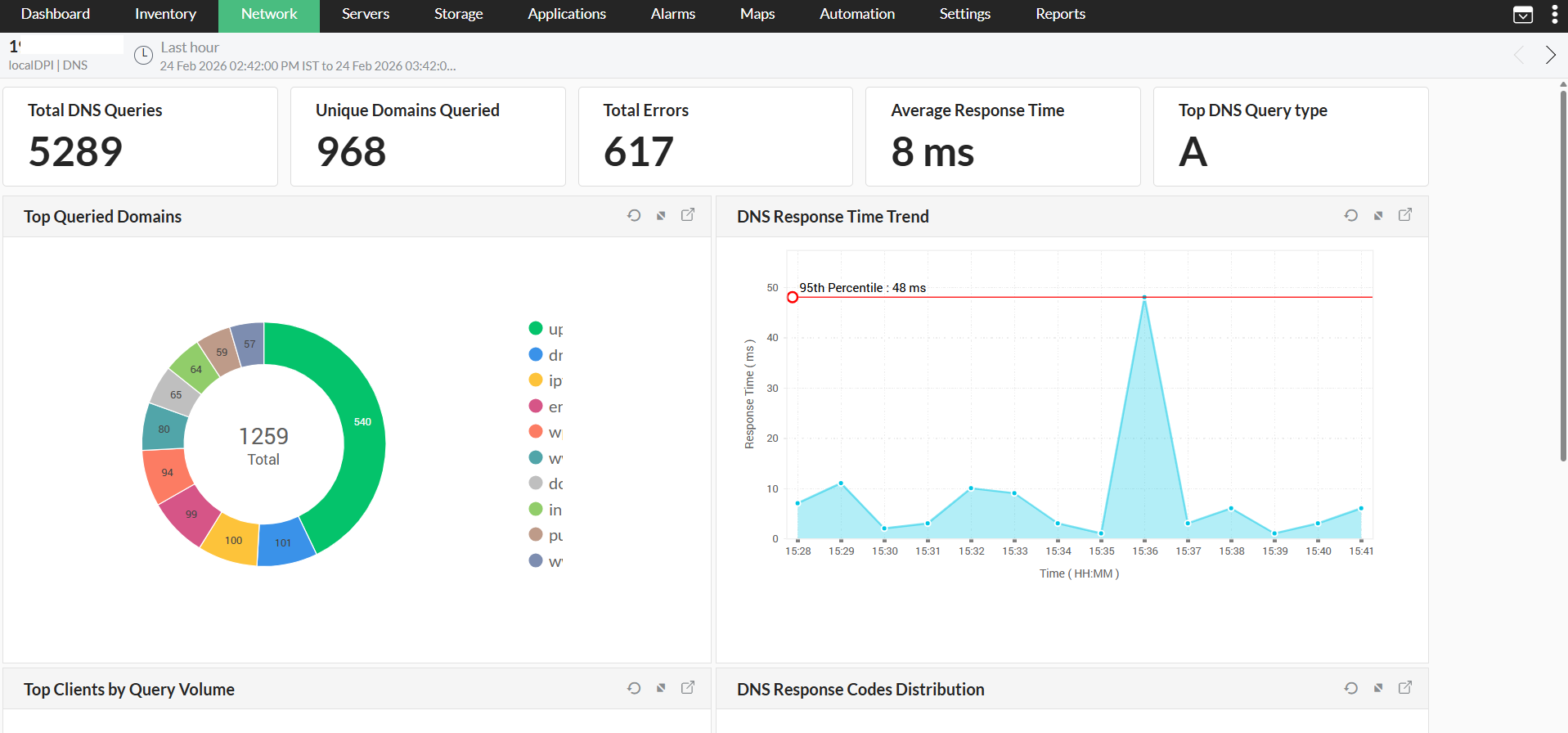
Users can gain visual insights from the widgets on the DNS Insights page. You can click the expand button at the top right of a widget to drill down and view detailed information about the widget components, which can be further drilled down for more granular analysis.
Header Metrics
The header provides an overview of DNS activity, including query counts, unique domains queried, error metrics, and response times. Administrators can quickly assess overall DNS health and identify high-level trends, such as traffic surges or performance bottlenecks.
Top Clients by Query Volume
This section helps identify devices generating the highest DNS query traffic. By analyzing this data, administrators can pinpoint potential misbehaving devices, detect unusual query patterns, or optimize resource allocation across clients. For example, a sudden surge in traffic from a single device may indicate a configuration issue, malicious activity, or an application stuck in a request loop.
DNS Response Codes Distribution
This section provides a breakdown of DNS responses across various types, such as successful (NOERROR) or failed queries (NXDOMAIN, SERVFAIL). Users can track DNS errors systematically to uncover misconfigured DNS records, unreachable servers, or external DNS issues. Proactive resolution of these failures ensures smoother DNS resolution and reliable network services.
DNS Query Type Distribution
This section displays the types of DNS records queried on the network, such as A, AAAA, or HTTPS. Administrators can use this data to observe traffic patterns, identify trends such as IPv6 adoption, and ensure compatibility and optimization for frequently requested record types.
Failed DNS Queries
This section highlights DNS resolution failures and allows users to drill down into specific error types and their frequency, such as incorrect domain configurations or unreachable DNS servers. This information is essential for identifying and resolving recurring errors before they impact operations or user experience.
Top Queried Domains
This section displays the most frequently queried domains over time. The data provides insight into services, applications, or endpoints that rely heavily on DNS lookups. Administrators can use this information to optimize domain configurations, enable caching for frequently queried domains, or plan capacity for critical services.
DNS Response Time Trend
This section shows DNS query response times over a timeline, helping administrators diagnose slow resolution issues and understand traffic behavior during peak periods. If response times spike during specific periods or for certain domains, users can investigate server capacity, network congestion, or DNS server health to address these issues effectively.
Using this data, administrators can take direct and measurable steps to troubleshoot DNS resolution issues, improve service reliability, and optimize overall network usage.