PHP Agent Configuration Options
The APM Insight PHP Agent Configuration file helps you fine tune the configuration for tracking web based transactions. These settings can be configured in the apminsight.conf file or from the web client. Make sure that this file is present in the folder where you have deployed the APM Insight agent.
Editing the configuration settings
These settings can be configured using the edit option available in the web client.
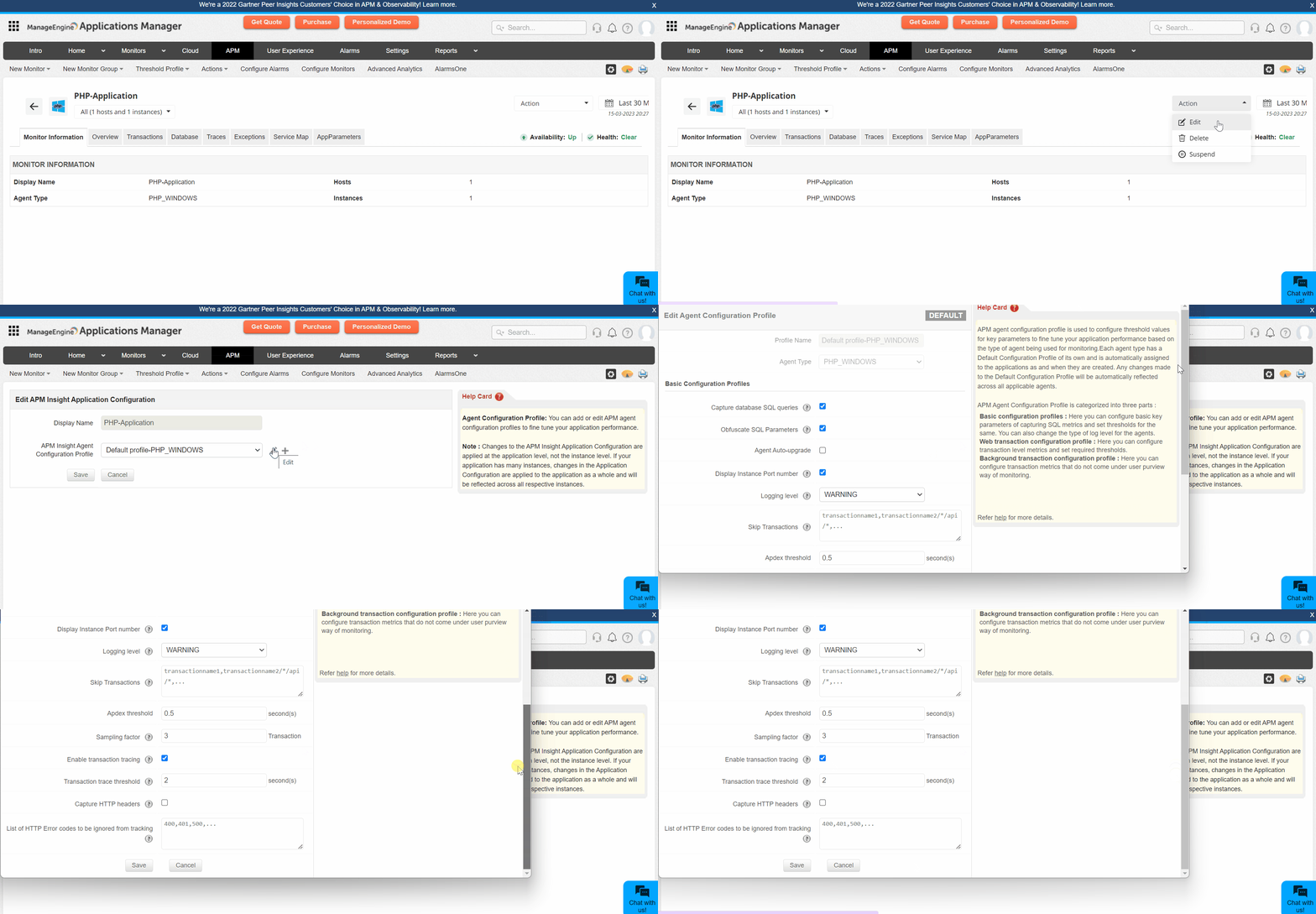
The APM Insight agent configuration profile is categorized into the following:
- PHP configuration profile
- Web transaction configurations
- Background transaction configurations
- Configurations available only in the apminsight.conf file
Note: The asterisk * indicates that the highlighted default value applies for versions above Applications Manager v16470.
PHP configuration profile
Basic configuration profile
| Name | Description | Default value |
|---|---|---|
| Capture database SQL Queries |
| True |
| Obfuscate SQL Parameters |
| True |
| Stacktrace threshold for SQLs in transaction trace |
| 3 (seconds) |
| Display Instance Port number |
| True |
| Logging level |
| WARNING |
| Skip Transactions |
| None |
| Group similar transactions |
| None |
| List of Exceptions to be skipped from tracking |
| None |
| Exclude Grouping in Transaction Names |
| None |
| List of URL Extensions to be Skipped from Tracking |
| .css, .js, .gif, .jpg, .jpeg, .bmp, .png, .ico, .woff, .properties.jsf, .ttf, .woff2, .otf, .svg, .webp, .json, .js.map, .swf, .conf, .properties, *.yml |
Web transaction configurations
| Name | Description | Default value |
|---|---|---|
| Group similar transactions by position |
| None |
| Apdex Threshold |
| 0.5 (seconds) |
| Sampling Factor |
| 1 (request) |
| Enable Transaction Tracing |
| True |
| Transaction Trace Threshold |
| 2 (seconds) |
| Capture CPU Time per Transaction |
| True |
| Capture Memory Allocation per Transaction |
| 2 (seconds) |
| Capture HTTP Parameters |
| False |
| List of HTTP Parameters to Obfuscate |
| password, authKey |
| Capture HTTP Headers |
| False |
| List of HTTP Headers to Ignore |
| Java- Accept, Cookie, Cache-Control, Connection, Host, Accept-Encoding, X-Site24x7-Id, X-SITE24X7-RUM-APPKEY, X-SITE24X7-RUM-TRACEID, Site24x7SyntheticKey .NET, PHP, Node.js, Python- X-Site24x7-Id, X-SITE24X7-RUM-APPKEY, X-SITE24X7-RUM-TRACEID, Site24x7SyntheticKey |
| List of HTTP Error Codes to be Ignored from Tracking |
| None |
| Capture HTTP Bytes |
| True |
Background transaction configurations
| Name | Description | Default value |
|---|---|---|
| Track background transactions |
| True |
| Capture traces |
| True |
| Transaction trace threshold |
| 5 (seconds) |
| Capture trace if external calls exceeds |
| 50 (Count) |
| Capture CPU time per transaction |
| False |
| Capture Memory allocation per transaction |
| False |
| Sampling factor |
| 1 (Request) |
Configurations available only in the apminsight.conf file
Note: This is only applicable to agent versions below 4.0.
Certain configuration files cannot be modified from the client. These settings can be configured in apminsight.conf file.
| Name | Description | Default value |
|---|---|---|
| application.name |
| PHP-Application |
| license.key* |
| |
| agent.server.port* |
| |
| behind.proxy |
|
Note: The * indicates mandatory values. If any of these entries are not provided or invalid, the Agent cannot be initialized/started. However, the Application Server (where the Agent is deployed) will start normally.

