IP scanning made simple: Discover and monitor network IPs with ease

ManageEngine OpUtils’ IP scanner delivers real-time visibility into every active IP address across your network. Using protocol-based IP scanning (such as ICMP ping sweeps, ARP lookups, and TCP checks), it detects live hosts, identifies device attributes, and maps utilization across complex IPv4 and IPv6 address spaces.

Beyond simple IP discovery, OpUtils enriches IP scan results with MAC address details, device type, OS fingerprinting, lease status, and vendor identification, helping you maintain a clean, accurate, and continuously updated IP inventory.

With automated subnet discovery, scheduled scans, and deep DHCP/DNS correlation, OpUtils enables IT teams to proactively track address usage, resolve conflicts faster, and streamline IP capacity planning.

Together, these capabilities of the OpUtils network IP scanner help you maintain an accurate IP inventory and troubleshoot issues faster.

How OpUtils IP scanning works

A typical IP scan with OpUtils follows a structured approach to ensure complete, reliable discovery. Once IP ranges or subnets are specified, OpUtils begins by probing addresses using ICMP, ARP lookups, TCP handshakes, and neighbor discovery/ICMPv6 for IPv6. Device responses are validated and enriched using SNMP, DNS resolution, WMI, and vendor OUI checks.

The collected data, such as status, hostname, MAC, OS fingerprint, and reservation are consolidated into a centralized repository. Scheduled re-scans ensure the data remains accurate and reflects newly provisioned, reclaimed, or moved IP users. This systematic approach eliminates blind spots while maintaining a consistent real-time IP inventory.

Key features of OpUtils' IP scanner

OpUtils brings together a range of capabilities to streamline IP address operations. Here are some of them:

  • Simplified discovery: Automatically discover and scan IP addresses across distributed networks, IPv4 and IPv6 address spaces, and segmented VLANs. OpUtils intelligently identifies subnets, updates newly added segments, and visualizes utilization to give administrators end-to-end IP inventory coverage. Read more
  • Support for IPv4 and IPv6: OpUtils supports dual-stack IP environments with seamless scanning of both IPv4 and IPv6 ranges. It leverages ICMP and neighbor discovery (ND) to detect IPv6-enabled nodes and map address utilization, helping teams confidently manage growing IPv6 adoption. Read more
  • Holistic IP scanning: Gain complete visibility into your address space including IPs, subnets, supernets, and DHCP scopes. OpUtils aggregates contextual data such as MAC address, hostname, status, and vendor to help quickly identify what devices are on your network and how they are allocated. Read more
  • Streamlined DNS and DHCP management: OpUtils integrates with Microsoft DNS and DHCP to give administrators unified visibility into DHCP scopes, IP allocation policies, and DNS records and zones. This helps maintain accurate IP-DNS mappings, and centralizes essential DDI insights, without requiring changes to existing Microsoft server setups. Read more
  • Proactive monitoring: OpUtils continuously monitors IP status and critical utilization thresholds to flag risks such as resource exhaustion. Configure alerts to detect sudden utilization spikes, inactive addresses, or unauthorized hosts, ensuring tighter control over network resources. Read more
  • Effective troubleshooting: Diagnose and resolve IP conflicts and connectivity issues faster. OpUtils highlights overlapping assignments, inactive or rogue IPs, missing hostnames, and mismatched MAC-to-IP entries. With IP-to-switch-port correlation, teams can instantly locate the physical point of connection and shorten resolution time. Read more
  • Comprehensive scan reports: View and analyze IP scan results using visual dashboards and detailed tabular reports. Export results in CSV, JSON, or XML to feed CMDB, ITSM, or inventory systems. Historical snapshots enable usage trend analysis, periodic audits, and compliance validation. Read more

IP scanning simplified with seamless IP discovery

OpUtils' flexible IP discovery options help you quickly bring IPs into a centralized IP address management console. You can initiate an IP scan by defining a range or by specifying individual IPs. For bulk onboarding, simply import IP lists via CSV or XLS formats. You can also import subnets directly from the Meraki dashboard.

Once configured, OpUtils automatically probes the specified IPv4/IPv6 addresses using ICMP, ARP, and TCP checks to determine availability, identify associated devices, and update their status in seconds. These scans run periodically to keep your IP inventory accurate and current, supporting both Windows and Linux-based environments without requiring agents.

This seamless IP discovery process ensures real-time visibility into device reachability, basic attributes, and allocation status, forming the foundation for reliable IP address management.

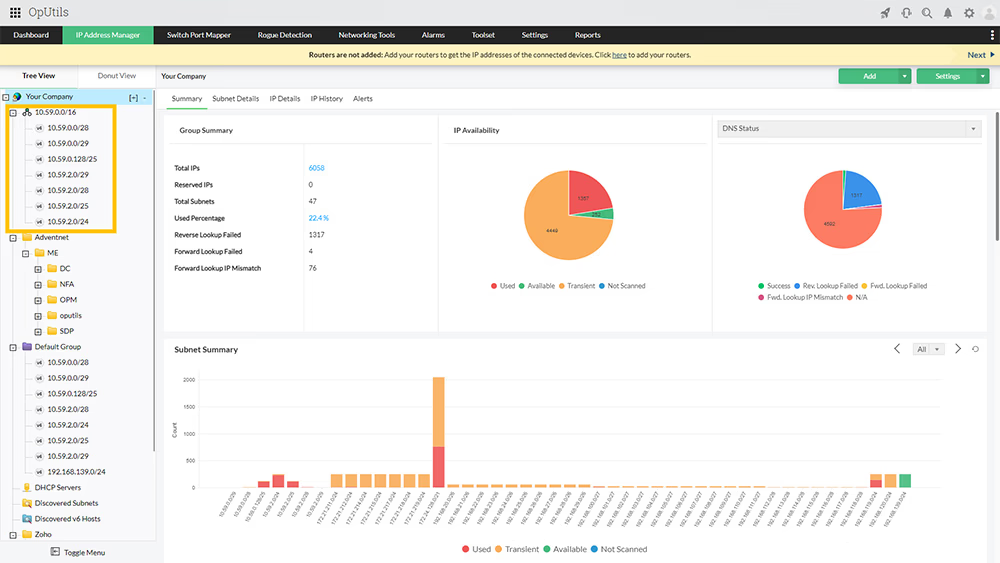
Scanning and managing IP subnets

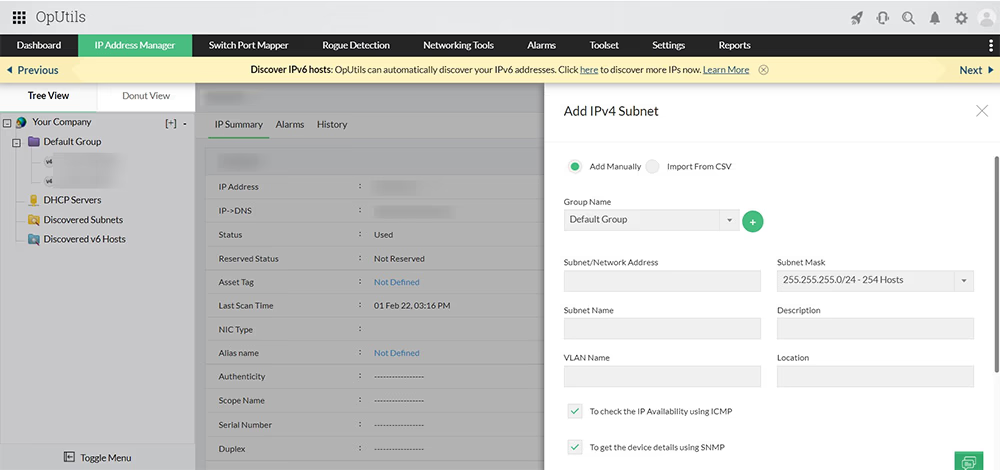
OpUtils automatically discovers and organizes IP subnets when routers or DHCP servers are added, giving you unified visibility across distributed networks. You can also manually onboard subnets by specifying the subnet address, mask, and logical grouping.

For each subnet, OpUtils offers multiple scan methods to enrich IP intelligence:

  • ICMP pings to identify IP availability and detect active hosts.
  • SNMP lookups to retrieve device details such as MAC, interface, and vendor.
  • DNS resolution to map hostnames and verify IP-DNS consistency.
  • WMI queries (Windows) to collect OS and hardware information for managed endpoints.

With continuous subnet-level monitoring, OpUtils helps teams validate address allocations, detect unauthorized or unexpected devices, and maintain clean, conflict-free address spaces across their network.

IP Scanner Tool - ManageEngine OpUtils

Enabling IPv4 and IPv6 scanning in tandem

As networks scale, IPv6 adoption continues to rise while IPv4 remains widely in use. Managing both address schemes simultaneously becomes complex without a unified IP scanning solution.

OpUtils simplifies this by automatically discovering and managing IPv4 and IPv6 addresses from a single console. It supports multiple IPv6 global prefixes and enables logical subnet grouping for cleaner organization, smarter allocation, and faster identification.

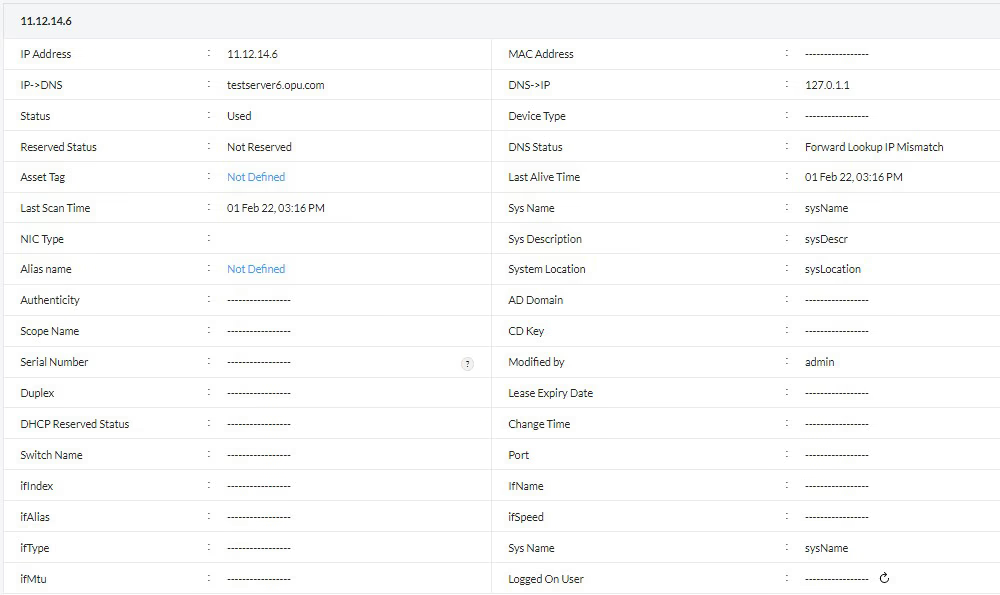
With enriched context such as scope name, reservation status, system location, and MAC address, OpUtils delivers complete visibility into dual-stack IP provisioning and utilization. This eliminates the need for multiple tools and empowers administrators to monitor evolving address spaces with ease.

IP Scanning - ManageEngine OpUtils

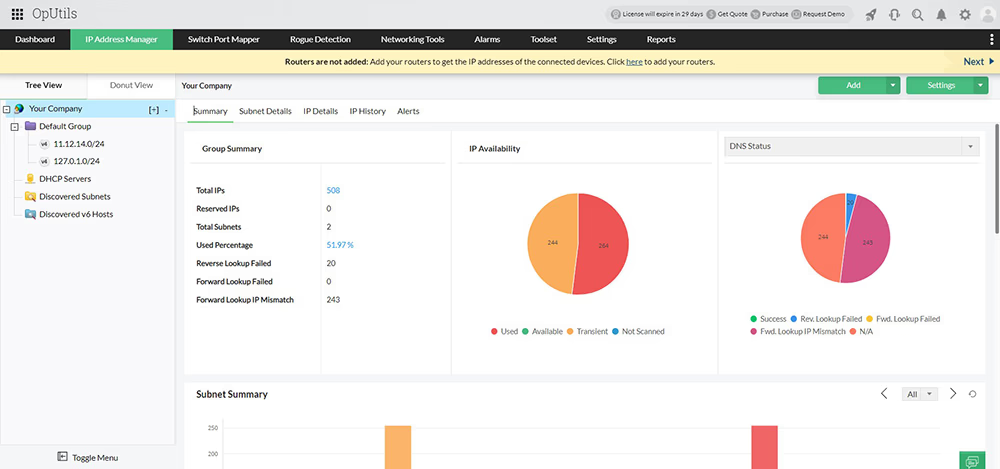
Holistic IP address scanning with OpUtils

In dynamic, large-scale networks, IP allocations change constantly. With enterprises relying heavily on DHCP and distributing devices across multiple subnets and supernets, a centralized IP scanning solution becomes essential to maintain visibility.

OpUtils delivers end-to-end IP scanning and lifecycle management across subnets, supernets, and DHCP scopes. It continuously detects provisioning and decommissioning events, updating IP status in real time to ensure accurate, up-to-date inventory.

With its advanced IP scanner, admins can drill down to individual IP records to view allocation history, lease details, and subnet structure. This holistic visibility enables faster troubleshooting, cleaner IP utilization, and improved network planning.

Scan Network IP Addresses - ManageEngine OpUtils

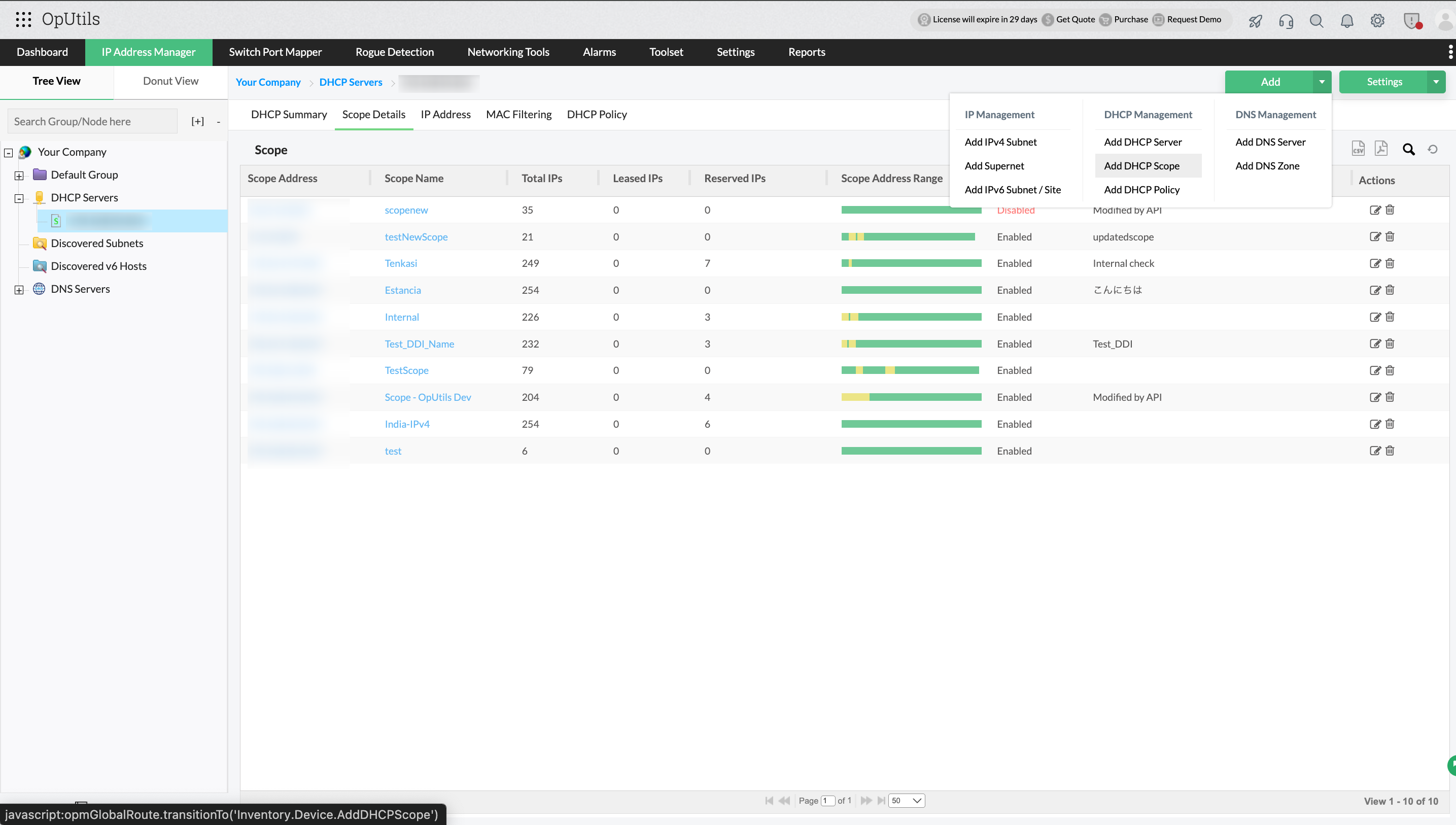
Streamlined DNS and DHCP management

Managing seamless IP-to-hostname associations and ensuring accurate DHCP allocation can become challenging in distributed, fast-changing networks. OpUtils bridges this gap by integrating directly with Microsoft DNS and DHCP, centralizing essential DDI visibility without altering your existing server configurations.

Through its unified console, OpUtils retrieves and correlates key DHCP and DNS elements, including:

  • DHCP scopes and policies.
  • Lease durations, active and expired leases.
  • Reservations and scope utilization.
  • DNS zones and resource records (A, PTR, CNAME, and more).

This tight integration ensures every scanned IP is validated against authoritative DNS and DHCP sources, reducing configuration errors and mismatched records.

OpUtils also monitors scope utilization thresholds to prevent address exhaustion, allowing admins to forecast capacity and plan subnet expansion proactively. Automated checks help maintain clean, conflict-free networks by detecting stale DNS records, abandoned leases, and discrepancies between IP address assignments and DNS mappings.

With accurate IP-DNS consistency and real-time tracking of lease and scope health, OpUtils strengthens network reliability and establishes foundational DDI-level governance, while continuing to rely on your trusted Microsoft DHCP and DNS servers as the source of truth.

DHCP and DNS management - ManageEngine OpUtils

Effortlessly manage IP addresses with proactive monitoring

Manual IP address management and static allocations often lead to conflicts, which if overlooked can result in costly network downtime. Since critical systems depend on consistent IP availability, it’s essential to adopt a proactive scanning solution that detects issues early and prevents misconfigurations. OpUtils’ advanced IP scanner simplifies this process by continuously monitoring your IP space and providing real-time insights such as allocation status, availability, assigned user, and lease details. Automated, periodic scans keep data updated without manual effort, helping you maintain an accurate IP inventory and avoid errors that disrupt operations.

IP Scanner - ManageEngine OpUtils

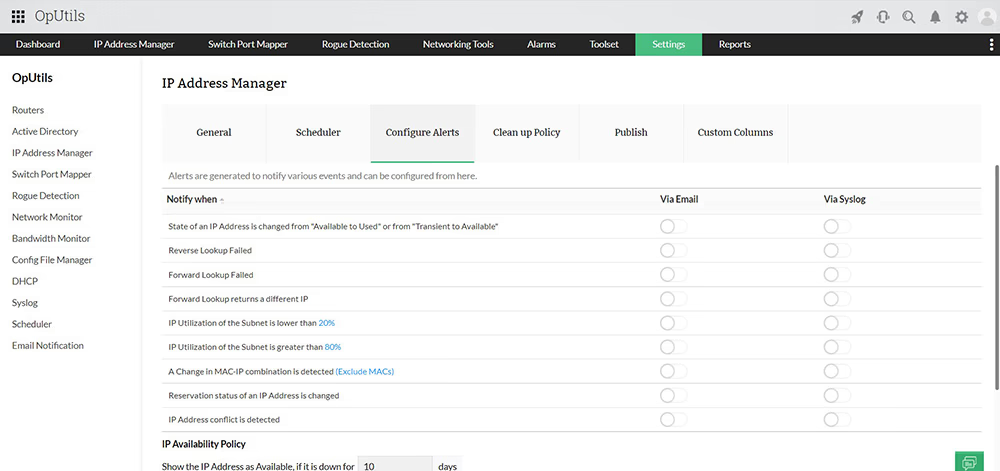
Instant IP scanning alerts for faster troubleshooting

It’s unrealistic to expect network admins to monitor IP address space around the clock. To improve operational efficiency, you need an IP scanning solution that can detect issues as they occur and immediately notify the right teams.

OpUtils’ real-time IP scanner generates instant, threshold-based alerts for critical events such as IP conflicts, failed lookups, and state changes. With immediate notifications, admins can troubleshoot faster and prevent minor issues from escalating into costly outages, keeping network performance stable and user impact minimal.

Network IP Scanner - ManageEngine OpUtils

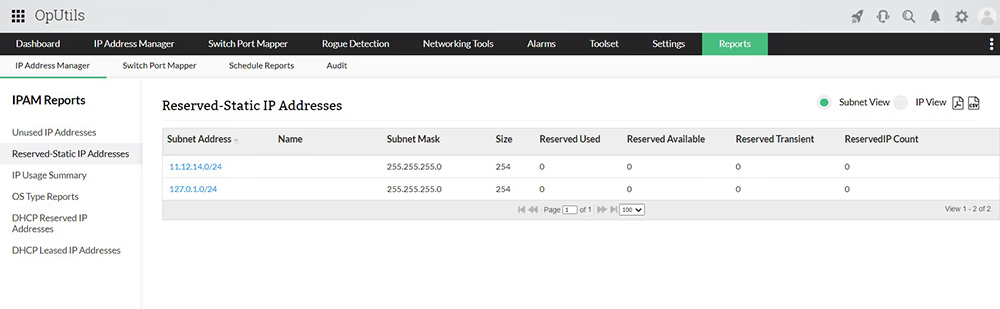
View detailed IP scan reports and historical logs

OpUtils’ IP scanner keeps a complete history of IP usage, helping you track which devices or users previously held an address. All IP activity, status changes, and utilization metrics are logged to simplify auditing and capacity planning.

The tool automatically identifies unused IPs, marking addresses that remain inactive for 10 days as Available, so you can reclaim space confidently. Scan results can be exported in PDF, CSV, or XLS formats for documentation, review, or compliance reporting.

In addition to reporting, the scanner strengthens security by detecting potential rogue devices during each scan. If a new endpoint appears that doesn’t match known IP-MAC relationships or trusted inventory records, it is flagged for verification so administrators can quickly investigate and stop unauthorized access.

IP Scanning Software - ManageEngine OpUtils

5 reasons why you should consider OpUtils IP scanner for your enterprise network

These capabilities make OpUtils IP scanner a reliable choice for securing and managing enterprise IP space.

1. Agentless IP scanning for faster deployment

OpUtils operates completely agent-free, enabling teams to start scanning in minutes without endpoint installs or configuration overhead. Scanning leverages standard protocols already supported within enterprise environments, ensuring seamless integration across Windows, Linux, network devices, and virtual infrastructure.

2. IP lifecycle visibility & data enrichment

Beyond availability tracking, OpUtils provides visibility into the entire lifecycle of an address from allocation to release. Every update enriches the record with contextual data including hostname, device interface, last seen time, reservation state, and switch-port mapping. This helps IT teams avoid abandoned IPs and eliminates fragmentation, while strengthening CMDB accuracy.

3. Role-based access control (RBAC)

To support distributed IT operations, OpUtils includes granular role-based access control. Administrators can define who can view, scan, modify, or reserve IP addresses, ensuring configuration integrity and minimizing accidental changes. Auditable logs track all user activity, supporting compliance and governance requirements.

4. Scalable IP scanning for large enterprises

OpUtils is engineered for large networks. Its elastic architecture allows thousands of subnets to be scanned in parallel without performance degradation. Incremental scanning ensures that only changed IPs are rechecked, helping organizations keep pace with fast-moving infrastructure.

5. Security-focused IP scanning

OpUtils supports basic security validation during IP discovery by flagging unauthorized devices, mismatched MAC-IP associations, and endpoints using expired or unassigned addresses. These insights help identify intrusions early and ensure devices comply with addressing policy. When combined with DHCP/DNS audits, OpUtils can reveal malicious spoofing or misconfigurations that threaten network stability.

If you’re interested in deeper network insights, our port scanning tool complements IP scanning perfectly. Download our 30-day free trial today and experience the ease of managing your network with our free network IP scanner.
Frequently asked questions on IP scanning

What is the difference between IP scanning and IP tracking?


IP scanning is the process of probing IP ranges or subnets to identify active devices, their attributes, and availability. IP tracking is the continuous monitoring of IP address usage over time, capturing allocation, de-allocation, and ownership history.

How does IP scanning work in enterprise networks?


In enterprise environments, IP scanning typically uses ICMP, ARP lookups, TCP checks, and SNMP to detect active hosts, resolve hostnames, and pull device attributes. OpUtils consolidates this data into a centralized IPAM repository and correlates it with DHCP/DNS for accuracy. Automated re-scans ensure the inventory stays up to date across dynamic and distributed networks.

What protocols does OpUtils use to scan IP addresses?


OpUtils uses multiple discovery and enrichment protocols, including:

  • ICMP ping to detect availability.
  • ARP lookups to map MAC-to-IP.
  • TCP connection checks to validate response.
  • Neighbor Discovery (ND)/ICMPv6 for IPv6.
  • SNMP to retrieve device information.
  • DNS to resolve hostnames.
  • WMI for OS and hardware details (Windows).

Can OpUtils scan both IPv4 and IPv6 simultaneously?


Yes, OpUtils supports dual-stack environments, enabling organizations to scan and manage IPv4 and IPv6 address spaces from a single console. It detects IPv6 devices using Neighbor Discovery (ND) and supports multiple IPv6 global prefixes.

How often should IP scans be run in a large network?


Most enterprises perform scheduled scans daily or multiple times per day to account for dynamic changes. OpUtils supports configurable periodic scans so teams can adjust frequency based on DHCP lease duration, number of endpoints, or compliance needs.

How does IP scanning help detect rogue or unauthorized devices?


IP scanning identifies devices that appear on the network without authorized IP assignment. By correlating MAC address, hostname, and switch-port location, OpUtils can help detect unknown endpoints, mismatched MAC - IP combinations, and unapproved hosts allowing teams to investigate and quarantine suspicious devices quickly.

How does OpUtils resolve IP conflicts?


OpUtils continuously monitors IP address status and flags overlapping or duplicate assignments. It highlights conflicting IP-to-MAC relationships and pinpoints the device location via switch-port mapping, helping administrators quickly reassign or reclaim addresses to restore stability.

Can IP scanning integrate with DHCP and DNS servers?


Yes, OpUtils integrates with DHCP and DNS servers to cross-verify real-time allocation with live scan results. This helps identify abandoned leases, stale DNS records, and unassigned devices, keeping IPAM data clean and authoritative.

Is IP scanning safe? Will it disrupt network traffic?


Yes, IP scanning is generally safe. OpUtils uses lightweight discovery methods such as ICMP and ARP, generating minimal traffic. Scans are throttled and can be scheduled to avoid busy hours, ensuring no disruption to critical services.

Does OpUtils require agents to scan network devices?


No. OpUtils is agentless. It uses standard network protocols to discover and enrich IP data, allowing for rapid deployment without touching endpoints.

How does OpUtils correlate IPs to switch ports?


Through SNMP-based discovery and switch-port mapping, OpUtils identifies which switch and port a device is physically connected to. This helps teams locate devices during troubleshooting, detect unauthorized endpoints, and streamline capacity planning.

How does IP scanning support auditing and compliance?


IP scanning maintains records of usage history, allocation state, and status changes. This helps validate resource ownership, track access over time, and ensure adherence to IP addressing policies. Exportable logs support internal audits and external compliance requirements.

What is the difference between ping sweep and ARP scan?


Ping sweep (ICMP): Asks each IP to respond; detects live hosts that allow ICMP replies.
ARP scan: Queries MAC-address mappings; detects hosts even if ICMP is blocked (same Layer-2 broadcast domain).
ARP scan is often more reliable inside local networks; ping sweep works across routed networks.

Can OpUtils run scheduled IP scans?


Yes. You can configure scheduled scans at regular intervals (daily, weekly, custom) to keep IP data current. Results automatically update the IP inventory, eliminating manual reconciliation.

Streamline IP management with OpUtils’ powerful IP scanning capabilities

Try OpUtils for free today
OpUtils IP Scanner