Driver Management
Deliver Reliable, Hardware-Agnostic OS DeploymentsEvery Time
n modern IT environments, one deployment rarely fits all. Different models, vendors, and configurations demand different driversand a single missing driver can break your deployment. OS Deployer’s Driver Management ensures every machine boots smoothly and performs optimally by automatically delivering the right drivers at the right moment. No manual hunting, no compatibility issues, and no delays.
1. Centralized Driver Repository
Bring all your drivers together. Deploy with confidence.
Stop juggling scattered driver folders and endlessly searching OEM sites. OS Deployer provides a single, structured, enterprise-grade repository to store and manage every driver your organization needs.
What it offers:
- Categorized storage for NIC, storage controllers, chipset, display, and peripheral drivers
- INF packages, and OEM bundles
- Automatic organization for quick access and clean management
Impact:
Faster deployment preparation, reduced troubleshooting, and complete transparency over your hardware dependencies.
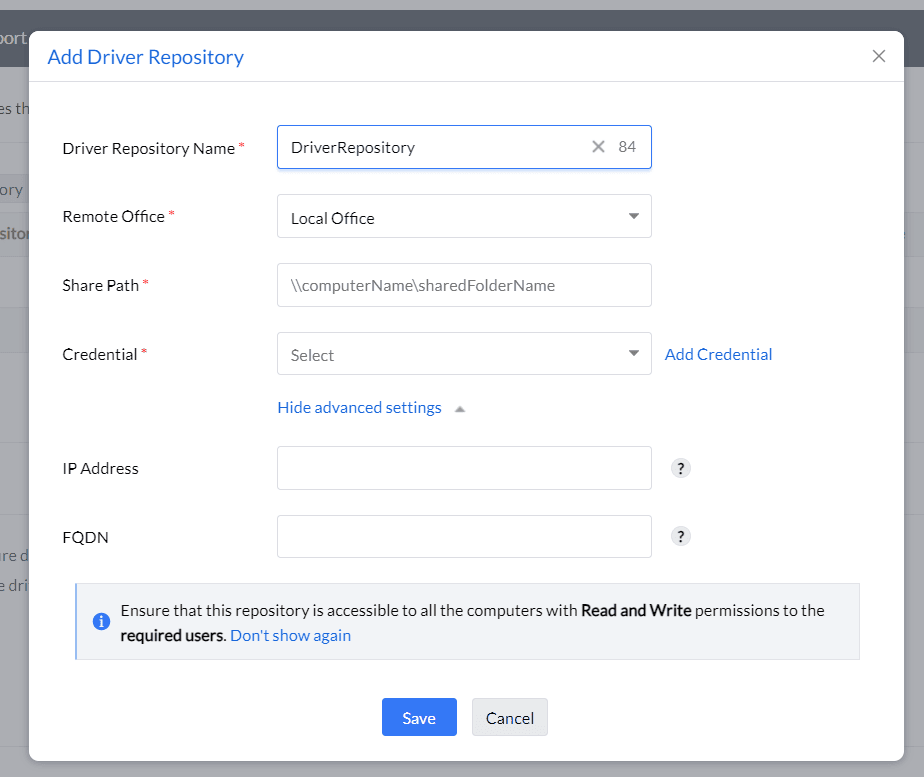
2. Intelligent Driver Extraction from Reference Machines
Build your driver library from your own golden images.
Instead of downloading drivers manually, OS Deployer lets you extract and capture drivers directly from a configured reference machine. This ensures your driver library remains accurate, validated, and deployment-ready.
Benefits:
- Eliminates mismatched or outdated drivers
- Ensures the drivers you deploy are already tested internally
- Keeps images lightweight (no need to embed drivers inside)
A smarter way to maintain consistency across diverse hardware fleets.
3. Smart Driver Injection During Deployment
Automatically match drivers to hardwareno technician required.
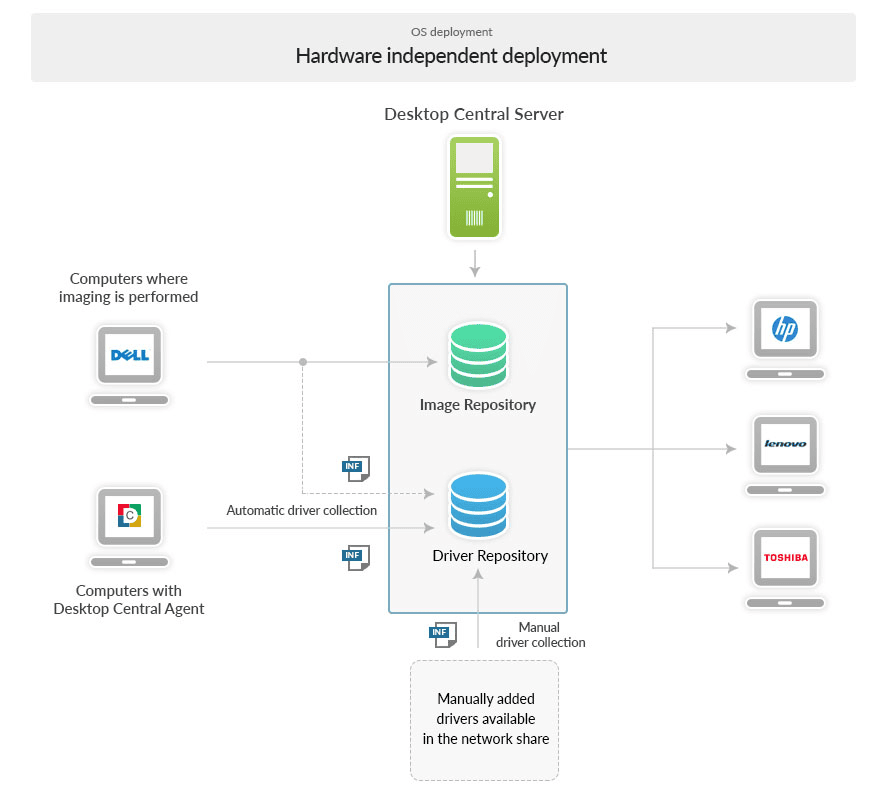
OS Deployer intelligently analyzes the hardware profile of each target device and automatically injects the appropriate drivers at critical stages:
- During WinPE boot media creation
- During image deployment
- For post-deployment driver activation
What this means for IT:
- Every machine boots correctly on the first attempt
- NIC and storage drivers are always correctly loaded
- Zero manual driver selection or troubleshooting Perfect deployments, even across varied vendor models.
4. OEM Driver Pack Integration
Optimized for enterprise hardware ecosystems.
Enterprises rely on a mix of Dell, HP, Lenovo, and other OEM systems. OS Deployer supports bulk OEM driver packs, allowing you to import and deploy vendor-certified drivers with ease.
Supports:
- Dell Command driver packs
- HP SSM driver bundles
- Lenovo SCCM/ThinInstaller packs
Outcome:
Guaranteed compatibility across all enterprise hardware without manual searching or validation.
5. Template-Based Driver Assignment
Apply the right drivers to the right deployment workflows.
With OS Deployer, you can assign specific drivers or driver groups to your deployment templates, ensuring complete control over what each machine receives
Key capabilities:
- Driver-to-template mapping
- Driver enable/disable toggles
- Model-specific driver targeting
- Validation alerts when drivers are missing or incompatible This level of granularity ensures predictable, repeatable deployment resultsideal for large-scale rollouts.
6. Automated Driver Updates & Health Management
Stay secure and currentwithout manual intervention
Outdated drivers cause instability and security gaps. OS Deployer simplifies upkeep with automated driver updates, health checks, and version control.
Includes:
- Replace old drivers with updated versions
- Remove obsolete or duplicate drivers
- Maintain clean, compliant driver libraries
Result:
A modern, secure driver ecosystem that evolves with your hardware fleet.
7. Scalable Driver Management for Large Deployments
Built for enterprises. Designed for speed.
Whether you’re deploying 10 devices or 10,000, OS Deployer’s driver management ensures that every machine receives the right components instantlyeven during mass rollouts or OS migration waves.
Why it scales well:
- Optimized driver matching engine
- High-performance repository access
- Consistent results across distributed sites
This means less downtime, fewer technician hours, and faster employee onboarding.
How Driver Management Fits into the OS
Deployment Pipeline
1. Capture or Import Drivers - Build a Unified Repository
Start by collecting drivers directly from a reference machine or importing OEM driver packs. OS Deployer automatically organizes them into a centralized driver repositoryclean, structured, and deployment-ready.
2. Create WinPE Media - Embed Essential NIC & Storage Drivers
While generating the WinPE boot environment, OS Deployer injects the necessary network and storage controller drivers to ensure seamless connectivity and disk detection during deployment.
3. Deploy OS Images - Smart Driver Matching & Injection
When an OS image is applied to a target device, OS Deployer intelligently identifies the hardware and injects the most compatible drivers automatically. This eliminates device-specific variability and ensures consistent deployments.
4. First Boot - Device Starts with Stable, Verified Drivers
The machine boots successfully on the first attempt with the correct hardware drivers already in place. No manual fixes, no reboots, and no technician intervention required.
5. Update Drivers - Maintain Compliance, Stability & Performance
As new drivers become available, IT teams can update or replace obsolete versions in the repository. This keeps the entire deployment ecosystem current, secure, and aligned with organizational standards.
Why IT Teams Rely on OS Deployer’s Driver Management
- Eliminates driver-related deployment failures
- Cuts troubleshooting time by up to 70%
- Enables hardware-agnostic OS imaging
- Ensures consistent results across all departments and locations
- Reduces manual workload for technicians A seamless, automated, enterprise-ready driver management experience.