
Last updated on: August 21, 2025
While we associate NASA with cutting-edge technology and brilliant minds, a surprising 2023 audit revealed a significant blind spot: wasteful software spending and the lack of software asset management (SAM). The OIG report estimates roughly $35 million wasted over the past five years, broken down as $15 million on unused Oracle licenses and $20 million in fines and overpayments due to license violations.
The audit exposed systemic issues. Decisions were driven by a fear of being audited rather than by data, leading to a lack of clear oversight. Key problems included disconnected systems with no centralized view of software usage, inconsistent staff training, and rampant "shadow IT," where software was installed without proper tracking. Shockingly, NASA's SAM office didn't even report to the CIO, which is a violation of federal policy.
The cost of this neglect far outweighed the cost of a solution. A robust SAM program, estimated at $3 million to implement and $2.5 million to maintain annually, could have saved NASA $4 million in just three years. This case underscores a universal truth: without proactive SAM, even the most advanced organizations face immense financial drain and compliance risks.
In this guide, we explore SAM from acquisition to disposal, covering its importance, core processes, benefits, best practices, and key metrics, as well as what to look for in a reliable SAM tool.
What is software asset management (SAM)?

Software asset management, according to ITIL®, is "all of the infrastructure and processes necessary for the effective management, control, and protection of software assets within an organization, across all stages of their lifecycle." IT asset management (ITAM) includes SAM as a subset.
SAM, to put it simply, is the process of overseeing a company's software assets over the course of their lifecycle. It assists companies in maximizing the return on their software investments, minimizing risks associated with software misuse or inefficiencies, and adhering to licensing agreements.
Importance of SAM in modern business
Software powers almost every aspect of modern business. From customer relationship management (CRM) to complex design tools, if it's not running efficiently, neither is your business. This makes SAM absolutely vital. Here's why SAM matters more than ever.
1. Optimization and cost reduction
- Identifies redundant or unused software to reduce unnecessary purchases.
- Transfers unused licenses to avoid the need to purchase new ones.
- Reduces the likelihood that using unlicensed software will result in penalties.
2. Legal risk reduction and compliance
- Simplifies software audits, resulting in labor and cost savings.
- Ensures there are no copyright violations in the software you are using.
- Promotes adherence to software regulations.
3. Enhanced security
- Detects outdated and unapproved software that could be a potential threat
- Enhances patch management by providing insight into software deployments.
- Restricts who should have access to software.
4. Improved operational efficiency and agility
- Speeds up planning for upgrades, managing roll outs, and fixing problems.
- Provides information for forecasting future requirements and planning IT budgets.
- Ensures prompt allocation of licenses to respond faster to needs.
- Monitors cloud, SaaS, and in-house configurations with evolving license regulations.
5. ROI and business value
- Maximizes the use of software to increase return on investment.
- Ensures that software investments align with overall business goals.
Core SAM processes

To manage software across its lifecycle and ensure accuracy, compliance, and cost optimization, SAM relies on a set of core processes: discovery and inventory; normalization; reconciliation; optimization; and policy and process enforcement.
Discovery and inventory
The first stage of any SAM initiative requires discovery and inventory activities. A thorough scanning process identifies all software across endpoints and servers, cloud services, SaaS applications, and virtual machines. Your goal should be to build a complete, accurate database that tracks all software assets.
Why it matters
The process of identifying every piece of software in your environment stands as a crucial factor because it enables proper management. An exact inventory enables users to track software usage and detect unauthorized software installations while building the foundation for license reconciliation.
Pro tip
Use automated scanning tools to perform regular system checks. Regular automated scanning provides both time savings and accurate inventory maintenance.
Normalization
This functions as a data processing technique that unifies identical software entries under single standard names during the software data standardization process. One example would be the normalization of Microsoft Office 2019, Microsoft Office Professional Plus 2019, and Office 2019 into a single, consistent entry.
Why it matters
It removes duplicate software entries to enhance license tracking and delivers precise software visibility.
Pro tip
Use SAM tools with built-in normalization features to enable automatic data processing and accurate inventory maintenance with minimal work.
Reconciliation
Software installation discovery gets compared against purchased licenses through the reconciliation process. Finding out if you are fully compliant, over-licensed, or under-licensed is the aim.
Why it matters
It helps businesses locate unused subscriptions and licensing surpluses to avoid unnecessary costs and protect against compliance problems.
Pro tip
Examine your installations and purchases on a regular basis, and act right away if there are any inconsistencies.
Optimization
It is the process of analyzing software usage trends and optimizing purchasing decisions, which maximizes software investment, reduces costs, and improves efficiency. It involves the recovery of unused licenses, consolidation of software, and vendor agreement reevaluation.
Why it matters
The costs of software can easily escalate when organizations fail to monitor them properly. Optimization enables your organization to pay only for the software applications and resources you actually utilize and require.
Pro tip
Review actual usage patterns because you should examine how frequently tools are used together with the users who access them. Software programs can be terminated or their licenses taken back if they have not been utilized within a specified period.
Policy and process enforcement
This is the process of establishing and enforcing guidelines for the processes for requesting, approval, installation, utilization, and retirement of the software.
Why it matters
It's important to have proper policies in place, or users might install software that isn't approved, leading to compliance and security problems.
Pro tip
Ensure that your SAM processes are tightly connected to service request management with dedicated forms for requesting or modifying access to new software. To keep things on track, define role-based access and approval processes within your software request workflows.
Benefits of implementing software asset management

SAM maximizes the return on your software investments while lowering risks and costs. Using SAM helps you:
- Remove the hassle of license expiration: In order to prevent users from losing access to crucial software, a well-implemented SAM system detects license expiration issues early. This helps reduce support tickets related to license expiry.
- Accelerate troubleshooting and resolution: You can diagnose and resolve software related tickets quickly when you have information about the specific version, license status, and user history.
- Ease onboarding and offboarding process: You can remove access for departing employees and grant new users access to the relevant software with ease. This lowers security risks and boosts license usage effectiveness.
- Reduce software conflicts and incompatibilities: You can detect potential conflicts and incompatibilities and avoid downtime by being aware of the installed software.
- Enable self-service: You can enable users to request software based on their eligibility if you possess accurate details about their software entitlements.
- Boost budgeting: Justifying software budgets and new purchases is supported by data and is more convincing when you can demonstrate real software usage and spot waste.
Software asset management lifecycle

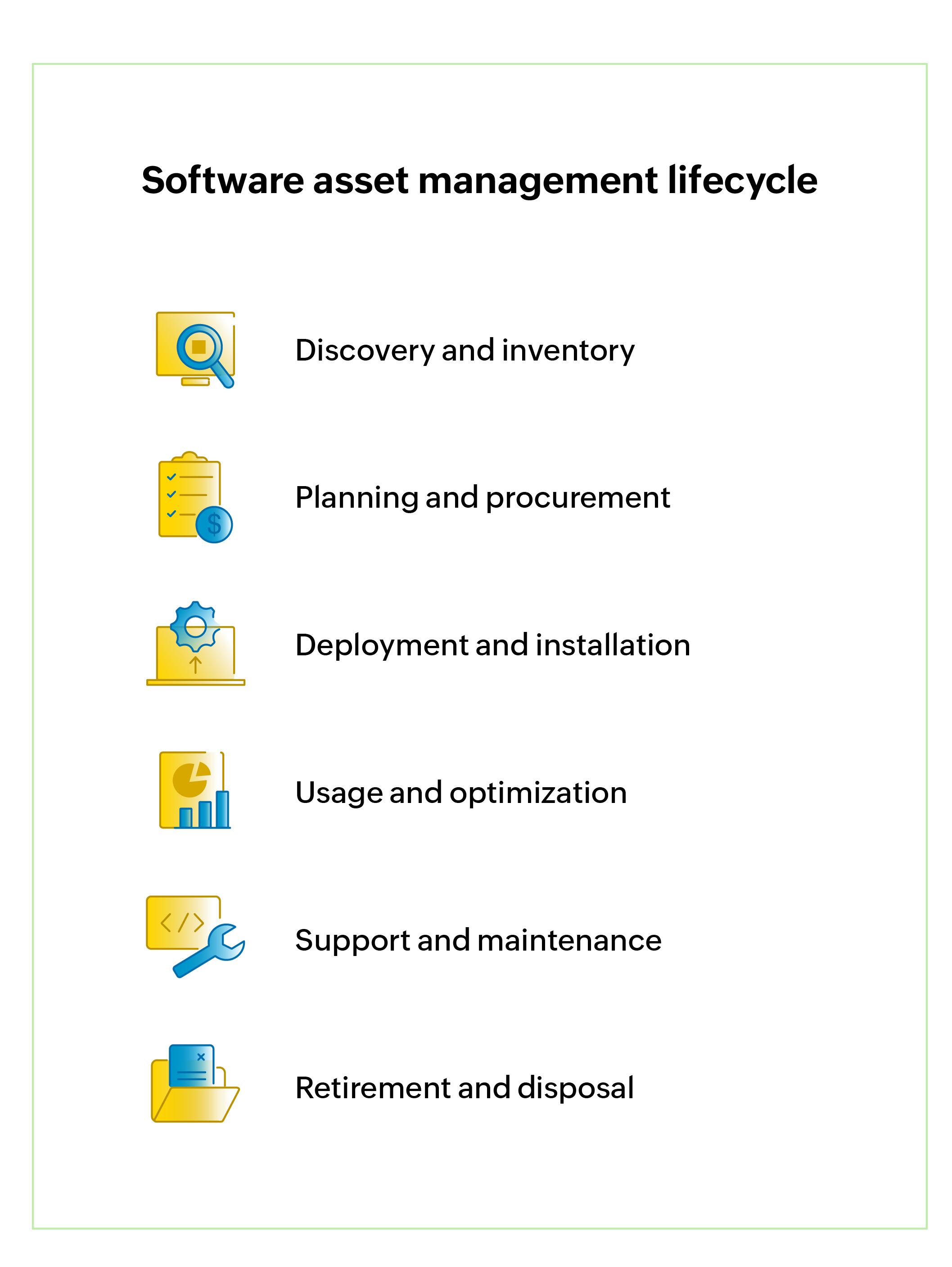
Starting with acquisition and ending with disposal, the SAM lifecycle encompasses various stages of software management. Every phase is essential for process organization, audit readiness, and software investment optimization. The SAM lifecycle's key phases are as follows: Discovery and inventory; planning and procurement; deployment and installation; usage and optimization; support and maintenance; and retirement and disposal.
Discovery and inventory
In this initial stage, every software asset in the organization is identified, located, and recorded. This involves:
- Detecting installed software by automatically scanning the IT environment.
- Recording information such as the installation path, software name, version, edition, and frequency of use.
- Keeping a central inventory of all software assets for visibility and control.
Planning and procurement
This stage guarantees that the appropriate software is obtained through the authorized channels as soon as the need for new software materializes. This involves:
- Determining the software needs and seeing whether the licenses that are already in place can be used again.
- Deciding on a budget and assessing licensing models.
- Purchasing software from approved suppliers while abiding by license terms.
- Keeping track of the license's SKU, quantity, edition, vendor, purchase, and renewal dates.
Deployment and installation
The software is installed and made accessible to end users following purchase. This involves:
- Verifying license compliance prior to installation.
- Installing the software only on approved devices.
- Ensuring installations are properly documented, safe, and compliant with policy.
- Associating each installation with a current license.
Usage and optimization
The goal of this stage is to maximize the value that can be obtained from software. This involves:
- Comparing the licenses allotted to the actual software usage.
- Cut expenses by finding licenses that are underutilized or unused.
- Looking for substitutes for expensive or rarely used tools.
- Reallocating or decommissioning software, depending on usage patterns.
- Collecting feedback from end users to improve software services and support.
Support and maintenance
Ongoing health of the software is ensured through regular updates, renewals, and support. This stage includes:
- Applying patches, upgrades, and updates to ensure performance and security.
- Monitoring the expiration dates of contracts and licenses in order to minimize compliance risk.
- Renewing software contracts as needed.
Retirement and disposal
At the end of the software lifecycle, unused or obsolete software must be retired. The following must be achieved in
this final stage:
- Identifying software that is no longer needed or supported.
- Recovering and reassigning any unused licenses, as applicable.
- Uninstalling the software in a manner that prevents a leak or breach.
- Updating records to reflect license termination or disposal.
SAM best practices
Proactive SAM is not only a best practice; it is also a cybersecurity necessity and a wise financial move. Think about the following best practices to increase the effectiveness of your SAM program.
1. Establish explicit rules right away
Outline who is responsible for what, using the ITSM and ITAM frameworks, from deployment and purchase to compliance and retirement. Things go much more smoothly when everyone is aware of their responsibilities.
2. Automate and centralize as much as you can
Organize all of your software asset data in one location. Automate tasks like license tracking, inventory management, reporting, and discovery with reliable SAM tools. This reduces errors, increases visibility, and saves time.
3. Plan frequent reviews and audits
Avoid waiting for an external audit to verify your compliance. Develop the habit of conducting internal audits. They assist you in identifying illegal software, making sure your records are correct, and managing your licenses.
4. Make the most of your licensing approach
Use a limited number of reliable vendors and stick to a standard set of authorized software tools. Make better purchasing decisions based on actual needs rather than conjecture by using usage data to renegotiate contracts.
5. Monitor usage and inform others
Keep tabs on the organization's software usage. At the same time, teach your staff about SAM policies and the importance of compliance. People are more inclined to follow the "how" when they comprehend the "why."
6. Align with industry standards
Integrate SAM into your ITSM processes to reap its full benefits. A strong framework is provided by industry standards such as ISO/IEC 19770 to direct your work and make sure nothing is overlooked.
SAM KPIs and
metrics to track
"The purpose of information is not knowledge. It is being able to take the right action."
— Peter F. Drucker
In SAM, the right action means turning data into decisions. The KPIs listed below are intended to achieve those goals by offering clear indicators to reduce expenses, demonstrate worth, and secure backing for ongoing enhancements.
| Metric | Description | Why it matters |
|---|---|---|
| License compliance rate (%) | Percentage of software installations covered by valid licenses. | Reveals compliance status and risk of audit penalties. |
| Software cost savings (USD) | Total savings from avoided purchases, reharvesting, optimized renewals, and audit reductions. | Demonstrates SAM’s ROI and financial impact. |
| Unused/underutilized software (%) | Percentage of licenses not used or rarely used over a defined period. | Helps identify reclaimable licenses and reduce future purchases. |
| Software spend reduction (%) | Percentage decrease in overall software spend compared to a set baseline. | Indicates success in optimizing software costs. |
| Software audit exposure (USD) | Estimated financial liability if audited today. | Quantifies compliance risk and helps prioritize remediation. |
| License reharvesting rate (%) | Percentage of licenses successfully reclaimed and reused. | Measures efficiency in maximizing the use of existing assets. |
| Software request fulfillment time | Average time to provision or de-provision software after approval. | Reflects IT agility and service responsiveness. |
| Unauthorized software installs | Count of unapproved or untracked software detected in the network. | Highlights shadow IT and related security and compliance risks. |
| Percentage of auto-discovered assets | Percentage of software assets found via automated discovery tools. | Shows effectiveness of SAM tools and reduces manual effort. |
| Contract renewal optimization (%) | Percentage improvement in pricing, terms, or scope during software renewals. | Demonstrates how SAM drives better vendor negotiations and long-term value. |
Features to look out
for in a SAM tool
Here are a few salient aspects to consider when choosing a SAM tool.
1. License tracking and management
- Centralized tracking of software licenses.
- Monitoring of license use to ensure compliance.
- Alerts for license termination or renewal.
- Tracking of each software asset, from purchase to retirement.
2. Software inventory management
- Automatic discovery of software assets in the organization.
- Real-time updates for accurate inventory tracking.
- Classification of software by type, seller, or business unit.
3. SaaS-centric management
- Capabilities to discover, manage, and optimize SaaS applications with real-time usage data.
- Insights to eliminate shadow IT and control spiraling SaaS spend.
- Automated renewal tracking for SaaS subscriptions.
4. Compliance and audit readiness
- Tools to identify and address software license non-compliance.
- Generation of audit reports within the application.
5. Cost optimization
- Insights into unused and underutilized software licenses.
- Suggestions for license reallocation or cancellation.
- Analytics to buy software and cut costs.
6. Integration capabilities
- Easy integration with ITSM platforms, ERP systems, SaaS offerings, and procurement software.
- Support to import and export data between the systems.
7. Reporting and analytics
- Custom dashboards for real-time insights.
- Detailed reports on software use, compliance, and costs.
- Predictive analytics to forecast software needs.
8. Contract and vendor management
- Centralized repository for managing vendor contracts and agreements.
- Alerts for contract renewals.
9. End-of-life (EoL) management
- Tools for identifying outdated or unsupported software.
- Secure decommissioning processes for retiring software.
- Ensuring appropriate data sanitation during the software disposal phase.
10. Security and risk management
- Alerts for software vulnerabilities and patch updates.
SAM trends that you need to look out for in 2025

- SAM and FinOps convergence: SAM is likely to converge with cloud financial ops (FinOps) onto a single integrated platform that provides total visibility of costs that enable better technology investment decisions.
- AI + automation: AI-enhanced predictive analytics will help identify complex software usage patterns and help IT teams be proactive by automating provisioning, optimizing license purchases, and speeding up software license compliance.
- Cybersecurity integration (SAM plus SecOps): SAM will assist as the organization employs many more security controls around vulnerability and end-of-life detection, providing SecOps a reduced total attack surface area and a faster route to navigate an intrusion.
- OSS management: SAM will evolve to manage open-source software (OSS) license compliance and vulnerability awareness and knowledge with to use of software composition analysis (SCA) tools.
Master your software landscape with ServiceDesk Plus

ServiceDesk Plus comes with native SAM capabilities to transform software chaos into a strategic, managed portfolio. Gain total control and visibility over your cloud and on-premises software to maximize ROI and ensure compliance.
ServiceDesk Plus' flexible agent-based and agentless discovery enables audit-ready governance by establishing a single software inventory throughout the lifecycle, from deployment and procurement to usage monitoring and safe retirement.
Utilize software metering to recover unused licenses, define and manage all license types, and automatically reconcile entitlements. The compliance dashboards and reports highlight over-licensed and under-licensed software, providing the data needed to optimize software spend.
In addition, ServiceDesk Plus improves visibility, by mapping software to users, hardware devices, and critical business services within the CMDB to better understand dependencies and assess impact. Seamless integration with ITAM and service management modules simplifies the work of service desk technicians and IT asset managers, delivering a unified, ITIL-aligned SAM experience within a single platform.
Don't wait for an impending audit. Take control now
SAM is the definitive answer to the question, "Are you getting value from your technology investments?" With the right strategy and the right platform, you can turn a chaotic expense into a managed, optimized asset portfolio.
Ready to see what a strategic SAM program can do for your bottom line? Sign up for a free 30-day trial of ServiceDesk Plus and see how you can start saving today. Get a quick tour of how IT asset management works in ServiceDesk Plus Cloud.
Looking for a standalone ITAM solution with software asset management capabilities? All the above capabilities are also available in our ITAM software: ManageEngine AssetExplorer.
Try AssetExplorer nowFrequently asked questions
1. What is an example of a software asset?
An example of a software asset is a licensed copy of Microsoft Office 365 installed on a laptop. Other examples include:
- Antivirus software licenses
- SaaS tools (e.g., Salesforce, Zoom)