S3 lifecycle policy: What it is and how it can reduce AWS storage costs


 ChatGPT
 Google AI
 Claude
 Perplexity
Most Amazon Simple Storage Service (S3) buckets are created in a hurry. Someone needs a place for logs, backups, or exports, the bucket goes up, data starts flowing in, and nobody thinks about it again.
The problem is that S3 never forgets. Every object lands in S3 Standard by default and stays there, billed at the same rate, until someone moves or deletes it. A log file nobody has opened in two years costs the same per GB as the one written this morning.
An S3 lifecycle policy fixes that by automating what happens to objects as they age. This article covers what a lifecycle policy is, where the savings come from, how to set one up, the pitfalls worth knowing, and how to find the buckets in your environment that don't have one.
What is an S3 lifecycle policy?
An S3 lifecycle policy is a set of rules attached to a bucket that tells S3 what to do with objects over time. Each rule does one of two things: move objects to a cheaper storage class, or delete them.
Rules can apply to an entire bucket or to a subset of objects, filtered by prefix, tag, or object size. Once the policy is in place, S3 handles the rest. There are no scripts to schedule and no jobs to maintain.
Why buckets without a lifecycle policy cost you more
Without a lifecycle policy, three things happen quietly in the background:
- Cold data keeps paying hot prices: Backups, logs, and historical exports are rarely accessed after the first few weeks, but they keep accruing S3 Standard charges.
- Obsolete objects never get cleaned up: Temporary files, expired exports, and old build artifacts pile up because nothing removes them.
- Hidden waste builds up: In versioned buckets, old object versions stay forever. Abandoned multipart uploads also keep consuming storage until they're explicitly cleaned up.
Here's what that looks like in practice. Say a bucket holds 10TB of application logs, and most of them are older than 90 days. At roughly $0.023/GB per month for S3 Standard in US East (N. Virginia), that's about $230 a month. Moving the same data to S3 Glacier Flexible Retrieval, at roughly $0.0036/GB per month, brings it down to about $36. If the logs only need to be kept for a year, expiring them after that takes the cost to zero.
Multiply that across dozens of buckets and several accounts, and the gap becomes a real line item.
Types of lifecycle actions
Every lifecycle rule is built from a handful of actions. Knowing what each one does helps you avoid gaps.
- Transition actions: Move objects to a cheaper storage class after a set number of days. For example, Standard to Standard-IA at 30 days, then to Glacier at 90 days.
- Expiration actions: Delete current objects after a set number of days. In an unversioned bucket, the delete is permanent. In a versioned bucket, S3 only adds a delete marker and keeps the object as a noncurrent version, so you keep paying until those versions expire too. This is the cleanup side of lifecycle management, and it's also how you meet rules that require data to be deleted after a set period.
- Noncurrent version expiration: In versioned buckets, every overwrite or delete leaves an old version behind. This action removes those versions after a set period. Noncurrent versions can also be moved to a cheaper storage class before they expire. They're one of the most common sources of silent storage growth.
- Expired delete marker cleanup: When all versions of an object are gone, a leftover delete marker can remain. This action removes it so the bucket stays tidy.
- Abort incomplete multipart uploads: Large uploads that fail midway leave partial data behind, and you're billed for it. A rule that aborts them after seven days is a common starting point.
The last three are the ones teams skip most often, and they're usually the easiest wins.
S3 storage classes at a glance
A transition rule is only as good as the class you're moving to. As a rule of thumb, the colder the class, the cheaper the storage and the more you pay (in time or money) to get data back.
| Storage class | Best for | Retrieval | Minimum storage duration |
|---|---|---|---|
| S3 Standard | Frequently accessed data | Immediate | None |
| S3 Intelligent-Tiering | Unknown or changing access patterns | Immediate | None |
| S3 Standard-IA | Infrequently accessed data that still needs fast access | Immediate, with per-GB retrieval fee | 30 days |
| S3 One Zone-IA | Re-creatable, infrequently accessed data | Immediate, with per-GB retrieval fee | 30 days |
| S3 Glacier Instant Retrieval | Rarely accessed archives that need millisecond access | Milliseconds | 90 days |
| S3 Glacier Flexible Retrieval | Backups and archives | Minutes to hours | 90 days |
| S3 Glacier Deep Archive | Long-term retention and compliance data | Hours (typically 12 to 48) | 180 days |
Example: An S3 lifecycle policy for application logs
Every lifecycle rule has the same building blocks:
- Rule name: Identifies the rule, so use something descriptive, such as the type of data it covers.
- Scope: Apply the rule to every object in the bucket, or narrow it with a filter.
- Filter: Match objects by prefix, tag, or object size.
- Actions: Transition or expire current versions, transition or expire noncurrent versions, and clean up expired delete markers and incomplete multipart uploads.
Here's a simple policy for a bucket that stores application logs: Logs move to Standard-IA after 30 days, to Glacier Flexible Retrieval after 90, and are deleted after a year. A second rule cleans up incomplete multipart uploads across the whole bucket.
{
  "Rules": [
    {
      "ID": "logs-tiering-and-expiry",
      "Filter": { "Prefix": "logs/" },
      "Status": "Enabled",
      "Transitions": [
        { "Days": 30, "StorageClass": "STANDARD_IA" },
        { "Days": 90, "StorageClass": "GLACIER" }
      ],
      "Expiration": { "Days": 365 }
    },
    {
      "ID": "abort-incomplete-uploads",
      "Filter": {},
      "Status": "Enabled",
      "AbortIncompleteMultipartUpload": { "DaysAfterInitiation": 7 }
    }
  ]
}
You can apply it from the AWS CLI:
aws s3api put-bucket-lifecycle-configuration \
  --bucket your-bucket-name \
  --lifecycle-configuration file://lifecycle.json
If you prefer the console, open the bucket, go to the Management tab, and choose Create lifecycle rule. The same options are available there.
If you manage infrastructure as code, you can define the same rules in HashiCorp Terraform or AWS CloudFormation, which matters for the best practices below.
Common pitfalls to avoid
Lifecycle policies are low-risk when configured carefully. These are the mistakes that turn savings into surprises:
- Minimum storage duration charges: If you move or delete an object before the class's minimum duration is up, you're still billed for the remaining days. Moving data to Glacier and deleting it a month later doesn't save what you'd expect.
- Small objects: Infrequent Access classes bill a minimum object size, and S3 applies a default minimum size to lifecycle transitions. Buckets full of tiny files can cost more in IA, not less.
- Transition request charges: Every transition is a billed request. On a bucket with millions of small objects, those charges can cancel out the storage savings.
- Retrieval fees and delays: Archived data that turns out to be needed costs money and time to restore. Be realistic about what "cold" means for each dataset.
- Deleting data you still need: In unversioned buckets, expiration is permanent. Check retention and compliance requirements before setting a rule, and test it on a single prefix first.
When S3 Intelligent-Tiering is a better fit
Lifecycle transitions work best when access patterns are predictable: logs get cold after a month, backups after a week. When they aren't, S3 Intelligent-Tiering is often the safer choice.
It automatically moves objects between access tiers based on how they're used, with no retrieval fees. In exchange, you pay a small monitoring charge per object, and very small objects aren't auto-tiered. The two approaches also work together. A lifecycle rule can move objects into Intelligent-Tiering and expire them later.
S3 lifecycle policy best practices
Here are some best practices when it comes to S3 lifecycle policies:
- Start where the savings are obvious. Logs, backups, exports, and temporary data are the easiest candidates.
- Always clean up incomplete multipart uploads. Seven days is a common starting point.
- Expire noncurrent versions in every versioned bucket.
- Scope rules with prefixes and tags so you're not applying one policy to data with very different needs.
- Test on one prefix first, then roll out to the rest of the bucket.
- Define lifecycle rules in your infrastructure code so new buckets don't launch without one.
- Review rules regularly since access patterns and retention requirements change.
Find buckets without a lifecycle policy with CloudSpend
Writing a lifecycle policy is the easy part. Knowing which buckets still need one is harder. Buckets get created by different teams, for different projects, across accounts and regions, and many never get a rule. Checking them one by one in the console doesn't scale.
CloudSpend flags this directly with the recommendation S3 buckets should have lifecycle policy configured:
- What we found: A list of the buckets that have no lifecycle policy configured, so you start from the affected buckets instead of auditing everything.
- Why it matters: Without a lifecycle policy, objects stay in their original storage class indefinitely, cold data keeps accruing standard storage charges, and obsolete objects are never cleaned up.
- Recommended action: Configure a lifecycle policy for each identified bucket to transition objects to cheaper storage classes or expire them over time.
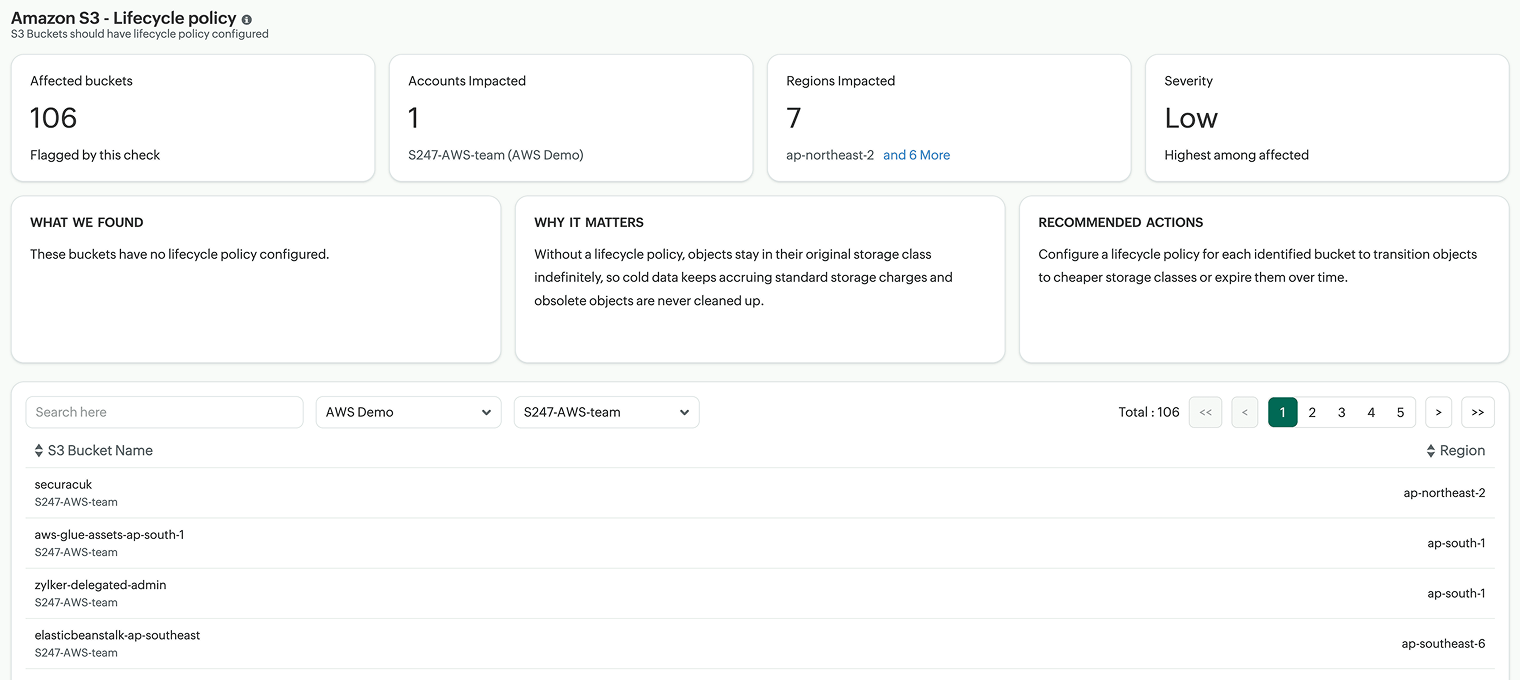
From there, the workflow is simple. Review the list, start with the buckets holding the most data or the oldest data, and apply a rule like the one above. Each bucket you fix stops the cost from growing.
Sign up for CloudSpend or request a demo to find S3 buckets missing a lifecycle policy, uncover other savings opportunities across your AWS environment, and start optimizing your cloud costs today.

Sinjan covers cloud cost management and FinOps at ManageEngine. He writes about the financial realities of running cloud infrastructure, from optimizing cloud spend to fostering cost accountability across teams, helping organizations move from cloud cost chaos to confident, data-driven decisions.