Unit Economics report
The Unit Economics report helps you understand the cost of your cloud usage at a unit level. Instead of looking at total spend, it shows how much each unit costs. For example, cost per hour, per request, or per GB.
This makes it easier to see how efficiently your resources are being used and how costs change as usage grows across services, regions, and resource types.
Why the Unit Economics report matters
Looking at total cloud spend does not always explain what is actually driving the cost. The Unit Economics report helps answer common cost questions with clear insights.
Are you paying more per unit over time?
The report shows cost per unit trends. If your unit cost increases even when usage is stable, it highlights pricing inefficiencies or suboptimal configurations.
Is a cost spike caused by higher usage or higher pricing?
By comparing usage trends with cost trends, you can quickly see whether the increase is due to more consumption or a higher cost per unit.
Which region is more cost-efficient for the same workload?
The report enables you compare unit costs across regions when the same usage type and unit are available in multiple regions. This helps you identify where the same resource delivers better cost efficiency.
Which service or usage type is more expensive per unit?
You can compare unit cost across services and usage types. This helps you choose better alternatives for the same requirement.
Which resources are driving a higher cost per unit?
Drill down to the resource level to identify specific resources with higher unit cost and take corrective action.
How the report helps
It connects cost, usage, and resource level data in one flow. You start from a summary view and drill down into details to understand the exact reason behind cost changes.
Use case
Let's consider a scenario when an engineering team notices a sudden increase in its monthly AWS bill for storage. The total cost has gone up, but it is not clear whether this is due to increased usage or inefficient resource selection.
Using the Unit Economics report, the engineering team analyzes the cost per GB for their storage volumes across regions. It finds that while the usage has increased slightly, the cost per unit is significantly higher in one region compared to others. On drilling down further, it identifies a specific set of volumes using a higher cost storage type.
With this insight, the engineering team moves those workloads to a more cost-efficient storage option in a different region. As a result, it reduces the cost per unit while maintaining the same level of performance.
This way, the Unit Economics report helps them move from a high-level cost concern to a clear, actionable optimization decision.
Benefits of Unit Economics report
The Unit Economic report provides you with the following benefits:
- Clear visibility into cost per unit instead of just total spend.
- Better understanding of cost efficiency across services and regions.
- Faster identification of cost anomalies and inefficiencies.
- Ability to drill down from summary to resource level.
- Supports better planning and optimization decisions.
How the Unit Economics report works
The Unit Economics report works by combining your cloud cost and usage data and breaking it down into a cost per unit value. It collects usage metrics from your cloud resources and groups them based on the dimensions you select, such as service, region, account, or business unit. For each group, the total cost is divided by the total usage to calculate the cost per unit.
The report presents this data in a layered view. It starts with a summary that shows cost per unit across services, regions, and usage types. From there, you can drill down to receive a detailed view that shows total cost, total usage, and how both metrics change over time. This helps you understand whether cost changes are driven by usage or pricing.
You can further drill down to the resource level to identify the exact resources contributing to the cost. At each level, trends are shown to help you track how cost and usage behaves over time.
This step-by-step breakdown helps you move from a high level view of cost efficiency to a detailed understanding of what is driving your cloud spend.
Viewing the Unit Economics report
To view the report,
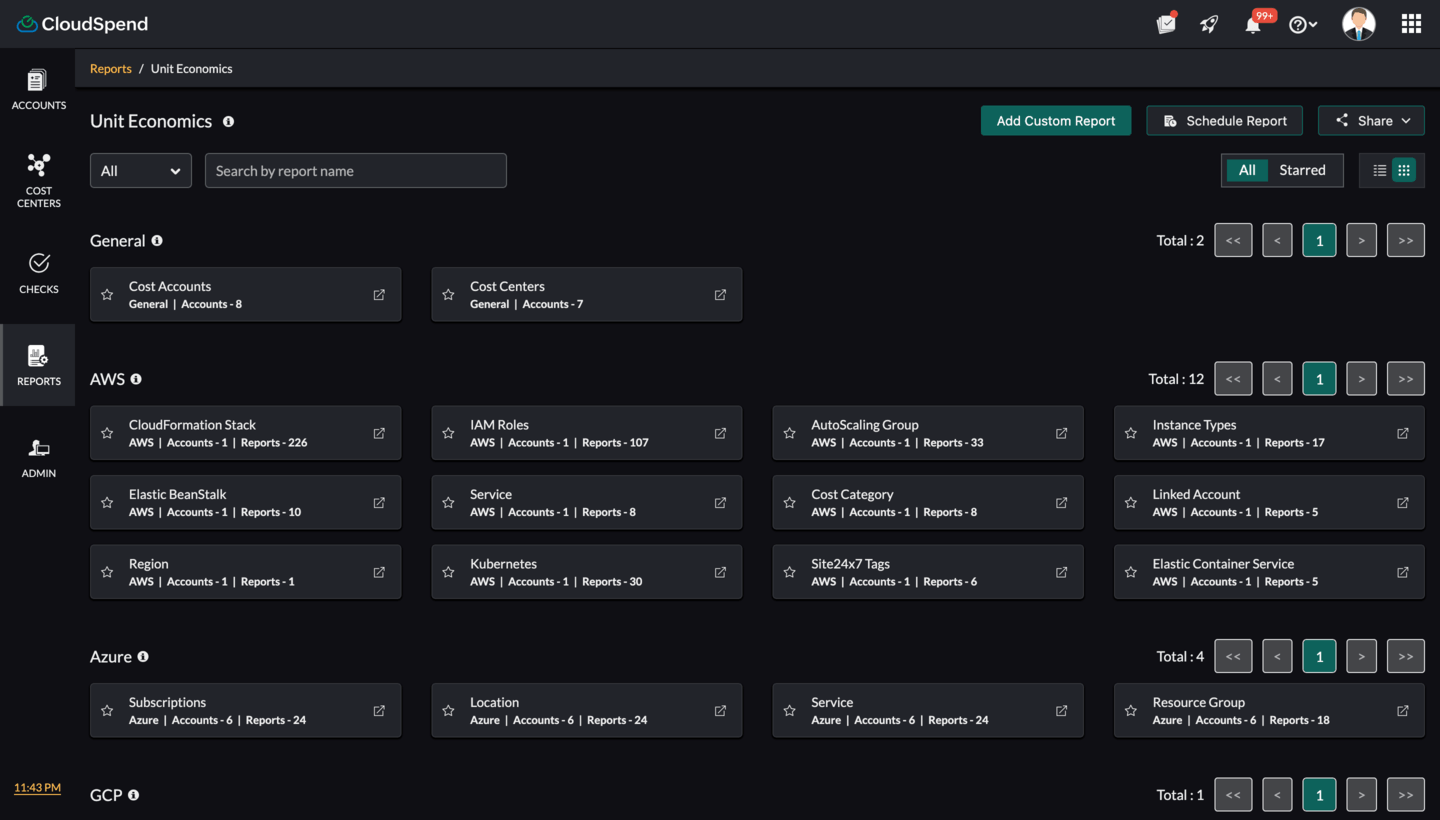
- Log in to CloudSpend and navigate to Reports.
- Go to General > Unit Economics.
- From the Unit Economics dashboard, choose the applicable report.
Adding a custom Unit Economics report
To add a custom report,
- Click Add Custom Report in the Unit Economics dashboard.
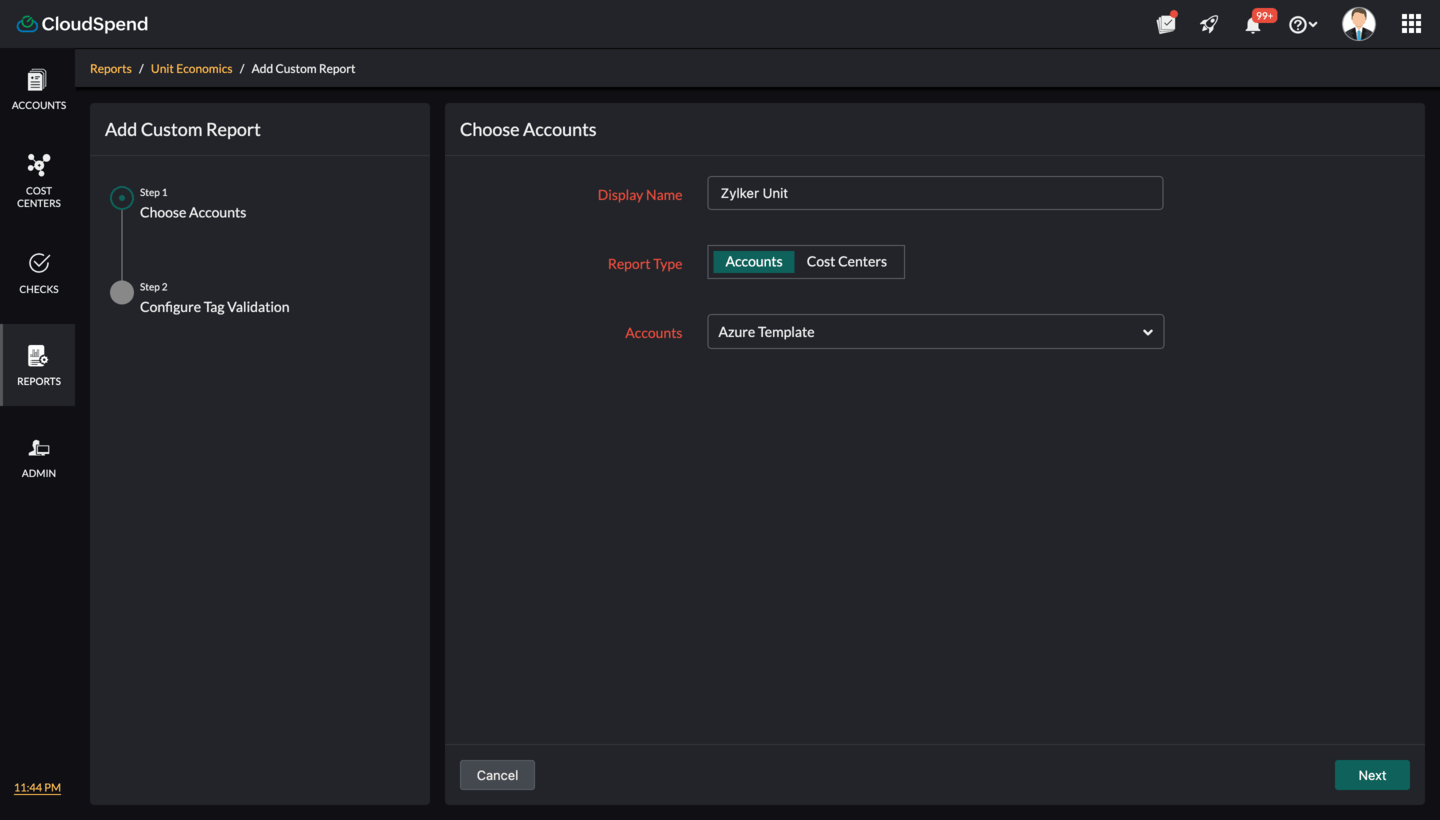
- In the Choose Accounts section, enter the following details:
- Display Name: Enter the display name.
- Report Type: Select the report type. The available options are Accounts and Business Units.
- Accounts/Business Units: Select the applicable cost accounts or business units.
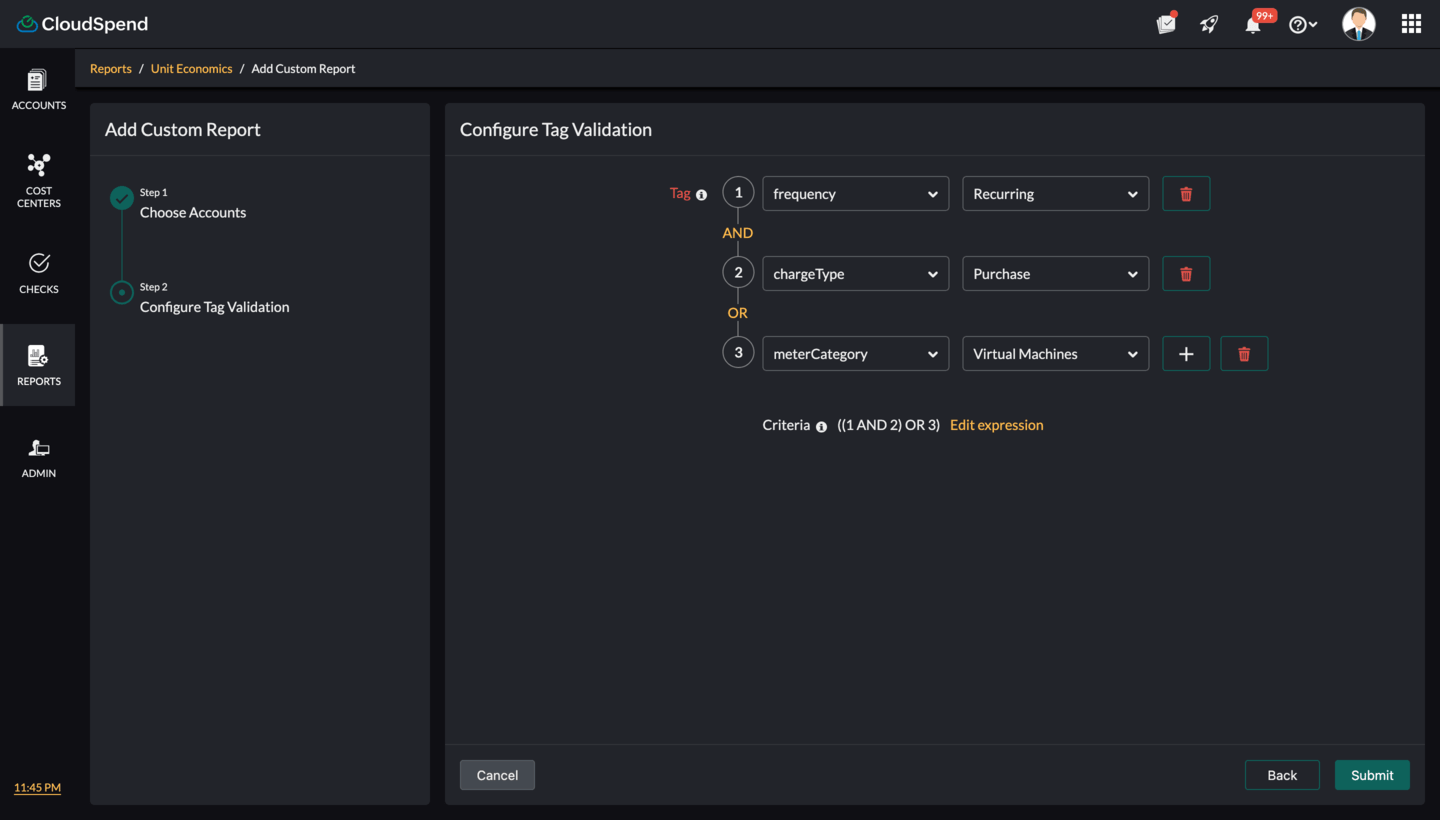
- In the Configure Tag Validation section, specify the tag values and logical conditions that determine compliance.
- Tag: Each row represents a tag condition. Learn more. Example:
- Row 1: Tag key createdBy with value AssumedRole:AROAQ
- Row 2: Tag key ecs:clusterName with value NEWECS
- Row 3: Tag key Name with value Test:Apiautomation-env
- Logical Operators (AND/OR): You can chain multiple conditions using AND/OR. In this example, the criteria are: ((1 AND 2) OR 3) as shown in the image. This means, a resource is compliant if it has both the first and second tag conditions, or it has the third condition.
- Click the add icon + to add another tag condition. Click the delete icon to delete a condition.
- Edit Expression: Fine-tune or manually edit the logical expression combining conditions.
- Tag: Each row represents a tag condition. Learn more. Example:
- Click Submit.
Understanding the Unit Economics dashboard
The Unit Economics dashboard consists of three key portions: the Unit Cost Summary,Details , and Resource Inventory sections.
Unit Cost Summary
The Unit Cost Summary is the main view of the report. It provides a list of cloud usage types along with their cost per unit, helping you compare efficiency across services and regions based on the selected time range.
At the top, you can select the cloud account, refine the data using filters, and choose a date range. You can also schedule the report to be generated and sent automatically at defined intervals, and share it with collaborators as a PDF or in email.
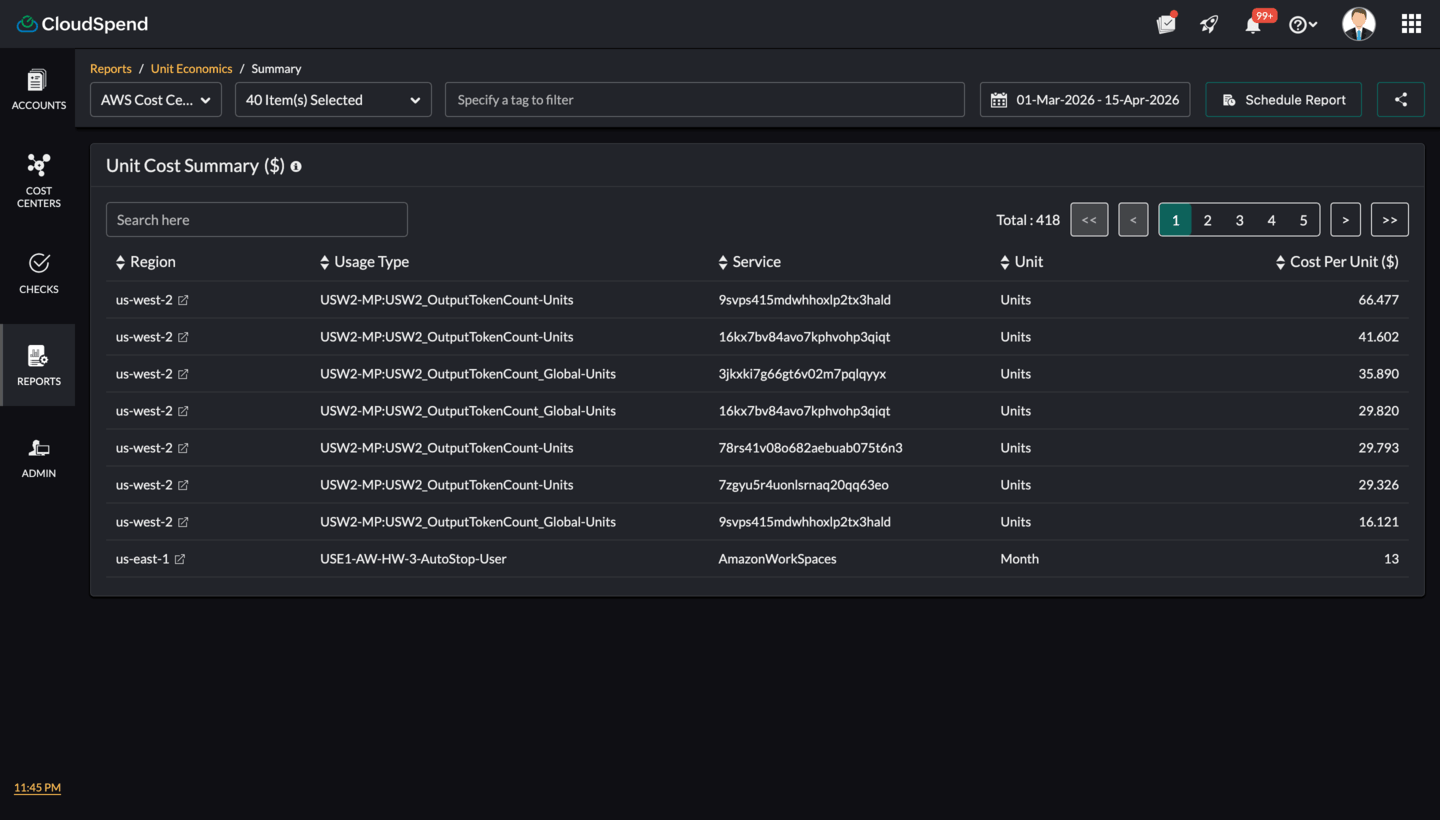
You can view the following details:
- Region: Shows where the resource is running. This helps you compare unit cost across regions.
- Usage Type: Represents the specific resource or operation. For example, storage, compute hours, or data scanned.
- Service: Indicates the cloud service associated with the usage, such as compute, storage, or database services.
- Unit: Defines how the usage is measured, such as hours, TB, or per month.
- Cost per Unit ($): Shows the cost for a single unit of usage. This is the key metric used to evaluate efficiency.
This view helps you compare how much each unit costs across different services and regions. You can quickly identify higher unit costs and investigate further by drilling down into details. The Unit Cost Summary acts as the starting point for understanding cost efficiency and finding optimization opportunities.
Summary Details
The Details page provides a deeper view of a selected unit from the Unit Cost Summary . It helps you understand how the cost per unit is derived by showing the relationship between cost, usage, and the contributing resources.
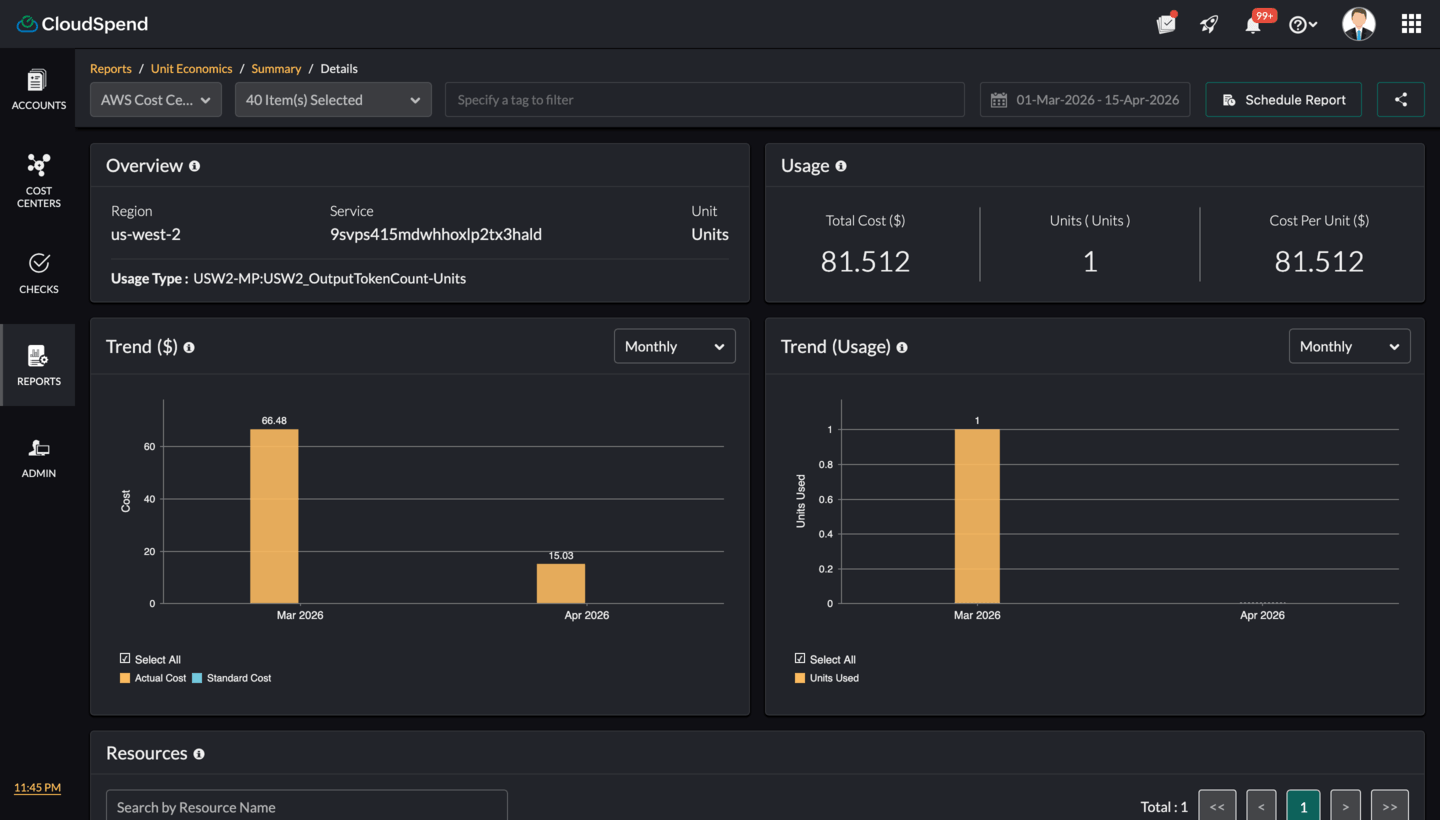
You can view the following details:
- Overview: This section shows the context of the selected entry.
- Region: The location where the usage is recorded.
- Service: The cloud service associated with the usage.
- Unit: The measurement unit, such as months or hours.
- Usage Type: The specific resource or operation being analyzed.
- Usage: This section summarizes key metrics for the selected unit. It helps you quickly understand whether the cost is driven by higher usage or higher unit price.
- Total Cost ($): Total spend for the selected usage.
- Units (Month/Count): Total units consumed during the selected period.
- Cost per Unit ($): Displays the cost per unit of resource usage. If the calculated value is less than 0.001, it is shown as < 0.001 since values below this range are rounded for consistency.
- Trend ($): This chart shows how the cost changes over time. It displays cost values across time periods and includes a comparison between actual cost and standard cost. The Trend chart helps identify cost spikes, steady trends, or unexpected changes over time.
- Trend (Usage): This chart shows how usage changes over time. It displays units consumed across time periods and helps correlate usage patterns with cost trends so you can understand usage growth.
- Resources: This section lists the individual resources contributing to the selected unit. It enables you to drill down to the resource level and identify which resources are contributing most to the cost.
- Resource Name: The specific resource.
- Total Cost ($): Cost attributed to the resource.
- Units Used: Usage by the resource.
- Cost per Unit ($): Unit cost at resource level.
Resource Inventory page
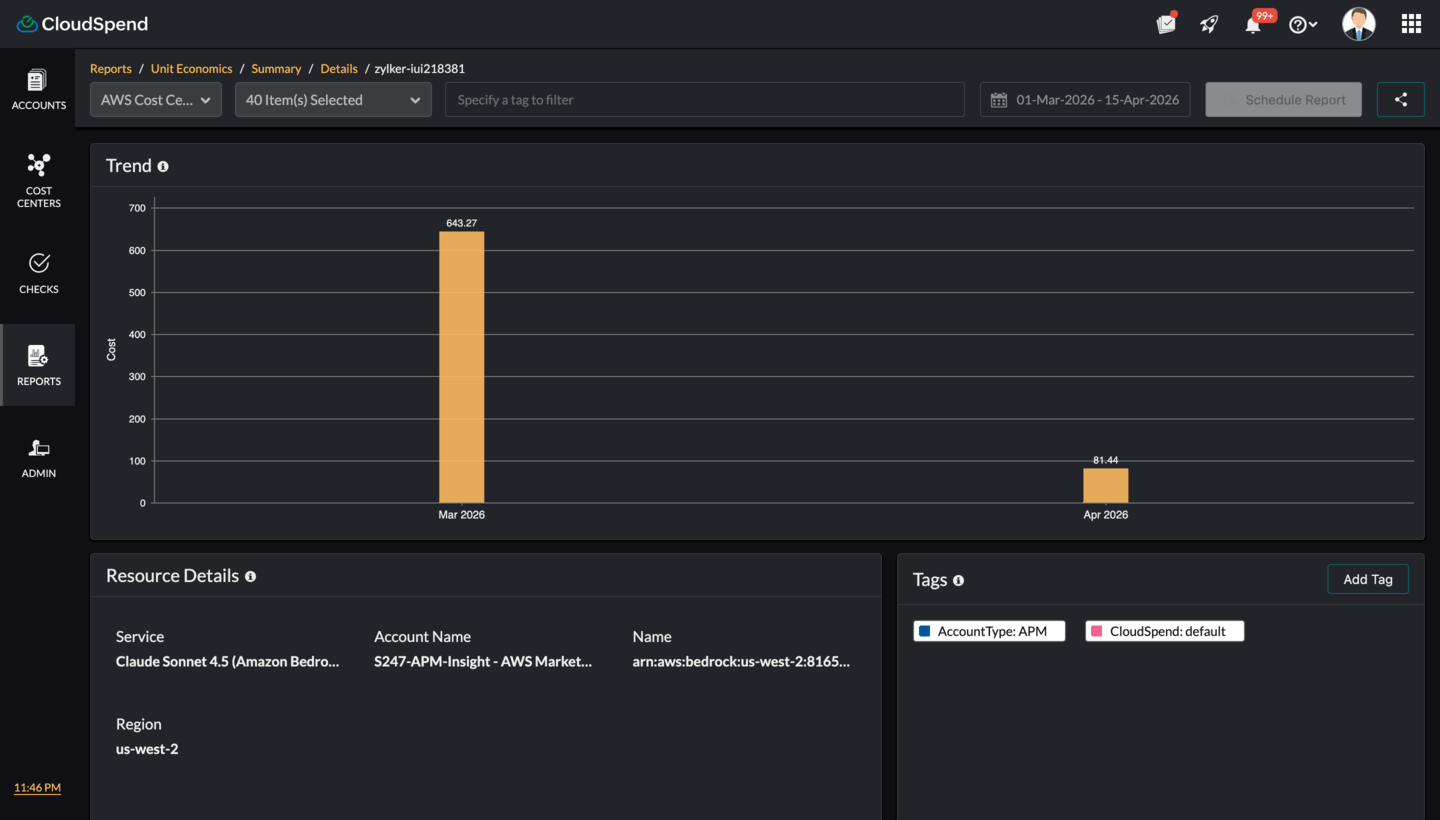
The resource inventory page provides a focused view of an individual resource from the Unit Economics report. It shows how the resource’s cost changes over time through the trend chart, along with key details such as service, account, region, and resource identifier. You can also view associated tags to understand ownership and categorization. This page helps you analyze the cost behavior of a specific resource and identify opportunities for optimization.