USB drives make it easy to transfer files between systems, but they also increase the risk of sensitive data leaving the organization through unauthorized devices. Device Control Plus helps reduce this risk by enforcing BitLocker encryption on the connected drive before users can transfer data to it. The entire process is policy-driven, allowing admins to ensure that only Bitlocker-encrypted devices are allowed to store or transfer organizational data.
Why USB encryption matters
USB drives make it easy to move files, but they also make it easy for sensitive data to leave the organization. If a drive is lost or stolen, any unencrypted files stored on it can be accessed immediately, exposing customer data, financial records, and other confidential information.
For organizations handling customer records, financial information, healthcare data, an unencrypted USB drive can result in data exposure, increase compliance risk under regulations such as GDPR and HIPAA, and damage customer trust.
The risk isn't limited to lost devices. Employees often copy files to USB drives for legitimate reasons such as backups, file sharing, or offline access. Without encryption controls, those files remain vulnerable once they leave managed endpoints.
By enforcing encryption before data is transferred to USB drives, organizations can ensure that sensitive files remain protected even if the device falls into the wrong hands. This results in stronger data security, reduced compliance risk, and greater control over information that leaves the organization.
How USB encryption works in Device Control Plus
Device Control Plus enforces encryption only when users attempt to copy corporate data to an unencrypted USB drive.This ensures that corporate data is copied only to encrypted devices without affecting user productivity. Device Control Plus can:
Grant read-only access
Users can connect unencrypted USB devices and view the files already available on them without any restrictions.

Enforce encryption before data transfer
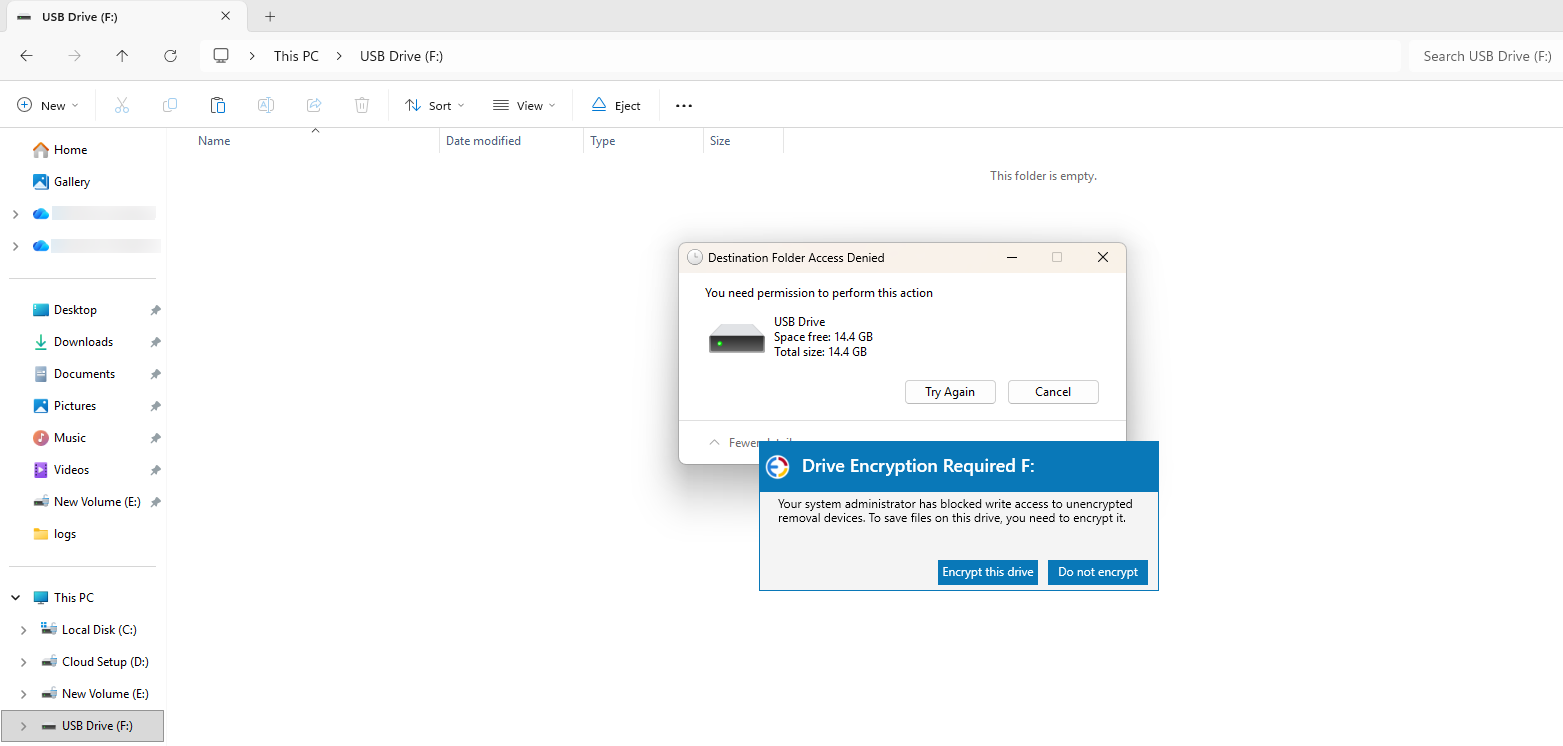
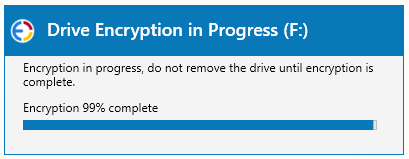
When users attempt to copy files to an unencrypted removable device, they are prompted to encrypt the device using BitLocker To Go. Write access is enabled only after encryption is complete, helping ensure that sensitive data is stored only on encrypted removable devices.
Retrieve recovery keys from a central console
Every USB drive encrypted through Device Control Plus generates a recovery key during encryption. Admins can retrieve the recovery key directly from the Device Control Plus server console using the drive's Key ID, helping users regain access to encrypted USBs when needed.
What do users experience down
- Access existing files
Existing files on the USB drive can be accessed with read-only permission without any additional prompts or interruptions.
- Write data to the USB drive
Users are prompted to encrypt the device before data from the endpoint can be copied to it.
- Unlock with password or recovery key
The drive prompts for the password each time it is connected. If forgotten, the IT admin can retrieve the recovery key from the Device Control Plus console and share it with the user.
Protect data copied to USB drives with Device Control Plus
Enforce BitLocker encryption to ensure that data is written only to encrypted USB devices.

Frequently Asked Questions
What is USB encryption in Device Control Plus?
+-It's a policy-based control that requires USB devices to be encrypted with BitLocker-to-Go before copying files to the USB drive. Unencrypted drives remain read-only until the user encrypts them with a password.
Read moreWhat happens if a user forgets their encryption password?
+-Every USB device encrypted through Device Control Plus generates a recovery key that's stored centrally. An admin can look up the key using the drive's Key ID from the Device Control Plus console and share it with the user to regain access.
Read moreDoes encryption block users from reading existing files on a USB drive?
+-No. Users can read and open existing files on a connected drive without any prompts. The encryption requirement is only triggered when a user attempts to copy new data to an unencrypted device.
Read moreCan unauthorized or unrecognized USB drives be blocked outright?
+-Yes. Device Control Plus can be configured to block unencrypted or unrecognized removable devices entirely, in addition to enforcing encryption for approved devices.
Read more