Remote Actions
Overview
Remote Actions in DEX Manager Plus are reusable, script-based tasks designed to be executed within Workflows. These actions enable IT administrators to perform system-level operations—such as restarting services, clearing temporary files, or uninstalling software—remotely, consistently, and without user intervention. They are not standalone deployments and must be embedded into a workflow to run.
Why Use Remote Actions?
| Benefit | Description |
|---|---|
| Reusable Automation | Define once and reuse across multiple workflows. |
| Remote Execution | Perform critical tasks on endpoints from a central console. |
| Workflow Integration | Seamlessly insert into any workflow to enable dynamic remediation. |
Accessing the Remote Actions Module
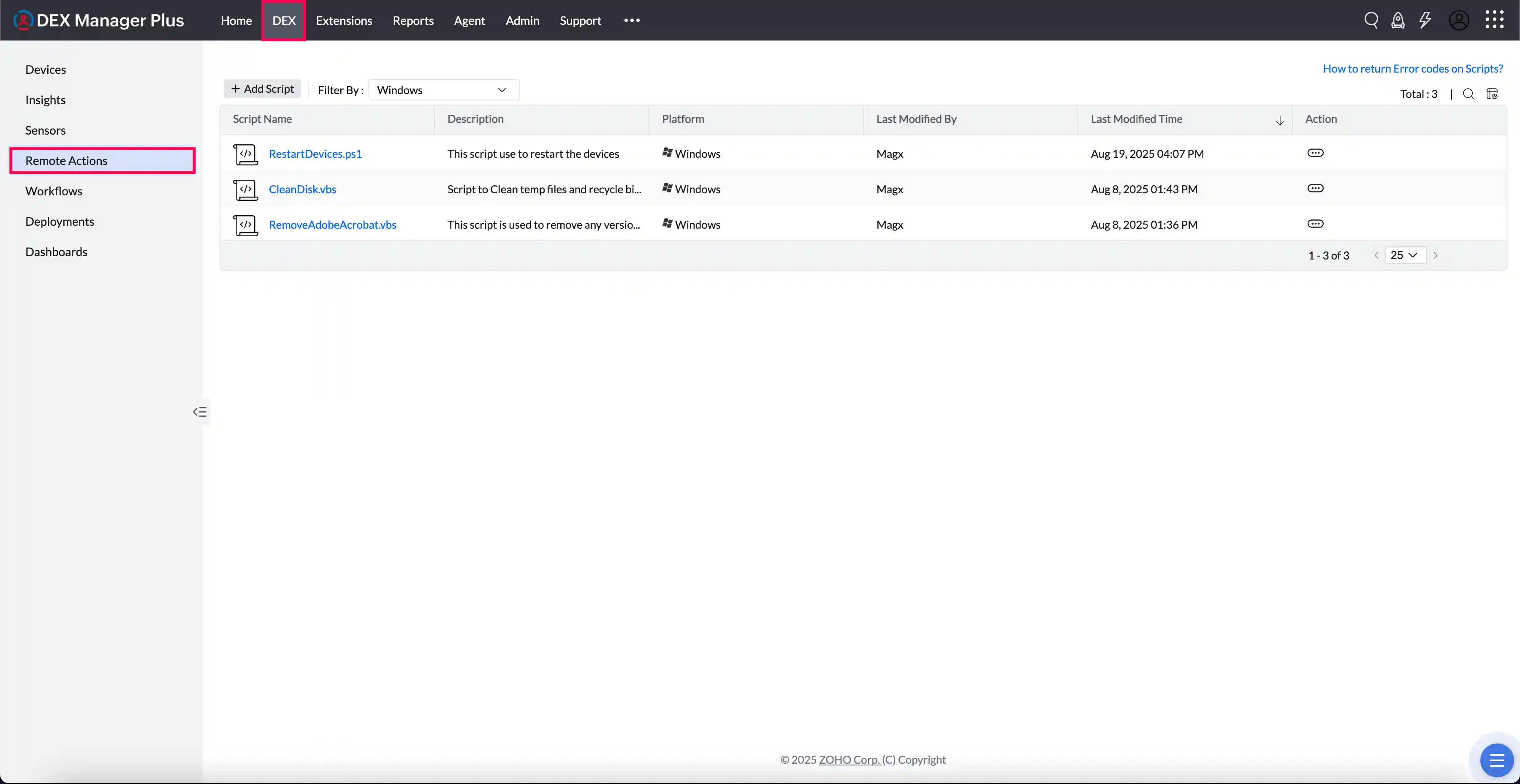
Navigate to Remote Actions in the left pane within the DEX tab. Browse or search for existing scripts. Click + Add Script to create a new remote action for workflow use.
Creating a Remote Action
Step 1: Upload the Script
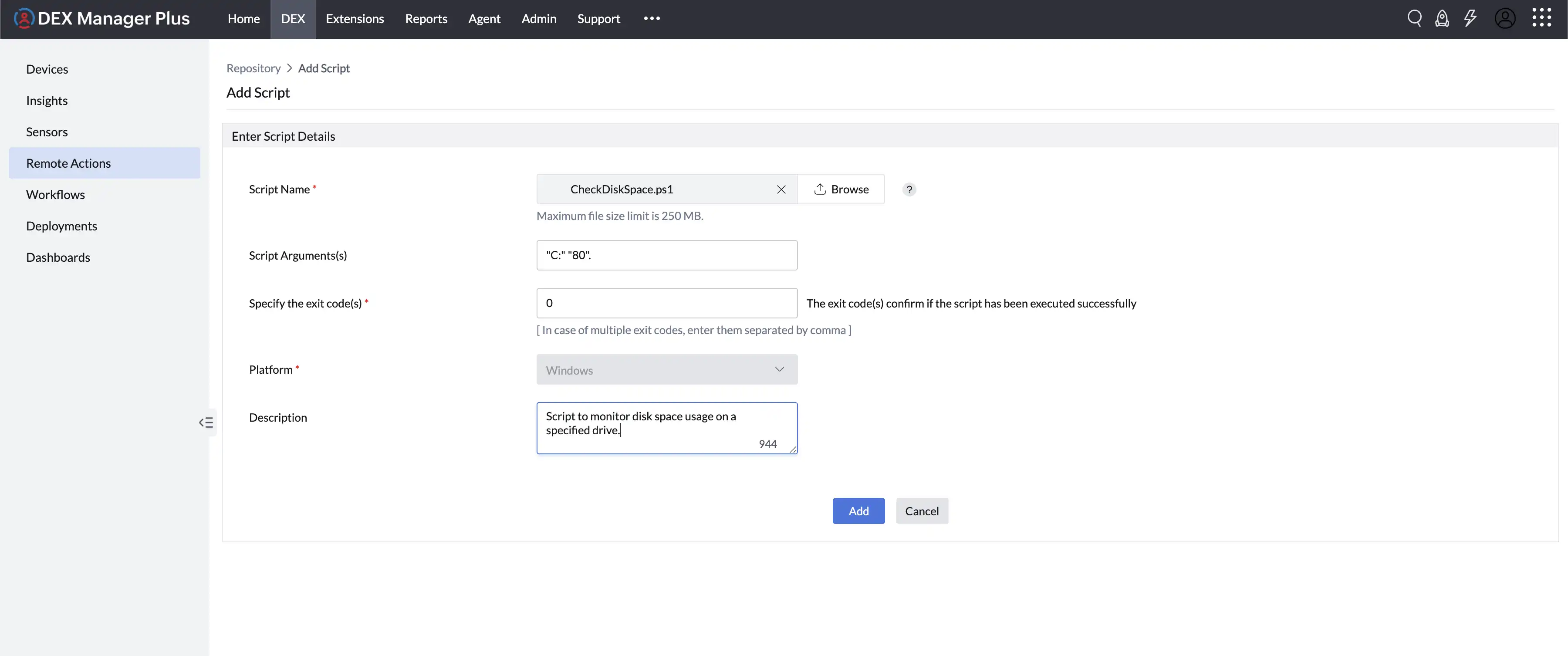
Use Upload Script to select your script file.
- File size limit: 250 MB
- Supported script types: .ps1, .sh, .vbs, etc.
Step 2: Configure Properties
| Field | Description |
|---|---|
| Script Arguments (optional) | Define runtime parameters, if required. |
| Exit Codes | Indicate successful execution (e.g., 0). Refer this document for details. |
| Platform | Specify the OS the script is intended for (Windows, macOS). |
Step 4: Save
Click Add to register the script in the Remote Actions library for future use in workflows.
Generating Remote Actions Using Ask Zia
DEX Manager Plus integrates Ask Zia — an AI-powered virtual assistant — directly within Remote Actions. IT professionals can generate custom remote action scripts instantly by entering natural language prompts in the Zia chat, eliminating the need to write scripts manually from scratch.
Powered by OpenAI technology, Zia understands your endpoint management requirements and produces ready-to-deploy remote action scripts in seconds, helping your team automate faster and reduce manual effort.
The Remote Action Generation feature is accessible to users with Remote Action Write permission. Ensure Zia is enabled before use. To enable Zia, navigate to Admin > Zia Configuration or refer to the Zia configuration guide.
Steps to Generate a Remote Action Using Ask Zia
Navigate to DEX > Remote Actions.
Click the Ask Zia button available next to Add Remote Action or within the Add Remote Action view.

A chat panel opens on the right side of the screen.
Select a suggested prompt or enter your own requirement. For example: "Generate a remote action to clear temporary files on Windows devices."
Zia generates a remote action script compatible with Windows, macOS, or both platforms based on your input.

Review the generated script, make any necessary modifications, and save the remote action.
Using Remote Actions in Workflows
Remote Actions are designed to function as executable steps in a workflow. You can combine them with conditions, user prompts, delays, or alerts to create robust endpoint automation.
How to use in a workflow:
- Go to Workflows > Create Workflow.
- Drag and drop a Remote Action block into the Builder view.
- Choose the required script from your library.
- Add preceding or succeeding blocks (e.g., Condition, Engage, Mail) to build the logic flow.
| Use Case | Description |
|---|---|
| Disk Cleanup | Remove temporary files to reclaim storage. |
| Restart Spooler Service | Resolve printer queue issues remotely. |
| Uninstall Unauthorized Software | Maintain software compliance. |
| Reset DNS/Network Settings | Fix intermittent connectivity without user action. |
Best Practices
| Recommendation | Why It Matters |
|---|---|
| Test scripts in a controlled group | Prevent negative impact on production devices |
| Include comments in scripts | Improve maintainability and handoffs |
| Use consistent naming conventions | Helps locate and organize scripts |
| Map correct exit codes | Ensures workflows behave predictably |
| Limit sensitive scripts to admin use | Maintains compliance and security |