GSS-TSIG (Kerberos-Based Secure DNS Updates)
Overview
GSS-TSIG (Generic Security Service Algorithm for Secret Key Transaction) is a security mechanism that enables cryptographic authenticated dynamic DNS updates using Kerberos, the same authentication infrastructure used by Microsoft Active Directory (AD).
DDI Central supports the configuration of GSS-TSIG between Microsoft Active Directory and BIND 9, allowing your DNS infrastructure to accept dynamic updates only from verified, domain-joined machines, without the overhead of distributing or rotating shared keys.
Why GSS-TSIG?
GSS-TSIG addresses this by leveraging Kerberos, which is built into Microsoft Active Directory. Authentication is handled centrally by AD, meaning no secrets are distributed between clients and DNS servers. Instead, trust is established through cryptographic signed tickets issued by AD, a model already trusted by your organization's identity infrastructure.
Key benefits:
- No shared secrets: eliminates the risk of key leakage and the burden of key rotation.
- Centralized trust: authentication is handled by Active Directory, which your organization already manages.
- Audit-ready: all authenticated updates are tied to verified machine identities.
- Enterprise-grade security: meets the authentication standards required by most compliance frameworks.
How It Works
When a domain-joined computer needs to update its DNS record, the following authentication flow takes place before any update is accepted by BIND 9:
- Kerberos login: The computer authenticates with Active Directory and receives a Ticket Granting Ticket (TGT), establishing its identity on the domain.
- Service ticket request: The computer requests a service ticket from AD specifically for the DNS server. AD issues this ticket only if the machine is authorized.
- Signed DNS update: The computer sends a dynamic DNS update to BIND 9, signed using GSS-TSIG with the Kerberos service ticket embedded. This signature proves the update originated from a trusted, domain-joined machine.
- Verification and update: BIND 9 verifies the Kerberos signature against Active Directory. If valid, the DNS record is updated. No shared key is required at any point in this process.
Configuring GSS TSIG in Linux servers
Prerequisites
Linux (BIND Server)
Ensure the following packages are installed on the Linux server:
Windows Active Directory
- Domain Controller must be running
- Windows DNS Server must be in a stopped state
- The DNS server's IPv4 settings must point to the Linux server IP under the Preferred DNS Server field
- Kerberos service must be active and working on the Domain Controller
Step 1 — Configure Kerberos on Linux
This is a mandatory step and must be performed on the Linux server, whether it is running on console or agent mode.
Edit /etc/krb5.conf with the following configuration:
[libdefaults]
default_realm = EXAMPLE.COM
dns_lookup_realm = false
dns_lookup_kdc = true
default_tgs_enctypes = aes256-cts-hmac-sha1-96 aes128-cts-hmac-sha1-96
default_tkt_enctypes = aes256-cts-hmac-sha1-96 aes128-cts-hmac-sha1-96
permitted_enctypes = aes256-cts-hmac-sha1-96 aes128-cts-hmac-sha1-96
[realms]
EXAMPLE.COM = {
kdc = dc.example.com
padmin_server = dc.example.com
}
[domain_realm]
.example.com = EXAMPLE.COM
example.com = EXAMPLE.COM
- The KDC must be specified as a resolvable FQDN from the Linux server.
- The realm and KDC defined here must be resolvable on the same server.
- AES256 and AES128 encryption types are supported for the keytab file.
To verify Kerberos authentication is working correctly, test using the kinit command with your keytab file after completing Step 3.
Step 2 — Create a Kerberos Principal for DNS
This step is performed on the Windows Active Directory side.
A dedicated AD user account must be created and mapped to the DNS Service Principal Name (SPN). Run the following command on the Windows Domain Controller:
ktpass -princ DNS/bindserver.example.com@EXAMPLE.COM `
-mapuser binduser `
-crypto AES256-SHA1 `
-ptype KRB5_NT_PRINCIPAL `
-pass * `
-out C:\bind.keytab
Understanding the command:
| Parameter | Description |
|---|---|
| DNS/bindserver.example.com@EXAMPLE.COM | The Service Principal Name (SPN) — DNS service on the FQDN of the BIND server, scoped to the Kerberos realm |
| -mapuser binduser | The AD user account mapped to this SPN |
| -crypto AES256-SHA1 | Encryption type — AES256-SHA1 or AES128-SHA1 are both supported |
| -ptype KRB5_NT_PRINCIPAL | Principal type — do not modify this value |
| -out C:\bind.keytab | Output path for the generated keytab file |
Once the command runs successfully, the keytab file will be generated at the specified output path.
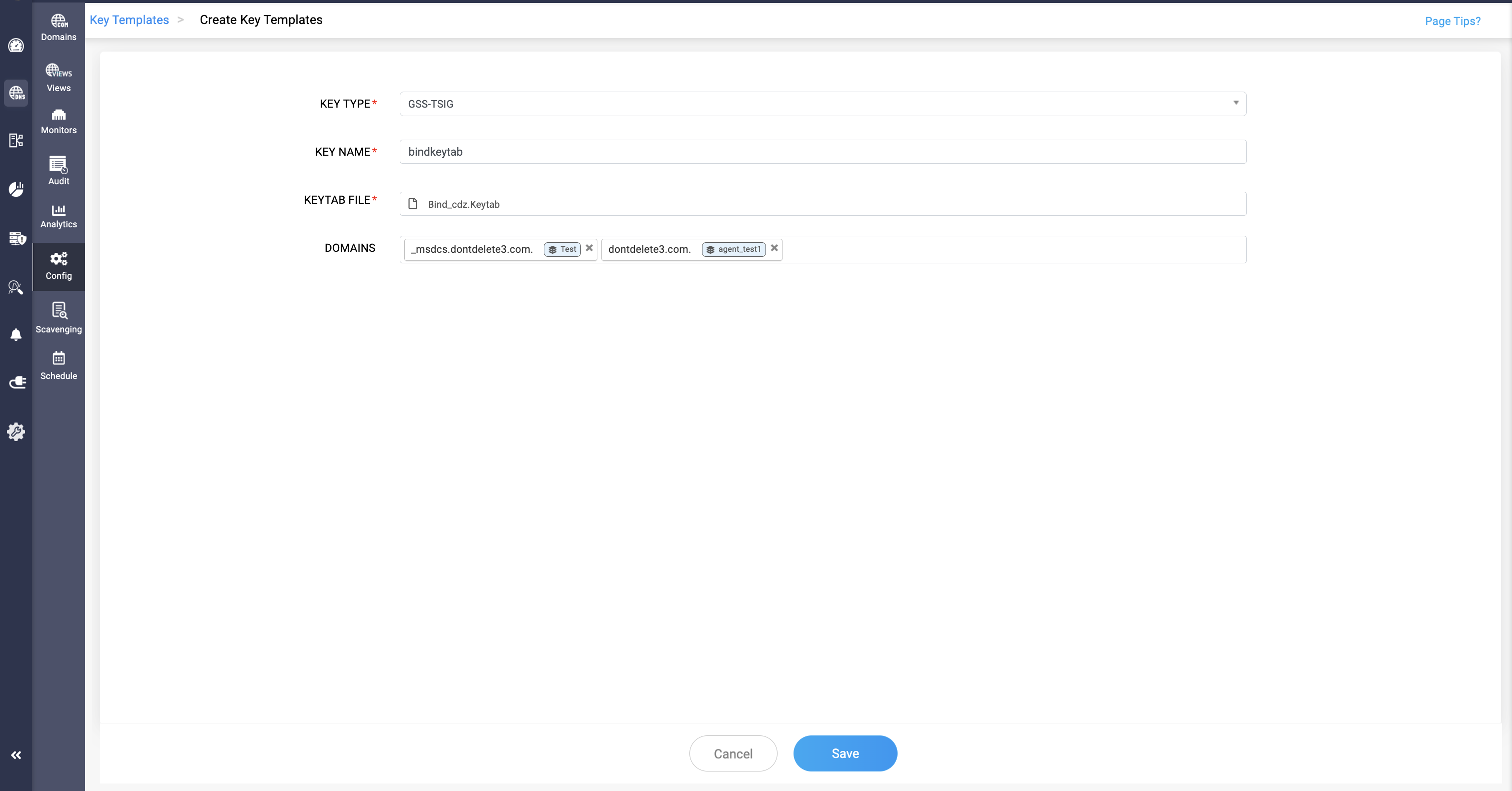
Step 3 — Configure GSS-TSIG Key Template in DDI Central
This step is performed in the DDI Central UI.
- Navigate to DNS > Config > Key Templates > Add Template
- In the Add Template form:
- Set Type to GSS-TSIG
- Provide a Name for the template
- Upload the keytab file generated in Step 2
- Specify the Active Directory domains associated with this keytab
Step 4 — Refresh Active Directory and Register DNS
Run the following commands on the Windows Domain Controller to refresh AD and allow the AD server to recognize the Linux DNS server for dynamic DNS updates:
ipconfig /registerdns
net stop netlogon
net start netlogon
This forces the Windows client to re-register its DNS records and restarts the Netlogon service, which signals AD to recognize the Linux BIND server as the authoritative DNS target for dynamic updates.
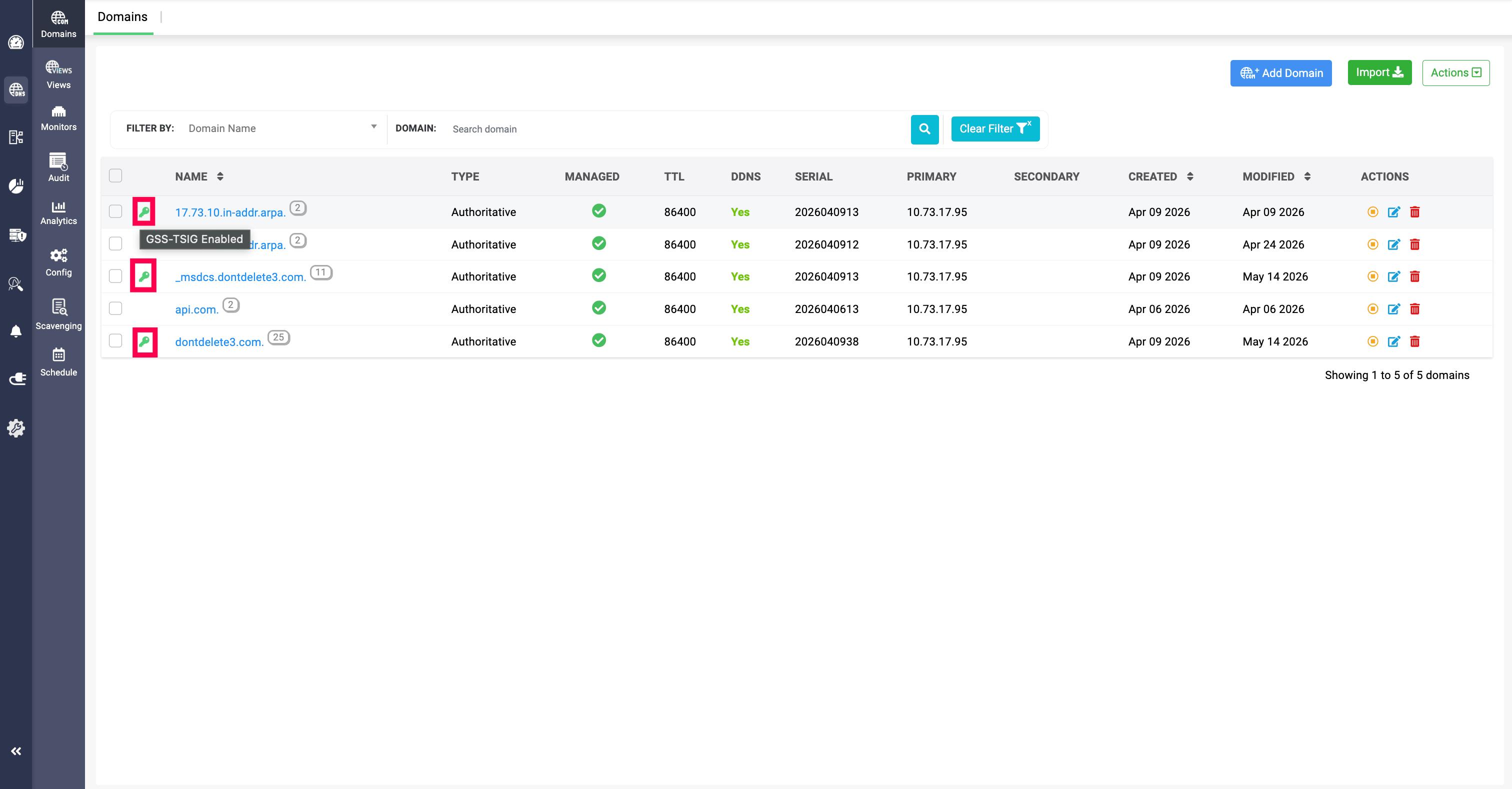
In the Domains page, domains with a key icon indicate that GSS-TSIG configuration has been implemented for them.