DNS Protection Templates in DDI Central
DNS Protection Templates in DDI Central let you codify your organization’s DNS-infrastructure safeguards into reusable, policy-driven profiles. Whether you’re guarding against volumetric DDoS, brute-force NXDOMAIN floods, or resource exhaustion from misconfigured recursive clients, these templates ensure consistent, automated rate-limiting and resource-controls—so your DNS servers stay available and secure under both everyday and attack-scale loads.
How to access and configure DNS Protection Templates in DDI Central
Step 1: Navigate to Protection Templates
- Go to: DNS > Config in the left-hand navigation menu.
- Navigate to Protection Templates to view the list of existing templates or to create a new one.
Step 2: Create a new Protection Template
- Click on the Create Protection Template button.
Step 3: Fill in the template fields
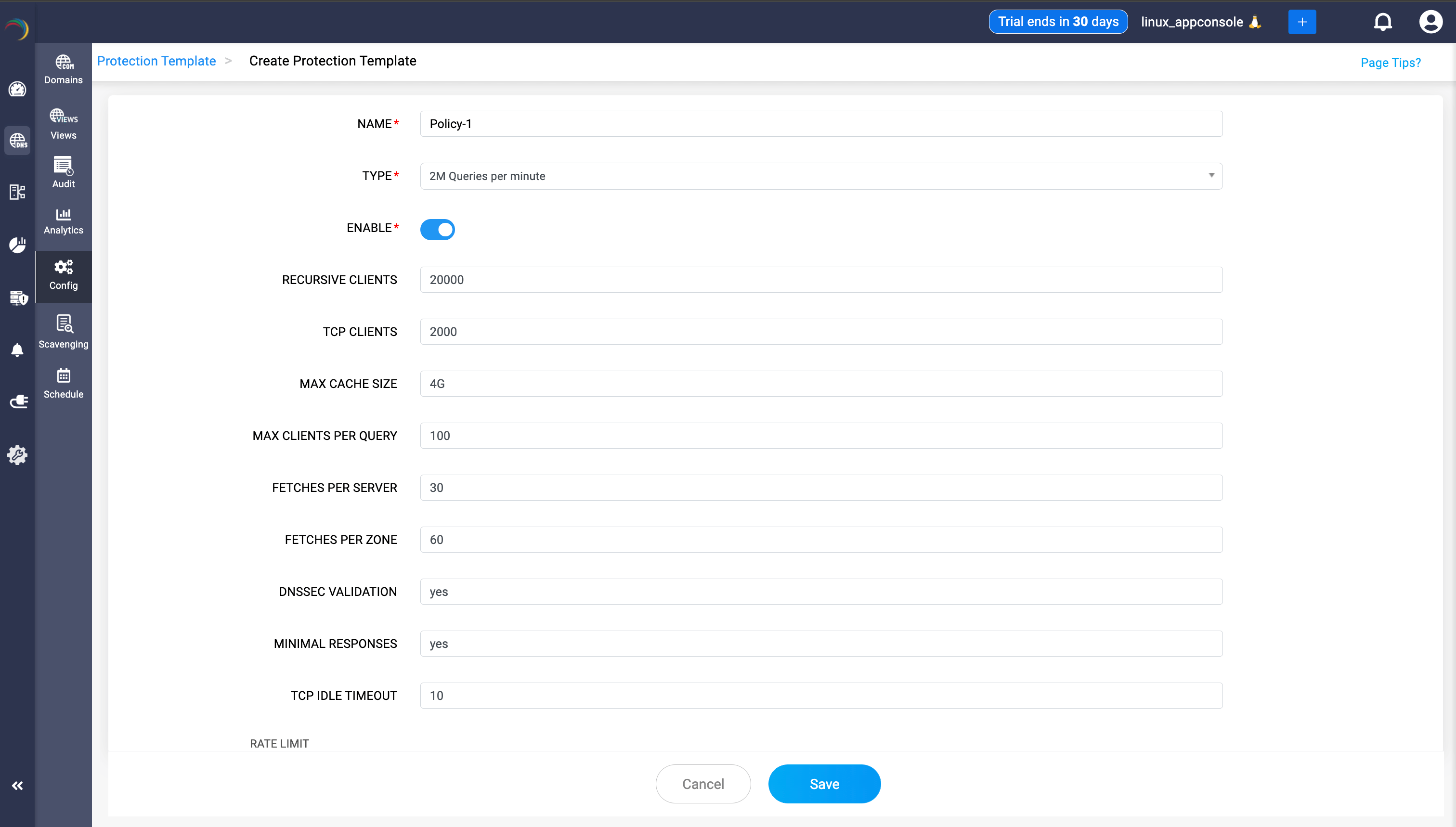
- NAME: Enter a unique name for your protection template. Example:
ddi-template - TYPE: Select the query rate limit preset from the dropdown.
- 50K Queries per minute
- 1M Queries per minute
- 2M Queries per minute
- 5M Queries per minute
- Custom (allows full customization beyond presets)
- ENABLE: Enable or disable the template by toggling this option. Set to “yes” or “no” to activate or deactivate.
- RECURSIVE CLIENTS: Specify the maximum number of recursive clients allowed to query the server.
- TCP CLIENTS: Set the maximum number of simultaneous TCP clients allowed (e.g., for DNSSEC or large responses).
- MAX CACHE SIZE: Set the maximum cache size (e.g.,
4Gfor 4 GB) for DNS record storage. - MAX CLIENTS PER QUERY: Set the maximum number of clients that can send the same query at the same time. Helps mitigate amplification and resource exhaustion attacks.
- FETCHES PER SERVER: Limit the number of concurrent fetches to each upstream server. Prevents overloading a specific upstream DNS server.
- FETCHES PER ZONE: Limit the number of concurrent fetches per DNS zone. Prevents resource exhaustion per DNS zone.
- DNSSEC VALIDATION: Enable (yes) or disable (no) DNSSEC validation for responses. Ensures authenticity and integrity of DNS data by validating signatures.
- MINIMAL RESPONSES: Enable (yes) or disable (no) minimal DNS responses. When enabled, only essential information is sent in DNS responses to reduce risk of data leakage.
- TCP IDLE TIMEOUT: Maximum time (in seconds) a TCP client connection may remain idle before it is closed.
Rate Limit Section
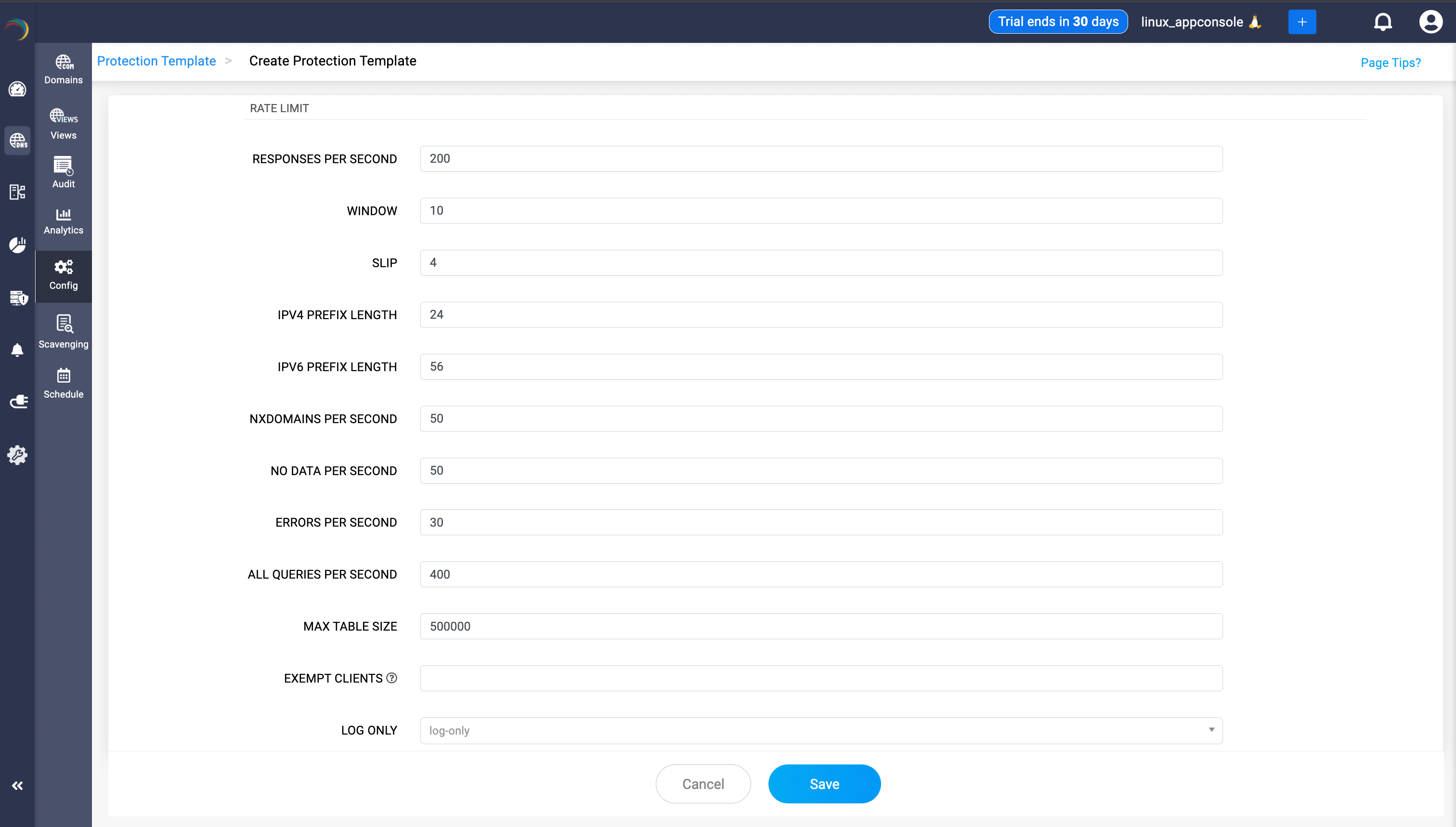
- RESPONSES PER SECOND: Maximum DNS responses allowed to be sent per second. Helps prevent flooding and abuse.
- WINDOW: Time window (in seconds) over which the rate limiting is measured. Example: If set to 10, the rate limits are calculated per 10 seconds.
- SLIP: “Slip ratio” for rate-limited responses. Controls the probability of returning a “slipped” response (such as a truncated reply), which can help reduce the rate-limiting impact for legitimate clients. Example: If set to 4, every 1 in 4 responses for a limited client is allowed through.
- IPv4 PREFIX LENGTH: The prefix length (in bits) used to aggregate IPv4 addresses for rate limiting. Example: 24 means rate limiting applies to all clients grouped by /24 subnet (e.g., 192.168.1.0/24).
- IPv6 PREFIX LENGTH: The prefix length (in bits) used to aggregate IPv6 addresses for rate limiting. Example: 56 means rate limiting applies to all clients grouped by /56 subnet.
- NXDOMAINS PER SECOND: Limits the number of “non-existent domain” (NXDOMAIN) responses allowed per second. Mitigates abuse such as random subdomain attacks.
- NO DATA PER SECOND: Limits the number of “No Data” (NODATA) responses (valid domain, but no data for query type) per second.
- ERRORS PER SECOND: Maximum number of error responses (e.g., SERVFAIL, REFUSED) sent per second.
- ALL QUERIES PER SECOND: Global cap for total queries received per second from all clients.
- MAX TABLE SIZE: Maximum size of the in-memory data table used to track rate-limiting data (number of tracked clients or subnets).
- EXEMPT CLIENTS: IP addresses or subnets that should be excluded from rate-limiting (e.g., monitoring systems or trusted partners). To input multiple values, admins are required to separate values using commas.
- LOG ONLY: Enables “log-only” mode for the template. When selected, the server logs rate-limit events instead of actually blocking or limiting clients. Useful for testing/monitoring before enforcing limits.
Step 4: Save and activate the template
- After filling in all fields, click the Save button at the bottom to create and apply the protection template. Protection templates ensure your DNS infrastructure can withstand high query rates and resist various DNS-based attacks.