Managing network IP address inventory
To visualize and take control of the IP allocations of each subnet managed by the DHCP server:
Select DHCP -> Manage IP menu from the left menu bar.
The Manage IP tab displays the following three sections:
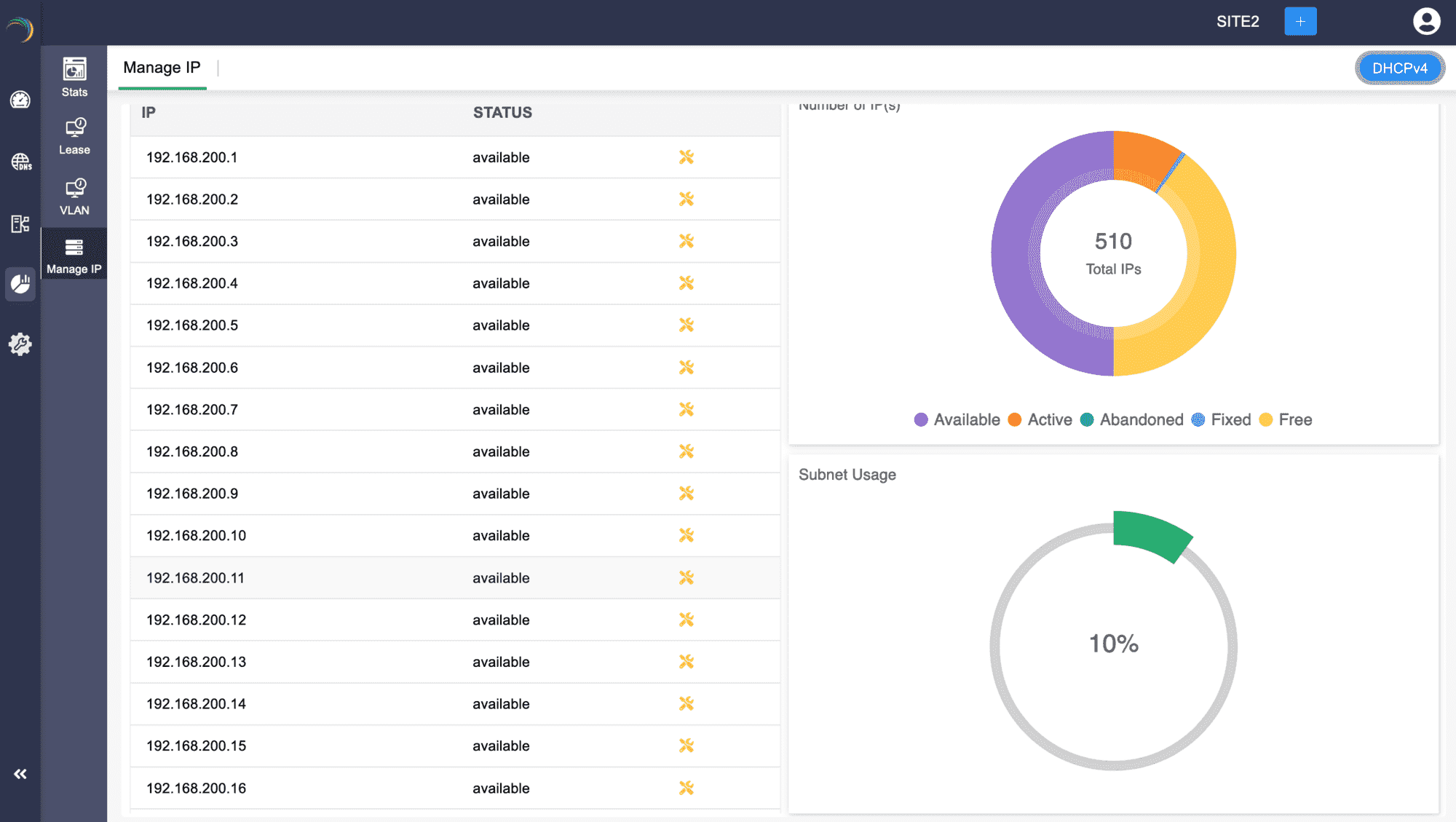
The first section - Manage IP on the left displays the list of available/free IP(s) within the subnet. Click on any desired IP from the list. This directly takes you to the Host Page. Here you can directly assign the chosen IP address to any host or client.
The second section- Number of IP (s) on the top right visually depicts the volume of IP addresses in different availability states along a doughnut plot :
- Available: IPs that are not currently assigned and are ready for allocation.
- Active: IPs that are currently in use and assigned to active devices on the network.
- Abandoned: IPs that were previously assigned but are no longer in use or have been released.
- Fixed: IPs that are reserved for specific devices or purposes, ensuring they are not allocated to other devices.
- Free: Typically includes both IPs that are available for immediate assignment and those that are reserved but not currently in use.
The third section-Subnet Usage, on the bottom right corner, illustrates the overall percentage of IP utilization within that subnet.