×![]()
×
×![]()
×
×
How to fetch the Product Name and Vendor Name of Applications
When adding a trusted application in Endpoint DLP Plus, enter the exact Product Name and Vendor Name associated with the application's executable. Incorrect values may prevent the application from being identified as a trusted application.
Steps to identify the Product Name and Vendor Name
Locate the application's original executable (.exe) file.
Do not use the application shortcut.
The executable is commonly located under:
C:\Program Files\C:\Program Files (x86)\
Right-click the executable and select Properties.
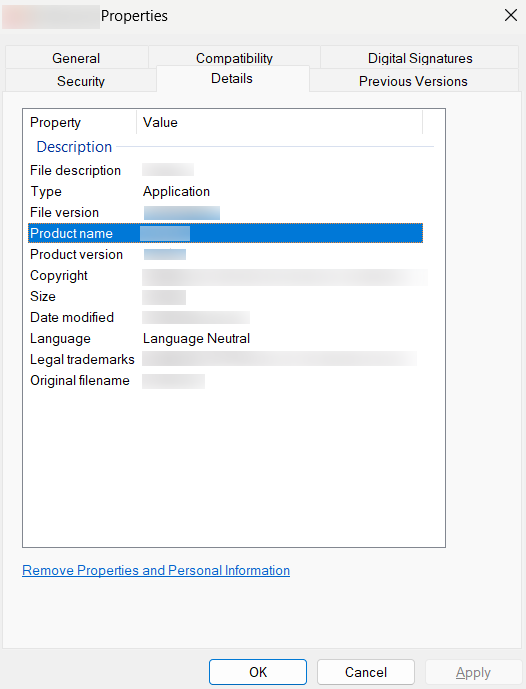
Product Name
- Open the Details tab.
- Copy the value displayed beside Product name.
- Enter this value in the Product Name field while adding the trusted application.
Vendor Name
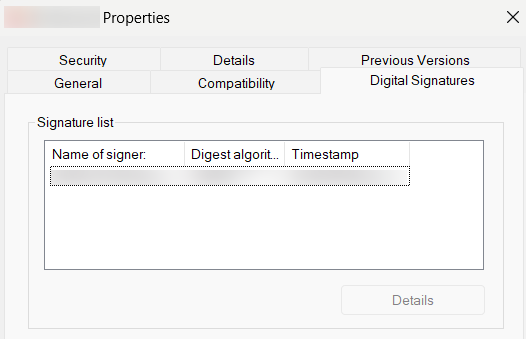
- Open the Digital Signatures tab.
- Under Signature list, copy the value displayed in the Name of signer column.
- Enter this value in the Vendor Name field while adding the trusted application.
Note
The Vendor Name must be obtained from the application's digital signature, as it represents the verified signer of the executable.