- Quick Links
- Highlights
- MFA
- SSO
- Adaptive authentication
- Related Products
- ADManager Plus Active Directory Management & Reporting
- ADAudit Plus Real-time Active Directory Auditing and UBA
- ADSelfService Plus Identity security with adaptive MFA, SSPR, and SSO
- Exchange Reporter Plus Exchange Server Auditing & Reporting
- EventLog Analyzer Real-time Log Analysis & Reporting
- M365 Manager Plus Microsoft 365 Management & Reporting Tool
- DataSecurity Plus File server auditing & data discovery
- RecoveryManager Plus Enterprise backup and recovery tool
- SharePoint Manager Plus SharePoint Reporting and Auditing
- Identity360 A cloud-native identity platform for workforce IAM
- AD360 Integrated Identity & Access Management
- Log360 (On-Premise | Cloud) Comprehensive SIEM and UEBA
- AD Free Tools Active Directory FREE Tools
Step-up authentication for modern access management
Not all access attempts are equal. A simple login from a known device may pose little risk, but deleting a user directory or accessing a finance dashboard from an unknown location demands stricter verification. Step-up authentication ensures additional identity proof is requested only when the context or action calls for it, reducing friction and strengthening security. Step-up MFA minimizes this risk by dynamically enforcing stronger authentication during critical access attempts like deleting users or elevating privileges.
A step-up from the standard MFA
Standard MFA was built for a simpler threat landscape where authenticating at the door was enough. However, once a session is live, it trusts everything that follows. That is a problem when the same login that opened a dashboard can also delete users, export data, or escalate privileges an hour later.
Step-up authentication fixes the security issues that modern threats have forced on older MFA systems. Risk is assessed when the access is requested , and additional verification fires only when context or action actually warrants it. The difference in practice is significant.
| Feature | Static MFA | Step-up authentication |
|---|---|---|
| Definition | Requires users to verify their identity using two or more authentication methods (factors) during login. | Triggers additional authentication only when specific risk conditions are met or sensitive actions are attempted. |
| When it occurs | At every login (or at set intervals), regardless of context. | Dynamically, based on risk signals like location, device, time, or actions like deleting a user. |
| User experience | Consistently requires multiple steps, even in low-risk scenarios. | Keeps access seamless for normal usage; adds friction only when needed. |
| Use case | Baseline security for all users and logins. | Added protection for high-risk conditions or privileged actions. |
| Example | Only logging in requires an MFA prompt. | A user logs in normally, but when trying to delete another user, they are prompted for an additional MFA verification. |
How step-up authentication works in Identity Access
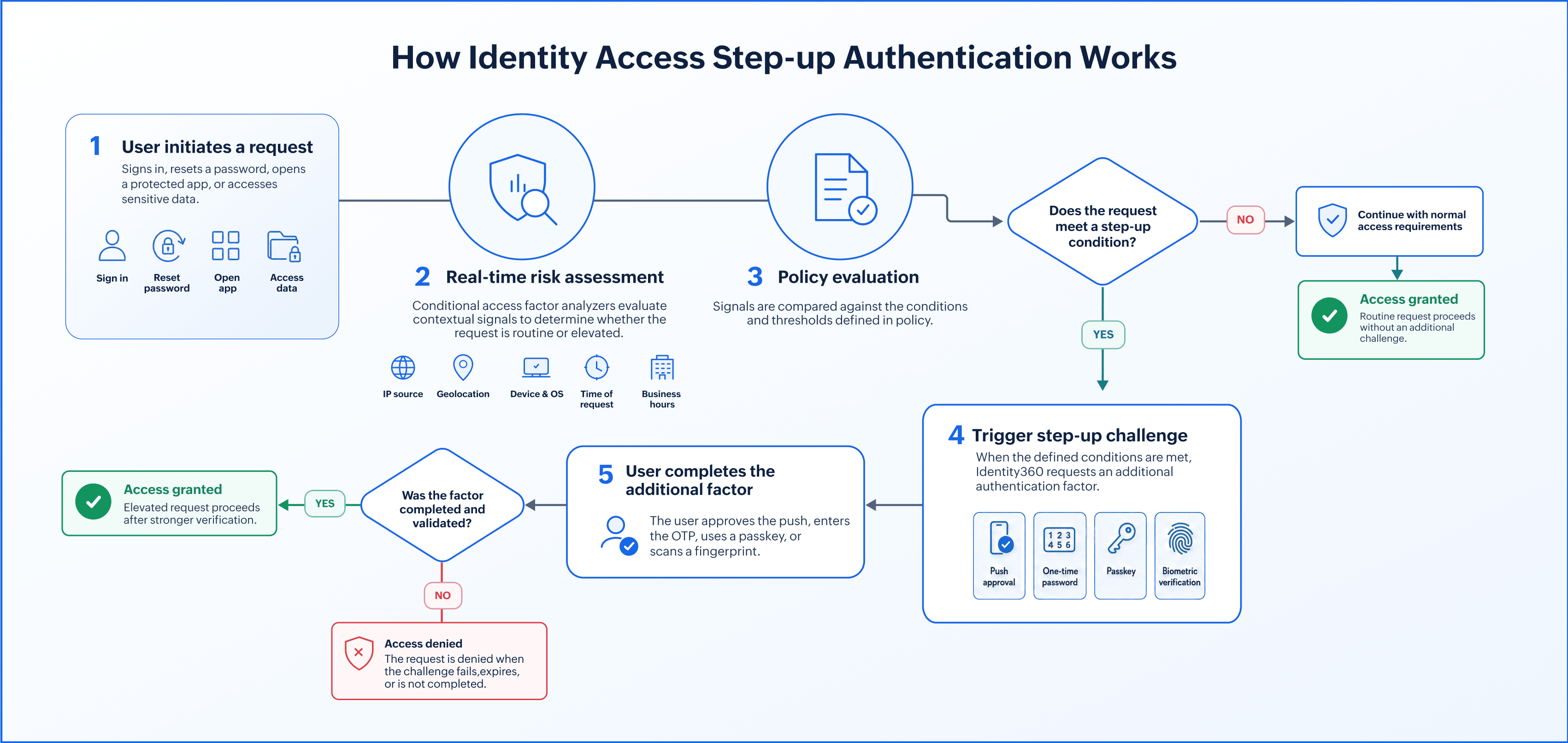
Step-up authentication runs as a short evaluate-then-challenge loop wrapped around a sensitive request. The conditional access engine in Identity Access accomplishes the evaluation, and the factor you configured performs the challenge. Here is the flow end to end.
- A user initiates an action or access request: This can be a login, a password reset, or an attempt to reach a protected application or dataset.
- The system runs a real-time risk assessment using contextual signals: Conditional access factor analyzers read the IP source, the geolocation, the device or operating system, and the time or business hours of the request. Each signal feeds the risk evaluation, and together they decide whether this request looks routine or elevated.
- If the risk threshold is met, a step-up challenge fires: The policy compares the signals against the conditions you defined and triggers the additional factor only when they cross the line.
- The user completes the additional factor: They confirm a push notification, enter a one-time password, present a passkey, or scan a fingerprint.
- Access is granted or denied: A completed factor lets the request through; a failed factor, or signals that never clear the bar, results in denial.
Enforce stronger authentication only when it matters
Strengthen your security posture without adding friction to every login. With conditional access policies, you can apply step-up authentication based on real-time context such as user location, device type, time of access, or specific actions being performed.
Context-aware conditions
Define when and where additional authentication is required using dynamic access conditions like:
- IP sources: Detect and react to logins from unknown or risky IPs.
- Geolocation: Restrict or challenge access based on country or region.
- Business hours: Apply stricter controls outside working hours.
- Operating system: Customize rules for different platforms like Windows, macOS, or Linux.
Target specific actions and endpoints
Choose to enforce step-up authentication during high risk actions, such as:
- Deleting users, groups, or applications
- Disenrolling u sers from MFA
- Login attempts, especially from high-risk conditions
- Modifying admin roles or permissions
- Export user data or audit logs
Fine-grained authentication controls
Customize how strict and granular your authentication system is .
- Configure passwordless login MFA methods for phishing resistance.
- Set up unique MFA combinations for varying access requests and risk conditions.
- Require one or more MFA authenticators only when certain conditions are met.
- Choose whether to allow or deny access outright when criteria fail.
- Track every step-up challenge and failures for privileged operations with tamper-evident audit trail.
Intelligent access protection, without user disruption
Instead of enforcing blanket MFA for all, protect what matter s, just-in-time. Ensure high assurance for critical operations while keeping regular access seamless.
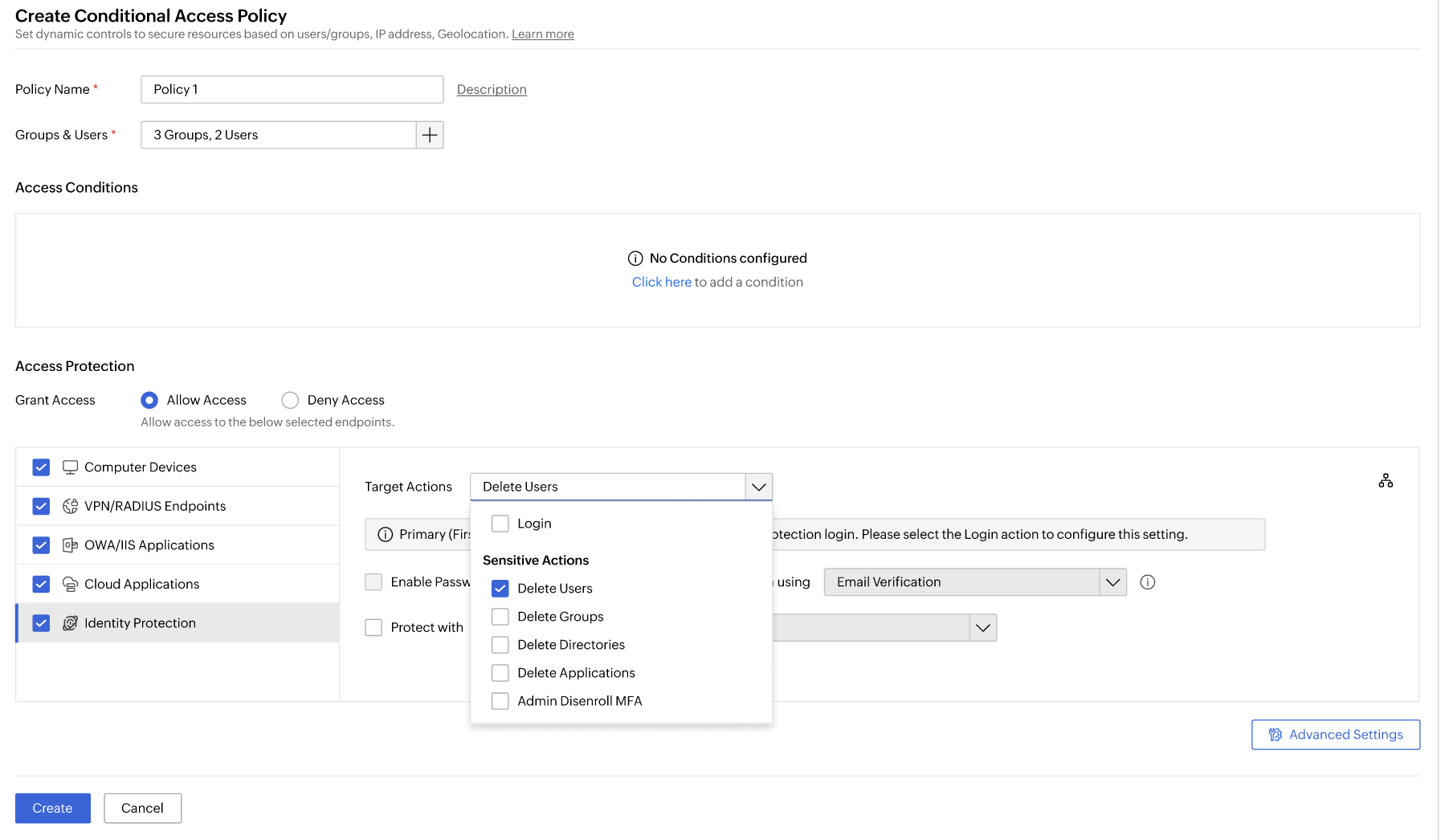
Choose specific target actions, including sensitive operations, that require protection in your access policy.
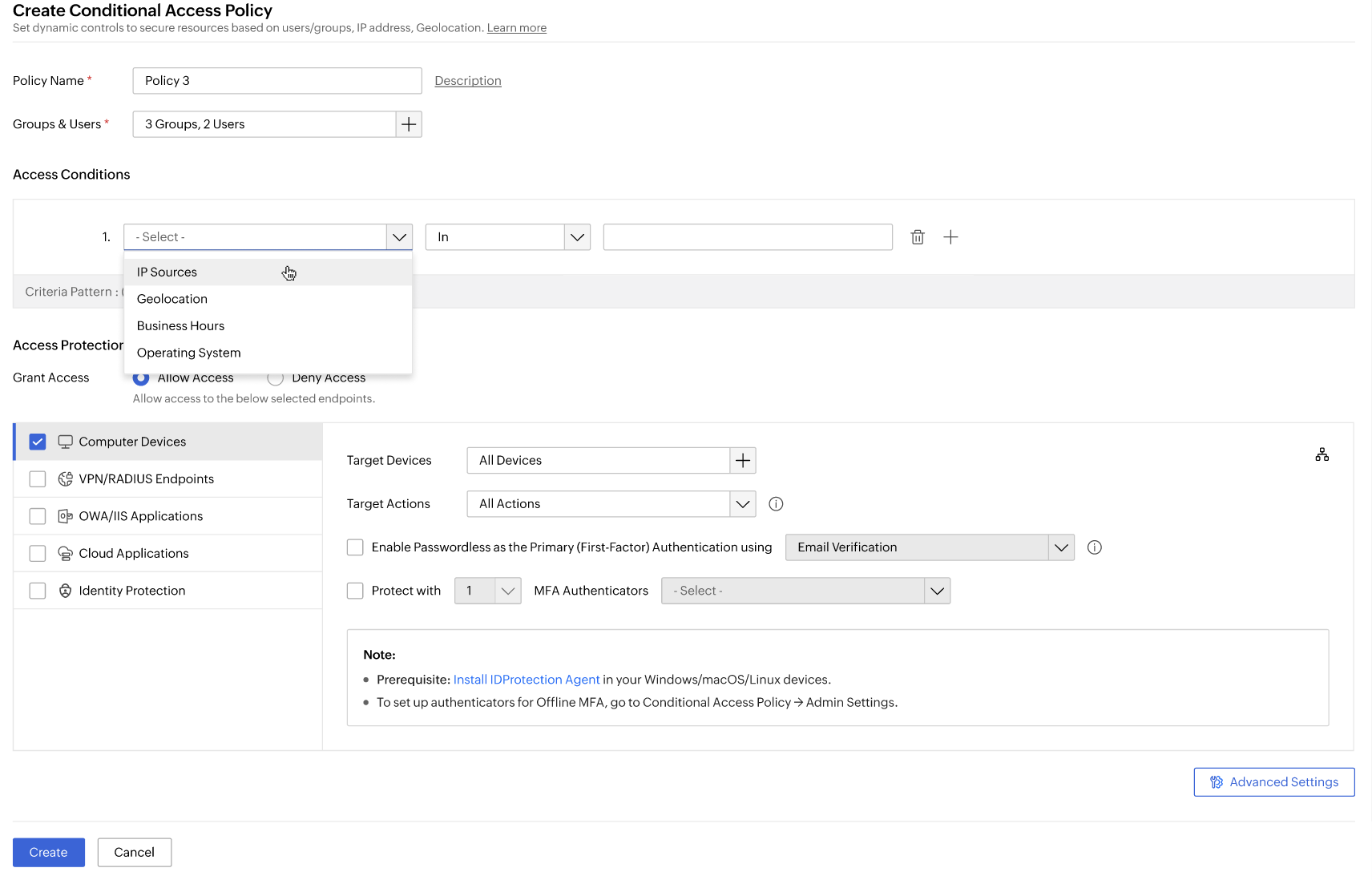
Select access conditions like IP, location, business hours, or OS to define policy rules.
FAQs
Step-up authentication is a security mechanism that requests an additional layer of authentication when users try to access high-risk resources or perform sensitive actions.
MFA always requires multiple authentication factors. Step-up MFA is context-driven—it applies additional verification only during high-risk scenarios, not every time. Identity Access' adaptive MFA takes this further by calibrating the strength of the challenge to the detected risk level.
Zero Trust requires continuous verification—not just at login. Step-up authentication re-validates identity and risk at every sensitive operation during a session, delivering the always-verify enforcement that Zero Trust demands beyond the perimeter.
Examples include deleting user accounts, accessing from suspicious IPs or locations, or logging in outside business hours.
Yes. Identity Access allows policy-based configuration for specific apps, endpoints, users, and even targeted admin actions.
Yes. Step-up can be triggered based on time-of-access, geolocation, device type, or a combination of these factors.
Other features of Identity Access
MFA
Add a second authentication factor to endpoint, application, VPN, OWA, and CLI logins. with authentication factors ranging from FIDO2 security keys to smartcards.
SSO
Give users one-click entry to every cloud application using a single set of credentials.
Conditional access
Evaluate every access request against user, device, IP address, geolocation, time, and operating system, then allow, deny, or challenge it accordingly.
Passwordless authentication
Replace passwords with FIDO2 security keys and platform biometrics, removing the credential most often phished and replayed.
Device authentication
Authenticate Windows, macOS, and Linux machines on cloud without Active Directory or Entra ID.
Desktop MFA
Verify identity at the Windows, macOS, and Linux login screen on both domain-joined and cloud-joined machines.
MFA for enterprise apps
Set MFA and access rules for each application on its own terms, so that critical applications carry a stronger challenge and routine ones stay quick.