- Quick Links
- Highlights
- MFA
- SSO
- Adaptive authentication
- Related Products
- ADManager Plus Active Directory Management & Reporting
- ADAudit Plus Real-time Active Directory Auditing and UBA
- ADSelfService Plus Identity security with adaptive MFA, SSPR, and SSO
- Exchange Reporter Plus Exchange Server Auditing & Reporting
- EventLog Analyzer Real-time Log Analysis & Reporting
- M365 Manager Plus Microsoft 365 Management & Reporting Tool
- DataSecurity Plus File server auditing & data discovery
- RecoveryManager Plus Enterprise backup and recovery tool
- SharePoint Manager Plus SharePoint Reporting and Auditing
- Identity360 A cloud-native identity platform for workforce IAM
- AD360 Integrated Identity & Access Management
- Log360 (On-Premise | Cloud) Comprehensive SIEM and UEBA
- AD Free Tools Active Directory FREE Tools
Conditional access for modern IAM
Traditional authentication only validates a username and password, both of which can be easily phished. Standard MFA methods like OTPs or push notifications do make attacks harder to execute by requiring multiple factors; however, if the device itself is compromised, even MFA falls short. And as workforces went remote and personal devices entered the mix, the attack surface only grew, and access now happens from anywhere, on anything, over networks no one controls.
The old credential and MFA authentication models check what you know or have. What you really need is a system that determines you are who you say you are by evaluating the full context of an access attempt against known patterns, like unfamiliar locations, dubious IP, or new devices—anything that is an anomaly from the usual authentication pattern.
Conditional access brings context-aware authentication to every access request. Before granting entry, Identity Access evaluates the full context of who is asking—from IP location and sign-in risk to device state and time of access—so the policy engine can make real-time access decisions based on identity-driven security signals rather than static credentials alone. It cross-checks that context against a defined set of conditions and only then decides whether to allow access, demand additional verification, or block the request entirely.
How conditional access works in Identity Access
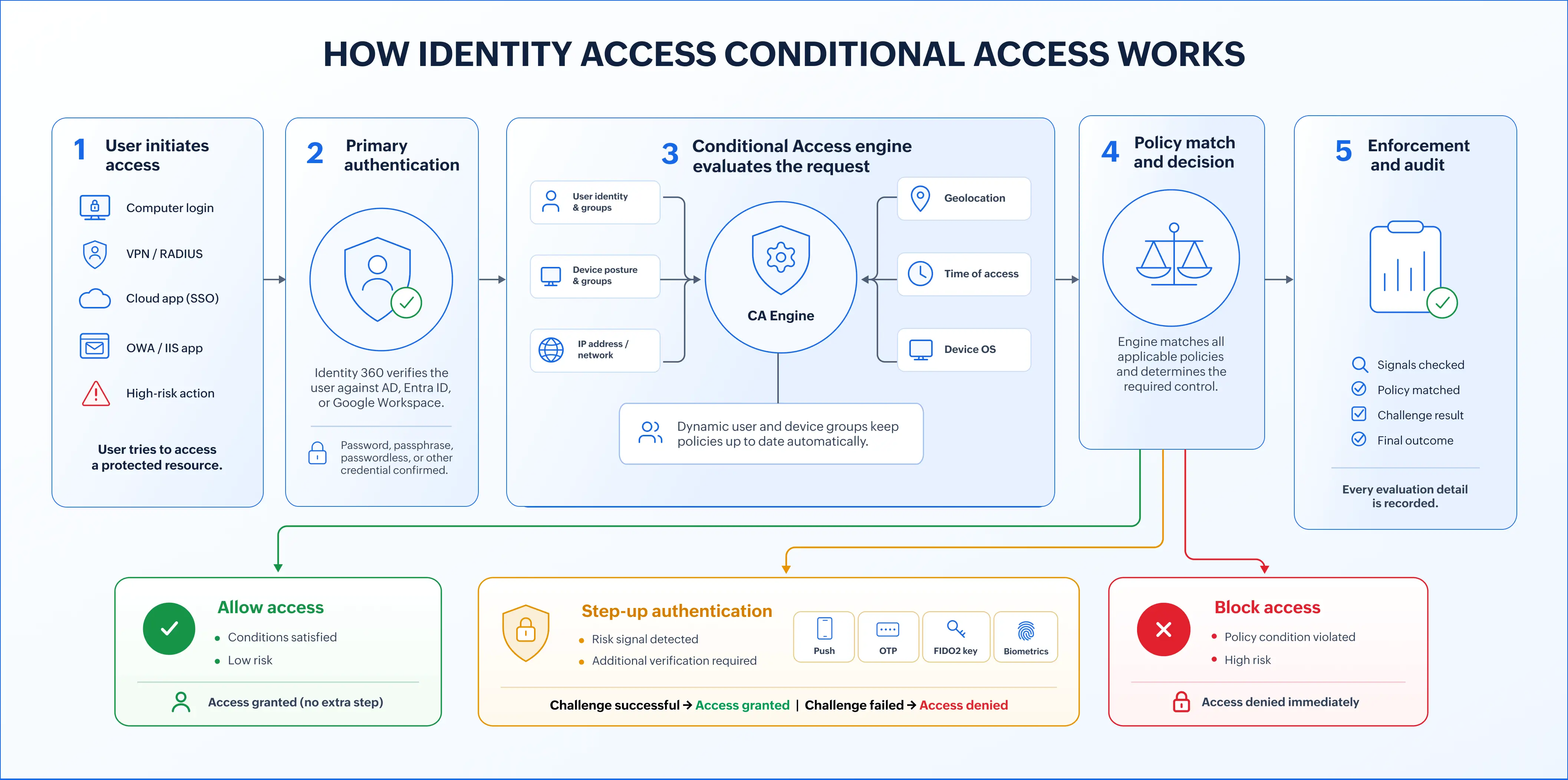
Every access attempt in Identity Access passes through the conditional access engine, from the moment a user submits their credentials to the moment access is granted, challenged, or blocked.
- User initiates login: The user enters their credentials to access a resource: a computer login, a VPN connection, a cloud app via SSO, an Outlook on the web session, or a high-risk action within Identity Access itself.
- Primary authentication: Identity Access verifies the user's identity against the connected directory (Active Directory, Microsoft Entra ID, or Universal Directory). The authentication factor is then verified.
- Conditional access policy evaluation begins: The access request is passed to Identity Access' conditional access policy engine. Identity Access evaluates all applicable policies for the user, the resource they're accessing, and the conditions at the time of the request.
- Risk signal assessment: Identity Access' risk engine checks every configured condition:
- Is this IP address trusted or flagged?
- Is the user's location expected or anomalous?
- Is this within permitted access hours?
- Is the device known and registered?
- Does the device OS match the allowed profile?
- Is the user in an authorized group for this resource?
- Policy match and outcome determination: Based on the signals collected, the conditional access engine matches the request against all active policies and determines one of three outcomes:
- Allow access: All conditions are met; no elevated risk signals. The user is granted immediate access to the resource with no additional verification.
- Additional MFA challenges: Conditions are partially met or a risk signal is elevated. The user must complete an additional MFA challenge using any enrolled authenticator before access is granted.
- Block access: A condition is unambiguously violated (e.g., blocked IP, geofenced location, outside permitted hours). Access is denied to the user and all actions during this verification are logged.
What you can protect with conditional access
Conditional access policies can be applied across every entry point your users interact with, from the machine they log in to in the morning to the cloud application they open at the end of the day.
Computer devices
Conditional access can be enforced when users try to access Windows, macOS, and Linux machines joined to Identity Access. This ensures they are authenticated even before they access any data points. Restrict login by device group, user group, time window, IP range, or device OS.
VPN or RADIUS endpoints
Identity Access acts as a RADIUS authentication server, sitting in front of any VPN solution. Conditional access policies applied at the VPN layer evaluate user identity, device posture, and network signals before allowing remote network access, ensuring that a valid credential alone is never sufficient for VPN entry.
Outlook on the web or IIS applications
Protect access to Microsoft Outlook on the web and IIS-hosted web applications with the full conditional access policy engine. Restrict access to corporate email and internal apps by IP, geolocation, time of access, or device OS. All conditions are evaluated on every login—users outside a trusted context are challenged or blocked before reaching the inbox.
Cloud applications
Any cloud application configured for SSO in Identity Access is covered by conditional access. Conditional access policies evaluate the full access context before the SSO assertion is issued, so the access decision happens before the user ever reaches the application. Per-App MFA settings allow different applications to carry different conditional access rules for the same user.
Identity Access high-risk actions
Conditional access extends inside the product itself. High-risk administrative actions such as bulk user deletion, role modifications, policy changes, credential resets, or data exports can be gated with step-up authentication. Even an authenticated admin session does not exempt a user from re-verification when performing a sensitive operation. Every step-up challenge is logged, creating a clean audit trail for privileged actions.
Risk signals used in conditional access
Identity Access' conditional access engine evaluates access requests against a rich set of risk signals and compliance conditions. Policies are built by combining these signals—any combination can trigger an allow, step-up, or block outcome.
User-based conditions
Policies can target access rules to specific users or groups, with multiple ways to define membership:
- Manual user selection: Apply a policy to specific named individuals.
- Static groups: Universal Directory groups with fixed membership defined by an administrator.
- Dynamic groups: Groups that auto-update based on user attributes (department, role, location, etc.); no manual membership management required.
- Directory groups: Active Directory and Microsoft Entra ID groups; users automatically inherit conditional access policies through their existing directory membership.
Device-based conditions
Device authentication can be evaluated as a major signal in conditional access to verify that only verified devices can access your resources.
- Manual device selection: Specific registered devices can be explicitly included or excluded.
- Static device groups: Fixed device groups managed by an administrator.
- Dynamic device groups: Device groups that stay current based on device attributes such as OS version, platform, or join date; no manual updates required.
Request context conditions
The conditional access engine evaluates the context of every access request in real time:
- IP address: Trusted IP ranges and blocked IP lists; evaluate whether the request originates from a known corporate network, an allowlisted address, or a flagged range.
- Geolocation: Restrict or allow access based on the country or region from which the request originates; block logins from outside permitted geographies entirely.
- Time of access: Define permitted access windows; requests outside business hours, shift schedules, or any custom time range trigger the configured policy outcome.
- Device OS: Evaluate the OS of the accessing device; allow or restrict based on whether the OS matches an approved profile.
Conditional access built for Zero Trust
Zero Trust is an access model you enforce. Every access decision must be earned, and that requires a policy engine that evaluates identity, device, and context on every request. Conditional access in Identity Access is built to operate exactly this way.
- No implied trust. Completing a login does not grant indefinite clearance. Identity Access re-evaluates access context at every risky action, ensuring the first authentication is not misused.
- Every access signal evaluated simultaneously. User identity, device registration, IP origin, geolocation, OS, group membership, and time of access are checked together on every request. A policy match requires the full context to be valid, not just one factor.
- Least-privilege access enforced at the policy level. Conditional access policies can be scoped to specific users, specific devices, specific resources, and specific time windows, so access is granted only for the right context.
- Every decision logged. Allow, step-up, and block outcomes are logged as audit reports against the full access context that produced them—user, device, location, time, and resource.
FAQ
MFA is a single control that requires additional verification. Conditional access is a policy engine that decides when and how MFA—and other controls—are applied, based on real-time access decisions driven by sign-in risk, IP location, and device compliance.
Zero Trust requires that every access request be verified on its own merits, regardless of where it originates or whether the user has authenticated before. Conditional access enforces this by evaluating identity, device, location, and context on every request—a completed login does not carry forward as implicit trust for the next action or resource.
Policies can be applied to Windows, macOS, and Linux device logins; VPN and RADIUS endpoints; Outlook on the web and IIS-hosted web applications; cloud applications connected via SSO; and high-risk administrative actions within Identity Access itself.
Yes. Per-app policy configuration means a user can face different authentication requirements depending on which resource they are accessing—a productivity tool may allow access on a trusted network without MFA, while a finance application requires step-up authentication regardless of device or location.
Yes. High-risk actions within Identity Access—bulk user deletion, role modifications, policy changes, credential resets, and data exports—can be gated with step-up authentication, even within an already authenticated admin session.
Other features
MFA
Add a second authentication factor to endpoint, application, VPN, OWA, and CLI logins. with authentication factors ranging from FIDO2 security keys to smartcards.
SSO
Give users one-click entry to every cloud application using a single set of credentials.
Passwordless authentication
Replace passwords with FIDO2 security keys and platform biometrics, removing the credential most often phished and replayed.
Device authentication
Authenticate Windows, macOS, and Linux machines on cloud without Active Directory or Entra ID.
Desktop MFA
Verify identity at the Windows, macOS, and Linux login screen on both domain-joined and cloud-joined machines.
MFA for enterprise apps
Set MFA and access rules for each application on its own terms, so that critical applications carry a stronger challenge and routine ones stay quick.