Authentication
Identity360's APIs use the industry-standard OAuth 2.0 protocol for authentication and authorization. This protocol delegates user authentication to the service hosting the user account and authorizes third-party applications to access the user account. Each API request must include an OAuth token to retrieve any resource from Identity360.
- Why should we use OAuth2.0?
- How does OAuth2.0 work?
- Terminologies
- Register your application
- Authorization request
- Generate access token
- OAuth scopes
Why should we use OAuth 2.0?
- Clients are not required to support password authentication or store user credentials.
- Clients gain delegated access, meaning access only to resources authenticated by the user.
- Delegated access can be revoked at any time.
- OAuth 2.0 access tokens expire after a set period. If the client experiences a security breach, user data will be compromised only until the access token expires.
How does OAuth 2.0 work?
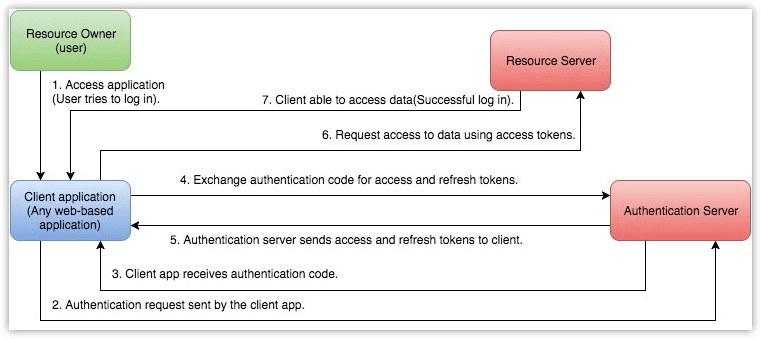
Terminologies
The following are some terms you need to know before you start using the Identity360 APIs.
- Protected resources:
- Identity360 resources that include users, groups, and more.
- Resource server:
- The Identity360 server that hosts protected resources.
- Resource owner:
- Any end user of your account who can grant access to the protected resources.
- Client:
- An application that sends requests to the resource server to access protected resources on behalf of the end user.
- Client ID:
- The consumer key generated from the connected application.
- Client secret:
- The consumer secret generated from the connected application.
- Authentication server:
- The authentication server provides the necessary credentials (such as access and refresh tokens) to the client. In this case, it is the Identity360 authentication server.
- Authentication code:
- The authentication server generates a temporary token and sends it to the client via the browser. The client then sends this code to the authentication server to obtain access and refresh tokens.
- Access token:
- A token sent to the resource server to access the protected resources of the user. The access token provides secure and temporary access to Identity360 APIs and is used by applications to make requests to the connected app. Each access token is valid for only one hour and can only be used for the operations specified in the scope.
- Refresh token:
- A token that can be used to obtain new access tokens. It has an unlimited lifetime until it is revoked by the end user.
Register your application
The first step is to register your application in Zoho's API Console.
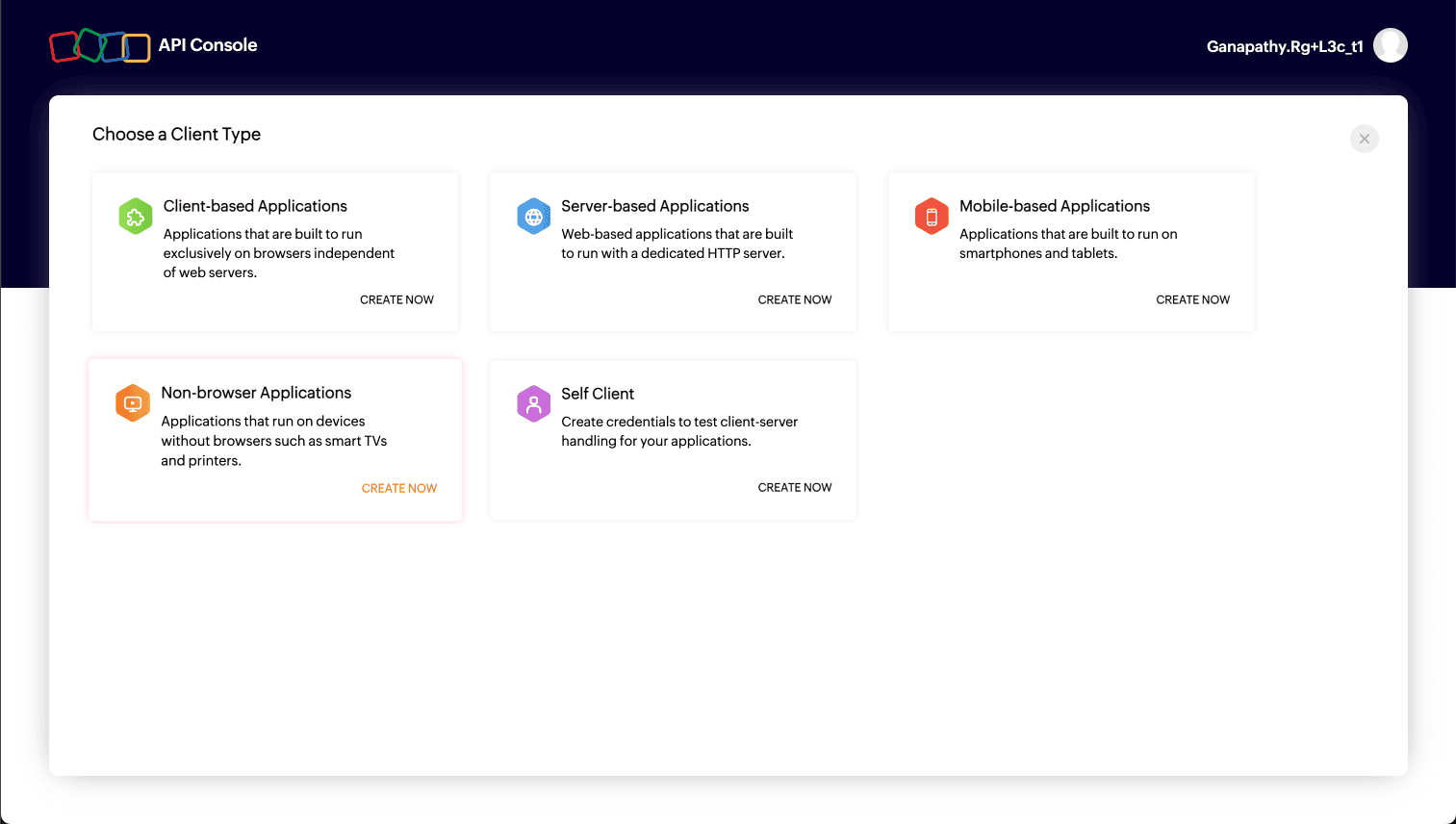
- Choose a client type:
- Client-based Applications: Applications that run exclusively on a browser and are independent of a web server.
- Server- bas ed Applications: Applications that are clients running on a dedicated HTTP server.
- Mobile-based Applications: Applications that are installed on smartphones and tablets.
- Non-browser Applications: Applications for devices without browser provisioning, such as smart TVs and printers.
- Self Client: Applications that are stand-alone and perform only back-end jobs like data sync (without any manual intervention).
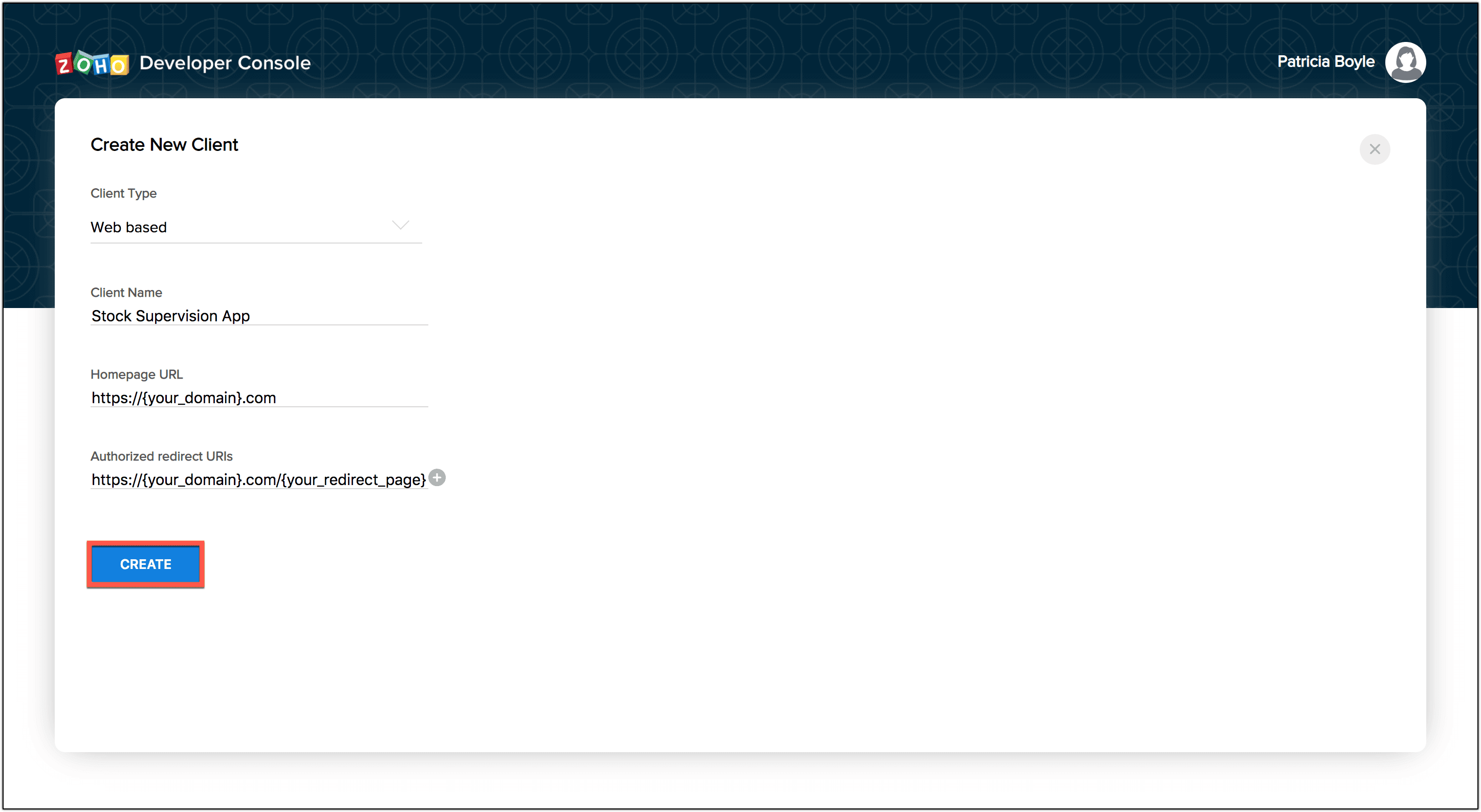
- Choose the Server-based Applications client option and enter the following details. You can also choose any of the other options depending on your requirements.
- Client Name: The name of your application you want to register in Zoho.
- Homepage URL: The URL of your webpage.
- Authorized Redirect URIs: A valid URL from your application to which your Zoho Account redirects you with a grant token (code) after successful authentication.
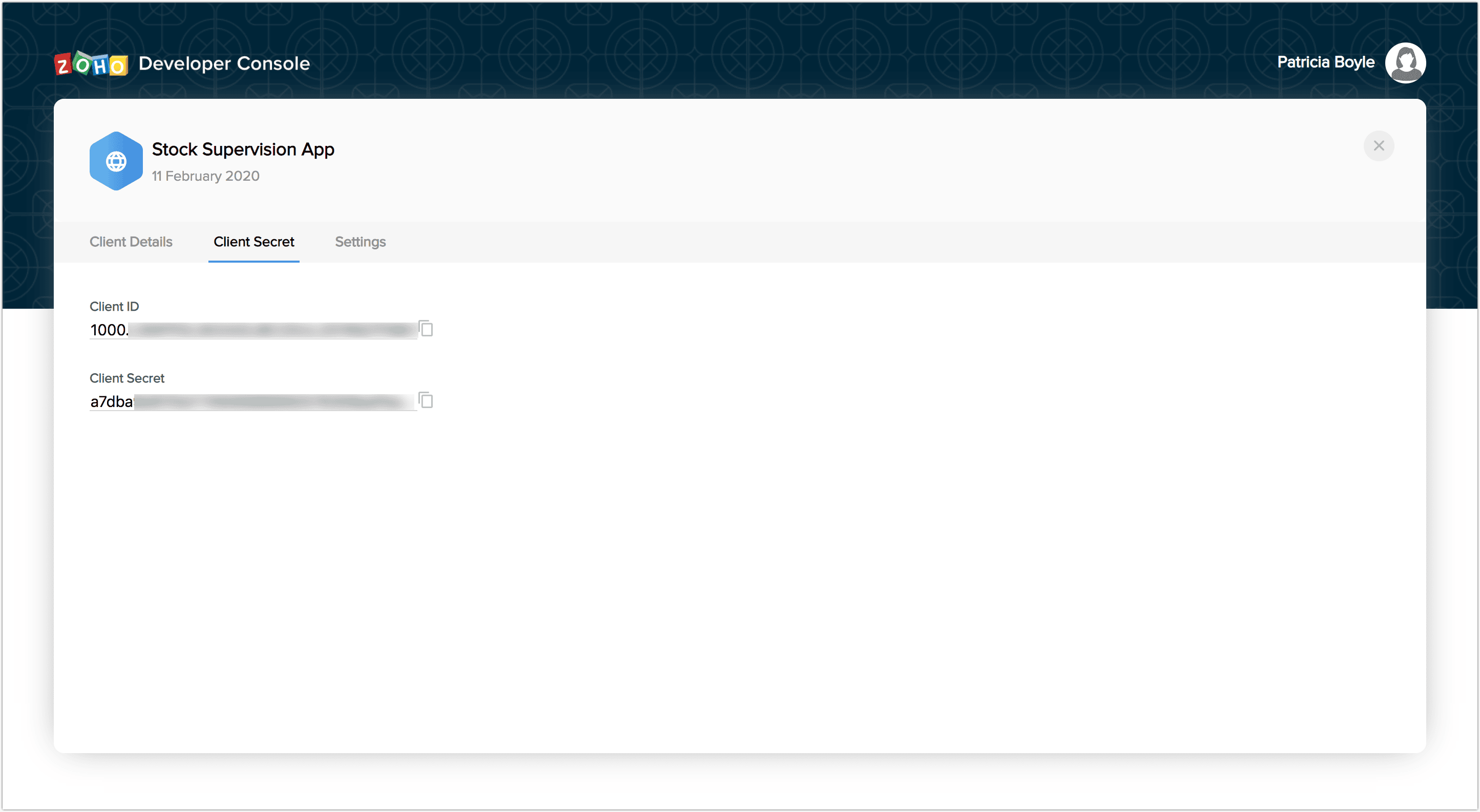
- On successful registration, you will be provided with a Client ID and a Client Secret. These are your OAuth credentials.
Authorization request
To use the Identity360 APIs, the user must authenticate the application to make API calls on their behalf with an access token. This access token, in return, must be obtained from a grant token (authorization code). The Identity360 APIs use the authorization code grant type to provide access to protected resources.
There are two ways in which you can generate the grant token based on the client type.
- Web-based application
- Self-client
Web-based application
Web-based applications are chosen when your application is used by multiple users and require user intervention during authorization. For a web-based client, you must use redirection-based code generation. In this authorization flow, obtain an authorization grant by invoking the authorization URI, which contains the parameters listed in the table below. Refer to the example to understand how to construct this authorization URI.
| Parameter | Description |
|---|---|
| client_ID | Client ID generated after registering the client. |
| response_type | The value must be code. |
| residrect_uri | Redirect URL mentioned while registering the client. |
| scope | The various scopes associated with Identity360; you can use the list of scopes as per your requirements. |
| access_type | Indicates offline or online; in cases where a refresh token can't be stored, use online access_type (the default will be online). |
| state | An opaque value used by the client to maintain state between the request and callback. |
After you invoke the authorization URI, a user consent page opens. Once you accept it, the application gets authorized. The grant token is sent as a parameter in the redirect_uri.

A back-end script from your end needs to store the following details from the above URL.
- code={grant_token}: This is used to generate access and refresh tokens.
- location={domain}: This tells you the domain of the user from which you have to make API calls.
- accounts-server={accounts_URL}: This is your account's URL, which you have to use to generate access and refresh tokens.
The application exchanges the authorization code for an access token.
If the user chooses to reject on the user consent page, the browser redirects to the redirect URI with the parameter error=access_denied, and your application is denied access to the user's data in Identity360.
Note The grant token is valid only for one minute.
Generate access token
Invoke a URL in the following format to exchange the authorization code (obtained at the end of the previous step) with an OAuth token.
| Parameter | Description |
|---|---|
| code | Authorization code obtained after generating the grant token. |
| client_id | Client ID obtained after registering the client. |
| client_secret | Client secret obtained after registering the client. |
| grant_type | The value must be authorization_code. |
| redirect_uri | Redirect URI mentioned while registering the client. |
After invoking the URL, you will be presented with an access token, which you must include in all API calls.
Each access token is valid for only an hour and used only for the operations defined in the scope.
A refresh token does not expire. Use it to refresh access tokens when they expire.
You can only generate a maximum of five refresh tokens in a minute.
OAuth scopes
| Scope name | Description | |
|---|---|---|
| User | idmpod.user.ALL | Grants read and write access to user and related data. |
| idmpod.user.READ | Grants read access to user and related data. | |
| idmpod.user.WRITE | Grants write access (create, update, and delete) to user. | |
| idmpod.user.CREATE | Grants access to create a user. | |
| idmpod.user.UPDATE | Grants access to update the user. | |
| idmpod.user.DELETE | Grants access to delete the user. | |
| Template | idmpod.template.user.READ | Grants read access to user templates and related data. |