- Quick Links
- Highlights
- MFA
- SSO
- Adaptive authentication
- Related Products
- ADManager Plus Active Directory Management & Reporting
- ADAudit Plus Real-time Active Directory Auditing and UBA
- ADSelfService Plus Identity security with adaptive MFA, SSPR, and SSO
- Exchange Reporter Plus Exchange Server Auditing & Reporting
- EventLog Analyzer Real-time Log Analysis & Reporting
- M365 Manager Plus Microsoft 365 Management & Reporting Tool
- DataSecurity Plus File server auditing & data discovery
- RecoveryManager Plus Enterprise backup and recovery tool
- SharePoint Manager Plus SharePoint Reporting and Auditing
- Identity360 A cloud-native identity platform for workforce IAM
- AD360 Integrated Identity & Access Management
- Log360 (On-Premise | Cloud) Comprehensive SIEM and UEBA
- AD Free Tools Active Directory FREE Tools
Strengthen your enterprise with holistic desktop MFA
The rise of infostealer malware and credential-based attacks has made endpoint login security one of the most pressing challenges in enterprise IT. Verizon's Data Breach Investigations Report consistently finds that over 36% of breaches involve compromised credentials. Once a password is stolen, nothing stands between a threat actor and your corporate systems, unless a additional factors are waiting at the login screen.
ManageEngine Identity Access addresses this gap by enforcing desktop MFA directly at the login screen across Windows, macOS, and Linux machines. By combining advanced authentication methods such as FIDO2 passkeys, biometric authentication, and TOTP codes with centralized identity policy management, organizations can prevent unauthorized access even when user passwords have already been compromised. Built to support modern Zero Trust security initiatives, Machine MFA helps enterprises verify every login attempt at every endpoint, without adding unnecessary friction to the day-to-day user experience.
Redefine endpoint authentication across your entire enterprise
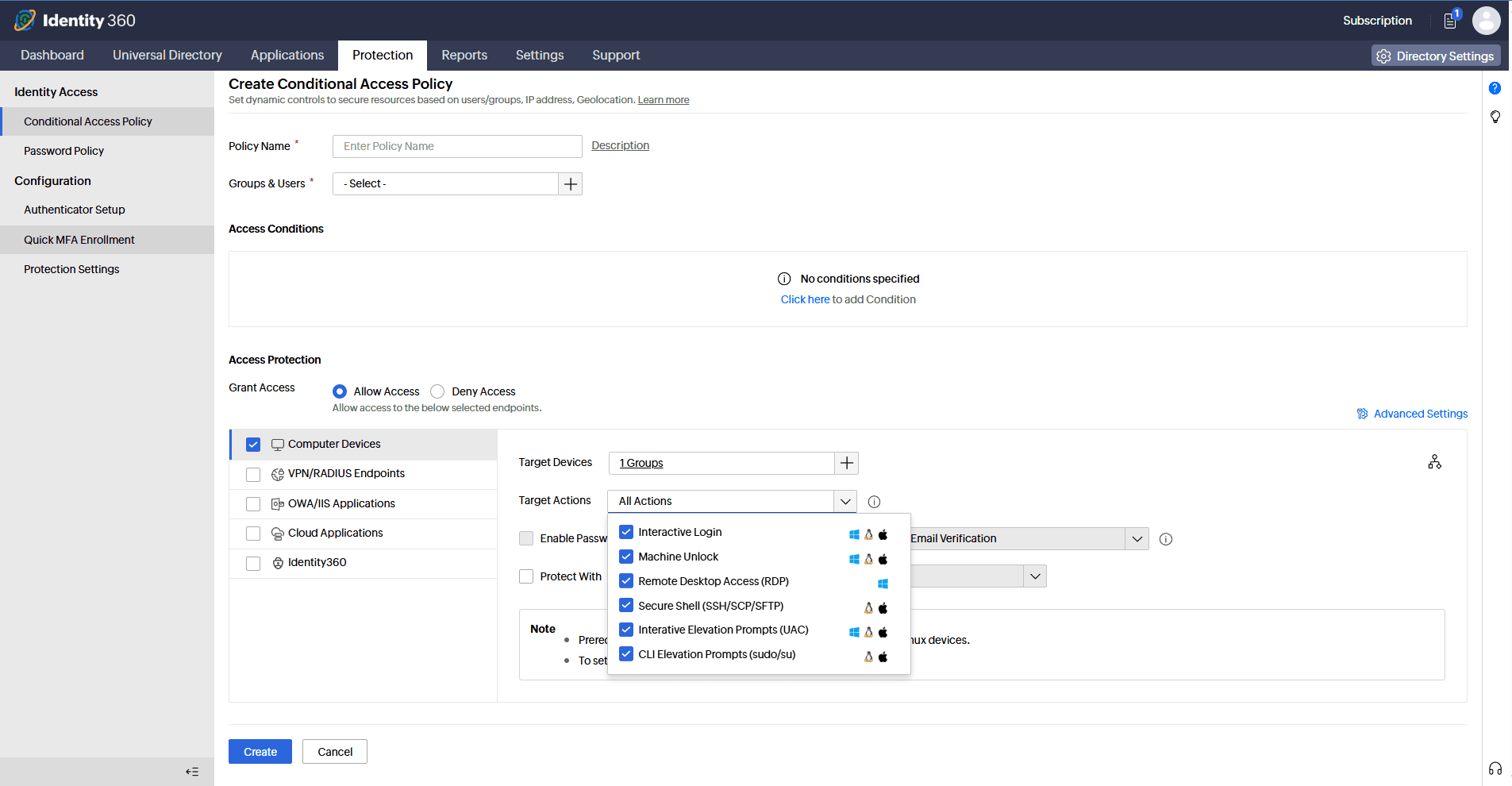
Identity Access extends MFA enforcement beyond traditional web and cloud applications to secure the very first point of access in your environment which is the machine login itself. Whether users are logging into their office workstations, remote laptops, or virtual machines, Identity Access ensures that a stolen or guessed password is never enough to grant access. Beyond standard MFA for desktop login, Machine MFA also extends protection to Remote Desktop Protocol (RDP) sessions; privilege elevation prompts such as UAC on Windows, Authorization Services dialogs on macOS and sudo prompts on Linux, as well as screen unlock events across all three operating systems. This makes it possible to secure every sensitive action and access point on every machine in your environment, not just the initial login.
Offline authentication that never goes down with the network
One of the most common objections to deploying MFA at the desktop login level is the fear of users being locked out when their device is off-network or the authentication server is unreachable. Identity Access resolves this with built-in offline MFA support. When connectivity to the Identity Access server is unavailable, the login agent uses authentication data securely stored on the machine itself, such as TOTP codes or biometric verification, to validate the user's identity locally without any dependency on a live network connection.
This capability is critical for field workers, traveling employees, and devices in air-gapped or limited-connectivity environments. Offline MFA ensures that security is never sacrificed for availability, and that users are never stranded at the login screen simply because their VPN dropped or they are working from a location with poor connectivity.
Granular policy management at scale
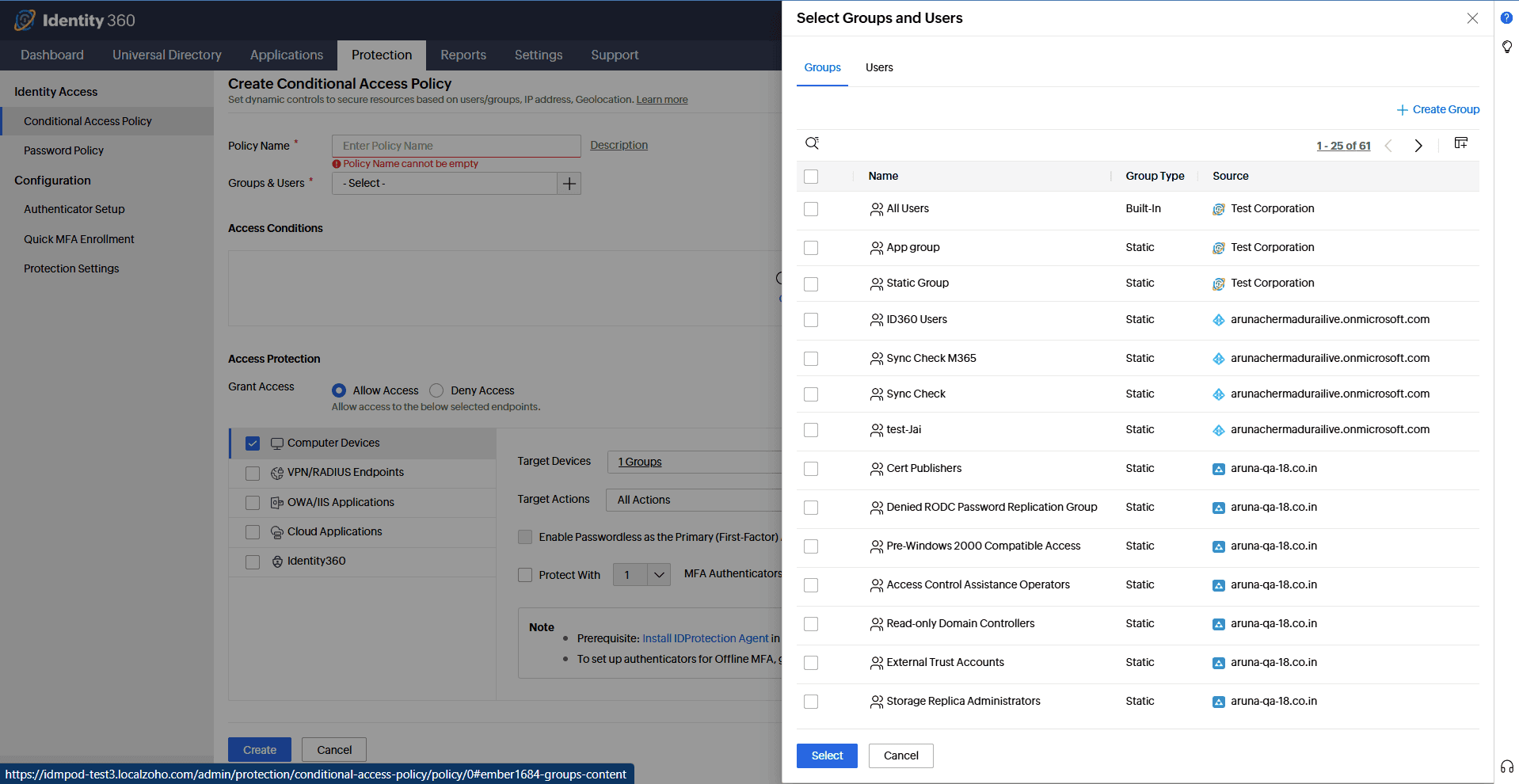
Identity Access's Machine MFA feature allows administrators to define and enforce authentication policies at the domain, organizational unit, and group level so that MFA configurations reflect the actual structure of your organization rather than a one-size-fits-all rule. Policies can be customized to require different factors for different populations, including stronger authentication for IT administrators, executives, and privileged users. Policies can also offer streamlined verification for standard employees with lower risk profiles.
Deploying the Identity Access login agent to managed endpoints is straightforward via manual installation, and once deployed, all configuration is managed centrally from the Identity Access admin console. Administrators also have access to detailed authentication reports covering login attempts, MFA enrollment statuses, identity verification failures, and enforcement activity, providing the visibility needed for both security operations and compliance auditing.
Adaptive, context-aware access policies
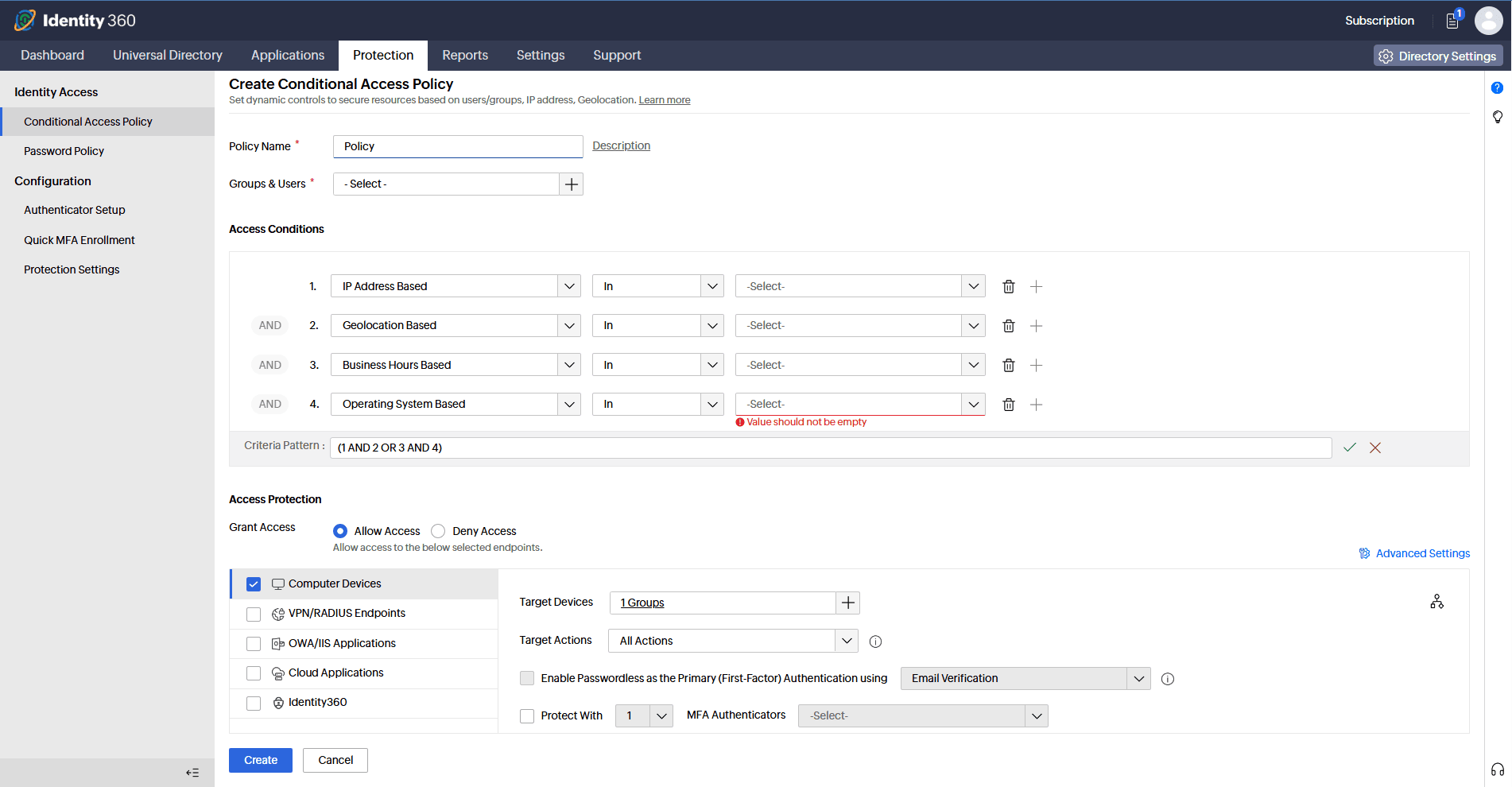
Not every login attempt carries the same level of risk, and not every user requires the same level of scrutiny. Identity Access supports risk-based authentication policies for desktop MFA that dynamically adjust authentication requirements based on real-time contextual signals. Administrators can define different authentication workflows based on a user's role or group membership, network location, IP address, device trust status, and the time of the access attempt.
This means that an employee logging in from within the corporate LAN during standard business hours might be authenticated with a simple TOTP code, while a privileged administrator connecting from an unrecognized network outside business hours could be required to complete biometric verification and a hardware security key challenge. This policy engine gives organizations granular control over endpoint access without creating unnecessary authentication overhead for low-risk scenarios, striking the right balance between security and user experience.
Authentication factors to suit every environment
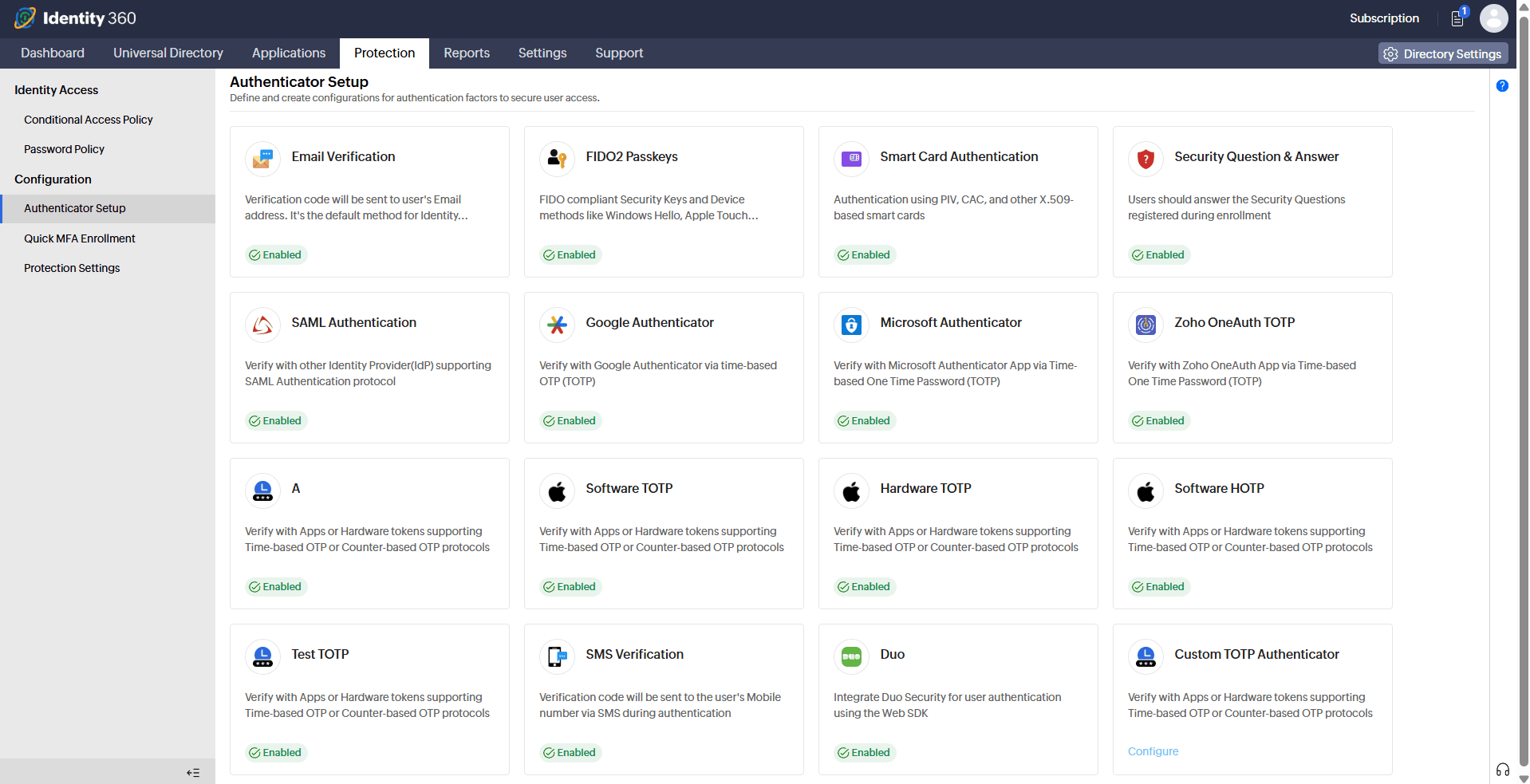
Identity Access supports a bevy of authentication methods for desktop MFA, giving organizations the flexibility to choose the right combination of factors for their users, their policies, and their risk tolerance. Supported factors include:
- FIDO2 authentication
- Biometric authentication
- Hardware TOTP
- Software TOTP
- DUO Security
- Smartcard authentication
- SAML authentication
- SMS verification
- Email verification
- HOTP
Why organizations choose Identity Access's Machine MFA
- Stop credential-based attacks before they escalate
Stolen passwords are the starting point for the majority of enterprise breaches. By placing a mandatory second factor at the machine login screen, Identity Access ensures that compromised credentials alone are never enough to gain access thereby neutralizing phishing, credential stuffing, and password spraying at the very first checkpoint.
- Extend MFA coverage to where it matters most
Most MFA deployments stop at web applications and cloud portals, leaving workstations and servers exposed. Identity Access closes that gap by bringing the same identity verification controls down to the machine access level, giving your security posture a consistent foundation across every layer of access.
- Keep remote and hybrid workers secure without disruption
Identity Access secures machine access events regardless of where a device is located. With offline MFA support for out-of-network devices, employees working from low-connectivity environments or traveling across time zones are never left without a secure, reliable way to authenticate.
- Enforce the right level of security for every user
Not all users carry the same risk, and blanket authentication policies create unnecessary friction. Identity Access's risk-based, policy-driven approach lets administrators calibrate authentication requirements by role, location, and device, ensuring that high-risk users face stronger controls while standard users experience minimal disruption.
- Support your compliance and audit requirements
ID360's Machine MFA supports organizations working toward alignment with key frameworks and requirements, including the authenticator assurance levels defined in NIST SP 800-63B-4, the access control and audit requirements relevant to HIPAA Security Rule compliance, and the access protection obligations under the GDPR.
Frequently asked questions
Desktop MFA is a security method that requires users to verify their identity with a second factor — such as a biometric scan, TOTP code, or hardware key, directly at the machine login screen. Unlike MFA for web apps or cloud portals, desktop MFA secures the endpoint itself, ensuring that a stolen password alone is never enough to access a workstation, server, or laptop.
2FA is a subset of MFA. 2FA always requires exactly two verification steps, while MFA is a broader term that can involve two or more factors. In practice, the terms are often used interchangeably, but MFA is the more flexible standard, allowing organizations to enforce different combinations of factors, such as a password plus biometric verification plus a hardware security key, depending on the risk level of the access attempt.
Windows Hello for Business is a capable native option, supporting biometric and PIN-based login with centralized, certificate-based management. Where organizations typically look beyond it is cross-platform consistency, enforcing the same MFA policies, adaptive authentication, and reporting across Windows, macOS, and Linux, with support for third-party authenticators and unified audit trails, is where a dedicated solution like Identity Access fills the gap.
Other features
MFA
Add a second authentication factor to endpoint, application, VPN, OWA, and CLI logins. with authentication factors ranging from FIDO2 security keys to smartcards.
SSO
Give users one-click entry to every cloud application using a single set of credentials.
Passwordless authentication
Replace passwords with FIDO2 security keys and platform biometrics, removing the credential most often phished and replayed.
Conditional access policy
Evaluate every access request against user, device, IP address, geolocation, time, and operating system, then allow, deny, or challenge it accordingly.
Device authentication
Authenticate Windows, macOS, and Linux machines on cloud without Active Directory or Entra ID.
MFA for enterprise apps
Set MFA and access rules for each application on its own terms, so that critical applications carry a stronger challenge and routine ones stay quick.